
1. Introduction
This manual provides essential information for the proper installation, operation, and maintenance of your XOMAX XM-2V784D Autoradio. Please read this manual thoroughly before using the device to ensure safe and optimal performance. Keep this manual for future reference.
2. Product Overview
The XOMAX XM-2V784D is a versatile 2-DIN car multimedia system designed to enhance your in-car entertainment and connectivity. Key features include:
- Digital DAB+ Radio: Integrated DAB+ tuner for high-quality digital radio reception, including a DAB+ antenna with SMB connection.
- Mirrorlink for Android: Mirror your Android smartphone screen directly onto the car radio's 7-inch touchscreen, allowing access to navigation, music, and other compatible apps.
- Bluetooth Connectivity: Features hands-free calling and wireless music streaming from your Bluetooth-enabled devices.
- 7-inch Capacitive Touchscreen: A responsive 18 cm (7-inch) capacitive touchscreen with 16:9 HD resolution (800 x 480 pixels) for intuitive control.
- Customizable Illumination: Choose from 7 adjustable LED illumination colors (blue, turquoise, yellow, green, red, purple, white) to match your vehicle's interior.
- Multimedia Playback: Supports various media formats (MPEG1, MPEG4, AVI, MP3, WMA, WAV, JPG, BMP) via USB and MicroSD card slots, each supporting up to 128 GB. Note: This unit does not include a CD player.
- Camera Inputs: Dedicated connectors for front and rear cameras.
- Steering Wheel Control Support: Compatible with existing steering wheel remote controls (adapter may be required, not included).
2.1. Package Contents
Ensure all items are present before installation:
- XOMAX XM-2V784D Autoradio
- DAB+ Antenna
- Remote Control (batteries not included)
- ISO Connection Cable
- 2-DIN Mounting Frame
- Matching 2-DIN Aperture
- Release Keys
- Installation Manual (DE/EN)
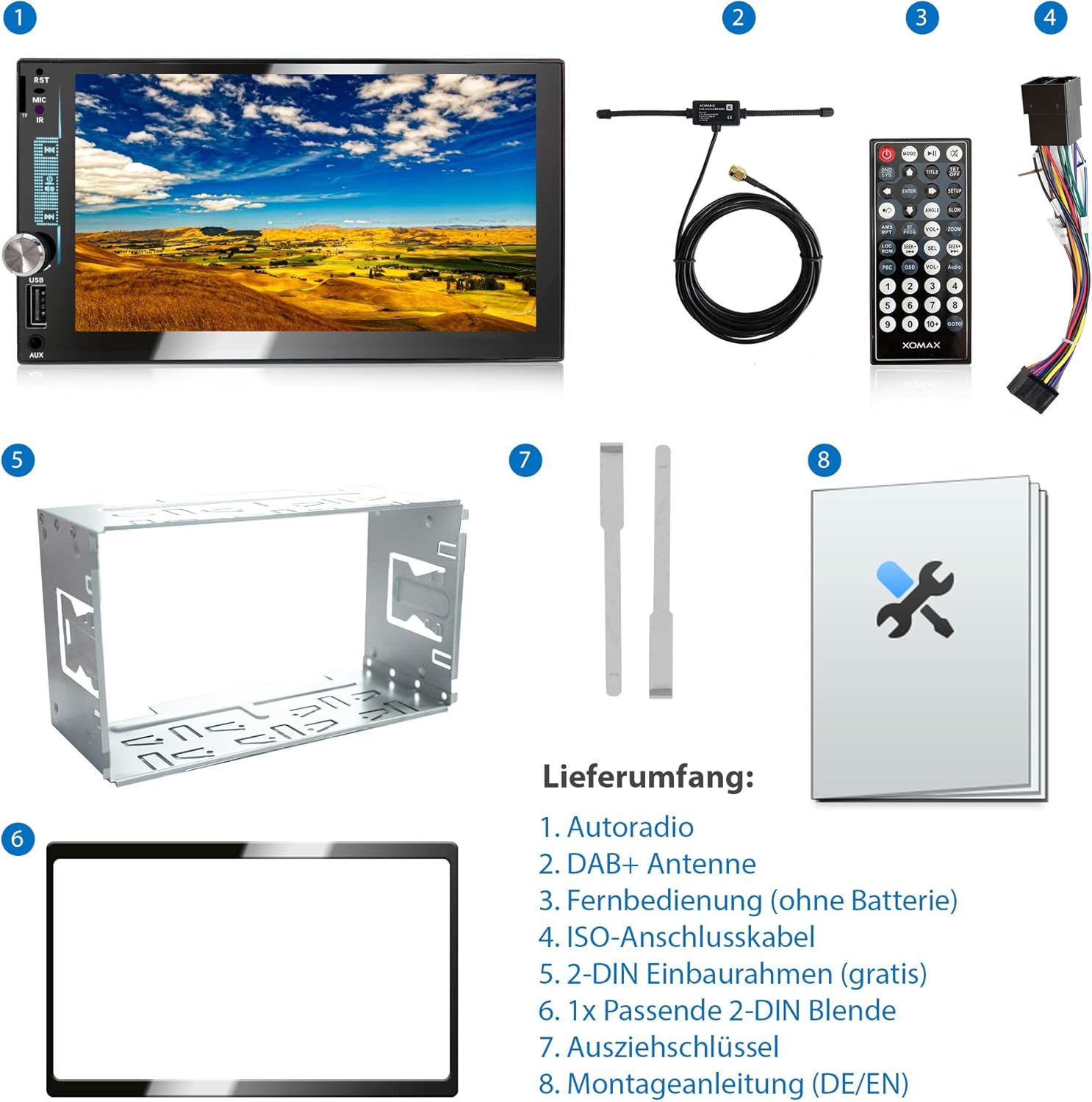
Image: Contents of the XOMAX XM-2V784D package, including the autoradio, DAB+ antenna, remote control, cables, mounting frame, aperture, and release keys.
3. Setup and Installation
Installation should ideally be performed by a qualified professional. Incorrect installation can damage the device or your vehicle.
3.1. Safety Precautions
- Disconnect the vehicle's battery before starting installation.
- Ensure all wiring is correctly connected to prevent short circuits or damage.
- Do not block ventilation openings.
- Securely mount the unit to prevent movement during driving.
3.2. Wiring Connections
Refer to the wiring diagram provided in the installation manual and on the unit itself. Key connections include:
- ISO Cable Socket: For main power and speaker connections.
- DAB+ Antenna Connection (SMB): Connect the included DAB+ antenna.
- Radio Antenna Connection: For FM/AM radio.
- Subwoofer Output: For external subwoofer connection.
- Front/Rear Camera Inputs: For connecting optional cameras.
- Audio/Video Inputs/Outputs: For external multimedia devices.
- Steering Wheel Remote Control: Connect to your vehicle's steering wheel controls (if compatible).

Image: Detailed view of the rear connections and physical dimensions of the XOMAX XM-2V784D Autoradio, showing ISO, camera, audio, video, and antenna ports.
3.3. Mounting
The unit is a standard 2-DIN size. Use the provided mounting frame and aperture for secure installation into your vehicle's dashboard.

Image: Front view of the XOMAX XM-2V784D Autoradio, showcasing its 7-inch touchscreen interface with various function icons.
4. Operating Instructions
4.1. Basic Operation
- Power On/Off: Press the power button on the front panel or remote control.
- Volume Control: Use the rotary knob or remote control buttons.
- Main Menu: Tap the 'Home' icon on the touchscreen to return to the main menu.
- Screen Brightness: Adjust in system settings.
- LED Illumination: Customize the LED button colors via the settings menu.
4.2. Radio (DAB+/FM/AM)
- Select the 'Radio' icon from the main menu.
- Choose between DAB+, FM, or AM bands.
- DAB+: Perform a station scan to find available digital radio stations.
- FM/AM: Use auto-scan or manual tuning to find stations. Save your favorite stations as presets.

Image: The XOMAX XM-2V784D Autoradio screen showing the DAB+ radio interface, with the included DAB+ antenna visible next to the unit.
4.3. Bluetooth Functionality
- Select the 'BT' or 'BT Music' icon from the main menu.
- Pairing: Enable Bluetooth on your smartphone and search for available devices. Select 'XOMAX' (or similar name) from the list and confirm pairing.
- Hands-free Calling: Once paired, you can make and receive calls directly through the autoradio. Use the built-in microphone and car speakers.
- Music Streaming: Play audio from your smartphone wirelessly via Bluetooth.

Image: The XOMAX XM-2V784D Autoradio screen showing the Bluetooth phone dialer, with smartphones below illustrating hands-free calling and music playback.
4.4. Mirrorlink (for Android)
- Select the 'Phone Link' icon from the main menu.
- Connect your Android smartphone to the autoradio via USB.
- Follow the on-screen prompts to establish the Mirrorlink connection. You may need to enable USB debugging or a specific Mirrorlink app on your phone.
- Once connected, your phone's screen will be mirrored on the autoradio display, allowing interaction via the touchscreen.

Image: The XOMAX XM-2V784D Autoradio screen mirroring a smartphone display, showing a racing game, demonstrating the Mirrorlink functionality.
4.5. USB/MicroSD Playback
- Insert a USB drive into the USB port or a MicroSD card into the card slot.
- Select the 'USB' or 'Card' icon from the main menu.
- Browse your media files (music, videos, images) and select to play.

Image: The XOMAX XM-2V784D Autoradio screen showing a radio interface, with a USB drive inserted into the front USB port, indicating multimedia playback capabilities.
4.6. Camera Input
- If front or rear cameras are connected, the display will automatically switch to the camera view when the corresponding gear is engaged (e.g., reverse for rear camera).
- You can also manually select the 'CAM' icon from the main menu to view camera feeds.

Image: The XOMAX XM-2V784D Autoradio screen displaying a simulated rear camera view with parking guidelines, and a car with a rear camera in the background.
4.7. Steering Wheel Control
- If your vehicle has steering wheel controls and they are connected to the autoradio, you can configure them in the system settings.
- This allows for convenient control of volume, track changes, and call management without taking your hands off the wheel.

Image: The XOMAX XM-2V784D Autoradio screen showing a menu for steering wheel control configuration, with a hand on a car's steering wheel in the background.
5. Maintenance
- Cleaning the Screen: Use a soft, lint-free cloth to gently wipe the touchscreen. Do not use abrasive cleaners or solvents.
- General Cleaning: Keep the unit free from dust and debris. Use a soft, dry cloth for the exterior.
- Software Updates: Check the manufacturer's website periodically for any available firmware updates to ensure optimal performance and compatibility.
- Temperature: Avoid exposing the unit to extreme temperatures.
6. Troubleshooting
If you encounter issues with your XOMAX XM-2V784D, refer to the following common problems and solutions:
| Problem | Possible Cause | Solution |
|---|---|---|
| No power/Unit does not turn on | Incorrect wiring, blown fuse, vehicle battery issue. | Check power connections and fuses. Ensure vehicle battery is charged. Consult an installer. |
| No sound | Volume too low, incorrect speaker wiring, mute function active. | Increase volume. Check speaker connections. Deactivate mute. |
| Bluetooth connection issues | Device not in pairing mode, interference, incorrect pairing process. | Ensure Bluetooth is enabled on both devices. Delete previous pairings and re-pair. Move closer to the unit. |
| Mirrorlink not working | Incorrect USB connection, phone settings, incompatible app. | Ensure USB cable is functional. Check phone settings (e.g., USB debugging, Mirrorlink app permissions). Try a different USB port if available. |
| Poor radio reception (DAB+/FM) | Antenna not properly connected, weak signal area, damaged antenna. | Check antenna connection. Perform a new station scan. Consider an external antenna booster if in a weak signal area. |
| Unit freezes or restarts unexpectedly | Software glitch, power fluctuation, incompatible media file. | Perform a soft reset (locate the RST button, usually a small pinhole). Ensure power connections are stable. Try playing different media files. Update firmware if available. |
| Touchscreen unresponsive or inaccurate | Screen calibration needed, physical damage, software issue. | Try a soft reset. If the issue persists, contact support. |
If the problem persists after attempting these solutions, please contact XOMAX customer support or a qualified service technician.
7. Specifications
| Feature | Specification |
|---|---|
| Brand | XOMAX |
| Model Number | XM-2V784D |
| Display | 7-inch (18 cm) Capacitive Touchscreen, 800 x 480 pixels (HD), 16:9 Aspect Ratio |
| Connectivity Technology | Auxiliary, Bluetooth, USB |
| Connections | USB Type A, 3.5mm Jack, ISO Cable, Subwoofer, Front/Rear Camera Input, Video Input/Output, Audio Input/Output, Radio Antenna, SMB DAB+ Antenna |
| Special Features | Integrated Bluetooth, Volume Control, DAB+, Rear Camera Input, SD Card Input, Screen Mirroring, RDS, Subwoofer Output, AM/FM Tuner, Multi-color Illumination |
| Compatible Devices | Speakers, Smartphones |
| Audio Output Mode | Stereo |
| Surround Sound Configuration | 2.1 |
| Video Encoding Support | H.263, MPEG-1, MPEG-2, MPEG-4, AVC (H.264) |
| Media Support | USB (up to 128GB), MicroSD (up to 128GB) |
| Installation Size | Double DIN (2 DIN) |
8. Warranty and Support
For warranty information and customer support, please refer to the documentation included with your product or visit the official XOMAX website. Keep your proof of purchase for warranty claims.


