
1. Introduction
The GOYERRNES GR-1580-APP is a non-contact infrared pyrometer designed for industrial temperature measurement. This device provides accurate and rapid temperature readings of various surfaces without physical contact. It is equipped with advanced features such as adjustable emissivity, multiple measurement modes, and Bluetooth connectivity for data export. This pyrometer is intended for measuring the surface temperature of inanimate objects only and is not suitable for human body temperature measurement.
2. Safety Information
Please read and understand all safety warnings before operating this device. Failure to do so may result in injury or damage to the instrument.
- Laser Safety: This product utilizes a Class 2(II) laser. Do not stare directly into the laser beam. Avoid direct eye exposure.
- Intended Use: This device is designed for industrial non-contact temperature measurement of inanimate objects. It is not for medical use or measuring human body temperature.
- Temperature Limits: Do not expose the device to extreme temperatures outside its operating range.
- Maintenance: Do not attempt to disassemble or modify the device. Refer all servicing to qualified personnel.
- Battery Handling: Ensure correct battery polarity during installation. Remove batteries if the device will not be used for an extended period.
3. Product Overview
The GOYERRNES GR-1580-APP pyrometer offers a range of features for precise and versatile temperature measurement.
Key Features:
- High Accuracy: Measures temperatures from -58°F to 2876°F (-50°C to 1580°C) with an accuracy of ±2-3% of reading and 0.1°F resolution.
- Fast Response: Provides temperature readings within 0.25 seconds.
- Adjustable Emissivity: User-adjustable emissivity from 0.1 to 1.0 for improved accuracy on various surfaces.
- Distance to Spot Ratio (D:S): A 30:1 D:S ratio allows for accurate measurements from a greater distance.
- Multiple Measurement Modes: Includes MIN (Minimum), MAX (Maximum), AVG (Average), and DIF (Difference) modes.
- Temperature Alarms: Setup high, low, and difference temperature alarms.
- Data Recording: REC mode allows recording of up to 12 sets of data.
- Connectivity: Bluetooth connection to the "AILink" APP for remote control and data export.
- Enhanced Visibility: Features an HD backlit screen and a built-in flashlight for use in dark environments.
- Dual Laser Pointers: For precise targeting of the measurement area.
- Tripod Mount: Integrated tripod screw hole for stable, hands-free operation.

Figure 3.1: Overview of the GOYERRNES GR-1580-APP pyrometer highlighting its various features such as FDA certification, °F/°C option, backlit display, adjustable emissivity, MAX/MIN/AVG measurement, data hold, dual laser, high & low temperature alerts, dual flashlight, Bluetooth, and a tripod screw hole.
4. Setup
4.1. Unpacking and Battery Installation
Carefully remove the pyrometer and accessories from the packaging. The device typically uses a 9V battery (included in some packages).
- Locate the battery compartment on the handle of the pyrometer.
- Open the battery compartment cover.
- Insert the 9V battery, ensuring correct polarity (+/-).
- Close the battery compartment cover securely.

Figure 4.1: Contents typically included in the packaging: the GOYERRNES GR-1580-APP pyrometer, instruction manual, carrying case, and a 9V battery.
4.2. Powering On/Off
To power on the device, press the trigger. The display will illuminate. To power off, release the trigger; the device will automatically shut down after a period of inactivity to conserve battery life.
4.3. App Connection (AILink APP)
The GR-1580-APP pyrometer can connect to your mobile device via Bluetooth for remote control and data management.
- Download the "AILink" APP from your mobile device's app store (Google Play for Android, App Store for iOS).
- Ensure Bluetooth is enabled on your mobile device.
- Power on the pyrometer.
- Open the "AILink" APP and follow the on-screen instructions to connect to the pyrometer. The device should auto-pair with a mobile phone nearby.
- Once connected, you can control the thermometer from up to 15 meters away and transmit or download measurement data.

Figure 4.2: The pyrometer displaying its readings, and a smartphone screen showing the AILink app interface for remote control and data display, along with QR codes for app download.
5. Operating Instructions
5.1. Basic Measurement
To take a temperature reading:
- Point the pyrometer at the target object. The dual laser pointers will indicate the approximate center of the measurement area.
- Press and hold the trigger. The temperature reading will appear on the display.
- Release the trigger to hold the last reading on the display.
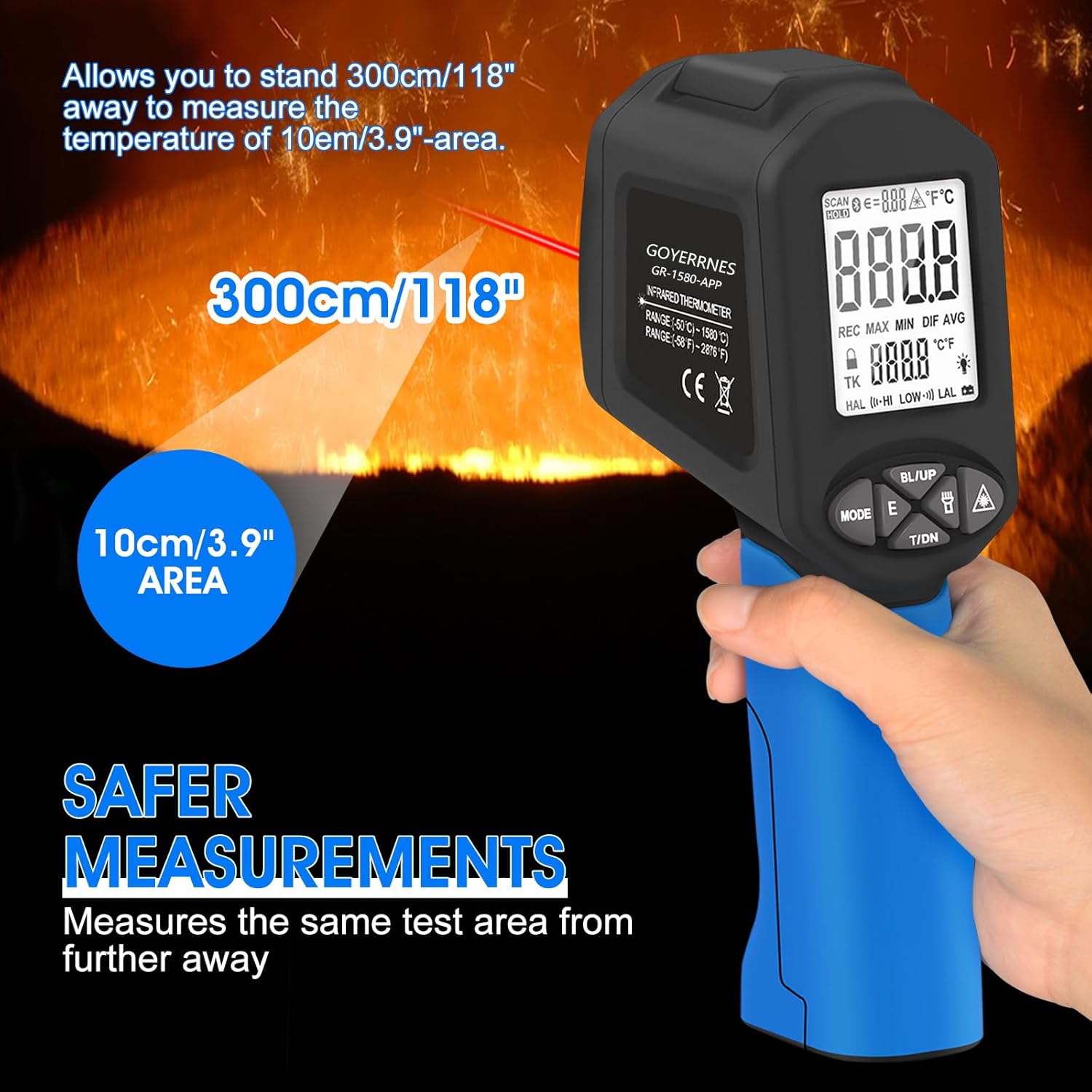
Figure 5.1: The pyrometer in use, demonstrating its ability to measure a 10cm (3.9") area from a distance of 300cm (118"), ensuring safer measurements.
5.2. Understanding Distance to Spot Ratio (D:S)
The GR-1580-APP has a D:S ratio of 30:1. This means that at a distance of 30 units from the target, the measurement spot diameter will be 1 unit. For example, at 30 inches, the spot size is 1 inch. To ensure accurate readings, the target object should be larger than the spot size. Measuring from further away increases the spot size.
5.3. Adjusting Emissivity
Emissivity (ε) is a measure of an object's ability to emit infrared energy. Different materials have different emissivities. Adjusting the emissivity setting on the pyrometer to match the target material improves measurement accuracy. The GR-1580-APP allows emissivity adjustment from 0.1 to 1.0.
- Press the 'MODE' button to navigate to the emissivity setting.
- Use the 'UP' and 'DOWN' buttons (often labeled BL/UP and T/DN) to adjust the emissivity value.
- Refer to the table below or common emissivity charts for typical values of various materials.
Common Emissivity Values:
- Asphalt: 0.90 to 0.98
- Ice: 0.96 to 0.98
- Plastic: 0.85 to 0.95
- Wood: 0.90

Figure 5.2: The pyrometer display showing the emissivity setting, with examples of common emissivity values for materials like asphalt, ice, plastic, and wood.
5.4. Using Measurement Modes (MIN/MAX/AVG/DIF)
Press the 'MODE' button repeatedly to cycle through the available measurement modes:
- MIN: Displays the minimum temperature recorded during a continuous scan.
- MAX: Displays the maximum temperature recorded during a continuous scan.
- AVG: Displays the average temperature recorded during a continuous scan.
- DIF: Displays the difference between the maximum and minimum temperatures recorded during a continuous scan.
5.5. Setting Temperature Alarms
The pyrometer can be configured to alert you if the measured temperature falls above or below a set threshold.
- Press the 'MODE' button until you reach the alarm setting (often indicated by HAL for High Alarm Limit or LAL for Low Alarm Limit).
- Use the 'UP' and 'DOWN' buttons to adjust the desired high or low temperature limit.
- An audible or visual alert will activate if the measured temperature exceeds the high limit or drops below the low limit.

Figure 5.3: The pyrometer display showing the settings for low temperature limit (-58°F) and high temperature limit (2876°F), indicating the range for temperature alarms.
5.6. Data Recording (REC Mode)
The REC mode allows you to store up to 12 sets of measurement data for later review or export via the AILink APP.
- Activate REC mode by pressing the appropriate button (refer to your device's specific button layout).
- Take measurements as usual. The device will store the readings.
- Review recorded data on the device or export it using the AILink APP.
5.7. Unit Conversion (°F/°C)
To switch between Fahrenheit (°F) and Celsius (°C) temperature units, press the dedicated °F/°C button or cycle through the 'MODE' options until the unit selection appears.
5.8. Flashlight Operation
The built-in flashlight can be activated to illuminate the target area in low-light conditions. Press the flashlight button (often integrated with another function button) to toggle it on or off.
6. Maintenance
6.1. Cleaning
To ensure accurate readings and prolong the life of your pyrometer:
- Wipe the device casing with a soft, damp cloth. Do not use abrasive cleaners or solvents.
- Gently clean the infrared lens and laser apertures with a soft, lint-free cloth or cotton swab. Avoid scratching the lens.
6.2. Battery Replacement
When the low battery indicator appears on the display, replace the 9V battery by following the steps in Section 4.1.
6.3. Storage
Store the pyrometer in its protective case in a cool, dry place when not in use. Remove the battery if storing for extended periods to prevent leakage.
7. Troubleshooting
If you encounter issues with your GOYERRNES GR-1580-APP pyrometer, refer to the following common problems and solutions:
- No Display/Device Not Powering On:
- Check battery installation and ensure correct polarity.
- Replace the 9V battery with a fresh one.
- Inaccurate Readings:
- Verify the emissivity setting matches the target material (refer to Section 5.3).
- Ensure the target object is larger than the measurement spot size (consider D:S ratio, Section 5.2).
- Clean the infrared lens and laser apertures.
- Ensure there are no obstructions between the pyrometer and the target.
- Bluetooth Connectivity Issues:
- Ensure Bluetooth is enabled on your mobile device.
- Make sure the pyrometer is powered on and within the 15-meter range.
- Restart both the pyrometer and your mobile device.
- Reinstall the "AILink" APP if necessary.
- Laser Not Visible:
- Check if the laser function is enabled (if applicable, refer to device controls).
- Ensure the laser apertures are clean.
If the problem persists, contact customer support for assistance.
8. Specifications
| Parameter | Value |
|---|---|
| Model | GR-1580-APP |
| Temperature Range | -50°C to 1580°C (-58°F to 2876°F) |
| Accuracy | ±4°C/7.2°F (-50°C to 0°C); ±2°C/3.6°F (above 0°C) |
| Resolution | 0.1°F / 0.1°C |
| Response Time | 0.25 seconds |
| Distance to Spot Ratio (D:S) | 30:1 |
| Emissivity | 0.1 to 1.0 (Adjustable) |
| Laser Type | Class 2(II) Laser Product, Wavelength 630-670nm |
| Connectivity | Bluetooth (AILink APP) |
| Power Source | 9V Battery |
| Dimensions | 212mm (8.34in) x 95mm (3.74in) |
| Weight | 250 g |
| UPC | 755361320945 |

Figure 8.1: Detailed diagram showing the dimensions of the pyrometer and a summary of its key specifications including temperature range, accuracy, emissivity, and resolution.
9. Warranty and Support
9.1. Warranty Information
The GOYERRNES GR-1580-APP Non-Contact Pyrometer comes with a 365-day warranty from the date of purchase, covering manufacturing defects and malfunctions under normal use.
9.2. Technical Support
GOYERRNES provides lifetime technical support for this product. If you have any questions, require assistance with setup, operation, or troubleshooting, please contact our customer support team. Refer to the product packaging or the official GOYERRNES website for contact details.