Introduction
This manual provides detailed instructions for the safe and effective operation, maintenance, and troubleshooting of your MeFix 8898 Portable 2 in 1 Soldering Iron Station and Hot Air Rework Station. Please read this manual thoroughly before use to ensure proper functionality and safety.
Safety Information
WARNING: Always exercise caution when working with high temperatures and electrical equipment. Failure to follow these safety guidelines may result in injury or damage to the equipment.
- Ensure the unit is connected to a grounded power outlet.
- Do not touch the soldering iron tip or hot air nozzle when hot. Temperatures can reach up to 480°C (896°F).
- Always place the hot air gun in its holder when not in use. The auto-sleep function will activate.
- Work in a well-ventilated area to avoid inhaling solder fumes.
- Keep flammable materials away from the work area.
- Unplug the unit from the power source before cleaning or maintenance.
- Do not operate the unit if the power cord or any components are damaged.
- Keep out of reach of children.
Package Contents
Verify that all items are present in your package:
- 1x MeFix 8898 Soldering Station Unit
- 1x Soldering Iron with Stand
- 1x Hot Air Gun with Holder
- 3x Hot Air Nozzles (various sizes)
- 5x Soldering Iron Tips (various types)
- 3x Tweezers
- 1x Cleaning Sponge
- 1x Power Cord

Image: The MeFix 8898 Soldering Station with its complete set of accessories, including the main unit, soldering iron, hot air gun, various nozzles, tips, tweezers, and cleaning sponge.
Setup
Follow these steps for initial setup of your MeFix 8898 station:
- Connect Components: Connect the soldering iron and hot air gun handle wires to their respective ports on the main unit. Ensure they are securely screwed in.
- Install Air Nozzle: Select the appropriate air nozzle for your task and securely attach it to the hot air gun.
- Place Handles: Place the soldering iron in its stand and the hot air gun in its designated holder on the unit.
- Power Connection: Connect the power cord to the unit and then to a suitable grounded electrical outlet.
Video: This video demonstrates the initial setup of the MeFix 8898 soldering station, including connecting the soldering iron and hot air gun, installing the air nozzle, and powering on the unit. It also shows how to adjust temperature and air volume settings.
Operating Instructions
General Operation
- Power On: Turn on the main power switch located on the front panel. The digital displays will illuminate.
- Temperature Adjustment:
- Use the UP (▲) and DOWN (▼) buttons below each display (SOLDER and REWORK) to set the desired temperature.
- The soldering iron temperature range is 180°C to 500°C (356°F to 932°F).
- The hot air gun temperature range is 100°C to 500°C (212°F to 932°F).
- Air Volume Adjustment (Hot Air Gun):
- Press the SET (⚙) button once to enter air volume adjustment mode for the hot air gun.
- Use the UP (▲) and DOWN (▼) buttons to adjust the air volume.
- Press the SET (⚙) button again to save the setting.
- Auto Sleep Function (Hot Air Gun Only): The hot air gun automatically enters standby mode (SLP) when placed back into its holder. It will resume operation when picked up. The soldering iron does not have this function.
Using the Soldering Iron

Image: A close-up view of the MeFix 8898 soldering iron being used to solder components on a circuit board, highlighting its precision and fast heating capability.
- Ensure the soldering iron tip is clean. Use the included sponge (dampened) to wipe off excess solder and flux.
- Apply a small amount of solder to the tip to "tin" it. This helps with heat transfer and prevents oxidation.
- Place the tip on the component lead and pad to be soldered, allowing heat to transfer.
- Apply solder to the heated joint, not directly to the iron tip. The solder should flow smoothly around the joint.
- Remove the iron once the solder has flowed correctly. Allow the joint to cool naturally.
Using the Hot Air Rework Station
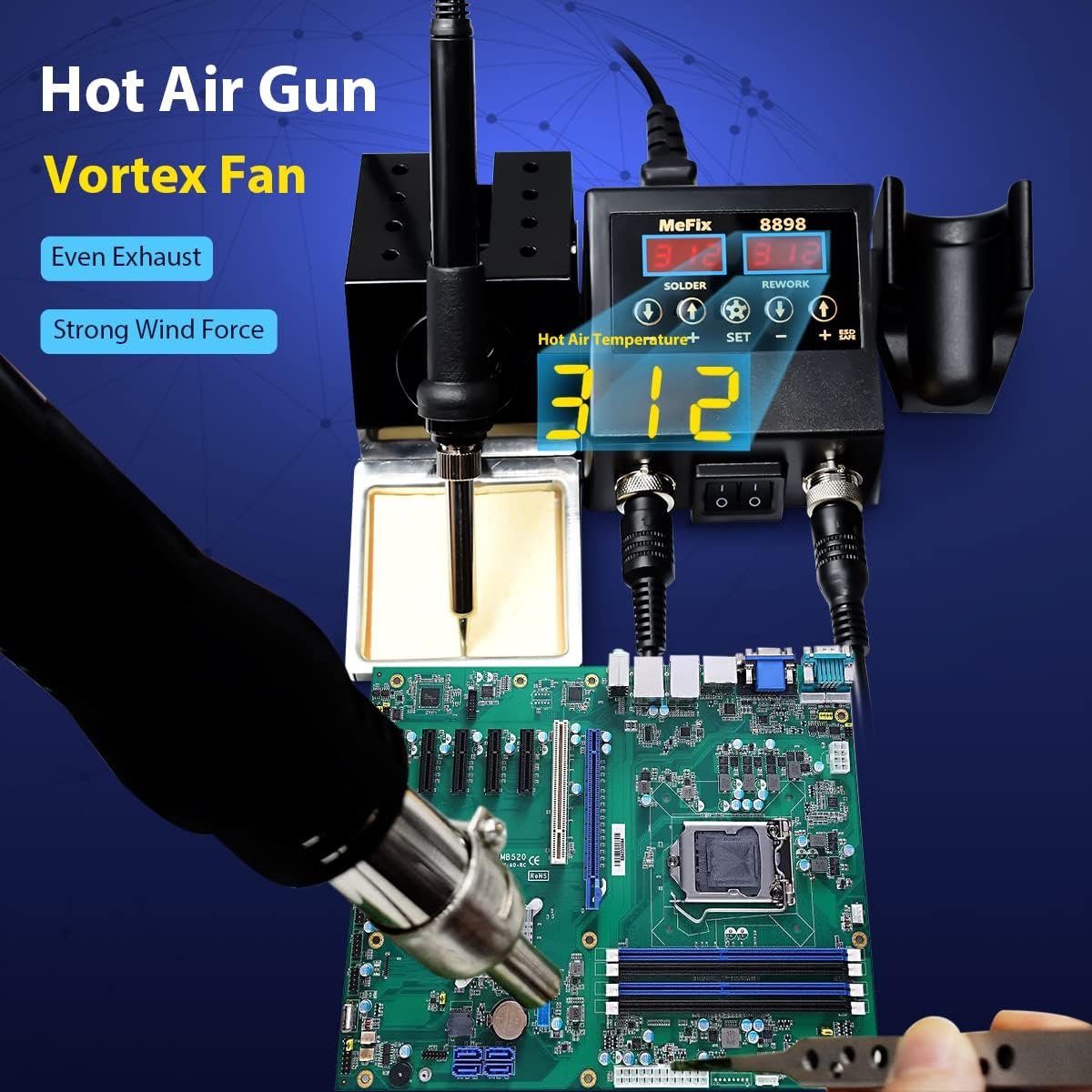
Image: The MeFix 8898 hot air gun in action, demonstrating its use for rework on a circuit board, emphasizing the even exhaust and strong wind force from its vortex fan.
- Select the appropriate nozzle for the component size.
- Set the desired temperature and air volume. Start with lower settings and increase if necessary.
- Hold the hot air gun a safe distance from the component, applying heat evenly. Avoid direct, prolonged heat on sensitive components.
- Once the solder melts, carefully remove the component using tweezers.
- For soldering, apply solder paste to the pads, position the component, and then apply hot air until the solder reflows.
Maintenance
- Soldering Iron Tip Care:
- Always tin the tip before and after use to prevent oxidation.
- Clean the tip regularly with the damp sponge or brass wool.
- Replace tips when they become pitted or no longer accept solder easily.
- Hot Air Gun Nozzle Cleaning:
- Ensure the nozzle is cool before handling.
- Clean any flux residue or debris from the nozzles using a soft brush or cloth.
- Unit Cleaning:
- Wipe the main unit and handles with a soft, dry cloth. Do not use abrasive cleaners or solvents.
- Ensure ventilation openings are clear of dust and debris.
- Heating Element Replacement: The unit comes with spare heating elements for both the soldering iron and hot air gun. Refer to specialized guides or professional assistance for replacement if needed.
Troubleshooting
| Problem | Possible Cause | Solution |
|---|---|---|
| Unit does not power on. | No power, loose connection, faulty power cord. | Check power outlet, ensure power cord is securely connected. |
| Soldering iron not heating. | Loose connection, faulty heating element, incorrect temperature setting. | Check connection to unit, verify temperature setting, consider replacing heating element if necessary. |
| Hot air gun not heating or no air flow. | Loose connection, faulty heating element/fan, incorrect temperature/air volume setting, gun not removed from holder. | Check connection to unit, verify settings, ensure gun is removed from holder to activate, consider replacing heating element/fan. |
| Display shows "H-E" or "S-E". | Heating element error (H-E) or sensor error (S-E). | Check connections. If error persists, the heating element or sensor may need replacement. |
| Poor solder joints. | Insufficient temperature, dirty tip, incorrect solder type, poor technique. | Increase temperature, clean and tin tip, use appropriate solder, practice soldering technique. |
Specifications
| Feature | Detail |
|---|---|
| Model Number | 8898 |
| Type | 2-in-1 Soldering Iron Station & Hot Air Rework Station |
| Soldering Iron Power | 60W |
| Hot Air Gun Power | 600W |
| Input Voltage | AC110V/60Hz (Note: Product specifications mention 240 volts, but also AC110V/60Hz. Assuming 110V for US market based on Amazon domain.) |
| Soldering Iron Temperature Range | 180°C - 500°C (356°F - 932°F) |
| Hot Air Gun Temperature Range | 100°C - 500°C (212°F - 932°F) |
| Temperature Stability | Soldering: ±5°C; Hot Air: ±20°C |
| Display Type | LED Digital Display |
| Hot Air Gun Air Volume | Up to 120L/min (Max) |
| Auto Sleep Function | Yes (Hot Air Gun only) |
| Material | Metal (for stand and certain components) |
| Item Weight | Approx. 2.48 pounds (1.13 kg) |
| Dimensions | Approx. 10.04 x 6.61 x 4.02 inches |
| Country of Origin | China |
Warranty and Support
MeFix products are designed for reliability and performance. For warranty information, technical support, or service inquiries, please refer to the contact information provided with your purchase or visit the official MeFix website. Keep your purchase receipt as proof of purchase for warranty claims.
For additional resources and product information, you may visit the MeFix Store on Amazon.


