
RK ROYAL KLUDGE RK61 Plus
RK ROYAL KLUDGE RK61 Plus Wireless Mechanical Keyboard User Manual
Model: RK61 Plus | Brand: RK ROYAL KLUDGE
Introduction
The RK ROYAL KLUDGE RK61 Plus is a versatile 60% compact mechanical keyboard designed for gaming and everyday use. It features triple-mode connectivity (Bluetooth 5.0, 2.4G wireless, and USB wired), hot-swappable switches, customizable RGB backlighting, and an extended USB hub. This manual provides detailed instructions for setting up, operating, and maintaining your keyboard to ensure optimal performance.

Image: The RK ROYAL KLUDGE RK61 Plus Wireless Mechanical Keyboard.
Package Contents
Before you begin, please ensure all items are present in your package:
- RK61 Plus Mechanical Keyboard x 1
- Sky Cyan 5 Pin Switches x 4 (additional switches)
- 2-In-1 USB Wired Cable x 1 (USB-A to USB-C)
- Keycap Puller x 1
- User Manual x 1
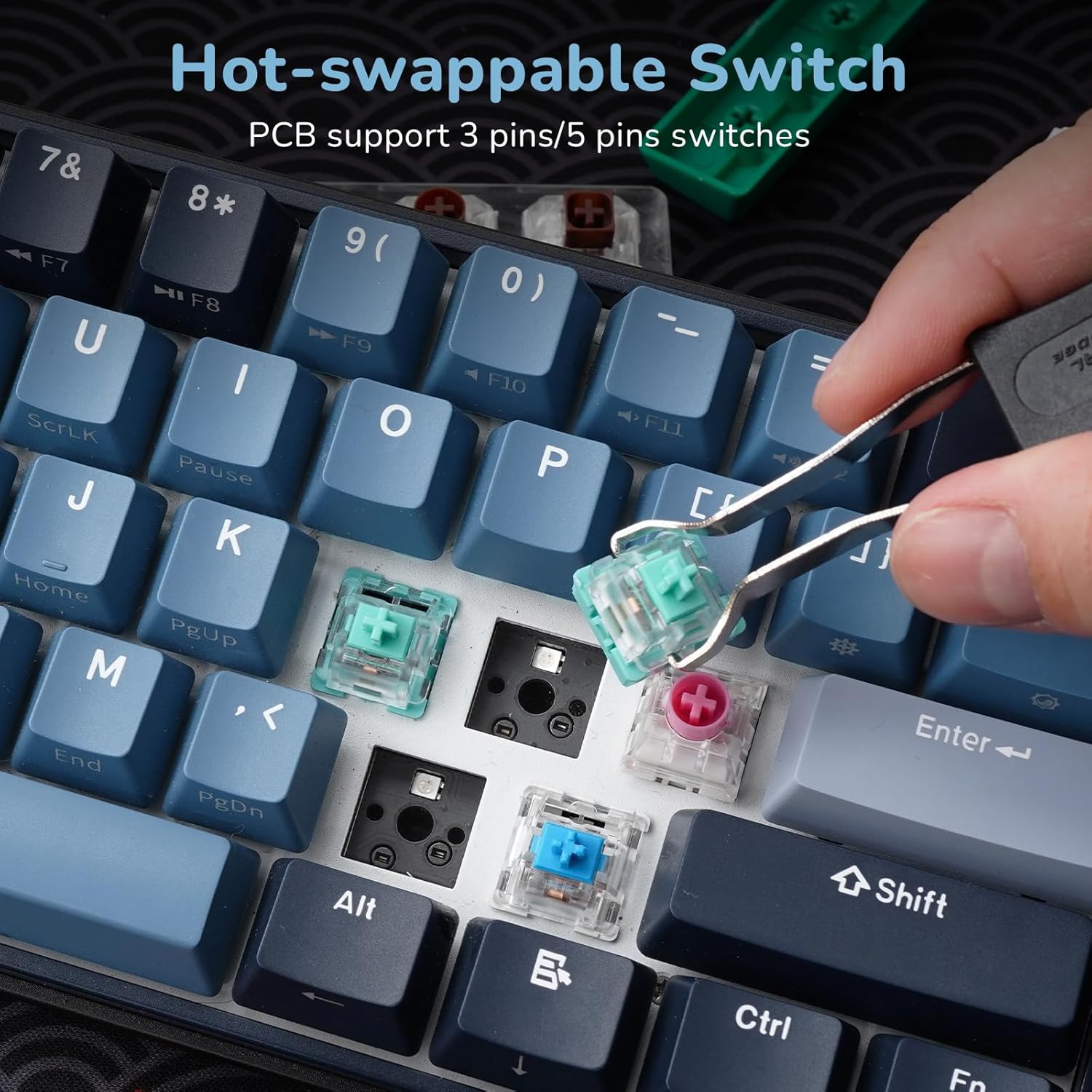
Image: Contents included in the RK ROYAL KLUDGE RK61 Plus package.
Setup and Connectivity
The RK61 Plus keyboard offers three versatile connection modes: USB Wired, 2.4G Wireless, and Bluetooth 5.0.
Triple Mode Connectivity
The keyboard supports seamless switching between devices and modes, making it ideal for various setups including laptops, desktops, PCs, and tablets.

Image: Visual representation of the three connectivity modes: Type-C (wired), 2.4Ghz (wireless), and Bluetooth.
Switching Modes:
- USB Wired Mode: Connect the keyboard directly to your device using the provided USB-C to USB-A cable. This mode also enables the extended USB hub.
- 2.4G Wireless Mode: Insert the 2.4G USB dongle into your device. Toggle the switch on the side of the keyboard to 'G' for 2.4G mode.
- Bluetooth Mode: Toggle the switch on the side of the keyboard to 'B' for Bluetooth mode. The keyboard can connect to up to 3 devices via Bluetooth. Switch between paired devices using Fn+Q/W/E.

Image: Close-up of the keyboard's side, showing the USB-A and Type-C ports, and the mode selection switch (B for Bluetooth, G for 2.4G, OFF/ON).
Extended USB Hub
The RK61 Plus features an extended USB hub with USB-A and Type-C ports, allowing for easy connection of additional USB devices like storage, mice, or for charging. Note: The USB hub functionality is only active when the keyboard is in USB wired mode.
Battery and Charging
The keyboard is equipped with an 1850 mAh rechargeable battery. For optimal battery life, it is recommended to turn off the RGB lighting when not needed. The keyboard can last up to 100 hours with RGB off and 18 hours with RGB on.

Image: Diagram illustrating the 1850 mAh battery capacity and estimated battery life with RGB on/off.
Video Guide: Connectivity Modes
Video: A detailed explanation of the three connectivity modes (Bluetooth, 2.4G Wireless, and Wired) and their practical applications.
Operating Instructions
60% Compact Layout
The RK61 Plus features a 60% compact layout, optimizing desk space while retaining essential functionality through function layer keys. Many keys have secondary functions accessible via the Fn key.
RGB Backlight Effects
Customize your typing experience with over 18 RGB backlight effects. The keyboard also supports custom lighting software for advanced personalization.

Image: Screenshot of the software interface for customizing RGB backlight effects and colors.
Hot-Swappable Switches
The RK61 Plus is equipped with quiet SkyCyan linear switches, offering a smooth typing experience. The hot-swappable design allows you to easily replace switches with most 3-pin or 5-pin MX-similar mechanical switches (e.g., Gateron, Cherry) to customize your keyboard's feel and sound.

Image: Exploded view showing the SkyCyan switches, sound-absorbing cotton, and fine-lubed stabilizers.

Image: A hand using a switch puller to remove a hot-swappable switch from the keyboard.
Macro Recording & Driver Support
The keyboard is supported by a superior driver that allows for extensive customization. You can redefine key functions, set up custom RGB backlight effects, and configure macros to perform complex commands, maximizing your keyboard's potential.
Video Guide: Typing Experience
Video: Demonstrates the typing sound and feel of the RK ROYAL KLUDGE RK61 Plus keyboard with different switch types.
Maintenance
To ensure the longevity and optimal performance of your RK61 Plus keyboard, regular maintenance is recommended:
- Cleaning Keycaps: Use a keycap puller to remove keycaps. Clean them with a soft cloth dampened with mild soap and water. Ensure they are completely dry before reattaching.
- Cleaning the Board: Use compressed air to remove dust and debris from between the switches. A soft brush can also be used for stubborn particles.
- Storage: When not in use for extended periods, store the keyboard in a dry, dust-free environment.
Troubleshooting
If you encounter any issues with your RK61 Plus keyboard, try the following solutions:
- Connectivity Issues:
- Ensure the correct mode (Bluetooth, 2.4G, or Wired) is selected via the side switch.
- For Bluetooth, ensure the keyboard is discoverable and correctly paired with your device (Fn+Q/W/E).
- For 2.4G wireless, ensure the dongle is securely inserted and the keyboard is in 'G' mode.
- For wired mode, ensure the USB cable is firmly connected to both the keyboard and your device.
- Keys Not Responding / Double Typing:
- Check battery level and charge if low.
- Try re-seating the affected key switch. If the issue persists, replace the switch with one of the spares provided.
- Consider updating the keyboard firmware if available from the RK ROYAL KLUDGE official website. (Some users reported resolving issues with firmware updates).
- RGB Lighting Problems:
- Ensure RGB lighting is enabled (Fn + \|/? key).
- Adjust brightness (Fn + Right Shift) or switch modes (Fn + \|/?).
- Check the lighting settings via the driver software.
Specifications
| Feature | Detail |
|---|---|
| Product Dimensions | 11.65 x 4.17 x 1.57 inches |
| Item Weight | 1.34 pounds |
| Connectivity Technology | 2.4Ghz Wireless Dongle, Bluetooth, USB-C |
| Keyboard Description | Wireless Gaming Keyboard 60 Percent |
| Number of Keys | 61 |
| Keyboard Backlighting | RGB |
| Special Features | Backlit, Programmable Keys, Wireless Mechanical Keyboard, Rechargeable, Hot-Swappable |
| Compatible Devices | Laptop, PC, Tablet, Smartphone |
| Battery | 1850 mAh (1 AAA batteries required, included) |
Warranty and Support
For warranty information and technical support, please refer to the official RK ROYAL KLUDGE website or the warranty card included with your product. Keep your purchase receipt for warranty claims.
For further assistance, you may also visit the RK ROYAL KLUDGE Store on Amazon.