
1. Safety Information
DANGER: Risk of electrical shock. Wait 3 minutes after removing power before servicing. This device operates at high voltages and can cause severe injury or death if not handled properly. Installation, operation, and maintenance must be performed by qualified personnel only.
- Always disconnect all power sources before working on the drive or connected equipment.
- Ensure proper grounding according to local and national electrical codes.
- Do not operate the drive with covers removed.
- Wear appropriate personal protective equipment (PPE).
- Refer to the warning labels on the product for specific safety instructions.

Image: Side view of the Lanlily 22A-D4P0N104 PowerFlex 4 AC Drive. This image highlights the safety warning regarding electrical shock and the need to wait 3 minutes after power removal before servicing. It also displays a label with fault codes and common parameters.
2. Product Overview
The Lanlily 22A-D4P0N104 PowerFlex 4 AC Drive is a variable frequency drive (VFD) designed for controlling the speed and torque of AC induction motors. It is suitable for a wide range of industrial applications requiring precise motor control. This model features a 480V input, 1.5 kW (2 Hp) output, and an integrated LCD display for easy parameter viewing and adjustment.
Key features include:
- Model: 22A-D4P0N104
- Type: PowerFlex 4 AC Drive
- Voltage: 480V
- Power: 1.5 kW (2 Hp)
- Display Type: LCD
3. Setup & Installation
3.1 Mounting
Mount the drive vertically on a flat, stable surface, ensuring adequate clearance for cooling airflow. Use appropriate fasteners for secure installation. The drive is designed for panel mounting.
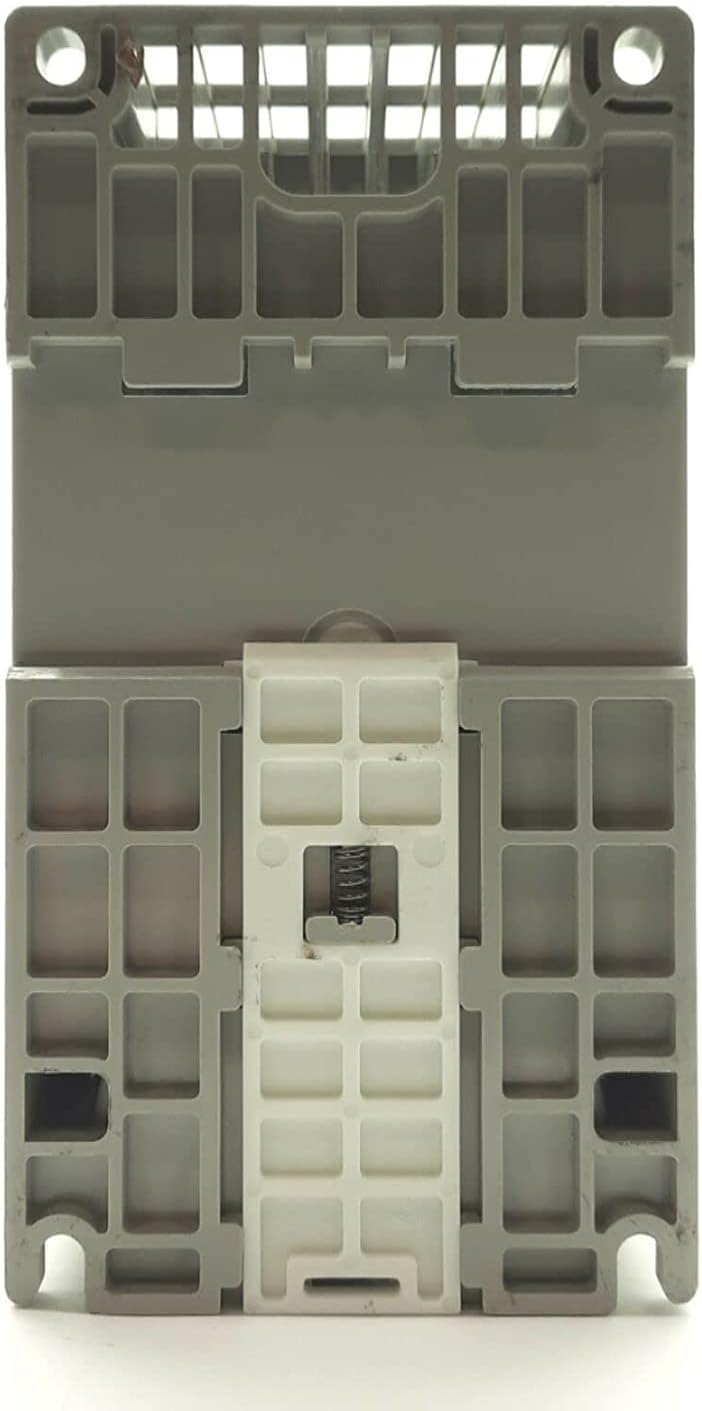
Image: Bottom view of the Lanlily 22A-D4P0N104 PowerFlex 4 AC Drive, illustrating the mounting tabs and spring-loaded clip for secure installation.
3.2 Wiring
All wiring must comply with local and national electrical codes. Ensure power is disconnected before making any connections.
- Power Wiring: Connect the incoming 480V AC power to the designated input terminals (L1, L2, L3). Connect the motor leads to the output terminals (T1, T2, T3). Ensure proper grounding.
- Control Wiring: Connect control signals (e.g., start/stop, speed reference) to the appropriate control terminals. Refer to the drive's wiring diagram for specific terminal assignments.

Image: Top view of the Lanlily 22A-D4P0N104 PowerFlex 4 AC Drive, showing the cooling fan and the terminal block area for power and control wiring connections.
4. Operating Instructions
4.1 Initial Power-Up
After verifying all connections, apply power to the drive. The LCD display will illuminate, showing the current status or a default parameter.
4.2 Parameter Setting
Use the keypad and LCD display to navigate and adjust drive parameters. Common parameters include motor data, acceleration/deceleration times, and speed reference sources. Refer to the drive's programming manual for a complete list of parameters and their functions.
4.3 Start/Stop Control
The drive can be started and stopped via the keypad or external control signals, depending on the configured control mode. Press the "Start" button on the keypad or activate the corresponding digital input to begin motor operation. Press "Stop" to halt the motor.
4.4 Speed Control
Adjust the motor speed using the speed potentiometer on the drive's keypad, or via an analog input signal (e.g., 0-10V, 4-20mA) if configured for external speed reference.
5. Maintenance
Regular maintenance ensures optimal performance and extends the lifespan of the PowerFlex 4 AC Drive. Always disconnect power before performing any maintenance tasks.
- Cleaning: Periodically clean the drive's exterior and cooling fins to prevent dust and debris buildup, which can impede airflow and lead to overheating. Use a soft, dry cloth or compressed air.
- Fan Inspection: Check the cooling fan for proper operation and ensure it is free from obstructions. Replace the fan if it becomes noisy or stops working.
- Terminal Connections: Periodically inspect all terminal connections for tightness. Loose connections can cause overheating and intermittent operation.
- Environmental Conditions: Ensure the operating environment remains within the specified temperature and humidity ranges.
6. Troubleshooting
The drive's LCD display will show fault codes if an error occurs. Refer to the fault code list on the drive's label or in the full product manual for detailed explanations and corrective actions.
Image: Side view of the Lanlily 22A-D4P0N104 PowerFlex 4 AC Drive, displaying a label with a comprehensive list of fault codes (e.g., F002 Auxiliary Input, F003 Power Loss, F004 UnderVoltage, F005 OverVoltage) and common parameters.
Common Fault Codes and Solutions:
| Fault No. | Fault Description | Possible Cause / Solution |
|---|---|---|
| F002 | Auxiliary Input | Check auxiliary input wiring and device status. |
| F003 | Power Loss | Verify input power supply. Check for loose connections or power interruptions. |
| F004 | UnderVoltage | Check input voltage. Ensure it is within specified limits. |
| F005 | OverVoltage | Check input voltage. May occur during deceleration if deceleration time is too short. Increase deceleration time. |
| F006 | Motor OverLoad | Reduce motor load or check motor sizing. Verify motor thermal overload settings. |
| F007 | Drive OverTemp | Check ambient temperature, ensure proper ventilation, and clean cooling fins/fan. |
| F008 | HW OverCurrent | Check motor and output wiring for short circuits. Verify motor parameters. |
If a fault persists after attempting the suggested solutions, contact technical support.
7. Specifications
| Parameter | Value |
|---|---|
| Model | 22A-D4P0N104 |
| Type | PowerFlex 4 AC Drive |
| Brand | Lanlily |
| Input Voltage | 480V AC |
| Output Power | 1.5 kW (2 Hp) |
| Display Type | LCD |
| UPC / GTIN | 724939372662 |
| Color | White (housing) |
8. Warranty & Support
8.1 Warranty Information
This Lanlily 22A-D4P0N104 PowerFlex 4 AC Drive comes with a one-year warranty from the date of purchase. The warranty covers defects in materials and workmanship under normal use. It does not cover damage caused by improper installation, misuse, unauthorized modifications, or external factors.
8.2 Technical Support
For technical assistance, troubleshooting beyond the scope of this manual, or warranty claims, please contact your authorized Lanlily distributor or customer support. Have your product model number and purchase information ready when contacting support.