
Redfern 10ex
Redfern Pure Breeze 10ex Portable Air Cooler User Manual
Brand: Redfern
Model: 10ex
1. Introduction
The Redfern Pure Breeze 10ex is a portable air cooler designed to efficiently reduce room temperature by up to 60 degrees Fahrenheit (15 Celsius). Its compact design and concealed castor wheels allow for easy portability from room to room without requiring complex installation. This unit is ideal for residential use, providing a comfortable environment wherever needed.
Unit measures approximately 10 inches deep x 11 inches wide x 30 inches high.
2. Key Features
- Reduces room temperature up to 60 degrees Fahrenheit (15 Celsius).
- Comes with a reusable gel ice pack to cool down faster.
- Easily portable from room to room thanks to the four concealed castor wheels.
- Unit measures 10 x 11 x 30 inches.
- Equipped with remote control for convenient operation.
- Features multiple operating modes: Sleep, Natural, Sway, and Cool.
- Adjustable fan speeds (1, 2, 3).
- 8-liter reservoir capacity.
- Suitable for floor areas up to 220 square feet.
3. Setup Guide
Follow these steps to set up your Pure Breeze 10ex air cooler:
- Unpack the Unit: Carefully remove the air cooler from its packaging. Ensure all components, including the remote control and reusable gel ice pack, are present.
- Position the Cooler: Place the unit on a flat, stable surface in the desired room. The concealed castor wheels allow for easy movement. Ensure there is adequate space around the unit for proper airflow.
- Fill the Water Tank: Locate the water tank at the bottom of the unit. Pull out the tank and fill it with clean water. For enhanced cooling, you can add the reusable gel ice pack to the water tank. Do not overfill.
- Connect to Power: Plug the power cord into a standard 220-volt electrical outlet. The unit consumes 45 watts.
- Initial Operation: Press the "ON/OFF" button on the control panel or remote control to power on the unit.

Figure 3.1: Front view of the Pure Breeze 10ex, highlighting its sleek design and air vents.
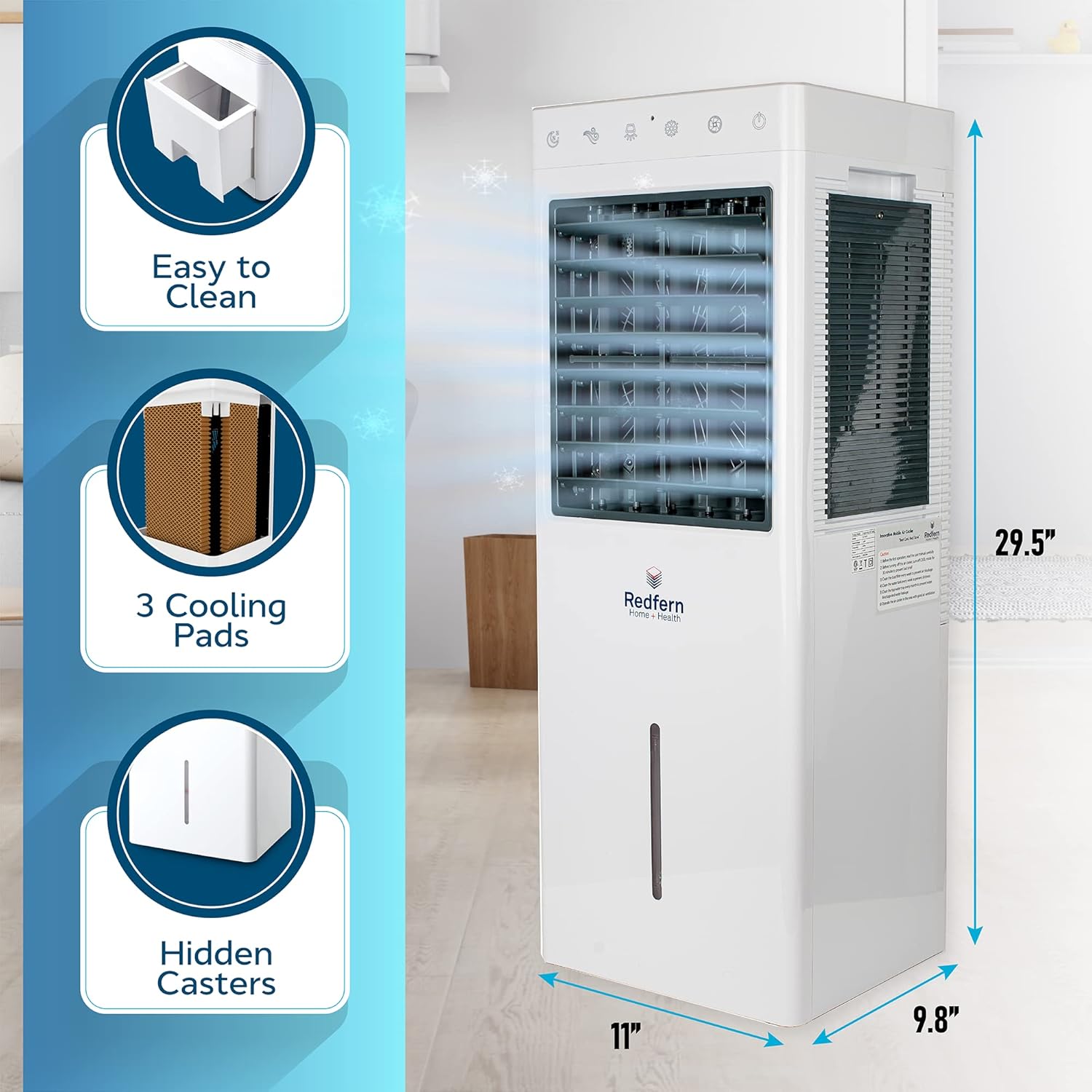
Figure 3.2: Side view illustrating the dimensions and key features like easy cleaning, cooling pads, and hidden casters.
4. Operating Instructions
The Pure Breeze 10ex can be operated using the control panel on top of the unit or the included remote control.
Control Panel / Remote Functions:
- ON/OFF: Powers the unit on or off.
- SPEED: Cycles through fan speeds (1, 2, 3).
- COOL: Activates the cooling function, utilizing the water and ice pack for evaporative cooling.
- SWAY: Activates the oscillation feature, moving the air vents from side to side for wider air distribution.
- NATURAL: Simulates a natural breeze by varying fan speed.
- SLEEP: Reduces fan speed and light indicators for quiet operation during sleep.
Video 4.1: Official Redfern iQ Pure Breeze Video demonstrating product features, setup, and operation.
5. Maintenance
Regular maintenance ensures optimal performance and longevity of your Pure Breeze 10ex air cooler.
- Water Tank Cleaning: Regularly empty and clean the water tank to prevent mold and mildew buildup. Use a mild detergent and rinse thoroughly.
- Cooling Pad Cleaning: The unit features 3 cooling pads that can be easily removed for cleaning. Rinse them under running water to remove dust and mineral deposits. Allow them to dry completely before reinserting.
- Exterior Cleaning: Wipe the exterior of the unit with a soft, damp cloth. Do not use abrasive cleaners or solvents.
- Storage: If storing the unit for an extended period, ensure the water tank and cooling pads are completely dry. Store in a cool, dry place.
6. Troubleshooting
If you encounter issues with your Pure Breeze 10ex, refer to the following common problems and solutions:
| Problem | Possible Cause | Solution |
|---|---|---|
| Unit does not power on. | No power supply; power cord not properly connected. | Check if the unit is plugged into a working 220V outlet. Ensure the power cord is securely connected. |
| Air is not cooling. | Water tank is empty; cooling pads are dirty; cooling function not activated. | Fill the water tank. Clean the cooling pads. Press the "COOL" button on the control panel or remote. Ensure the gel ice pack is frozen and placed in the tank. |
| Weak airflow. | Fan speed is too low; air intake/outlet blocked. | Increase the fan speed using the "SPEED" button. Ensure nothing is obstructing the air intake or outlet grilles. |
| Unusual odor. | Stagnant water in the tank; dirty cooling pads. | Empty and clean the water tank thoroughly. Clean the cooling pads. Use fresh water. |
7. Specifications
- Brand: Redfern
- Model Name: 10ex (also referred to as 'castor' in some specifications)
- Mounting Type: Freestanding
- Special Feature: Portable
- Color: Multicolored (unit is primarily white)
- Controls Type: Remote
- Reservoir Capacity: 8 Liters
- Floor Area Coverage: 220 Square Feet
- Recommended Uses: Residential
- Included Components: Fan, Remote
- Number of Speeds: 3
- Product Dimensions: 10"D x 11"W x 30"H
- Voltage: 220 Volts
- Power Source: Electric (45 watts)
- Item Weight: 18.43 pounds
- Country of Origin: China
- UPC: 882903031240
8. Warranty and Support
For warranty information, technical support, or service inquiries, please refer to the warranty card included with your product or contact Redfern customer service directly. Keep your purchase receipt as proof of purchase.
Redfern Customer Service: www.redfern.com/support (Example Link)
Related documents10ex


Ask a question about this manual
Ask about setup, troubleshooting, compatibility, parts, safety, or missing instructions. Manuals+ will review the question and use this page’s manual context to help answer it.