
Astell&Kern PATHFINDER
Astell&Kern PATHFINDER In-Ear Monitors User Manual
Model: PATHFINDER | Brand: Astell&Kern
1. Product Overview
The Astell&Kern PATHFINDER is a high-fidelity in-ear monitor (IEM) developed in collaboration with Campfire Audio. It redefines the hybrid IEM experience by integrating advanced dual-chamber driver technology, delivering a wider frequency range, realistic sound reproduction, and superior band balance. This model is the second collaboration IEM, building upon the success of the AK SOLARIS X.

Figure 1.1: Astell&Kern PATHFINDER In-Ear Monitors.
The PATHFINDER features a unique driver configuration: a Knowles dual-diaphragm BA driver for the mid-range, Campfire Audio's proprietary T.A.E.C. Technology with custom dual BA drivers for the high-range, and a 10mm dual custom dynamic driver with Radial Venting Technology for the low-to-mid range. This innovative design ensures clear and natural sound across the entire spectrum.

Figure 1.2: PATHFINDER branding, highlighting the collaboration.
2. Package Contents
Please verify that all items listed below are included in your package. If any items are missing or damaged, please contact your retailer.
- Astell&Kern PATHFINDER In-Ear Monitors (Left & Right)
- 3.5mm Unbalanced Cable (approx. 120cm)
- 2.5mm Balanced Cable (approx. 120cm)
- 4.4mm Balanced Cable (approx. 120cm)
- Campfire Audio Marshmallow Eartips: 3 pairs (S/M/L) - Foam type
- Final E-Type Eartips: 5 pairs (XS/S/M/L/XL)
- Silicone Eartips: 3 pairs (S/M/L)
- Earphone Protection Sleeve
- Eartip & Cable Storage Pouch
- Leather Zipper Carrying Case
- Cleaning Tool

Figure 2.1: Complete package contents of the PATHFINDER IEMs.
3. Product Features
3.1 Dual Chamber Driver Technology
The PATHFINDER employs an innovative driver combination for exceptional sound balance. It features a newly developed Knowles dual-diaphragm BA driver for the mid-range, offering high output in a compact size for clearer and more natural sound. For the high-range, Campfire Audio's proprietary "T.A.E.C. Technology" is utilized with custom dual BA drivers specialized for high-frequency reproduction. The low-to-mid range is handled by a 10mm dual custom dynamic driver, incorporating Campfire Audio's latest "Radial Venting Technology" for the first time. This 3D-printed chamber design naturally expresses powerful bass while preserving the unique sound of the dynamic drivers.
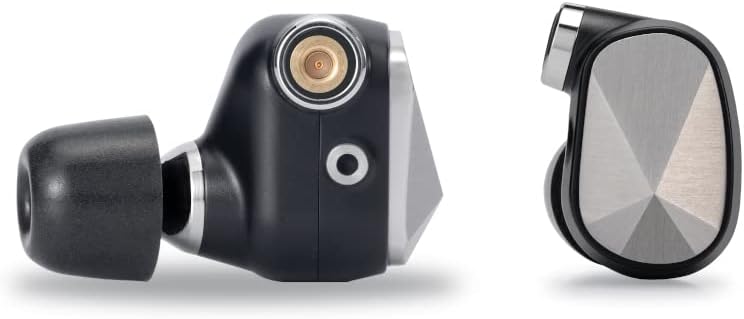
Figure 3.1: Side view of the PATHFINDER IEM, highlighting its design.
3.2 Custom Beryllium/Copper MMCX Connectors
The custom Beryllium/Copper MMCX connectors are more resistant to wear and damage than standard brass connectors, ensuring a robust and secure connection for long-term durability.
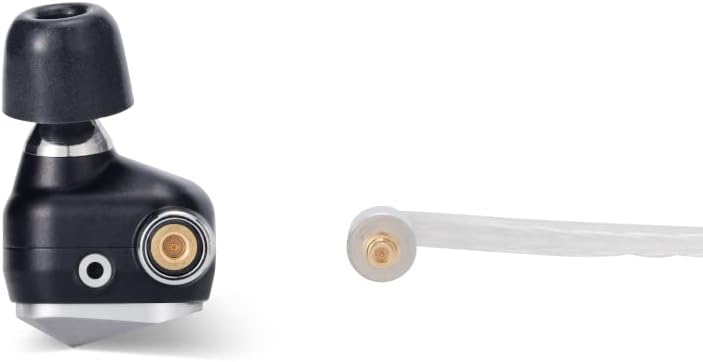
Figure 3.2: Detail of the durable MMCX connector.
3.3 Flat Design Silver-Plated OFC Litz Cables
Three types of silver-plated OFC Litz cables are included: 3.5mm unbalanced, 2.5mm balanced, and 4.4mm balanced. These cables feature a newly developed flat design, making them less prone to tangling and easier to store. The conductors are enamel-coated for clearer and more expansive sound. The plugs and connectors are overmolded for enhanced durability and finished with metal housings.

Figure 3.3: The three included high-quality audio cables.
3.4 Design Concept: Mountain Peak Inlay
The design merges Astell&Kern's philosophy of expressing the purity of original sound through "light and shadow" with Campfire Audio's reverence for nature. This fusion resulted in the "Mountain Peak" inlay design. Each inlay is crafted from stainless steel, featuring six facets that reflect light and shadow, forming the shape of a shining mountain rising from the earth. This design embodies the premium craftsmanship and innovation that both brands pride themselves on.
4. Setup
4.1 Connecting the Cables
- Identify the left (L) and right (R) earpieces. The earpieces are marked with 'L' and 'R' indicators.
- Select the desired cable (3.5mm, 2.5mm, or 4.4mm) based on your audio source's output.
- Align the MMCX connector on the cable with the MMCX port on the earpiece. Gently push the connector straight into the port until you feel a click. Do not twist or force the connection.
- To disconnect, firmly grasp the earpiece and the cable connector, then pull them straight apart. Avoid pulling on the cable itself.

Figure 4.1: PATHFINDER IEMs with cable connected.
4.2 Choosing and Attaching Eartips
Proper eartip selection is crucial for optimal sound quality and comfort. Experiment with the various types and sizes provided (Marshmallow foam, Final E-Type, Silicone) to find the best fit for your ears.
- Foam Eartips: Compress the foam eartip by rolling it between your fingers before inserting it into your ear. Hold it in place for a few seconds while the foam expands to create a seal.
- Silicone/Final E-Type Eartips: Gently push the eartip onto the nozzle of the IEM until it is securely seated. Ensure the eartip forms a good seal in your ear canal for the best bass response and noise isolation.
4.3 Wearing the IEMs
The PATHFINDER IEMs are designed to be worn with the cable routed over the top of your ear. This provides a secure fit and reduces microphonics (cable noise).
- Insert the earpiece into your ear canal.
- Loop the cable over the top and behind your ear.
- Adjust the earpiece and cable for a comfortable and secure fit.

Figure 4.2: PATHFINDER IEMs showing the over-ear cable routing.
5. Operating Instructions
5.1 Basic Usage
- Connect the appropriate cable to your PATHFINDER IEMs as described in Section 4.1.
- Plug the other end of the cable into your audio source (e.g., digital audio player, smartphone, amplifier) using the corresponding 3.5mm, 2.5mm, or 4.4mm jack.
- Start playing audio on your source device.
- Adjust the volume on your audio source to a comfortable listening level. Avoid excessively high volumes to prevent hearing damage.
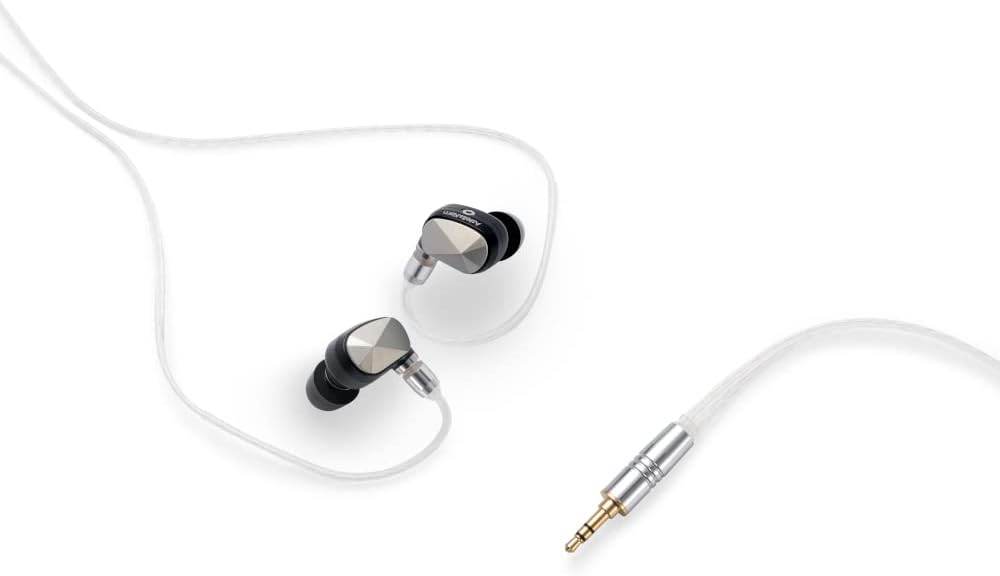
Figure 5.1: PATHFINDER IEMs connected and ready for audio playback.
5.2 Important Listening Practices
- Always start with a low volume level on your audio source and gradually increase it to a comfortable level.
- Do not listen at high volumes for extended periods, as this can cause permanent hearing damage.
- Be aware of your surroundings when using the IEMs, especially in situations where situational awareness is critical (e.g., walking near traffic).
6. Maintenance
6.1 Cleaning the IEMs and Eartips
- Regularly clean the earpieces and eartips to maintain hygiene and sound quality.
- Use the provided cleaning tool to gently remove any earwax or debris from the eartips and the nozzle of the IEMs.
- Wipe the body of the IEMs with a soft, dry, lint-free cloth. Do not use harsh chemicals or abrasive materials.
- For silicone eartips, they can be removed and washed with mild soap and water. Ensure they are completely dry before reattaching them to the IEMs.
- Foam eartips should not be washed; replace them if they become dirty or lose their elasticity.
6.2 Cable Care
- Store cables neatly to prevent tangling and damage. The flat design of the included cables helps reduce tangles.
- Avoid sharp bends or excessive pulling on the cables, especially near the connectors.
- When disconnecting, always pull from the connector housing, not the cable itself.
6.3 Storage
- When not in use, store your PATHFINDER IEMs and cables in the provided leather zipper carrying case or the storage pouch to protect them from dust, dirt, and physical damage.
- Avoid exposing the IEMs to extreme temperatures, humidity, or direct sunlight.
7. Troubleshooting
| Problem | Possible Cause | Solution |
|---|---|---|
| No sound or sound from only one side. |
|
|
| Poor sound quality (e.g., lack of bass, muffled sound). |
|
|
| Uncomfortable fit or earpieces falling out. |
|
|
8. Specifications
| Feature | Detail |
|---|---|
| Model Name | PATHFINDER |
| Brand | Astell&Kern |
| Color | Black |
| Ear Placement | In-Ear |
| Headphone Form Factor | Closed-back Canal Type In-Ear |
| Connectivity Technology | Wired (3.5mm unbalanced, 2.5mm balanced, 4.4mm balanced) |
| Noise Control | Sound Isolation |
| Frequency Response | 20Hz - 20,000Hz |
| Impedance | 6.2 Ohms |
| Material | Aluminum |
| Cable Features | Detachable |
| Water Resistance Level | Not Waterproof |
| Recommended Uses | Running, Exercise, Cycling |
| Compatible Devices | Mobile Phones |
| Control Type | Media Control (via source device) |
9. Warranty and Support
Astell&Kern products are manufactured to the highest quality standards. For information regarding warranty coverage, please refer to the warranty card included with your product or visit the official Astell&Kern website. If you encounter any issues or require technical assistance, please contact Astell&Kern customer support or your authorized retailer.
For further assistance, please visit: www.astellnkern.com
Ask a question about this manual
Ask about setup, troubleshooting, compatibility, parts, safety, or missing instructions. Manuals+ will review the question and use this page’s manual context to help answer it.