
1. Safety Information
Read all instructions carefully before using the appliance. Keep this manual for future reference. Improper use can result in electric shock, fire, or injury.
- Electrical Safety: Ensure the appliance is connected to a properly grounded outlet. Do not use extension cords or adapters. Disconnect from power before cleaning or maintenance.
- Water Connection: Connect the water inlet hose to a cold water tap. Ensure all connections are tight to prevent leaks.
- Children and Vulnerable Persons: This appliance can be used by children aged 8 years and above and persons with reduced physical, sensory or mental capabilities or lack of experience and knowledge if they have been given supervision or instruction concerning use of the appliance in a safe way and understand the hazards involved. Children shall not play with the appliance. Cleaning and user maintenance shall not be made by children without supervision.
- Installation: The appliance must be installed on a firm, level surface. Remove all transit bolts before use to prevent damage and excessive vibration.
- Flammable Materials: Do not wash items that have been cleaned in, washed in, soaked in, or spotted with combustible or explosive substances such as wax, oil, paint, gasoline, degreasers, dry-cleaning solvents, kerosene, etc.
- Door Safety: Do not force the door open during a cycle. The door will unlock automatically when it is safe to open.
2. Product Overview
The Hoover H-WASH 550 is a high-capacity front-load washing machine designed for efficient and thorough laundry care. It features a large 14 kg drum, a powerful Eco-Power Inverter Motor, and smart connectivity options.
Key Features:
- Large Capacity: 14 kg drum suitable for large households and bulky items.
- High Spin Speed: Up to 1400 revolutions per minute (rpm) for effective water extraction.
- Energy Efficiency: Class A rating ensures low energy consumption.
- Eco-Power Inverter Motor: Provides quiet operation, durability, and energy savings.
- hOn App Connectivity: Wi-Fi and Bluetooth enabled for remote control, additional programs, and smart features.
- Allergy Care Pro Cycle: Specialized program for removing allergens from fabrics.
Appliance Components:

Image 1: Front view of the Hoover H-WASH 550 washing machine with the loading door open, showing the drum interior and the control panel at the top. This illustrates the large capacity and modern design.
- Control Panel: Located at the top front, featuring a rotary dial, digital display, and touch buttons for program selection and options.
- Detergent Drawer: Positioned on the left side of the control panel for adding detergent and fabric softener.
- Loading Door: Large front-loading door for easy access to the drum.
- Drum: Stainless steel drum for washing clothes.
- Filter Access: Located at the bottom front for easy maintenance.
3. Setup and Installation
Proper installation is crucial for the safe and efficient operation of your washing machine. Follow these steps carefully.
3.1 Unpacking
- Remove all packaging materials.
- Remove Transit Bolts: Locate and remove the transit bolts from the rear of the machine. These bolts secure the drum during transport and must be removed before use. Keep them for future transport.
3.2 Positioning and Leveling
Place the washing machine on a firm, flat, and stable floor. Adjust the leveling feet at the bottom of the machine until it is perfectly level and stable. This prevents excessive vibration and noise during operation.
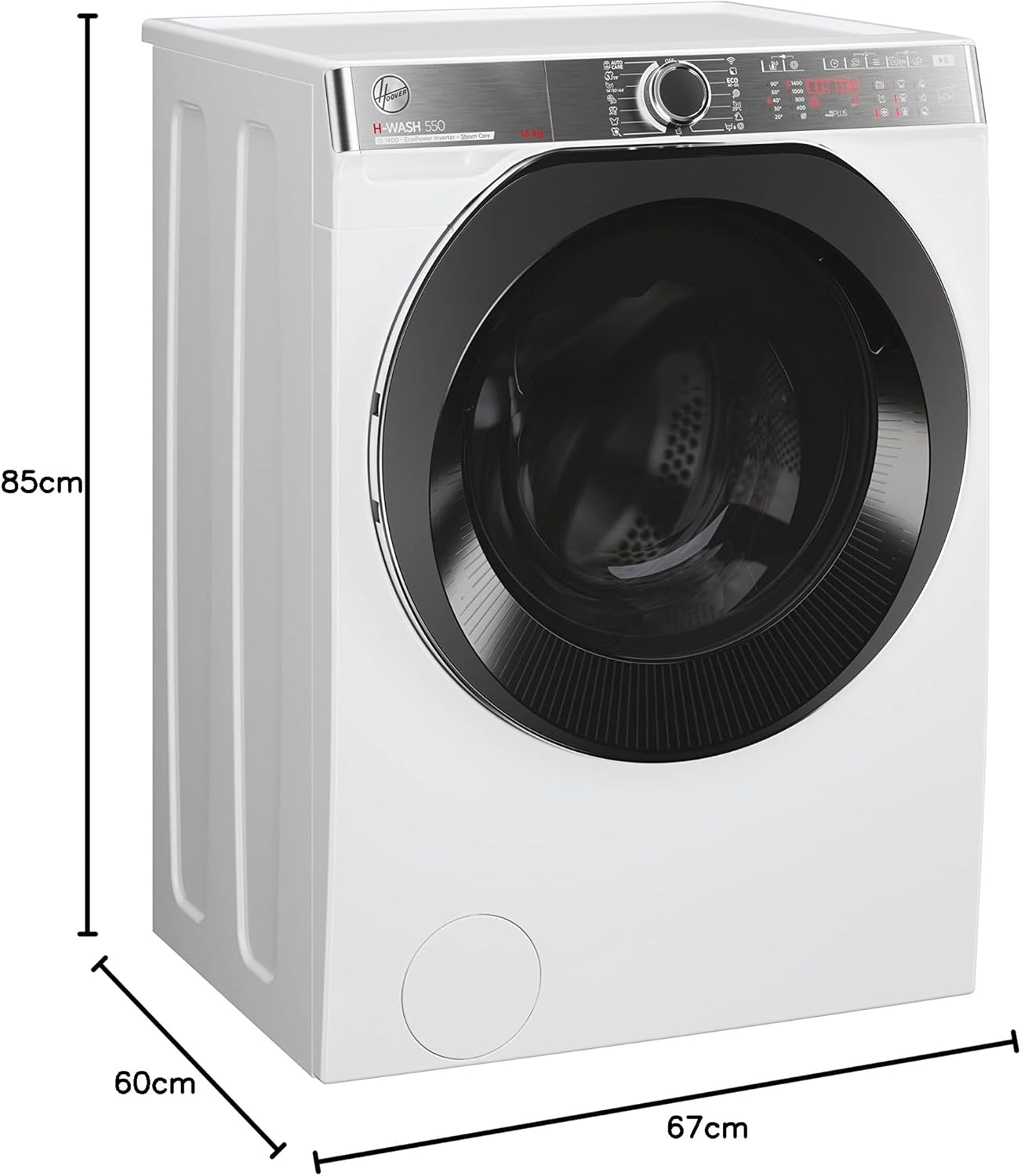
Image 2: Side view of the Hoover H-WASH 550 washing machine illustrating its dimensions: 85 cm height, 60 cm width, and 67 cm depth. This helps in planning the installation space.
- Dimensions (Approximate): Height: 85 cm, Width: 60 cm, Depth: 67 cm.
3.3 Water Connection
- Connect the supplied inlet hose to the cold water tap and to the inlet valve on the back of the washing machine.
- Ensure the drain hose is properly positioned in a standpipe or over the edge of a sink, ensuring it is securely fixed to prevent displacement during draining.
3.4 Electrical Connection
Plug the power cord into a grounded electrical outlet. Ensure the voltage matches the appliance's requirements (230 Volts).
3.5 Initial Run
Before washing clothes, run an empty wash cycle (e.g., a short cotton program at 60°C) without laundry or detergent to clean the drum and internal components.
4. Operating Instructions
This section guides you through the daily use of your Hoover H-WASH 550 washing machine.
4.1 Control Panel Overview

Image 3: Close-up view of the Hoover H-WASH 550 washing machine's control panel, showing the rotary dial, digital display, and touch-sensitive buttons for various functions and program options.
- Program Selector Dial: Used to choose the desired wash program.
- Digital Display: Shows program duration, selected options, and error codes.
- Temperature Button: Adjusts the wash temperature.
- Spin Speed Button: Modifies the spin speed.
- Delay Start Button: Sets a delayed start time for the wash cycle.
- Start/Pause Button: Initiates or pauses the selected program.
- Option Buttons: Additional functions like extra rinse, pre-wash, or steam.
4.2 Preparing Laundry
- Sort laundry by fabric type, color, and degree of soiling.
- Check garment care labels for washing instructions.
- Empty pockets and close zippers or fasteners.
- Load laundry into the drum, ensuring not to exceed the maximum 14 kg capacity. Do not overload the machine, as this can affect washing performance and cause excessive vibration.
4.3 Adding Detergent and Additives
Open the detergent drawer and add the appropriate amount of detergent and fabric softener to the designated compartments. Refer to your detergent packaging for dosage recommendations.
4.4 Selecting a Wash Program
- Turn the Program Selector Dial to choose the desired wash program (e.g., Cotton, Synthetics, Delicates, Allergy Care Pro).
- The digital display will show the default duration and settings for the selected program.
4.5 Adjusting Program Options
After selecting a program, you can customize it using the option buttons:
- Temperature: Press the temperature button to cycle through available temperature settings.
- Spin Speed: Press the spin speed button to adjust the spin speed up to 1400 rpm.
- Delay Start: Press the delay start button repeatedly to set the desired delay time.
- Other Options: Select additional functions like extra rinse or pre-wash as needed.
4.6 Starting and Ending a Cycle
- Press the Start/Pause button to begin the wash cycle. The indicator light will illuminate.
- To pause a cycle, press the Start/Pause button again. Press it once more to resume.
- At the end of the cycle, the machine will signal with an audible alert, and the display will show "End" or similar. The door will unlock automatically after a short delay.
- Unload the laundry and leave the door slightly ajar to allow the drum to air dry.
4.7 hOn App Connectivity (Wi-Fi + Bluetooth)
Your Hoover H-WASH 550 can be connected to the hOn App for enhanced control and features.
- Download the hOn App from your smartphone's app store.
- Follow the in-app instructions to pair your washing machine using Wi-Fi and Bluetooth.
- Through the app, you can:
- Start, pause, or stop wash cycles remotely.
- Access additional specialized wash programs.
- Receive notifications about cycle status.
- Monitor energy consumption.
- Get maintenance tips and reminders.
5. Maintenance
Regular maintenance ensures the longevity and optimal performance of your washing machine.
5.1 Cleaning the Detergent Drawer
Remove the detergent drawer and rinse it under running water to remove any detergent residue. Clean the housing of the drawer with a brush if necessary. Reinsert the drawer.
5.2 Cleaning the Drum
Run a maintenance wash cycle (e.g., a hot wash with a descaling agent or washing machine cleaner) periodically to prevent odor and limescale buildup in the drum.
5.3 Cleaning the Filter
The filter should be cleaned regularly to prevent blockages.
- Open the filter cover at the bottom front of the machine.
- Place a shallow container underneath to catch any residual water.
- Unscrew the filter slowly and allow water to drain.
- Remove any lint, coins, or foreign objects from the filter.
- Clean the filter under running water and screw it back in securely. Close the cover.
5.4 Cleaning the Exterior
Wipe the exterior surfaces of the washing machine with a soft, damp cloth. Do not use abrasive cleaners or solvents.
5.5 Winterization (if applicable)
If the machine is to be left in an unheated area during winter, drain all water from the hoses and pump to prevent freezing and damage. Consult a qualified technician if unsure.
6. Troubleshooting
Before contacting customer service, try these solutions for common issues.
| Problem | Possible Cause | Solution |
|---|---|---|
| Machine does not start | No power; door not closed; Start/Pause not pressed. | Check power supply; ensure door is firmly closed; press Start/Pause button. |
| No water filling | Water tap closed; inlet hose kinked; water pressure too low. | Open water tap; straighten hose; check household water pressure. |
| Water not draining | Drain hose kinked or blocked; filter blocked. | Straighten drain hose; clean the pump filter (see Maintenance section). |
| Excessive vibration/noise | Transit bolts not removed; machine not level; uneven load. | Remove transit bolts; adjust leveling feet; redistribute laundry in the drum. |
| Detergent residue in drawer | Insufficient water pressure; drawer blocked. | Check water pressure; clean detergent drawer. |
| Error code on display | Specific fault detected. | Refer to the full user manual for specific error code meanings or contact customer support. |
7. Specifications
Detailed technical specifications for the Hoover H-WASH 550 H5WPB414AMBC-S washing machine.
| Feature | Detail |
|---|---|
| Brand | Hoover |
| Model Number | H5WPB414AMBC-S (31018766) |
| Type | Front-load Washing Machine |
| Capacity | 14 kg |
| Maximum Spin Speed | 1400 rpm |
| Energy Efficiency Class | A |
| Noise Level (Spin) | 80 dB (Class C) |
| Dimensions (H x W x D) | 85 cm x 60 cm x 67 cm |
| Weight | 74 kg |
| Voltage | 230 Volts |
| Connectivity | Wi-Fi, Bluetooth (hOn App) |
| Energy Consumption (Eco 40-60) | 56 kWh / 100 cycles |
| Water Consumption (Eco 40-60) | 56 Liters / cycle |
| Program Duration (Eco 40-60) | 4:00 hours |
| EPREL Registration Number | 663710 |

Image 4: The energy label for the Hoover H-WASH 550, displaying its Class A energy efficiency, 14 kg capacity, 56 kWh/100 cycles energy consumption, 56 liters water consumption, and 80 dB spin noise level. The QR code links to the EPREL database.
8. Warranty and Support
Your Hoover H-WASH 550 washing machine comes with a manufacturer's warranty and dedicated customer support.
8.1 Warranty Information
The product is covered by a 24-month manufacturer's warranty from the date of purchase. Please retain your proof of purchase for any warranty claims. The warranty covers manufacturing defects and malfunctions under normal use conditions.
8.2 Customer Support
For technical assistance, spare parts, or warranty claims, please contact Hoover customer service. You can find contact details on the official Hoover website or in the documentation provided with your appliance.
- Manufacturer: Candy Hoover Group contact
- Website: corporate.haier-europe.com
- E-mail: eprel_info@haier-europe.com
- Phone: +3903920861
- Address: Via Comolli 16, 20861 Brugherio MB, IT
For detailed product information and compliance documents, you can also visit the EPREL database using the registration number 663710.