
HEALTHY CHOICE 7L Digital Air Fryer
Healthy Choice 7L Digital Air Fryer User Manual
Model: 7L Digital Air Fryer
Brand: HEALTHY CHOICE
Important Safety Instructions
When using electrical appliances, basic safety precautions should always be followed, including the following:
- Read all instructions before use.
- Do not touch hot surfaces. Use handles or knobs.
- To protect against electric shock, do not immerse cord, plugs, or the appliance in water or other liquid.
- Close supervision is necessary when any appliance is used by or near children.
- Unplug from outlet when not in use and before cleaning. Allow to cool before putting on or taking off parts.
- Do not operate any appliance with a damaged cord or plug or after the appliance malfunctions or has been damaged in any manner.
- The use of accessory attachments not recommended by the appliance manufacturer may cause injuries.
- Do not use outdoors.
- Do not let cord hang over edge of table or counter, or touch hot surfaces.
- Do not place on or near a hot gas or electric burner, or in a heated oven.
- Extreme caution must be used when moving an appliance containing hot oil or other hot liquids.
- Always attach plug to appliance first, then plug cord into the wall outlet. To disconnect, turn any control to "off", then remove plug from wall outlet.
- Do not use appliance for other than intended use.
- This appliance is intended for household use only.
Product Overview
The Healthy Choice 7L Digital Air Fryer utilizes advanced 'turbo air' technology to cook food with little to no oil, providing a healthier alternative to traditional frying. Its intuitive digital touch screen and pre-set programs make cooking simple and efficient.

Figure 1: Healthy Choice 7L Digital Air Fryer. This image displays the overall design of the air fryer, highlighting its white body, rose gold accents, and the digital control panel.
Components

Figure 2: Key components of the air fryer. This diagram labels the digital touch screen display, air inlet, handle, and frying basket for easy identification.
- Digital Touch Screen Display: For setting time, temperature, and selecting pre-set programs.
- Air Inlet: Located at the top, for air circulation during cooking.
- Handle: Ergonomically designed for safely pulling out the frying basket.
- Frying Basket: Non-stick and dishwasher-safe, where food is placed for cooking.
Setup
- Unpacking: Carefully remove the air fryer and all packaging materials. Ensure all components are present and undamaged.
- Initial Cleaning: Before first use, clean the frying basket and any removable parts with warm soapy water. Wipe the main unit with a damp cloth. Ensure all parts are completely dry before assembly.
- Placement: Place the air fryer on a stable, heat-resistant surface, away from walls or other appliances to allow for proper air circulation. Ensure there is at least 10 cm of free space on the back and sides, and 10 cm above the appliance.
- Power Connection: Plug the power cord into a grounded electrical outlet.
Operating Instructions
Basic Operation
- Preparation: Place ingredients into the frying basket. Do not overfill the basket to ensure even cooking.
- Power On: Plug in the air fryer. The digital display will illuminate.
- Set Temperature and Time:
- Use the temperature control buttons (up/down arrows) to set the desired cooking temperature between 80°C and 200°C. For defrosting, the range is 50°C to 90°C.
- Use the time control buttons (up/down arrows) to set the cooking time from 1 to 60 minutes. For defrosting, the time can be set up to 120 minutes.
- Start Cooking: Press the start button to begin the cooking process. The air fryer will automatically preheat if necessary.
- Shaking/Turning Food: For some recipes, it may be necessary to shake or turn the food halfway through the cooking time to ensure even browning. Carefully pull out the basket, shake or turn the food, and then reinsert the basket. The air fryer will resume cooking automatically.
- Completion: Once the set time has elapsed, the air fryer will beep, indicating that cooking is complete. Carefully remove the basket and transfer the cooked food.
Using Pre-set Programs
The air fryer features eight one-touch pre-set programs for common dishes, optimizing cooking time and temperature for consistent results.

Figure 3: Eight pre-set cooking programs. This image illustrates the icons for each pre-set function available on the digital display.
To use a pre-set program:
- Place ingredients in the frying basket.
- Press the menu button to cycle through the available pre-set programs (Chips, Prawns, Fish, Steak, Ribs, Bake, Chicken, Defrost).
- Once the desired program is selected, press the start button to begin cooking. The air fryer will automatically set the optimal temperature and time for that program.
- You can manually adjust the time and temperature even after selecting a pre-set program if needed.
Maintenance and Cleaning
Regular cleaning ensures optimal performance and extends the lifespan of your air fryer.
- Unplug and Cool: Always unplug the air fryer from the power outlet and allow it to cool completely before cleaning.
- Cleaning the Frying Basket: The non-stick frying basket is dishwasher safe. Alternatively, it can be washed by hand with warm water and a non-abrasive sponge. Do not use metal utensils or abrasive cleaning materials, as these can damage the non-stick coating.
- Cleaning the Interior: Wipe the interior of the air fryer with a damp cloth and mild detergent. Ensure no water enters the electrical components.
- Cleaning the Exterior: Wipe the exterior surface with a soft, damp cloth. Do not use harsh chemicals or abrasive cleaners.
- Storage: Ensure the air fryer is clean and dry before storing. Store it in a cool, dry place.
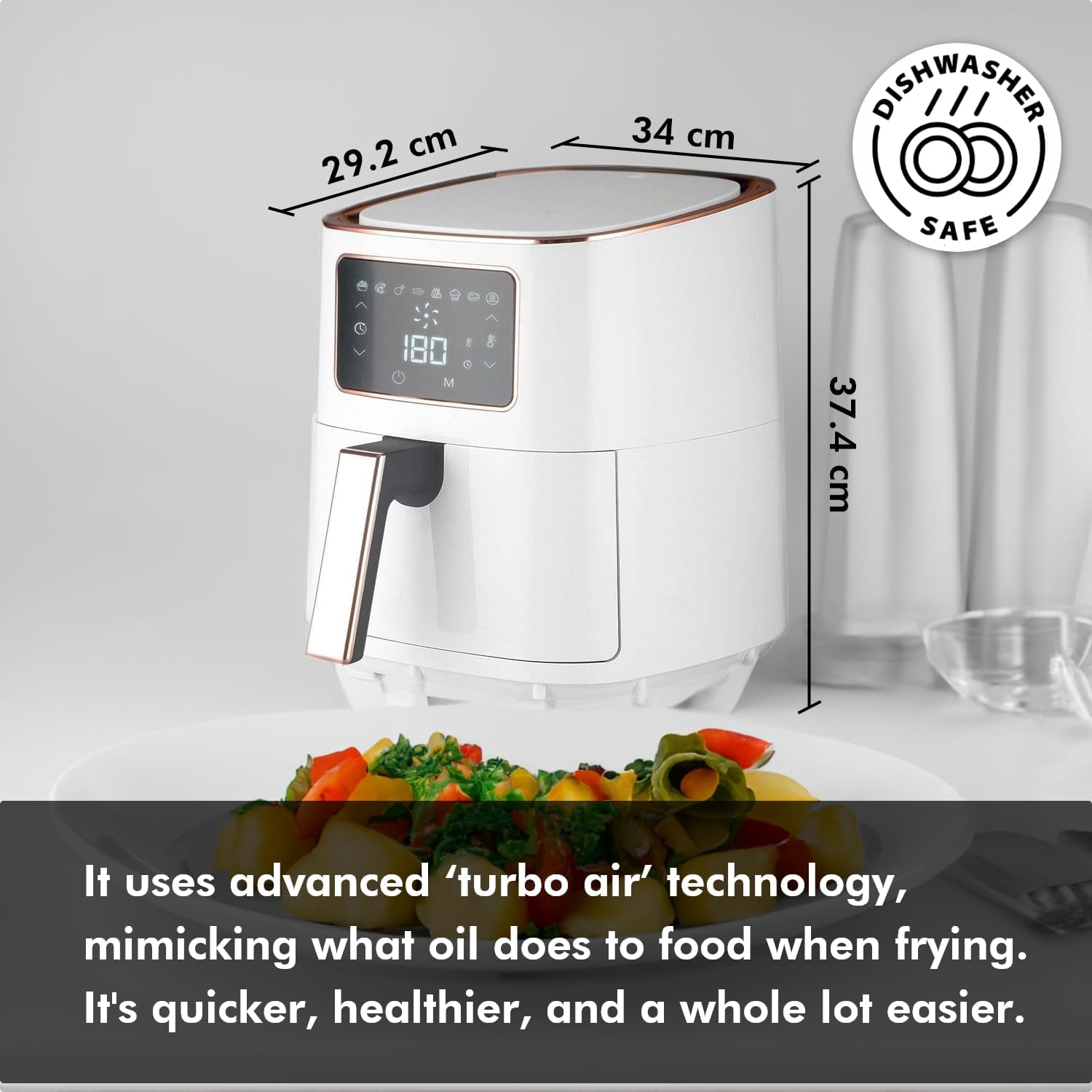
Figure 4: The frying basket is dishwasher safe, simplifying cleanup after use.
Troubleshooting
If you encounter issues with your air fryer, please refer to the following common problems and solutions:
| Problem | Possible Cause | Solution |
|---|---|---|
| Air fryer does not turn on. | Not plugged in; power outlet malfunction; appliance malfunction. | Ensure the power cord is securely plugged into a working outlet. Check the circuit breaker. If the issue persists, contact customer support. |
| Food is not cooked evenly. | Basket overloaded; food not shaken/turned; incorrect temperature/time. | Do not overload the basket. Shake or turn food halfway through cooking. Adjust temperature and time settings as needed. |
| White smoke coming from the appliance. | Grease residue from previous use; fatty ingredients. | Clean the basket and interior thoroughly after each use. For fatty foods, place a small amount of water in the bottom of the drawer to prevent smoke. |
| Food is not crispy. | Not enough oil (if applicable); temperature too low; cooking time too short. | Ensure a thin layer of oil is applied to food if desired for extra crispiness. Increase temperature or cooking time. |
Specifications
Detailed technical specifications for the Healthy Choice 7L Digital Air Fryer:

Figure 5: Technical Specifications. This image provides a summary of the air fryer's electrical and physical characteristics.
| Feature | Detail |
|---|---|
| Brand | HEALTHY CHOICE |
| Model | 7L Digital Air Fryer |
| Colour | White/Rose Gold |
| Capacity | 7 Litres |
| Power/Wattage | 1700 watts |
| Product Dimensions (L x W x H) | 34 x 29.2 x 37.4 cm |
| Item Weight | 5.5 kg |
| Temperature Range (Cooking) | 80°C - 200°C |
| Temperature Range (Defrost) | 50°C - 90°C |
| Time Range (Cooking) | 1 - 60 minutes |
| Time Range (Defrost) | Up to 120 minutes |
| Special Features | Dishwasher Safe (basket), Digital Touch Screen |
Warranty and Support
For warranty information, please refer to the warranty card included with your product or contact the retailer where the product was purchased. Keep your proof of purchase for warranty claims.
For technical support or service inquiries, please contact HEALTHY CHOICE customer service. Contact details can typically be found on the manufacturer's official website or on the product packaging.
Related documents7L Digital Air Fryer


Ask a question about this manual
Ask about setup, troubleshooting, compatibility, parts, safety, or missing instructions. Manuals+ will review the question and use this page’s manual context to help answer it.