
Konsew Jack A4F
Jack A4F Sewing Machine User Manual
Brand: Konsew | Model: Jack A4F
Introduction
This manual provides comprehensive instructions for the setup, operation, and maintenance of your Konsew Jack A4F digital linear sewing machine. Designed for both professional and domestic use, this machine features advanced digital controls for precision and efficiency.
Key features include automatic thread trimming, digital stitch length adjustment, digital presser foot lift, and short thread cutting. The machine is equipped with a stepper motor for precise control and reduced noise, enhancing your working environment.

Image: Close-up of the Jack A4F sewing machine head, highlighting its robust construction and digital display.
Setup
The Jack A4F sewing machine is shipped with the table disassembled. Follow these steps for proper assembly and initial setup:
- Table Assembly: Assemble the machine table according to the included diagram. Ensure all bolts are securely tightened for stability.
- Machine Mounting: Carefully place the sewing machine head onto the assembled table, aligning it with the designated mounting points. Secure it with the provided fasteners.
- Oil Basin Setup: The machine features a detached oil basin. Fill the basin with the recommended sewing machine oil (not included) to the indicated level. Ensure the oil lines are properly connected to the machine's lubrication points.
- Power Connection: Connect the power cable to the machine and then to a suitable electrical outlet. Ensure the power switch is in the OFF position before connecting.
- Initial Threading: Thread the machine according to the threading guide provided in the separate quick-start guide.

Image: The Jack A4F sewing machine fully assembled on its table, ready for operation.
Operating Instructions
The Jack A4F offers advanced digital controls for precise sewing operations. Familiarize yourself with the control panel for optimal performance.
Control Panel Overview
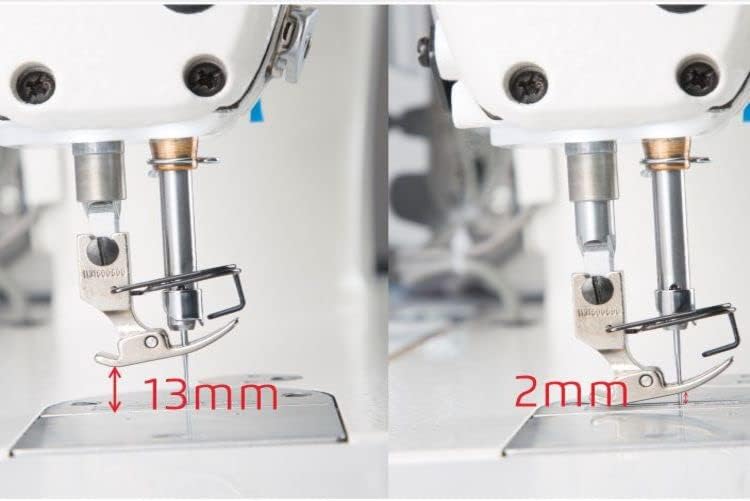
Image: Detailed view of the Jack A4F digital control panel, showing various buttons and the display screen.

Image: A hand pointing to the digital control panel of the Jack A4F, demonstrating ease of interaction.
Stitch Length Adjustment
The stitch length can be precisely controlled down to 0.1mm using the stepper motor. Adjustments can be made via the control panel. The stitch length locking function prevents accidental changes during operation.
- Use the '+' and '-' buttons on the control panel to increase or decrease stitch length.
- The digital display will show the current stitch length setting.
Digital Presser Foot Lift
The presser foot is digitally controlled by a stepper motor, allowing for up to 13 levels of adjustment directly from the panel with a single click. This feature provides flexibility for various fabric thicknesses.
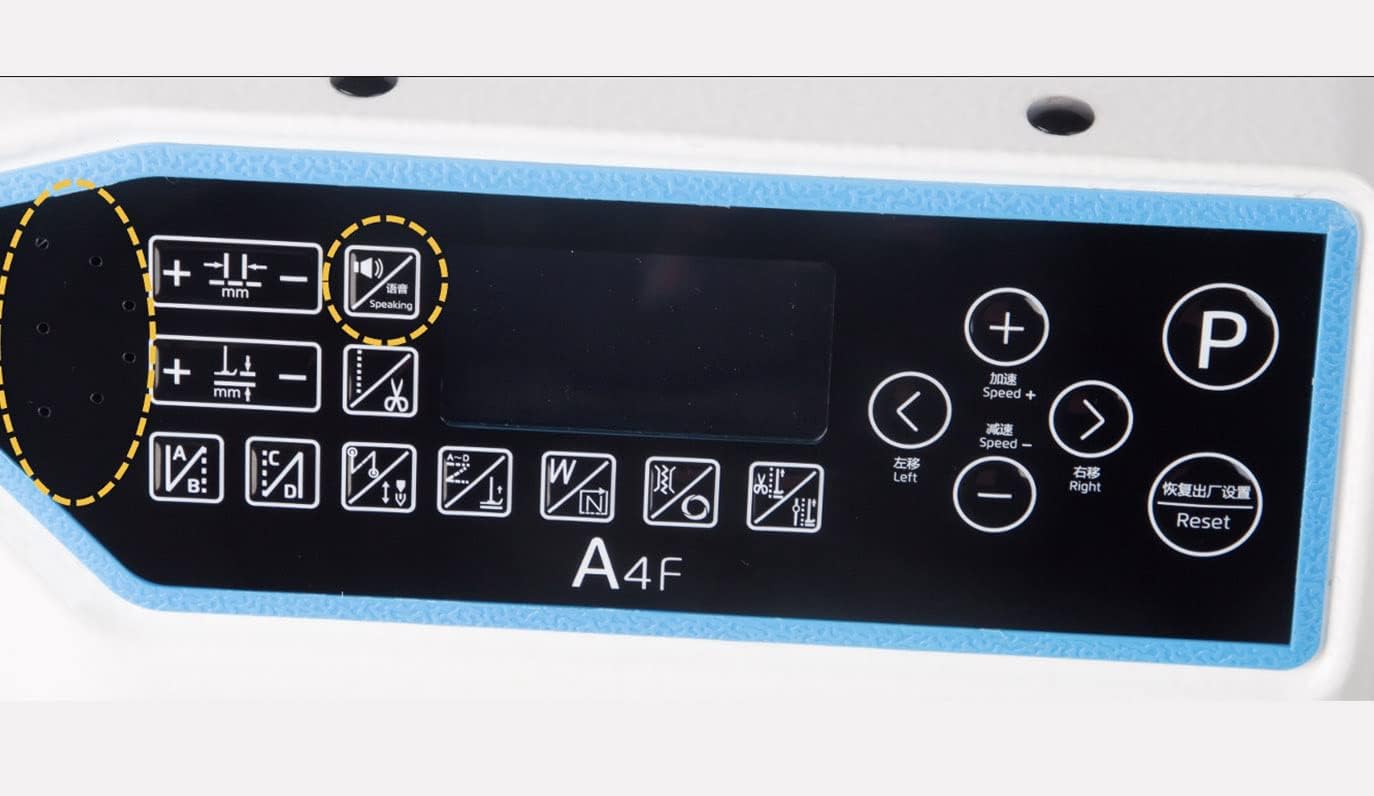
Image: Visual comparison showing the presser foot lifted to 13mm and lowered to 2mm, demonstrating the digital lift capability.
Automatic Thread Trimming
The machine features an automatic short thread cutting function, eliminating the need for manual trimming and preventing thread tangles. This saves time and reduces material waste.

Image: A side-by-side comparison illustrating the clean, short thread cut achieved by the machine versus a longer, untrimmed thread.
Reinforcement Stitching
Activate the initial and/or final reinforcement stitch function to prevent seams from unraveling. This digital feature ensures strong and durable stitching.
Ornamental Stitches
Create beautiful ornamental stitches by alternating stitch lengths. These patterns can be customized to suit different design requirements.

Image: A fabric sample displaying various ornamental stitch patterns, showcasing the machine's versatility.
Maintenance
Regular maintenance ensures the longevity and optimal performance of your Jack A4F sewing machine.
- Lubrication: Regularly check the oil level in the detached oil basin and refill as necessary with appropriate sewing machine oil. Refer to the oil level indicator.
- Cleaning: Keep the machine clean from lint and dust, especially around the needle plate, feed dogs, and bobbin area. Use a soft brush or compressed air.
- Noise Reduction: The stepper motor for electronic stop significantly reduces operational noise, contributing to a quieter and more comfortable working environment. While this is a feature, maintaining the machine properly will help preserve this benefit.

Image: A bar graph illustrating the significant reduction in noise (dB) achieved by the Jack A4F's stepper motor controlled electronic stop compared to classic linear sewing machines.
Troubleshooting
The Jack A4F is designed with intelligent error detection and guidance to assist you in resolving common issues.
- Error Indication: If an error occurs, the machine's display will indicate the specific issue.
- Voice Guidance: Press the "VOCE" (Voice) button on the control panel to receive spoken instructions on how to resolve the detected problem. This feature provides real-time assistance.

Image: The Jack A4F control panel, with the "Speaking" (VOCE) button circled, indicating the voice guidance feature for troubleshooting.
Specifications
| Feature | Detail |
|---|---|
| Brand | Konsew |
| Model Number | Jack A4F |
| Color | Multicolor |
| Material | Metal |
| Item Weight | 80 Kilograms |
| Product Dimensions | 55P x 120L x 130H centimeters |
| Power Source | Corded Electric |
| Electrical | Yes |
| UPC | 630606393895 |
Warranty and Support
Konsew is committed to providing reliable products and support. For any inquiries or assistance, please refer to the following information:
- Spare Parts Availability: Spare parts for the Jack A4F sewing machine are available for 10 years from the date of purchase.
- Technical Support: For technical assistance, troubleshooting, or service, please contact your authorized Konsew dealer or the seller, GDG vendita e assistenza macchine per cucire.
- Product Information: For additional product details and updates, visit the official Konsew website or consult your purchase documentation.
Ask a question about this manual
Ask about setup, troubleshooting, compatibility, parts, safety, or missing instructions. Manuals+ will review the question and use this page’s manual context to help answer it.