1. Product Overview
The DOQAUS CARE 3 Bluetooth 5.3 Wireless On-Ear Headphones are designed to provide a high-quality audio experience with extended playtime and versatile connectivity. They feature three distinct EQ modes for customized sound, a stable Bluetooth connection, and a comfortable, foldable design for portability.

Image: DOQAUS CARE 3 Bluetooth 5.3 Wireless On-Ear Headphones, showcasing their sleek blue design and on-ear form factor.
2. What's in the Box
Verify that all components are present in the package before proceeding with setup.
- 1x DOQAUS C3 Bluetooth Headphones
- 1x AUX Cable (3.5mm audio cable)
- 1x Charging Cable (USB-A to USB-C)
- 1x Storage Pouch
- 1x User Manual (this document)
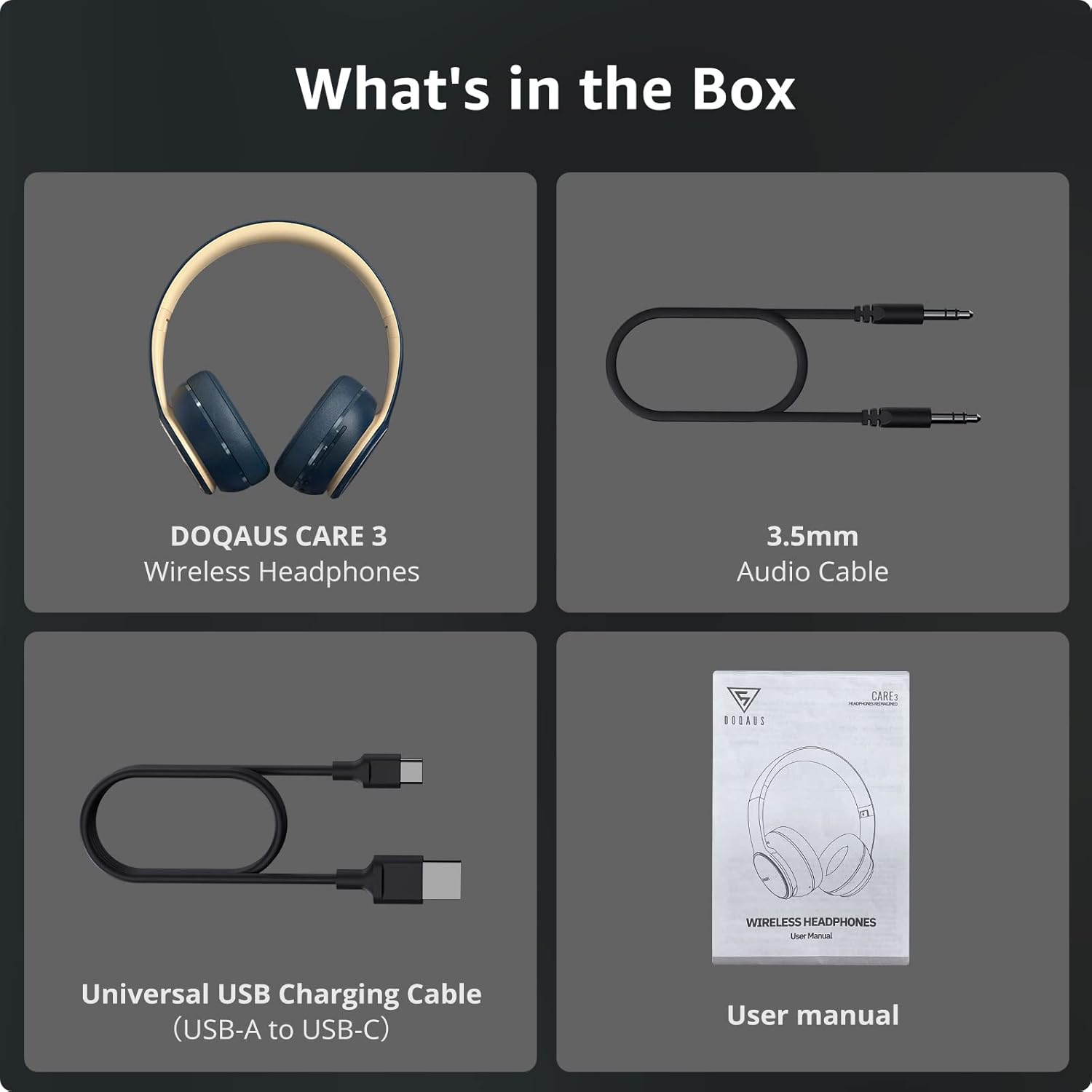
Image: The complete package contents of the DOQAUS CARE 3 headphones, including the headphones themselves, a 3.5mm audio cable, a USB charging cable, and the user manual.
3. Setup Guide
3.1. Charging the Headphones
Before first use, fully charge your DOQAUS CARE 3 headphones. A full charge provides up to 40 hours of playtime.
- Connect the small end of the USB charging cable (USB-C) to the charging port on the headphones.
- Connect the larger end of the USB charging cable (USB-A) to a USB power adapter (not included) or a computer's USB port.
- The LED indicator on the headphones will show the charging status (e.g., red for charging, blue for fully charged).

Image: The DOQAUS CARE 3 headphones being charged, highlighting their impressive 40-hour battery life on a single charge.
3.2. Powering On/Off
- To Power On: Press and hold the Power button for approximately 3 seconds until the LED indicator lights up.
- To Power Off: Press and hold the Power button for approximately 3 seconds until the LED indicator turns off.
3.3. Bluetooth Pairing
The headphones utilize Bluetooth 5.3 for a fast and stable connection.
- Ensure the headphones are powered off.
- Press and hold the Power button for 5-7 seconds until the LED indicator flashes blue and red alternately, indicating pairing mode.
- On your device (phone, PC, tablet), enable Bluetooth and search for available devices.
- Select "DOQAUS CARE 3" from the list of devices.
- Once connected, the LED indicator will flash blue slowly.

Image: An illustration of the Bluetooth 5.3 chip within the headphones, emphasizing a stable connection and a 10-meter (33 feet) wireless range, compatible with various devices like cellphones, iPads, PCs, laptops, and MP3/4 players.
4. Operating Instructions
4.1. Music Playback and Volume Control
- Play/Pause: Press the Multi-function button (often the power button or a dedicated play/pause button).
- Next Track: Press and hold the Volume Up button.
- Previous Track: Press and hold the Volume Down button.
- Volume Up: Short press the Volume Up button.
- Volume Down: Short press the Volume Down button.
4.2. Call Management
The built-in HD microphone allows for clear, hands-free calls.
- Answer/End Call: Short press the Multi-function button.
- Reject Call: Press and hold the Multi-function button for 2 seconds.
- Redial Last Number: Double-press the Multi-function button.

Image: A woman wearing the DOQAUS CARE 3 headphones, demonstrating the clear hands-free calling capability provided by the built-in microphones.
4.3. EQ Modes
The DOQAUS CARE 3 headphones feature 3 EQ modes to customize your listening experience:
- Balanced Sound: Standard audio profile.
- Bass Boosted: Enhanced bass for deeper low frequencies.
- High Definition Sound: Optimized for clarity and detail.
To switch between EQ modes, press the EQ button (refer to the headphone's physical controls for exact location).

Image: A visual representation of the DOQAUS CARE 3 headphones' HiFi Stereo Sound and the three distinct EQ modes: Balanced Sound, Extra Powerful Bass, and High Definition Sound, allowing users to immerse themselves in rich audio.
4.4. Wired Connection (AUX Mode)
For situations where Bluetooth is not available or preferred, you can use the included 3.5mm audio cable.
- Connect one end of the 3.5mm audio cable to the AUX port on the headphones.
- Connect the other end to the 3.5mm audio jack of your device.
- The headphones will automatically switch to wired mode. Note that controls on the headphones may be limited in wired mode, and playback will be controlled by your connected device.
5. Comfort and Design
The DOQAUS CARE 3 headphones are designed for extended wear with comfort in mind.
- Memory-Protein Earmuffs: Soft and breathable for comfort and sound isolation.
- Adjustable Headband: Ensures a flexible and ergonomic fit for various head shapes.
- Lightweight Design: Weighing approximately 200g for reduced fatigue during long listening sessions.
- Foldable Design: Allows for easy storage and portability.

Image: A person wearing the DOQAUS CARE 3 headphones, illustrating the comfort features such as soft memory foam earpads, flexible and adjustable headband, and the overall foldable design for easy portability.
6. Maintenance
6.1. Cleaning
- Use a soft, dry cloth to wipe the surfaces of the headphones.
- Do not use abrasive cleaners, alcohol, or chemical solvents.
- Keep the charging port and audio jack free of dust and debris.
6.2. Storage
- When not in use, store the headphones in the provided storage pouch to protect them from dust and scratches.
- Store in a cool, dry place, away from extreme temperatures and direct sunlight.
6.3. Battery Care
- Avoid fully discharging the battery frequently.
- If storing for a long period, charge the headphones to about 50% every few months to preserve battery health.
7. Troubleshooting
| Problem | Possible Cause | Solution |
|---|---|---|
| Headphones do not power on. | Low battery. | Charge the headphones fully. |
| Cannot pair with device. | Headphones not in pairing mode; Bluetooth off on device; device too far. | Ensure headphones are in pairing mode (flashing blue/red). Turn on Bluetooth on your device. Move device closer to headphones (within 10m). Clear previous Bluetooth connections on your device. |
| No sound or low volume. | Volume too low; incorrect audio source; headphones not connected. | Increase volume on headphones and device. Ensure headphones are correctly paired or AUX cable is fully inserted. Check audio output settings on your device. |
| Poor call quality. | Weak signal; microphone obstruction. | Move closer to your device. Ensure microphone is not covered. |
8. Specifications
| Feature | Detail |
|---|---|
| Model Name | CARE 3 |
| Connectivity Technology | Bluetooth 5.3 |
| Wireless Communication Technology | Bluetooth |
| Headphones Jack | 3.5 mm Jack |
| Ear Placement | On Ear |
| Form Factor | On Ear |
| Battery Life | 40 Hours |
| Bluetooth Range | 33 Feet (10 meters) |
| Audio Driver Type | Dynamic Driver (40mm) |
| Frequency Range | 20 Hz - 20,000 Hz |
| Special Features | 3 EQ Modes, Hifi stereo sound, Microphone Included, Wired & Wireless capability, Foldable design |
| Item Weight | 11.3 ounces (approx. 320g) |
| Material | Faux Leather (earmuffs) |
| Color | Blue |
9. Warranty and Support
DOQAUS provides comprehensive support for its products.
- Refund Policy: All DOQAUS Headphones include a refund option within 30 days of purchase.
- Replacement Guarantee: An 18-month replacement guarantee is provided for your headphones.
- Customer Service: For any inquiries, issues, or further information, please contact DOQAUS customer service. All emails are typically processed within 24 hours.
For contact information, please refer to the official DOQAUS website or the contact details provided with your purchase documentation.


