Introduction
This manual provides comprehensive instructions for the installation, operation, maintenance, and troubleshooting of your WAVYPO BAT-40 replacement battery. This battery is designed for use with the AT&T IFWA-40 NetComm Mobile Hotspot, offering an upgraded capacity of 3800mAh for extended performance.
Safety Information
Please read all safety warnings and instructions carefully before using this product to prevent injury or damage. Failure to follow these instructions may result in fire, explosion, electric shock, or other hazards.
- Do not attempt to disassemble, open, or service the battery pack.
- Battery must be recycled or disposed of properly.
- May explode if damaged or disposed of in fire.
- Never leave the Hotspot plugged in to charge for longer than 24 hours.
- Hotspot should never be left to charge in direct sun or extreme temperatures (0°F/-18°C - 113°F/45°C).
- To reduce risk of fires and burns, read instructions in operating guide before use.

Image: WAVYPO BAT-40 battery label displaying safety warnings, model number, capacity, nominal voltage, limited charger voltage, standard, serial number (197926202005104), and certifications (RoHS, CE, FC, UKCA).
Package Contents
- 1 x WAVYPO BAT-40 Replacement Lithium-ion Battery (3800mAh)

Image: The WAVYPO BAT-40 replacement lithium-ion battery, showing its compact design and branding.
Setup: Battery Installation
Follow these steps to safely replace the battery in your AT&T IFWA-40 NetComm Mobile Hotspot.
- Power Off Device: Ensure your AT&T IFWA-40 NetComm Mobile Hotspot is completely powered off and disconnected from any power source.
- Locate Battery Compartment: Refer to your hotspot's original user manual to locate and open the battery compartment. This is typically on the back of the device.
- Remove Old Battery: Carefully remove the existing battery from the compartment. Note its orientation.
- Insert New Battery: Insert the WAVYPO BAT-40 replacement battery into the compartment, ensuring it is oriented correctly according to the polarity markings (+/-) and fits securely.
- Close Compartment: Close the battery compartment cover securely.
- Initial Charge: Before first use, fully charge the new battery for optimal performance.

Image: The WAVYPO BAT-40 battery positioned next to a compatible AT&T IFWA-40 NetComm Mobile Hotspot, illustrating the product's intended use.
Operating Instructions
To ensure the best performance and longevity of your WAVYPO BAT-40 battery, follow these operating guidelines:
- First Use: Make sure to fully charge and discharge your new battery 3 to 5 cycles for best performance. This helps calibrate the battery's charge indicator and optimize its capacity.
- Charging: Use the original charger or a certified compatible charger for your AT&T IFWA-40 NetComm Mobile Hotspot. Avoid using unapproved chargers.
- Discharging: It is generally recommended to allow the battery to discharge significantly before recharging, but avoid letting it completely drain to 0% frequently, as this can reduce its lifespan.
- Capacity: The 3800mAh capacity provides extended usage time compared to standard batteries.
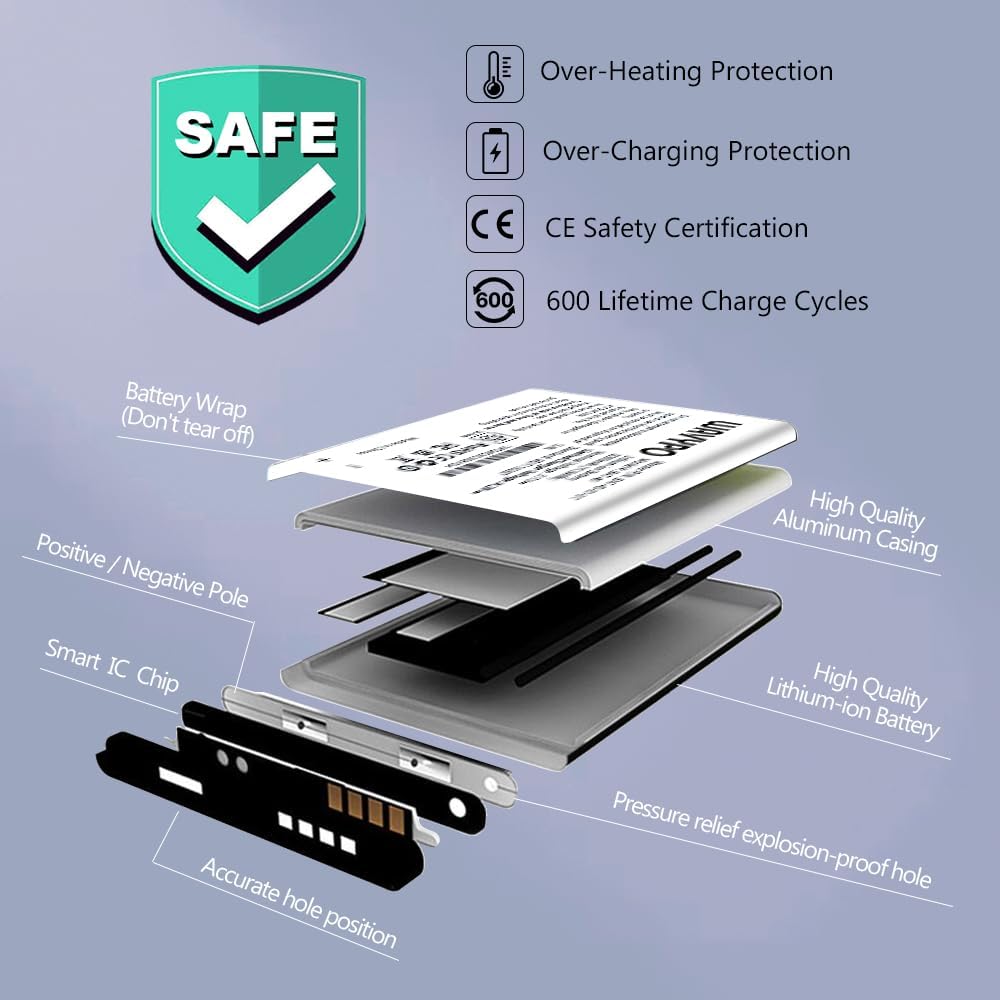
Image: Visual comparison illustrating the larger capacity of the 3800mAh WAVYPO battery compared to a 2100mAh battery, indicating extended power.
Maintenance and Care
Proper maintenance extends the life of your battery and ensures safe operation.
- Temperature: Store and operate the battery within recommended temperature ranges (0°F/-18°C to 113°F/45°C). Extreme temperatures can degrade battery performance and safety.
- Storage: If storing the battery for an extended period, charge it to about 50-60% and store it in a cool, dry place. Recharge it every few months to prevent deep discharge.
- Cleaning: Keep battery contacts clean and dry. Use a soft, dry cloth to wipe them if necessary.
- Disposal: Do not dispose of batteries in household waste. Recycle them at an authorized battery recycling facility.

Image: Exploded view diagram of the WAVYPO battery, highlighting internal components such as the Smart IC Chip, high-quality lithium-ion battery, aluminum casing, and safety features like over-heating protection and pressure relief explosion-proof hole.

Image: The WAVYPO BAT-40 battery alongside icons representing its key features: efficient charging, long battery life, Grade A+ battery cells, and fully certified protected battery. The battery label also shows serial number 197926202005104.
Troubleshooting
If you encounter issues with your WAVYPO BAT-40 battery, refer to the following common problems and solutions:
| Problem | Possible Cause | Solution |
|---|---|---|
| Battery not charging | Incorrect installation, faulty charger, or extreme temperature. |
|
| Short battery life | Battery not fully conditioned, high power consumption by device, or aging battery. |
|
| Battery not recognized by device | Improper installation or dirty contacts. |
|
Specifications
Key technical specifications for the WAVYPO BAT-40 replacement battery:
- Model: BAT-40
- Master P/N: BAT-40-01-01
- Battery Type: Lithium-ion
- Capacity: 3800mAh (14.06Wh)
- Nominal Voltage: 3.7V
- Limited Charger Voltage: 4.2V
- Standard: GB/T 18287
- Product Dimensions: 1.97 x 1.18 x 0.2 inches
- Item Weight: 2.08 ounces
- Manufacturer: Shenzhen Maxpower Technology Co., Ltd.
- Certifications: UL, CE, RoHS
- Life Cycles: Over 600 charging cycles

Image: The WAVYPO BAT-40 battery highlighting its "Brand New 0 Cycle" status and a lifespan of "Up to 600+ Cycles," indicating its durability and fresh condition. The battery label also shows serial number 197926202005104.
Warranty and Support
WAVYPO provides a worry-free warranty for this product. If you are not satisfied with your purchase or encounter any issues, please contact our customer service team.
- Contact Support: Utilize the "Contact Seller" feature on the Amazon product page for prompt assistance.
- Return Policy: Refer to Amazon's standard return policy for details on returns and replacements.
For more information about WAVYPO products, visit the official WAVYPO Store on Amazon.