
OUKITEL WP19
OUKITEL WP19 Rugged Smartphone User Manual
Model: WP19
1. Introduction
This manual provides essential information for the safe and efficient use of your OUKITEL WP19 Rugged Smartphone. Please read it thoroughly before operating the device to ensure proper functionality and to understand its features.

Image 1.1: OUKITEL WP19 Rugged Smartphone highlighting its large battery, fast charging, IP68/IP69K rating, memory, screen, and camera features.
2. Device Overview
Familiarize yourself with the physical components of your OUKITEL WP19 smartphone.

Image 2.1: Various views of the OUKITEL WP19, illustrating the placement of buttons, cameras, and ports.
2.1 Physical Components
- Front Camera: Located at the top of the display.
- Display: 6.78-inch FHD+ screen.
- Volume Buttons: On the side, typically for adjusting audio levels.
- Power Button/Fingerprint Sensor: On the side, used for power control and biometric authentication.
- SIM/MicroSD Card Slot: On the side, for inserting SIM cards and expandable storage.
- USB Type-C Port: At the bottom, for charging and data transfer.
- Rear Cameras: Main 64MP, 20MP Night Vision, 2MP Macro, with LED flash and IR emitters.
- Speaker: Typically located at the bottom or rear.
3. Setup
3.1 SIM Card and MicroSD Card Installation
- Locate the SIM/MicroSD card slot on the side of the device.
- Use the provided SIM ejector tool to open the tray.
- Carefully place your Nano-SIM card(s) and/or MicroSD card into the designated slots on the tray. Ensure correct orientation.
- Gently push the tray back into the device until it is flush.
3.2 Initial Power On and Charging
- Press and hold the Power button until the OUKITEL logo appears.
- Follow the on-screen prompts to complete the initial setup, including language selection, Wi-Fi connection, and Google account setup.
- To charge the device, connect the USB Type-C cable to the phone's port and the other end to the 33W fast charger.
- The device supports OTG (On-The-Go) reverse charging, allowing it to charge other compatible electronic devices. Connect the devices using an OTG cable.

Image 3.1: The OUKITEL WP19 connected to a charger, illustrating its 21000mAh battery capacity and 33W fast charging capability.
4. Operating Instructions
4.1 Basic Navigation (Android 12)
- Home Screen: Swipe left or right to access app pages. Swipe down from the top for notifications and quick settings.
- App Drawer: Swipe up from the bottom of the home screen to view all installed applications.
- Multitasking: Swipe up from the bottom and hold to view recent apps.
- Back: Swipe from the left or right edge of the screen to go back.
- Side Fingerprint Unlock: Register your fingerprint in the security settings for quick and secure unlocking.
4.2 Camera Features
The OUKITEL WP19 features a versatile camera system for various photography needs.

Image 4.1: Examples of camera functionality, including underwater photography, night vision, and macro mode.
- 64MP Main Camera: For high-resolution photos in various lighting conditions. Supports Ultra HD 4K / 30fps video recording.
- 20MP Night Vision Camera: Equipped with 4 infrared emitters, allowing clear imaging up to 20 meters in complete darkness. Useful for night observation or security.
- 2MP Macro Camera: For capturing detailed close-up shots of small objects.
- 16MP Front Camera: For selfies and video calls.
- Underwater Mode: Activate this mode before submerging the phone to take photos or videos underwater. Ensure all ports are securely sealed.
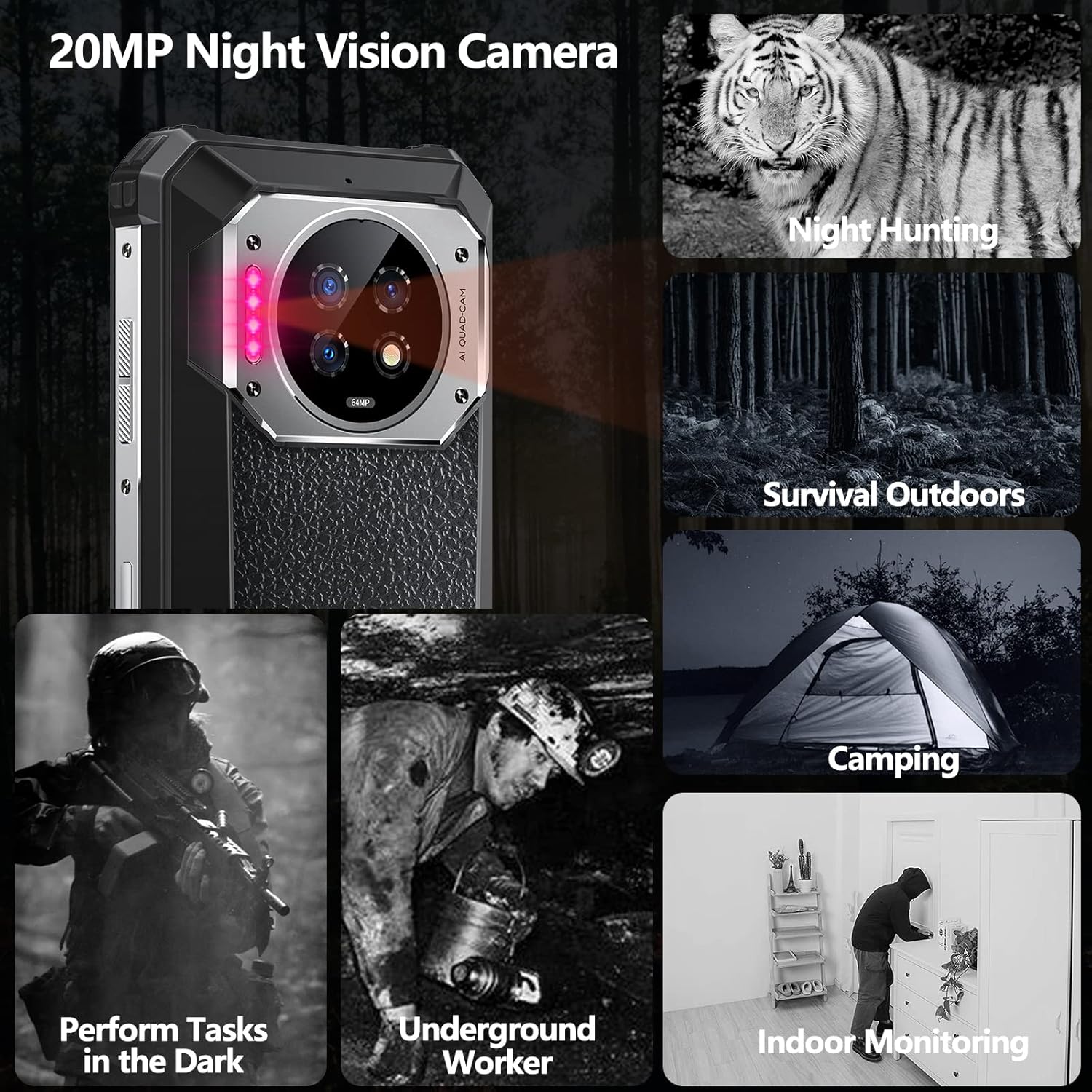
Image 4.2: Demonstrates the 20MP infrared night vision camera's utility in low-light environments, such as night hunting, outdoor survival, camping, and indoor monitoring.
4.3 Connectivity
- 4G Network: Supports dual SIM dual 4G LTE. Compatible with T-Mobile, MetroPCS, and Mint Mobile. Note: AT&T, CRICKET, Verizon, Boost Mobile, Straight Talk, or U.S. Cellular are NOT supported.
- NFC: For contactless payments and quick data sharing. Enable NFC in settings.
- GPS: Integrated GPS, Galileo, GLONASS, and Beidou for accurate positioning and navigation.
5. Maintenance
5.1 Cleaning and Care
- To clean the screen, use a soft, lint-free cloth. For stubborn smudges, a screen cleaner designed for electronics can be used.
- Wipe the phone's body with a damp cloth. Avoid harsh chemicals or abrasive materials.
- Ensure all port covers are securely closed to maintain water and dust resistance.
5.2 Water and Dust Resistance
The OUKITEL WP19 is IP68/IP69K rated for water and dust resistance and MIL-STD-810G certified for drop resistance. While rugged, proper care is still necessary.

Image 5.1: Visual representation of the OUKITEL WP19's durability against water, dust, and drops.
- Do not intentionally expose the phone to high-pressure water jets or prolonged submersion beyond specified limits (1.5 meters for 30 minutes).
- After exposure to water, especially saltwater, rinse the phone with fresh water and dry it thoroughly before charging or opening any ports.
- Avoid dropping the phone from excessive heights, as extreme impacts can compromise its ruggedness.
5.3 Software Updates
Regularly check for and install software updates to ensure optimal performance, security, and access to new features. Navigate to Settings > System > System update to check for available updates.
6. Troubleshooting
This section addresses common issues you might encounter with your OUKITEL WP19.
| Problem | Possible Solution |
|---|---|
| Phone does not power on. | Ensure the battery is charged. Connect to the charger for at least 10 minutes, then try powering on again. |
| Cannot connect to network. | Check if the SIM card is correctly inserted. Verify that your carrier is supported (T-Mobile, MetroPCS, Mint Mobile). Check network settings. |
| Battery drains quickly. | Close unused apps, reduce screen brightness, disable unnecessary features like Wi-Fi, Bluetooth, GPS when not in use. Check for background app activity. |
| Camera not working. | Restart the phone. Clear the camera app's cache and data (Settings > Apps > Camera > Storage). |
| GPS accuracy issues. | Ensure GPS is enabled and you have a clear view of the sky. Restart the device. |
7. Specifications
Detailed technical specifications for the OUKITEL WP19 Rugged Smartphone.

Image 7.1: A summary of the OUKITEL WP19's key specifications and features.
- Model Name: OUKITEL WP19
- Operating System: Android 12
- Processor: MediaTek Helio G95 Octa-Core
- RAM: 8GB
- Internal Storage: 256GB (Expandable up to 512GB via MicroSD)
- Display: 6.78-inch FHD+ (2460x1080), 90Hz Refresh Rate, Corning Gorilla Glass
- Main Camera: 64MP
- Night Vision Camera: 20MP (IMX350, F2.0, 4 IR Emitters, 20m range)
- Macro Camera: 2MP
- Front Camera: 16MP
- Battery Capacity: 21000mAh
- Charging: 33W Fast Charging, OTG Reverse Charging
- Durability: IP68/IP69K Waterproof & Dustproof, MIL-STD-810G Drop-proof
- Connectivity: Dual SIM Dual 4G LTE, Wi-Fi, Bluetooth, NFC, GPS (GPS, Galileo, GLONASS, Beidou)
- Security: Side Fingerprint Unlock
- Dimensions: Approximately 9.61 x 9.09 x 2.01 inches (24.4 x 23.1 x 5.1 cm)
- Weight: Approximately 2.01 pounds (0.91 kg)
8. Warranty and Support
8.1 Warranty Information
OUKITEL products typically come with a standard manufacturer's warranty. Please refer to the warranty card included in your product packaging or visit the official OUKITEL website for detailed warranty terms and conditions. Keep your proof of purchase for warranty claims.
8.2 Customer Support
For technical assistance, troubleshooting beyond this manual, or service inquiries, please contact OUKITEL customer support through their official website or the contact information provided with your purchase. When contacting support, please have your device model and purchase details ready.