
1. Introduction
This manual provides detailed instructions for the safe and efficient operation of your JIGUUN 1500 Watt Pure Sine Wave Power Inverter. This device converts 12V DC battery power to 110/120V AC household power, suitable for various applications including home, RV, camping, and emergency use. Please read this manual thoroughly before installation and operation to ensure proper use and longevity of the product.
2. Important Safety Information
Failure to follow these safety instructions may result in electric shock, fire, serious injury, or death.
- Ensure the inverter is connected to a 12V battery system. Using an incorrect voltage (e.g., 24V) will damage the unit. A 12V 200AH or above battery is recommended for optimal power supply.
- Always connect the inverter and the battery using the correct polarity: red cable to positive (+), black cable to negative (-). Incorrect connection will cause a short circuit and damage the inverter.
- Do not exceed the inverter's rated continuous power of 1500W. Overloading the inverter with high-rated power equipment (e.g., appliances with starting power 4-6 times their working power) will cause damage.
- Keep the inverter dry and away from direct sunlight, water, or any liquids. Do not operate in wet environments.
- Ensure adequate ventilation around the inverter. The built-in cooling fans require clear airflow to prevent overheating.
- Do not keep the inverter powered on when your RV, truck, or car engine is not running for extended periods, as this can drain the vehicle's battery.
- In case of a short circuit, replace the supplied fuse with one of the same rating.
- This inverter produces a pure sine wave output, which is safe for sensitive electronic equipment like TVs, printers, and computers.
3. Package Contents
Upon opening the package, please verify that all the following items are included:
- 1x JIGUUN DC 12V to AC 110V 1500W Pure Sine Inverter
- 1x User Manual
- 2 Set of Battery Cables (2x Red, 2x Black)
- 1x Remote Control
- 10x 30A Fuses (built-in, no need to install)
- 1x Alligator clip safety ground
4. Product Overview
The JIGUUN 1500 Watt Pure Sine Wave Power Inverter is designed for reliable and efficient power conversion. It features multiple outputs and advanced protection systems.
4.1 Components and Features
- Pure Sine Wave Output: Provides clean, stable, and quiet power, similar to grid electricity, suitable for sensitive electronics.
- LCD Display: Shows real-time input voltage, output voltage, output frequency, battery capacity, and load power.
- Multiple AC Outlets: Equipped with 4 AC 110V/120V outlets for connecting various appliances.
- USB Charging Port: One 2.1A USB port for charging mobile devices.
- Intelligent Cooling Fans: Two high-speed fans automatically activate when the inverter temperature exceeds 45°C (113°F) to prevent overheating.
- Remote Control: Allows for convenient power control from a distance.
- Rugged Aluminum Alloy Housing: Durable construction for lasting protection.
- New Designed DC Terminals: Offers high current DC input, suitable for thicker cables.

Figure 1: JIGUUN 1500W Pure Sine Wave Power Inverter with included battery cables.

Figure 2: Labeled components of the JIGUUN inverter, including fans, USB port, AC receptacles, power indicator, ON/OFF switch, and LCD display.

Figure 3: The JIGUUN inverter demonstrated in various application scenarios: car, emergency, family, and work environments.
5. Setup and Installation
5.1 Connecting the Inverter to a Battery
- Prepare the Battery: Ensure your 12V battery is fully charged and in good condition. A 12V 200AH or larger battery is recommended for the 1500W inverter.
- Position the Inverter: Place the inverter on a stable, flat surface in a well-ventilated area, away from direct sunlight, heat sources, and moisture. Ensure there is sufficient space around the unit for airflow.
- Connect DC Cables:
- Connect the red (positive) battery cable to the red (positive) terminal on the inverter. Tighten securely.
- Connect the other end of the red cable to the positive (+) terminal of your 12V battery. Tighten securely.
- Connect the black (negative) battery cable to the black (negative) terminal on the inverter. Tighten securely.
- Connect the other end of the black cable to the negative (-) terminal of your 12V battery. Tighten securely.
Important: Always connect the positive terminals first, then the negative terminals. When disconnecting, disconnect the negative terminals first, then the positive terminals. Ensure all connections are tight to prevent arcing and overheating.
- Grounding: For safety, connect the grounding wire (typically green or green/yellow) from the inverter's grounding terminal to a proper earth ground point.

Figure 4: The JIGUUN 1500W inverter shown with its included red and black battery connection cables, ready for installation.

Figure 5: A diagram illustrating the connection of the JIGUUN inverter within a typical solar power system, showing connections to solar panels, charge controller, battery, and various output devices.
6. Operating Instructions
6.1 Powering On/Off
- To Power On: After ensuring all connections are secure, press the ON/OFF switch on the inverter to the 'ON' position. The LCD display will illuminate, and the power indicator light will turn on.
- To Power Off: Disconnect all AC loads from the inverter. Then, press the ON/OFF switch to the 'OFF' position. The LCD display and power indicator will turn off.
6.2 Understanding the LCD Display
The intelligent LCD display provides real-time operational data:
- DC IN: Displays the input voltage from the 12V battery.
- Frequency: Shows the output AC frequency (60Hz).
- AC OUT: Indicates the output AC voltage (110V/120V).
- BAT: Battery level bar, showing the remaining battery capacity.
- LOAD: Load level bar, indicating the power consumption of connected devices.
- Wattage (W): Displays the current power output in watts.

Figure 6: Close-up view of the JIGUUN inverter's intelligent LCD display, detailing the battery level bar, load level bar, DC input voltage, AC output voltage, output frequency, and load power.

Figure 7: Illustration highlighting the smart LCD display and the intelligent cooling function of the JIGUUN inverter, showing fan activation based on temperature thresholds.
6.3 Connecting AC Appliances
Once the inverter is powered on, plug your AC appliances into the 110V/120V AC outlets. Ensure the total continuous power draw of all connected appliances does not exceed 1500W. For inductive loads (e.g., refrigerators, microwaves), consider their higher starting wattage (4-6 times their running wattage).
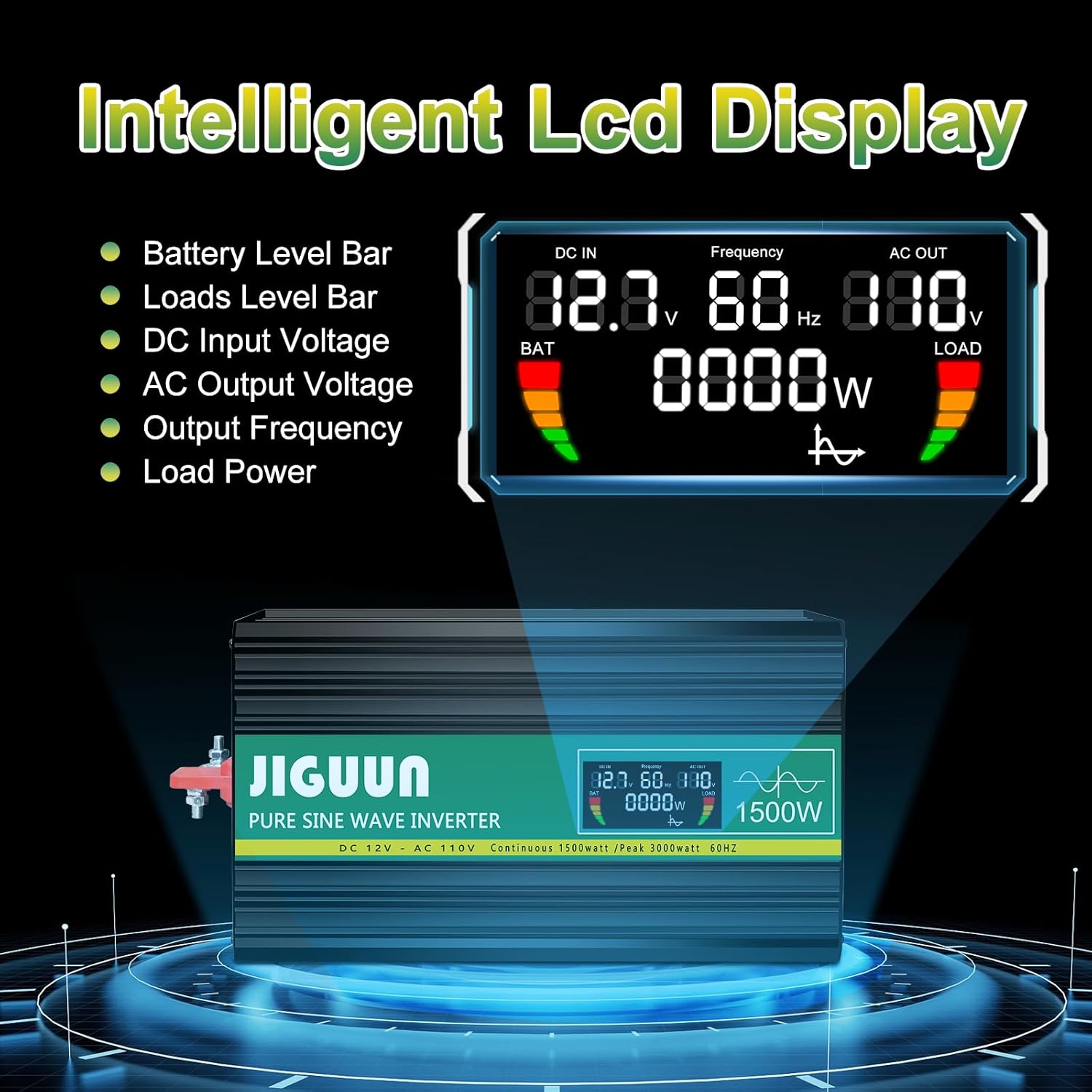
Figure 8: The JIGUUN 1500W inverter connected and actively powering a range of common household and electronic appliances, including an air fryer, blender, toaster, laptop, and camera.
6.4 Remote Control Operation
The included remote control allows you to turn the inverter ON or OFF from a distance, providing convenience in various setups (e.g., RVs, remote installations). Simply press the power button on the remote to toggle the inverter's power state.
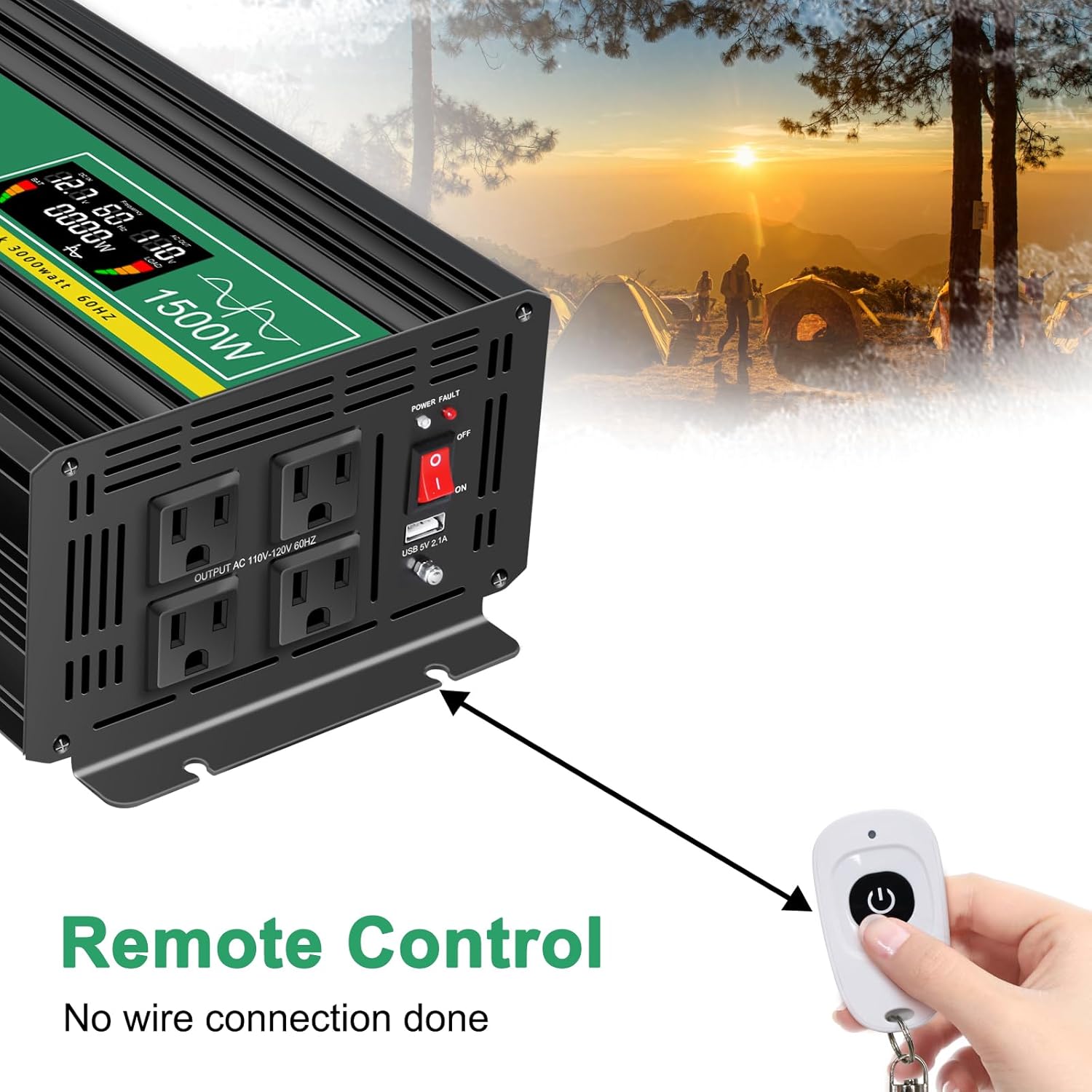
Figure 9: An image illustrating the remote control functionality for the JIGUUN inverter, showing a hand holding the compact remote control unit.
7. Maintenance
To ensure optimal performance and longevity of your JIGUUN Power Inverter, follow these maintenance guidelines:
- Keep Clean: Regularly wipe the exterior of the inverter with a dry, soft cloth to remove dust and dirt. Do not use liquid cleaners or solvents.
- Check Connections: Periodically inspect all DC and AC connections to ensure they are tight and free from corrosion. Loose connections can lead to overheating and poor performance.
- Ventilation: Ensure the cooling fan vents are clear of obstructions. Dust or debris can accumulate and hinder airflow, leading to overheating. Use compressed air to clear vents if necessary.
- Storage: If storing the inverter for an extended period, disconnect it from the battery and store it in a cool, dry place away from direct sunlight and extreme temperatures.
8. Troubleshooting
The JIGUUN Power Inverter is equipped with a 7-point comprehensive protection system to ensure safe operation. If you encounter issues, refer to the following table:
8.1 Comprehensive Protection System
- Under Voltage Protection: Shuts down if input DC voltage drops too low.
- Over Voltage Protection: Shuts down if input DC voltage exceeds safe limits.
- Overload Protection: Shuts down if connected load exceeds the inverter's capacity.
- Over Temperature Protection: Shuts down if internal temperature becomes too high.
- Short Circuit Protection: Protects against short circuits on the AC output.
- AC Ground Terminal: Ensures proper grounding for safety.
- Reverse Connection Protection: Protects against damage from incorrect battery polarity.

Figure 10: A diagram illustrating the various protection systems integrated into the JIGUUN inverter's BMS (Battery Management System), including temperature control, ground wire, overload, reverse polarity, short circuit, low voltage, and over voltage protection.
8.2 Troubleshooting Table
| Problem | Possible Cause | Solution |
|---|---|---|
| Inverter does not turn on | Loose battery connections; Low battery voltage; Blown fuse; Incorrect polarity. | Check and tighten all battery cable connections. Recharge or replace battery. Check and replace internal fuses if necessary. Verify correct positive/negative connections. |
| No AC output | Overload; Over-temperature; Low/High input voltage; Faulty appliance. | Reduce load. Allow inverter to cool down. Check battery voltage. Test appliance on another power source. |
| Fans not running | Normal operation (temperature below 45°C); Fan malfunction. | Fans only activate when temperature exceeds 45°C. If inverter is hot and fans are not running, contact support. |
| LCD display shows error/warning | Indicates a protection mode has been activated (e.g., low voltage, overload). | Refer to the specific error code on the display and consult the protection system list above to identify the issue and apply the corresponding solution. |
9. Specifications
| Feature | Specification |
|---|---|
| Brand | JIGUUN |
| Model Number | 92e85479-8c90-4260-ae1e-65b137694b41 |
| Continuous Power | 1500 Watts |
| Peak Power | 3000 Watts |
| DC Input Voltage | 12V |
| AC Output Voltage | 110V/120V |
| Output Waveform | Pure Sine Wave |
| Output Frequency | 60Hz |
| Conversion Efficiency | >90% |
| USB Output | 2.1A |
| Product Dimensions | 13.62 x 6.5 x 4.33 inches |
| Item Weight | 9.37 pounds |
| Recommended Uses | Home, Office, Vehicle, Camping, Emergency |
| Power Source | Solar and Battery Powered |
| Color | Green |
10. Warranty and Support
JIGUUN provides a 1-year warranty with free replacement for this product. If you have any questions, concerns, or require technical assistance, please do not hesitate to contact the JIGUUN customer service team via email. They are committed to resolving any issues you may encounter.
For further assistance, please refer to the contact information provided with your purchase or visit the official JIGUUN store on Amazon.