
BEBALETY HT650C
Digital LCD Handheld Infrared Thermometer Hygrometer HT650C User Manual
Model: HT650C | Brand: BEBALETY
1. Introduction
The BEBALETY HT650C is a portable, handheld instrument designed for accurate and convenient measurement of both temperature and relative humidity. Utilizing non-contact infrared technology for temperature readings, it also incorporates a hygrometer for humidity detection. This device features a color LCD backlight display, data hold function, and settable high/low temperature alarms, making it suitable for various applications where environmental conditions need to be monitored.

Figure 1: The HT650C device alongside its user manual.
2. Safety Information
Please read all safety warnings and instructions carefully before using the HT650C. Failure to follow these instructions may result in electric shock, fire, or serious injury.
2.1 Laser Safety
The HT650C emits Class 2 laser radiation (output <1mW, wavelength 630-670nm). Observe the following precautions:
- CAUTION: Avoid direct eye exposure to the laser beam.
- Do not stare into the laser beam.
- Do not aim the laser at people or animals.
- Use the laser only for its intended purpose of targeting measurement areas.

Figure 2: Side view of the HT650C, highlighting the laser warning label.
2.2 General Safety
- Do not use the device in environments with explosive gas, vapor, or dust.
- Keep the device dry. Do not expose it to water or high humidity.
- Do not attempt to disassemble or modify the device. Refer all servicing to qualified personnel.
- Remove batteries if the device is not used for an extended period.
3. Setup
3.1 Battery Installation
The HT650C is powered by batteries (type typically AAA, check compartment for specifics). To install or replace batteries:
- Locate the battery compartment cover on the handle of the device.
- Open the battery compartment cover by sliding or lifting it.
- Insert the batteries, ensuring correct polarity (+ and -) as indicated inside the compartment.
- Close the battery compartment cover securely.
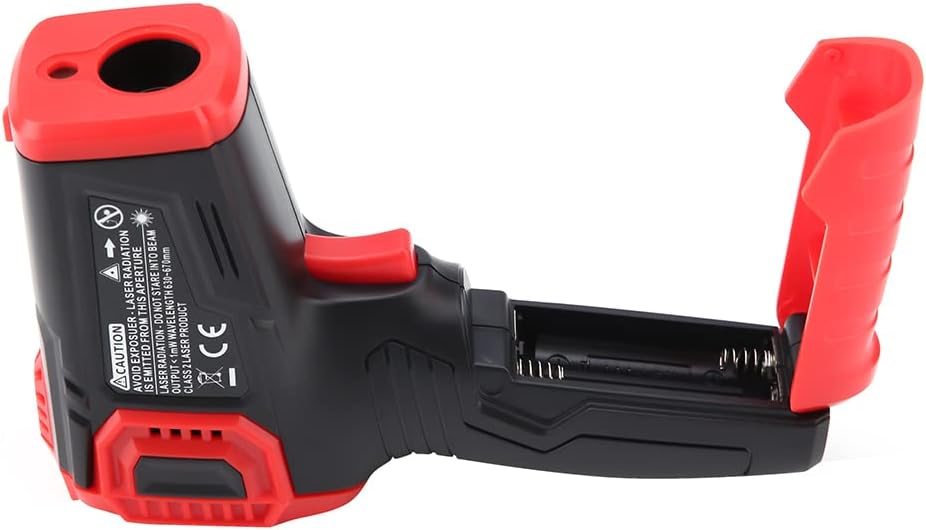
Figure 3: The HT650C with its battery compartment open, showing battery insertion.
3.2 Powering On/Off
To power on the device, press the measurement trigger. The device will automatically power off after a period of inactivity to conserve battery life.
4. Operating Instructions
4.1 Taking a Measurement
- Point the infrared sensor (located at the front of the device) towards the target surface.
- Press and hold the measurement trigger. The laser pointer will activate to help aim.
- The temperature and humidity readings will be displayed on the LCD screen.
- Release the trigger to hold the current readings on the display (Data Hold function).

Figure 4: The HT650C in use, displaying a temperature reading on its screen.
4.2 Display and Buttons
The color LCD backlight display provides clear readings. The device typically includes buttons for:
- MODE Button: To cycle through different measurement modes or settings.
- Unit Conversion Button (℃/℉): To switch between Celsius and Fahrenheit temperature units.
- Backlight Button: To turn the display backlight on or off.
- Laser Button: To enable or disable the laser pointer.
- Alarm Setting Buttons: To set high and low temperature alarm thresholds.

Figure 5: Angled view of the HT650C, showing the LCD display and various control buttons.
4.3 Temperature Unit Conversion
Press the ℃/℉ button to toggle the temperature display between Celsius and Fahrenheit.
4.4 High/Low Temperature Alarm
The device allows setting of high and low temperature alarm thresholds. When the measured temperature exceeds the high limit or falls below the low limit, an audible or visual alarm may activate. Refer to the specific instructions in the full manual for detailed steps on setting these alarms.
5. Maintenance
5.1 Cleaning
To ensure accurate readings and prolong the life of your device, keep it clean:
- Wipe the device clean with a soft, damp cloth.
- Do not use abrasive cleaners or solvents.
- Ensure the infrared lens and humidity sensor are free from dust and debris.
5.2 Battery Replacement
When the battery indicator shows low power, replace the batteries as described in Section 3.1. Dispose of used batteries responsibly according to local regulations.
5.3 Storage
Store the device in a cool, dry place, away from direct sunlight and extreme temperatures. If storing for an extended period, remove the batteries.
6. Troubleshooting
If you encounter issues with your HT650C, refer to the following common problems and solutions:
| Problem | Possible Cause | Solution |
|---|---|---|
| Device does not power on. | Low or dead batteries; incorrect battery polarity. | Replace batteries; ensure correct polarity. |
| Inaccurate temperature/humidity readings. | Sensor obstructed or dirty; device not at stable ambient temperature; measurement distance too far. | Clean sensors; allow device to acclimate; ensure proper measurement distance. |
| Laser not working. | Laser function disabled; device malfunction. | Press the laser button to enable; if problem persists, contact support. |
| Display is dim or flickering. | Low batteries. | Replace batteries. |
If the problem persists after trying these solutions, please contact BEBALETY customer support.
7. Specifications
| Feature | Detail |
|---|---|
| Brand | BEBALETY |
| Model | HT650C |
| Special Feature | High Accuracy |
| Display Type | Digital, Color LCD Backlight |
| Connectivity Technology | Infrared |
| Power Source | Battery Powered |
| Product Care Instructions | Wipe Clean |
| Unit Count | 1.0 Count |
| Reusability | Reusable |
| Style | Digital |
| Date First Available | June 26, 2022 |
8. Warranty and Support
For information regarding warranty coverage, technical support, or service, please refer to the warranty card included with your product or visit the official BEBALETY website. Contact details for customer service are typically provided in the product packaging or on the manufacturer's support page.