
1. Introduction
This manual provides detailed instructions for the Time and Diamonds NASA Smart Watch, Model Grehge-UNKNOWN. Please read this manual thoroughly before using your device to ensure proper operation and to maximize its features. This smartwatch is designed to be a companion for your daily activities, offering health monitoring, sports tracking, and smart notifications.

Figure 1: Front view of the NASA Smart Watch, showcasing its design and a heart rate display.
2. Safety Information
- Do not attempt to disassemble or modify the device. Unauthorized modifications can void your warranty and cause damage.
- Keep the device away from extreme temperatures, direct sunlight, and corrosive liquids.
- This device is rated IP67 for water and dust resistance. It can withstand immersion in water up to 1 meter for 30 minutes. Avoid hot water, steam, or prolonged immersion.
- The health monitoring functions are for reference only and should not be used for medical diagnosis or treatment. Consult a medical professional for health-related concerns.
- Use only the provided charging cable. Using incompatible chargers may cause damage or fire.
3. Package Contents
Ensure all items are present in the package:
- NASA Smart Watch (Model: Grehge-UNKNOWN)
- Magnetic Charging Cable
- User Manual (this document)
4. Setup
4.1 Charging the Device
Before first use, fully charge your smartwatch. Connect the magnetic charging cable to the charging contacts on the back of the watch and plug the USB end into a standard USB power adapter (not included) or a computer USB port.
- Charging time: Approximately 2-3 hours for a full charge.
- Battery life: Up to 6 days of normal use, 20 days standby.
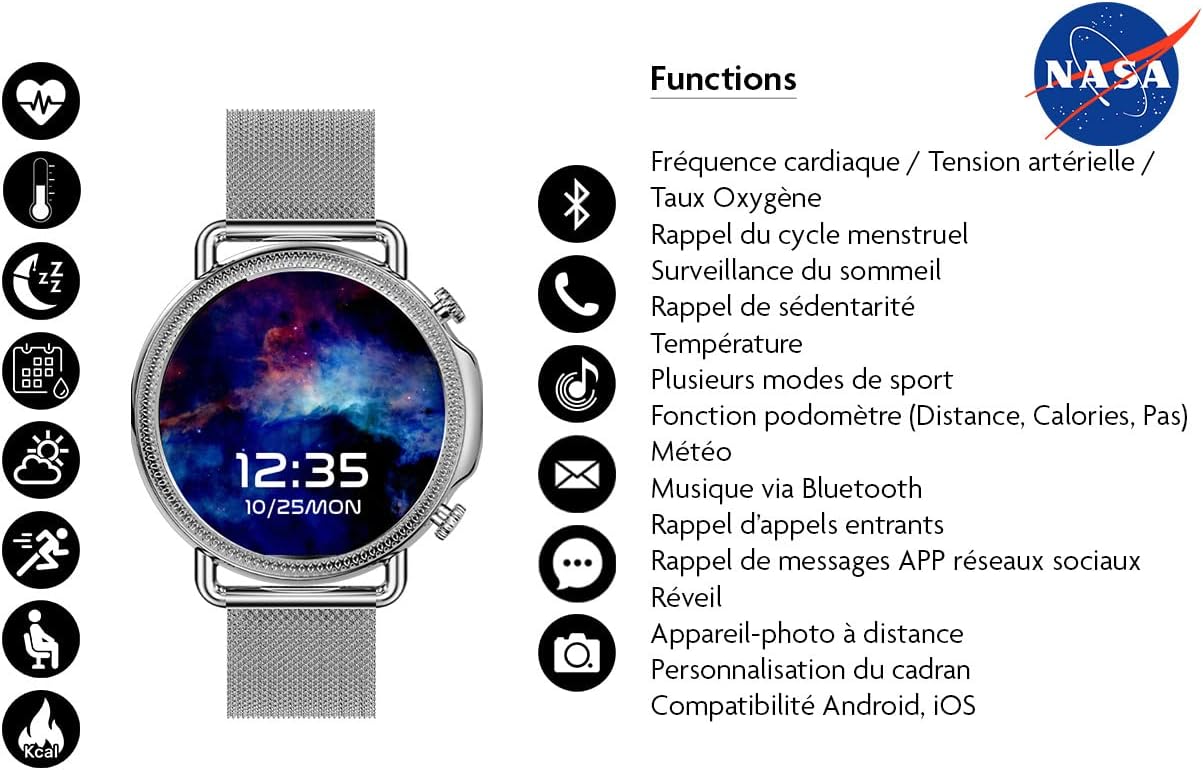
Figure 2: Rear view of the watch, highlighting the charging contacts and health sensors.
4.2 Powering On/Off
- Power On: Press and hold the side button for a few seconds until the screen lights up.
- Power Off: From the watch face, swipe down to access quick settings or navigate to the settings menu. Select "Power Off" and confirm.
4.3 App Installation (Da Fit)
To unlock the full functionality of your smartwatch, download and install the "Da Fit" application on your smartphone.
- Scan the QR code provided in the watch's packaging or search for "Da Fit" in your smartphone's app store (Android Market, Google Play Store, or Apple App Store).
- Install the application.
- Ensure your smartphone's Bluetooth is enabled.
4.4 Pairing with Smartphone
After installing the Da Fit app, follow these steps to pair your watch:
- Open the "Da Fit" app on your smartphone.
- Follow the on-screen instructions to create an account or log in.
- In the app, navigate to the "Device" or "Add Device" section.
- The app will search for available Bluetooth devices. Select "Grehge-UNKNOWN" or a similar device name from the list.
- Confirm the pairing request on both your watch and smartphone.
- Once paired, the watch will synchronize data with the app.
Note: The watch uses Bluetooth 5.0 for connectivity and is compatible with both Android and iOS operating systems.
5. Operating the Watch
5.1 Basic Navigation
The watch features a 1.3-inch IPS touch screen and physical buttons for interaction.
- Touch Screen: Swipe left/right, up/down to navigate through menus and features. Tap to select.
- Side Buttons: Typically, one button serves as a power/back button, while others may provide quick access to specific functions or sports modes. Refer to the on-screen prompts for specific button functions.
5.2 Customizing Watch Faces
The watch offers customizable watch faces, including unique spatial images.
- On the Watch: Long-press the watch face to enter the watch face selection mode. Swipe left/right to browse and tap to select.
- Via Da Fit App: Open the Da Fit app, navigate to the "Watch Faces" or "Dial Settings" section to explore more options and upload custom images.

Figure 3: Watch face featuring a cosmic image, demonstrating customization options.

Figure 4: Watch face displaying the official NASA logo.
5.3 Health Monitoring
The watch provides various health tracking features. Access these through the watch's menu or the Da Fit app.
- Heart Rate: Monitors your heart rate throughout the day.
- Blood Pressure: Provides estimated blood pressure readings.
- Blood Oxygen (SpO2): Measures blood oxygen saturation levels.
- Pedometer: Tracks your steps, distance, and calories burned.
- Sleep Quality: Monitors your sleep patterns (deep sleep, light sleep, wake-up times).
- Physical Cycle Reminder: For female users, track menstrual cycles.
- Sedentary Reminder: Alerts you to move after periods of inactivity.
Important: Health data from this device is for reference only and cannot be used for medical purposes. Consult a healthcare professional for any health concerns.
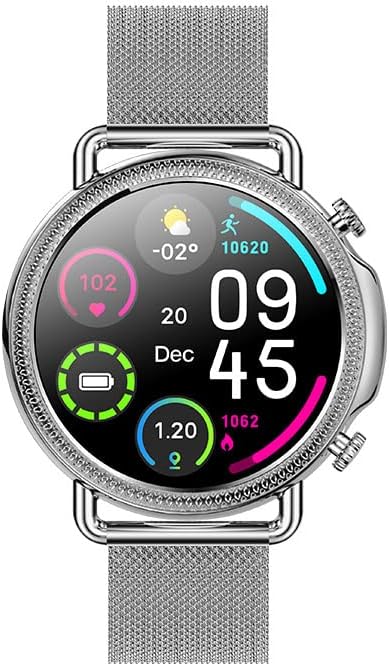
Figure 5: Watch face showing various health metrics including heart rate and battery status.
5.4 Sports Modes
The watch supports 8 different sports modes to track your workouts. Select the appropriate mode before starting an activity for accurate data collection.
- Common modes include walking, running, cycling, and more.
- Data tracked includes duration, calories burned, heart rate, and distance (where applicable).
5.5 Notifications and Other Features
Stay connected with your smartphone through various smart features:
- Call Notifications: Receive alerts for incoming calls.
- Message Center: View SMS and social media app notifications (e.g., WhatsApp, Facebook).
- Weather: Get real-time weather updates.
- Stopwatch: A built-in stopwatch for timing activities.
- Remote Control: Control your smartphone's camera remotely.
- Alarm: Set alarms directly on the watch or via the app.
- Find Phone: Locate your paired smartphone by making it ring.
- Music via Bluetooth: Control music playback on your smartphone.

Figure 6: Watch face surrounded by icons illustrating the watch's diverse functionalities.
6. Maintenance
- Cleaning: Wipe the watch and strap regularly with a soft, dry cloth. For stubborn dirt, use a slightly damp cloth and then dry thoroughly. Avoid harsh chemicals or abrasive materials.
- Water Resistance (IP67): The watch is resistant to splashes, rain, and brief immersion. It is not suitable for swimming, diving, or high-pressure water activities. Ensure the watch is dry before charging.
- Battery Care: To prolong battery life, avoid fully discharging the battery frequently. Charge the watch when the battery level is low. Store the watch in a cool, dry place if not used for extended periods.
7. Troubleshooting
| Problem | Possible Solution |
|---|---|
| Watch does not power on. | Ensure the watch is fully charged. Connect to the charger for at least 30 minutes. |
| Cannot pair with smartphone. |
|
| Notifications are not received. |
|
| Inaccurate health data. |
|
8. Specifications
| Feature | Detail |
|---|---|
| Brand | Time and Diamonds |
| Model Number | Grehge-UNKNOWN (BNA30109) |
| Display | 1.3-inch IPS Touch Screen, 240x240dpi resolution |
| Chipset | RTK8762C |
| Connectivity | Bluetooth 5.0 |
| Compatibility | Android, iOS |
| Battery Capacity | 200mAh Lithium Polymer |
| Battery Life | Up to 6 days (normal use), 20 days (standby) |
| Memory | 64MB |
| Water Resistance | IP67 (Dust and water resistant) |
| Health Sensors | Heart Rate, Blood Pressure, Oxygen Saturation, Pedometer, Sleep Monitor, G Sensor |
| Special Features | Physical cycle reminder, sedentary reminder, alarm clock, message center, find phone, 8 sports modes, weather, stopwatch, remote control, vibration. |
| Charging Type | Magnetic cable charging |
| Human Interface Input | Buttons, Touchscreen |
9. Warranty and Support
For warranty information and customer support, please refer to the documentation provided with your purchase or contact Time and Diamonds customer service. Keep your proof of purchase for warranty claims.
For further assistance, please visit the official Time and Diamonds website or contact their support channels.