
Infinix Hot 10 Play X688
User Manual for Infinix Hot 10 Play X688 Leather Wallet Flip Case
Model: Infinix Hot 10 Play X688
Introduction and Overview
This manual provides instructions for the proper use and care of your new Leather Stand Wallet Flip Case for the Infinix Hot 10 Play X688. This case is designed to protect your device while offering convenient features such as card slots and a stand function.
Key features of your case include:
- Durable protection against bumps, knocks, drops, chips, dirt, scratches, and marks.
- Constructed from quality PU leather and a thermoplastic polyurethane (TPU) inner gel case.
- Precise cutouts for camera, charging port, speaker, headphone jack, and lock button, ensuring full accessibility.
- Integrated stand feature for hands-free viewing in landscape mode.
- Multiple slots for convenient storage of cash and credit cards.
Setup and Installation
Follow these steps to properly install your Infinix Hot 10 Play X688 phone into the case and utilize its features:
- Inserting Your Phone: Gently align your Infinix Hot 10 Play X688 with the TPU inner gel case. Press the phone firmly but carefully into the case until it is securely seated. Ensure all edges are properly covered and the cutouts align with your phone's ports and buttons.
- Using Card Slots: Open the flip cover. Locate the designated slots on the left side of the case. Insert your credit cards, ID cards, or other small items into these slots. A larger pocket is also available for cash or notes.
- Activating Stand Feature: To use the stand function, open the flip cover completely. Fold the back of the case along the designated crease to form a triangular support. Rest your phone, still in its TPU holder, against this support to achieve a stable landscape viewing angle.
- Magnetic Closure: The case features a magnetic closure to keep the flip cover securely shut when not in use, protecting your screen.

Figure 1: Phone inserted into the case with cards in slots.
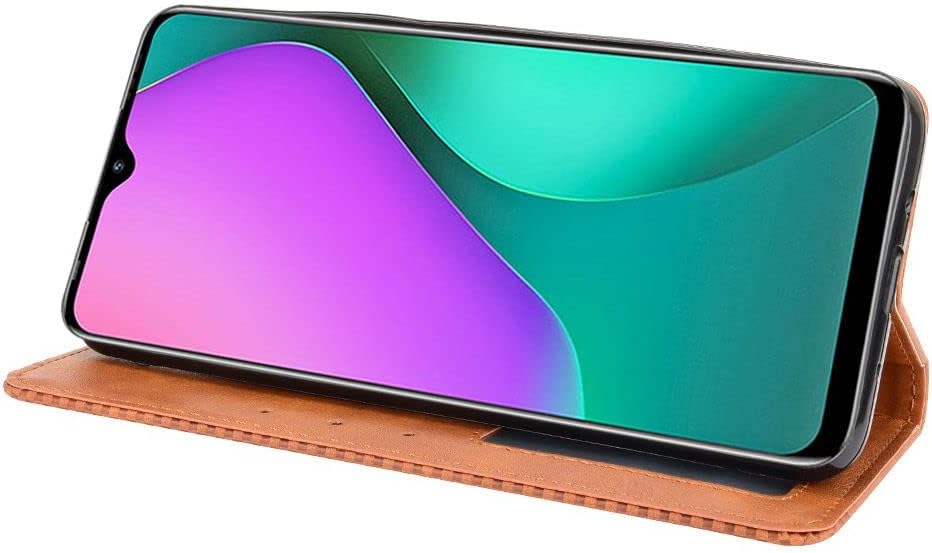
Figure 2: Case folded into a stand for landscape viewing.
Operating Instructions
Your wallet flip case is designed for daily use, providing both protection and convenience:
- Screen Protection: Keep the flip cover closed when your phone is not in active use to protect the screen from scratches and impacts.
- Access to Ports and Buttons: The precise cutouts ensure that all ports (charging, headphone) and buttons (power, volume) are fully accessible without needing to remove the phone from the case.
- Camera Use: The camera cutout on the back allows for unobstructed photo and video capture.
- Card and Cash Storage: Utilize the integrated card slots and cash pocket for convenient storage of essential items, reducing the need for a separate wallet.

Figure 3: Front view of the closed wallet case.

Figure 4: Back view of the case, highlighting the camera cutout.
Maintenance and Care
To ensure the longevity and appearance of your leather wallet flip case, follow these maintenance guidelines:
- Cleaning: Wipe the exterior of the case with a soft, slightly damp cloth. For tougher spots, use a mild soap solution, then wipe clean with a dry cloth. Avoid harsh chemicals or abrasive cleaners, as these can damage the PU leather.
- Avoid Excessive Moisture: While the case offers some protection, avoid prolonged exposure to water or high humidity, which can affect the material.
- Sunlight Exposure: Limit direct exposure to strong sunlight for extended periods to prevent fading or material degradation.
- Storage: When not in use, store the case in a cool, dry place away from direct heat sources.
Troubleshooting
If you encounter any issues with your case, consider the following common solutions:
- Phone Not Fitting: Ensure you have the correct model case for your Infinix Hot 10 Play X688. Gently re-align the phone and apply even pressure when inserting.
- Magnetic Closure Weak: Overstuffing the card slots can sometimes reduce the effectiveness of the magnetic closure. Try removing some cards or cash.
- Case Appears Worn: Normal wear and tear may occur over time. Refer to the "Maintenance and Care" section for tips on preserving the case's appearance.
- Difficulty Accessing Ports/Buttons: Double-check that your phone is fully seated in the TPU inner case and that the cutouts are aligned.
If these steps do not resolve your issue, please refer to the "Warranty and Support" section for contact information.
Specifications
| Feature | Detail |
|---|---|
| Product Dimensions | 5.91 x 3.94 x 0.39 inches |
| Item Weight | 1.76 ounces |
| ASIN | B0B51SDRLR |
| Item Model Number | Infinix Hot 10 Play X688 |
| Color | Brown |
| Manufacturer | Generic |
| Date First Available | June 25, 2022 |
| Brand | Generic |
| Compatible Phone Models | Infinix Hot 10 Play X688 |
| Compatible Devices | Infinix Hot 10 Play X688 |
| Material | Plastic |
Note: The outer material is PU Leather, while the inner phone holder is made of thermoplastic polyurethane (TPU), a type of plastic.
Warranty and Support
Your product is manufactured by Generic. For any inquiries or issues, please contact customer service.
If you have any questions, encounter quality problems, or are dissatisfied with the product, please reach out to the seller directly. Manyip (the seller mentioned in the product description) provides 24-hour customer service and quality assurance to offer a satisfied solution.
When contacting support, please provide your purchase details, including the product title and model number (Infinix Hot 10 Play X688).
Ask a question about this manual
Ask about setup, troubleshooting, compatibility, parts, safety, or missing instructions. Manuals+ will review the question and use this page’s manual context to help answer it.