
1. Safety Precautions
Please read and understand all safety instructions before installing, operating, or performing maintenance on the BEBALETY JH-S2-2T Variable Frequency Drive (VFD). Failure to follow these instructions may result in severe injury, property damage, or death.
- Electrical Hazard: Always disconnect all power sources to the VFD and connected equipment before performing any wiring, inspection, or maintenance. Wait for the capacitor discharge indicator to extinguish before touching any components.
- Voltage Compatibility: This VFD is designed for a single-phase 220V AC input. Connecting it to a 380V AC power supply will cause irreparable damage to the unit.
- Proper Grounding: Ensure the VFD's ground terminal is properly connected to a reliable earth ground to prevent electrical shock.
- Installation Environment: Install the VFD in a non-flammable environment, free from explosive gases, corrosive substances, and excessive dust. Ensure adequate ventilation to prevent overheating.
- Professional Installation: Wiring and internal maintenance should only be performed by qualified and authorized personnel. The VFD contains high voltage components that can be lethal. Do not open the casing unless specifically instructed by a qualified technician.

Image 1.1: Angled view of the BEBALETY JH-S2-2T Variable Frequency Drive, showing the front panel and a safety precaution label affixed to the bottom left. This label reiterates critical safety warnings regarding power, wiring, and environmental conditions.
2. Product Overview
The BEBALETY JH-S2-2T Variable Frequency Drive (VFD) is a compact and versatile inverter designed for precise motor speed control. It features a quick response time for starting and stopping, and provides substantial torque at low speeds. Integrated protection mechanisms ensure the safety and longevity of both the VFD and the connected equipment.

Image 2.1: The BEBALETY JH-S2-2T Variable Frequency Drive shown alongside a ribbon cable, likely for external control or programming. The VFD features a digital display and control buttons on its front panel.
Key Features:
- Responsive Control: Offers quick start and stop responses with high torque at low speeds.
- Comprehensive Protection: Includes built-in safeguards against undervoltage, overvoltage, overcurrent, and overheating. Features immediate short-circuit protection for connected equipment.
- External Control Capability: Supports stepless speed control via external analog voltage inputs (0-5V/0-10V) and current signal inputs (0-20mA).
- Integrated Cooling: Features an internal cooling system and built-in temperature detection, reducing reliance on specific external environmental conditions.
- Advanced Functions: Equipped with multi-function relay transmission, PID control, and constant pressure water supply functions for diverse applications.
3. Components and Variations
The BEBALETY JH-S2-2T VFD may be shipped in slightly different versions (new or old models) which primarily affect the internal layout or minor aesthetic details. Functionality remains consistent across these variations.

Image 3.1: This image illustrates the visual differences between the 'New Type' and 'Old Type' models of the BEBALETY JH-S2-2T VFD. Both types include the main VFD unit and a ribbon cable, with minor variations in the VFD's casing or internal access panel.
4. Installation and Wiring
Proper installation and wiring are crucial for the safe and efficient operation of the VFD. Refer to the safety precautions in Section 1 before proceeding.
4.1 Mounting
- Mount the VFD vertically on a stable, non-flammable surface.
- Ensure sufficient clearance around the unit for proper airflow and heat dissipation, especially around the cooling fan and vents.
- Avoid mounting in direct sunlight or near heat sources.

Image 4.1: Bottom view of the VFD, highlighting the integrated cooling fan. This fan is essential for dissipating heat, and its vents must not be obstructed during installation.
4.2 Wiring Connections
All wiring must comply with local electrical codes and standards. Use appropriate wire gauges for the VFD's power rating.

Image 4.2: Side view of the VFD, revealing the terminal block for power input, motor output, and control signals. The terminals are clearly labeled for correct wiring.
- Power Input (R, S): Connect the single-phase 220V AC power supply to terminals R and S.
- Motor Output (U, V, W): Connect the three-phase motor to terminals U, V, and W.
- Ground (GND): Connect the earth ground wire to the designated ground terminal.
- Control Terminals: Utilize the control terminals for external speed control (0-5V/0-10V analog voltage, 0-20mA current signal) or other multi-function relay connections as required by your application. Refer to the detailed wiring diagram in the full product manual for specific control terminal assignments.
5. Operating Instructions
The VFD's front panel provides intuitive controls for basic operation and parameter adjustment.
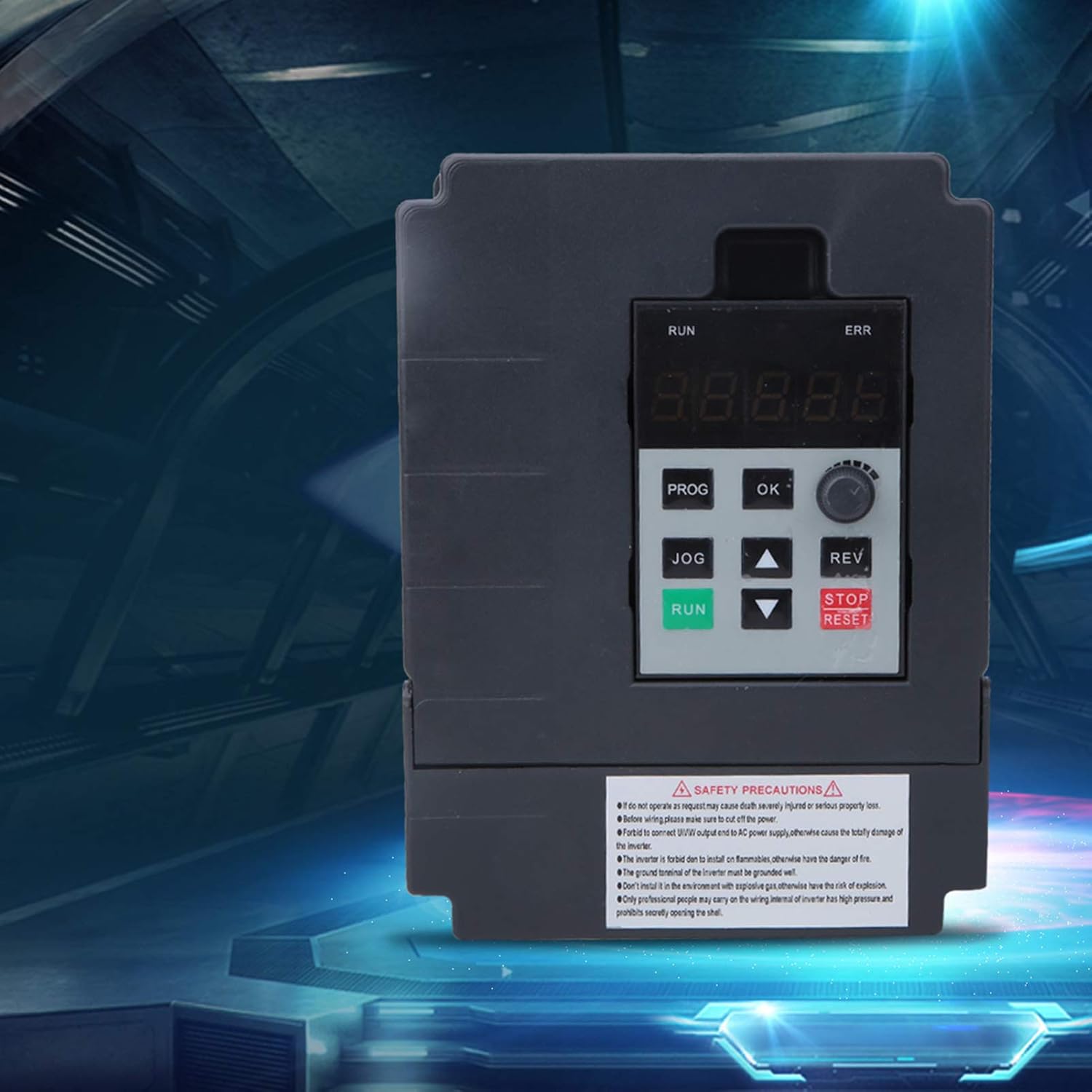
Image 5.1: Close-up front view of the BEBALETY JH-S2-2T VFD's control panel. It features a digital display, a rotary potentiometer for speed adjustment, and various control buttons including RUN, JOG, PROG, OK, REV, and STOP/RESET.
5.1 Control Panel Functions
- Digital Display: Shows operating frequency, output current, voltage, and error codes.
- RUN Button: Initiates motor operation.
- STOP/RESET Button: Stops motor operation or clears error codes.
- JOG Button: Provides momentary motor operation at a preset jog frequency.
- PROG Button: Enters parameter programming mode.
- OK Button: Confirms parameter settings or menu selections.
- ▲ / ▼ Buttons: Used to navigate menus and adjust parameter values.
- REV Button: Reverses motor direction (if enabled).
- Rotary Potentiometer: Adjusts the output frequency (motor speed) directly.
5.2 Basic Operation
- Power On: After ensuring all wiring is correct and secure, apply power to the VFD. The digital display will illuminate.
- Speed Adjustment: Use the rotary potentiometer to set the desired output frequency. Alternatively, if configured, use external analog inputs.
- Start Motor: Press the RUN button to start the motor. The display will show the operating frequency.
- Stop Motor: Press the STOP/RESET button to stop the motor.
- Reverse Direction: If configured, press the REV button to change the motor's rotation direction while running.
6. Maintenance
Regular maintenance helps ensure the longevity and reliable operation of your VFD.
- Cleaning: Periodically clean the VFD's exterior, especially the cooling fan and ventilation grilles, to prevent dust accumulation. Use a soft, dry cloth. For stubborn dust, a vacuum cleaner or compressed air can be used, ensuring power is disconnected.
- Environmental Check: Ensure the operating environment remains within specified temperature and humidity ranges. Verify that there are no obstructions to airflow around the VFD.
- Terminal Inspection: Annually, with power disconnected, inspect all wiring terminals for tightness. Loose connections can cause overheating and damage.
- Professional Inspection: For internal components, it is recommended to have a qualified technician perform periodic inspections.
7. Troubleshooting
This section provides guidance for common issues. For complex problems, contact qualified service personnel.
| Problem | Possible Cause | Solution |
|---|---|---|
| VFD does not power on | No input power; Blown fuse; Internal fault | Check power supply; Inspect fuses; Contact service. |
| Motor does not run | VFD not in RUN mode; Incorrect wiring; Motor fault; Parameter settings | Press RUN; Verify motor wiring; Check motor; Review VFD parameters. |
| "ERR" indicator active | Overvoltage; Undervoltage; Overcurrent; Overheat; Other fault | Note error code on display; Refer to full manual for specific code meaning and resolution; Press STOP/RESET to clear after resolving issue. |
| Motor speed unstable | Poor grounding; Interference; Incorrect PID settings | Verify grounding; Check for EMI sources; Adjust PID parameters. |
8. Specifications
Technical specifications for the BEBALETY JH-S2-2T Variable Frequency Drive.
| Specification | Detail |
|---|---|
| Model | JH-S2-2T |
| Brand | BEBALETY |
| Input Voltage | Single Phase 220V AC |
| Output Voltage | 3-Phase 220V AC |
| Power Source | 220V |
| Rated Power | 0.75 kW |
| Manufacturer | BEBALETY |
| Date First Available | June 24, 2022 |