
Introduction
This manual provides detailed instructions for the proper use, setup, and maintenance of your RoadKing RKING1000 Truck Driver Headset. Please read this manual thoroughly before operating the device to ensure optimal performance and longevity.
What's in the Box
Upon opening your RoadKing RKING1000 package, you should find the following items:
- RoadKing RKING1000 Headset
- Micro USB Charging Cable
- Car Charger
- Protective Drawstring Bag
- User Manual

Image: The RoadKing RKING1000 headset, Micro USB charging cable, car charger, protective drawstring bag, and user manual.
Product Overview
The RoadKing RKING1000 is a mono wireless headset designed for clear communication and comfort. It features advanced noise-cancelling technology and a lightweight design.
Key Features
- Bluetooth 5.0 Wireless Technology: For stable and efficient connectivity up to 32 feet.
- Advanced Noise-Cancelling Microphone: Equipped with a windsock to reduce background noise and protect against dirt and moisture.
- Multi-Function Button: Enables easy control, including three-way calling.
- LED Indicator Light: Displays power, charging status, and connection status.
- Cushioned Ear Cup: Designed to seal out ambient noise for improved listening.
- Auto Power-Off Function: Conserves battery life when not in use.
- Long Battery Life: Up to 14 hours of talk time on a single charge.

Image: The noise-cancelling microphone with its protective windsock design.
Design and Comfort
The RKING1000 headset is engineered for extended wear with maximum comfort and portability.
- Ultra Soft Earpad: Ensures comfort during long periods of use.
- Lightweight Construction: Designed for easy portability and reduced fatigue.
- Mono Headset Configuration: Allows awareness of surroundings while maintaining communication.

Image: Detail of the headset's lightweight and cushioned design for comfort.

Image: A user wearing the RoadKing RKING1000 headset.
Setup
Charging the Headset
Before initial use, fully charge your headset. The RKING1000 can be charged using any DC 5V power source with a charging current of more than 500mA, such as a car charger, power bank, or computer USB port.
- Connect the Micro USB charging cable to the charging port on the headset.
- Connect the other end of the cable to a compatible DC 5V power source.
- The LED indicator light will show the charging status. Refer to the 'LED Indicator Status' section for details.
- Once fully charged, disconnect the charging cable.
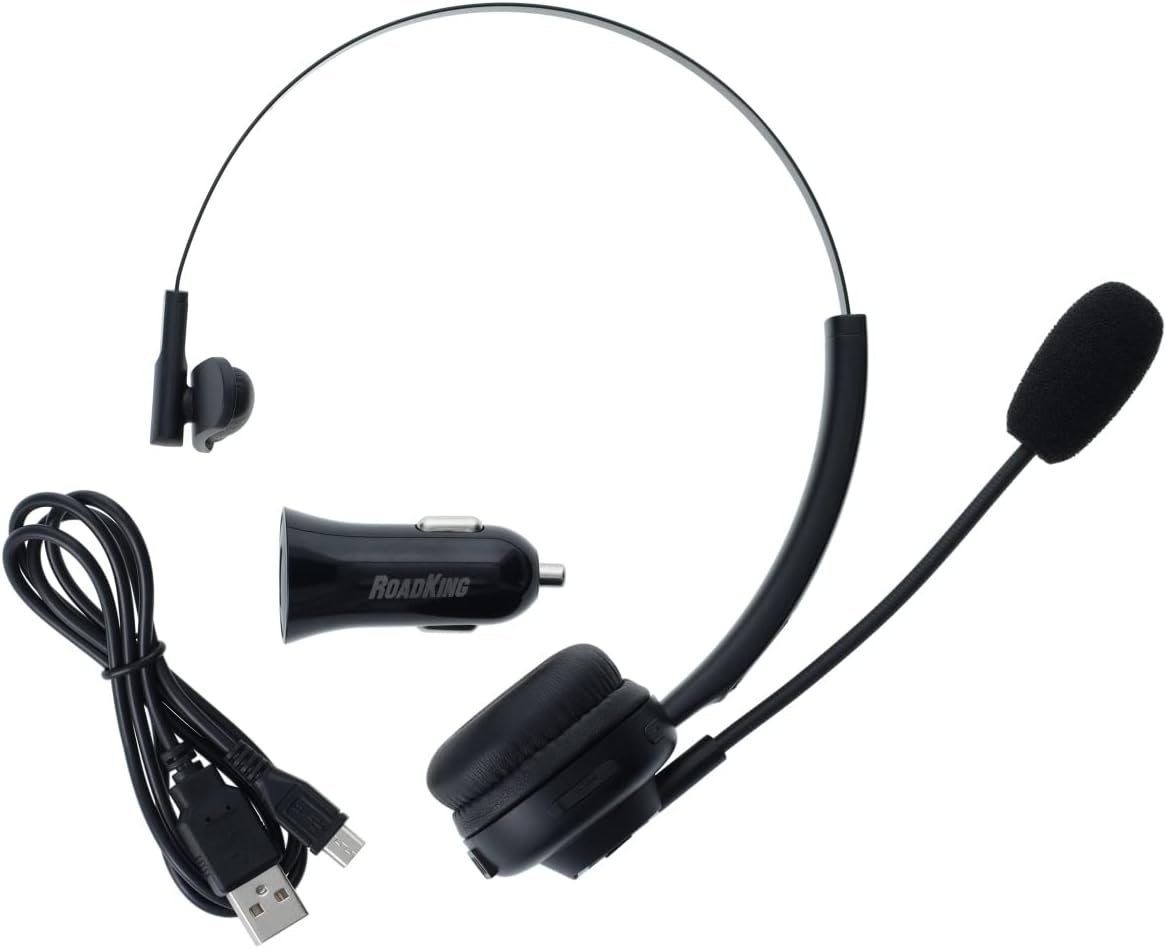
Image: Headset with charging accessories.
Pairing with a Bluetooth Device
The RKING1000 headset uses Bluetooth 5.0 technology for wireless connection.
- Ensure the headset is charged and powered off.
- Press and hold the Multi-Function Button until the LED indicator flashes blue and red alternately, indicating pairing mode.
- On your device (e.g., cellphone, laptop, smart speaker), enable Bluetooth and search for available devices.
- Select "RKING1000" from the list of found devices.
- Once paired, the LED indicator will flash blue periodically.
- The headset will automatically attempt to reconnect to the last paired device when powered on.
Operating Instructions
Power On/Off
- Power On: Press and hold the Multi-Function Button for approximately 3 seconds until the LED indicator lights up.
- Power Off: Press and hold the Multi-Function Button for approximately 3 seconds until the LED indicator turns off. The headset also features an automatic power-off function to conserve battery.
Call Management
Use the Multi-Function Button and volume controls for managing calls.
- Answer/End Call: Press the Multi-Function Button once.
- Reject Call: Press and hold the Multi-Function Button for 2 seconds.
- Redial Last Number: Double-press the Multi-Function Button.
- Three-Way Calling: While on a call, answer a new incoming call by pressing the Multi-Function Button once. To switch between calls, double-press the Multi-Function Button. To end the current call and switch to the held call, press the Multi-Function Button once.
- Volume Control: Use the dedicated volume buttons on the headset to adjust the listening volume.

Image: Side view of the headset showing control buttons and charging port.
LED Indicator Status
- Flashing Blue & Red: Pairing mode.
- Flashing Blue (periodically): Connected and operational.
- Solid Red: Charging.
- Light Off: Fully charged or powered off.
Maintenance
To ensure the longevity and optimal performance of your RoadKing RKING1000 headset, follow these maintenance guidelines:
- Microphone Windsock: The microphone windsock is designed to protect the microphone from dirt and moisture. Regularly inspect it for wear and tear. Replace if damaged to maintain clear communication and microphone protection.
- Cleaning: Use a soft, dry cloth to clean the headset. Avoid using harsh chemicals or abrasive materials.
- Storage: When not in use, store the headset in the provided protective drawstring bag to prevent dust accumulation and physical damage.
- Charging: Always use the provided charging cable and a compatible DC 5V power source. Avoid overcharging the battery.
Troubleshooting
If you encounter issues with your RoadKing RKING1000 headset, please refer to the following common solutions:
- Headset not powering on: Ensure the headset is fully charged.
- Cannot pair with device: Make sure the headset is in pairing mode (flashing blue and red LED). Ensure Bluetooth is enabled on your device and it is within the 32-foot range. Try restarting both the headset and your device.
- No audio or poor audio quality: Check the volume levels on both the headset and your connected device. Ensure the headset is properly paired and connected. If using the microphone, ensure it is positioned correctly and the windsock is intact.
- Intermittent connection: Move closer to your paired device to ensure you are within the Bluetooth range. Avoid obstacles that may interfere with the signal.
If these steps do not resolve the issue, please contact customer support.
Specifications
| Model Name | RKING1000 |
| Brand | RoadKing |
| Connectivity Technology | Wireless (Bluetooth 5.0) |
| Bluetooth Range | Up to 33 Feet |
| Noise Control | Active Noise Cancellation |
| Battery Life | Up to 14 Hours (Talk Time) |
| Charging Requirement | DC 5V, >500mA |
| Item Weight | 9.6 Ounces |
| Product Dimensions | 3.4 x 7.6 x 9.5 inches |
| Material | Sponge (earpad) |
| Compatible Devices | Cellphones, Laptops, Smart Speaker |
Warranty and Support
The RoadKing RKING1000 headset comes with a One-Year Limited Warranty. For detailed warranty information, please visit the official RoadKing products website. You can also find support and additional product information by visiting the RoadKing Store on Amazon.
For customer service inquiries, please refer to the contact information provided on the product packaging or the official RoadKing website.

Image: Product packaging displaying warranty and support details.


