
1. Introduction
This manual provides comprehensive instructions for the installation, operation, and maintenance of your Grandekor Motorized Blackout Roller Shade. Please read this manual thoroughly before installation and use to ensure proper function and safety. The shade features 100% blackout capability, a cordless design for safety, and remote control operation.

Image: Grandekor Motorized Blackout Roller Shade in a living room setting, controlled by a remote.
2. Safety Information
- The cordless design enhances safety for children and pets by eliminating entanglement hazards.
- The insulated motor includes an obstacle detection feature, automatically stopping movement to prevent damage and ensure safety.
- Keep the remote control out of reach of children to prevent unintended operation.
- Ensure proper battery installation as described in this manual.

Image: Cordless design and quiet operation for child and pet safety.
3. Package Contents
Verify that all components are present before beginning installation:
- Motorized Roller Shade
- Single-channel Remote Control
- Mounting Hardware (brackets, screws, wall anchors)
- User Manual (this document)
- Valance (if applicable)

Image: Included accessories and dimensions of components.
4. Specifications
| Brand | Grandekor |
| Model Number | a1ff1687-a8a6-4d9f-b24c-72461a569790 |
| Material | Polyester |
| Product Dimensions | 72"L x 35"W (for this specific variant) |
| Color | White (for this specific variant) |
| Opacity | Blackout (100%) |
| Operation Mode | Automatic, Motorized |
| Special Features | Blackout, Cordless, Quiet Motor (<56dB at 1 meter) |
| Power Source | 6 x LR6 Dry Batteries (pre-installed) |
| Battery Life | 3-6 months (approximate) |
| Control Type | Remote Control, Smart Control (via optional bridge/transponder) |
| Item Weight | 2.8 Pounds |
5. Setup
5.1. Measurement Guidelines
Accurate measurement is crucial for proper fit and function.
- For Inside Mount: Measure the exact width of your window opening. Order a shade that is at least 0.5 inches smaller than this width. Ensure the window depth exceeds 2.7 inches for internal installation.
- For Outside Mount: Order a shade that is at least 4 inches wider than the width of your window and 4 inches longer than the height of your window for optimal coverage.
- Important: Do not measure the size of the fabric itself; measure the window opening.

Image: Measurement guide for inside and outside mounting.
5.2. Mounting the Shade
The shade can be mounted inside or outside the window frame. Follow the instructions provided with the mounting hardware.
- Mark the desired positions for the mounting brackets.
- Drill pilot holes if necessary and secure the brackets using the provided screws and wall anchors.
- Attach the roller shade to the installed brackets. Ensure it clicks securely into place.
6. Battery Installation and Replacement
The motorized shade is powered by 6 pre-installed dry batteries. These batteries typically last 3-6 months depending on usage. When replacement is needed:
- Locate the battery compartment on the left side of the shade's headrail.
- Unscrew the small screws securing the battery compartment cover.
- Carefully remove the battery box.
- Replace the old batteries with 6 new LR6 dry batteries, ensuring correct polarity.
- Reinsert the battery box and secure the cover with the screws.
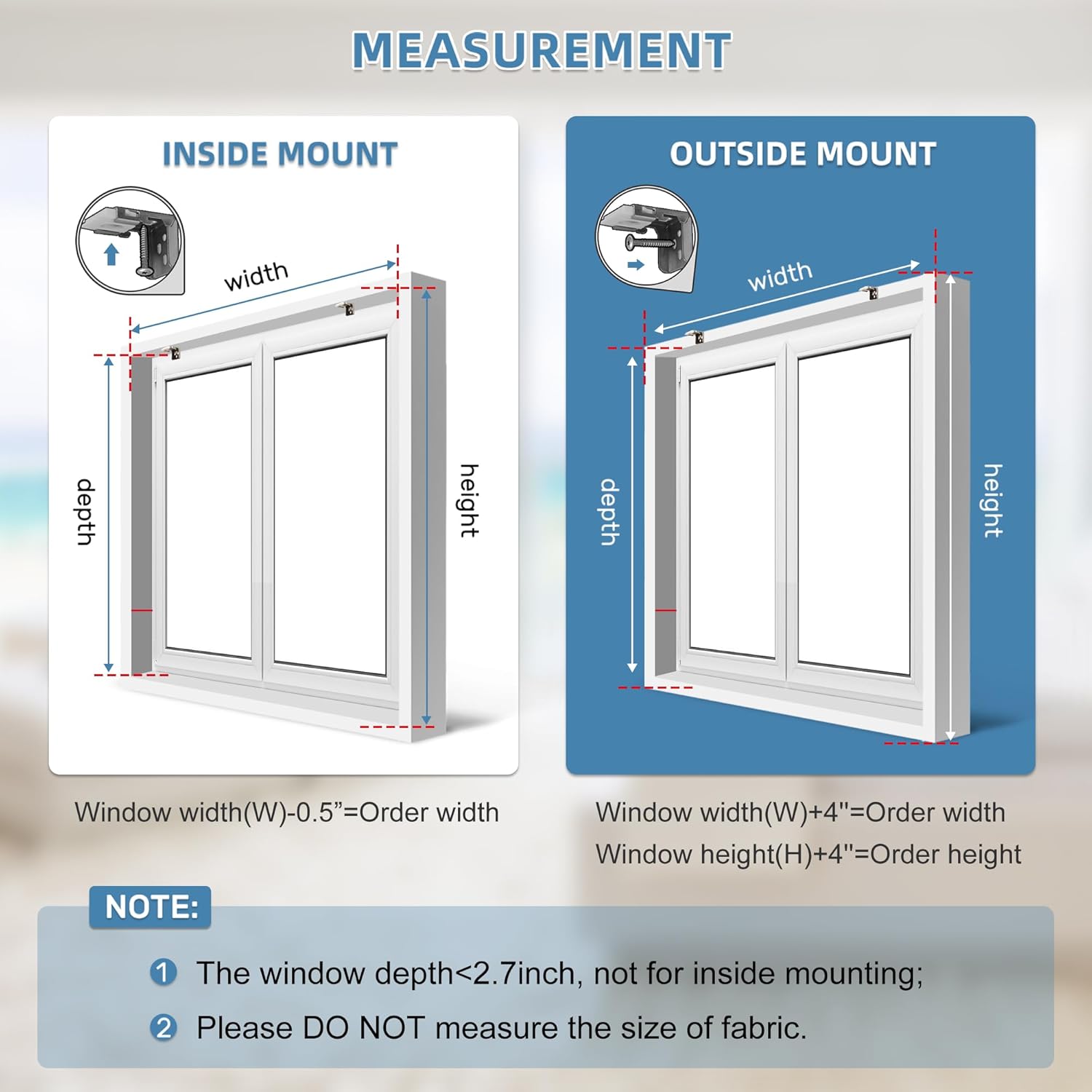
Image: Battery compartment details and replacement instructions.
7. Operating Instructions
7.1. Remote Control Operation
The included single-channel remote control allows for easy operation of your shade.
- Press the Up button to raise the shade.
- Press the Down button to lower the shade.
- Press the Stop button to halt the shade at any desired position.
- The remote has an operational range of up to 20 meters.
For controlling multiple shades (up to 15), a 15-channel remote control (B0CGHM23SM) is available for separate purchase.

Image: Remote control and smart control overview.
7.2. Smart Control (Optional)
For advanced control via voice commands (Amazon Alexa, Google Assistant) or the Tuya app, a smart bridge (B0D4DFBVD7) or wireless transponder (B0BNB94RT2) is required (sold separately). These devices operate on 2.4G WiFi networks only.
- Once connected to a smart bridge/transponder, you can use the Tuya app to manage multiple shades by grouping them.
- The app allows for percentage control, enabling precise adjustment of light levels.
- Voice commands can be used to open, close, or adjust shades to specific positions.
7.3. Setting Limits and Favorite Positions
The electronic trip memory allows you to set specific upper and lower limits, as well as a favorite intermediate position, for the shade's travel. Refer to the detailed instructions provided with your remote control for programming these settings. Once set, the shade will automatically stop at these programmed points.
7.4. Timing Control (with Smart Bridge/Transponder)
When integrated with a smart bridge or wireless transponder, you can schedule automatic opening and closing times for your shades via the Tuya app, enhancing convenience and energy efficiency.
8. Maintenance
- Cleaning: The shade fabric is made of 100% polyester and is designed for spot cleaning only. Use a soft, damp cloth with mild soap for any stains. Do not machine wash or submerge the fabric.
- Battery Check: Regularly check the battery level. Replace all 6 batteries simultaneously when they are low to ensure consistent performance.
- Motor Care: The motor is designed for quiet and reliable operation. Avoid obstructing the shade's movement, as this can strain the motor.

Image: Multi-layered blackout fabric properties.
9. Troubleshooting
| Problem | Possible Cause | Solution |
|---|---|---|
| Shade does not move with remote. | Dead batteries in remote or shade. Remote not paired. Obstruction. | Replace batteries in remote and shade. Re-pair remote if necessary (refer to remote manual). Check for obstructions. |
| Shade stops unexpectedly. | Obstacle detected. Low batteries. Limit settings incorrect. | Remove any obstructions. Replace batteries. Reset upper/lower limits (refer to remote manual). |
| Smart control not working. | Smart bridge/transponder not connected or configured. WiFi issue. | Ensure smart bridge/transponder is properly installed and connected to 2.4G WiFi. Check app settings. |
| Shade is noisy during operation. | Minor friction or debris. | Ensure the shade is installed correctly and not rubbing against the window frame. Clean any visible debris from the mechanism. |
10. Warranty and Support
For warranty information, please refer to the product documentation included in your package or visit the official Grandekor website. If you encounter any issues not covered in this manual or require further assistance, please contact Grandekor customer support through their official channels.
You can also refer to the official PDF instructions for use: Instructions for Use (PDF)


