
1. Introduction
Thank you for choosing the HONEYWHALE M5 Pro Electric Scooter. This manual provides essential information for the safe operation, assembly, maintenance, and troubleshooting of your scooter. Please read it thoroughly before use to ensure optimal performance and user safety.
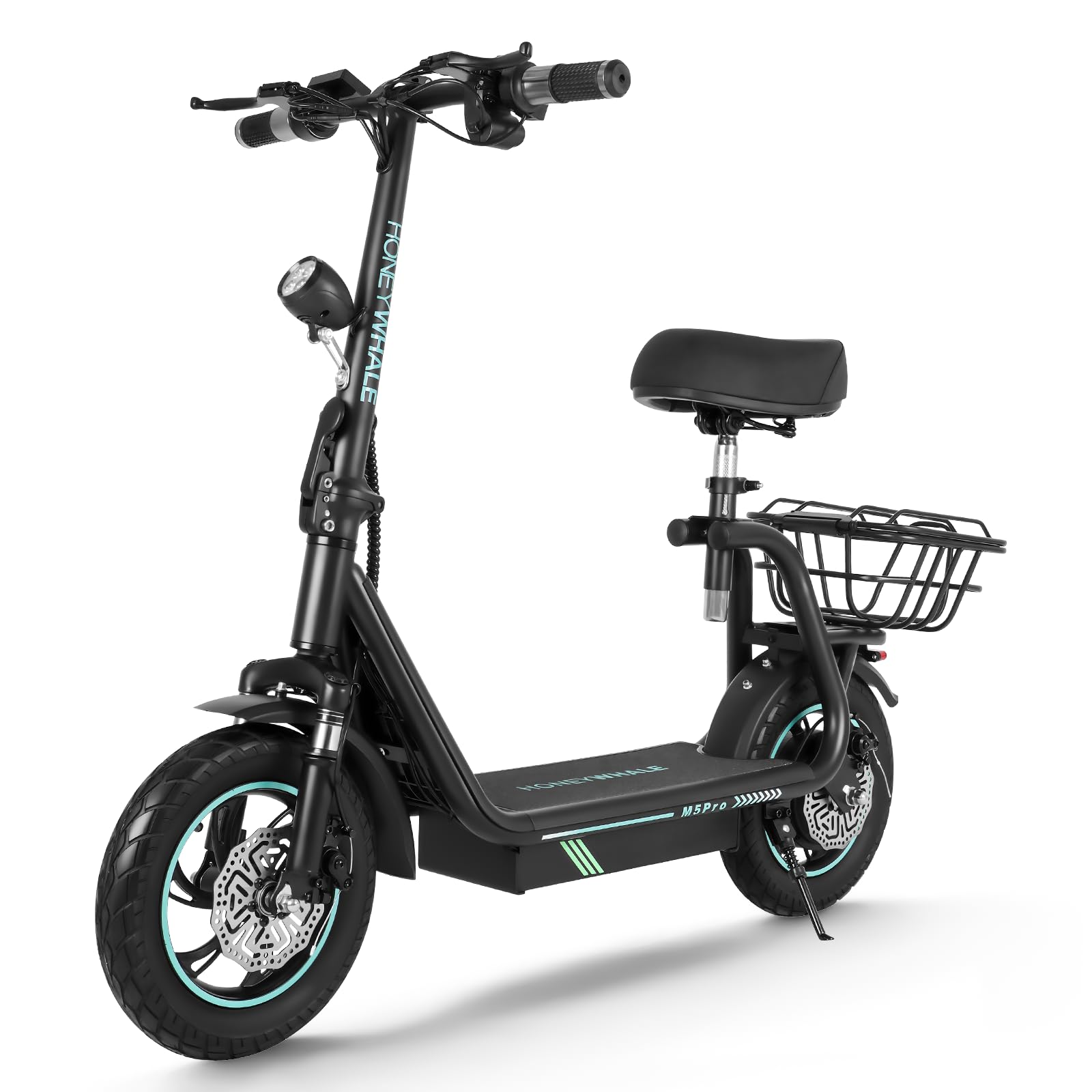
Image 1: The HONEYWHALE M5 Pro Electric Scooter, showcasing its sleek design and key features like 40 km/h max speed, 15° max climbing angle, 650W motor, and 12-inch wheels.
2. Safety Information
Your safety is paramount. Always adhere to the following guidelines:
- Always wear a helmet and appropriate protective gear (knee pads, elbow pads) when riding.
- Familiarize yourself with local laws and regulations regarding electric scooter use.
- Do not ride in wet conditions, heavy rain, or through puddles deeper than 2 cm.
- Avoid riding on uneven surfaces, steep inclines, or slippery terrain.
- Maintain a safe distance from other vehicles and pedestrians.
- Regularly check the brakes, tires, and all fasteners before each ride.
- Do not allow children under 16 years old to operate the scooter.
- Do not perform stunts or sudden maneuvers.
3. Package Contents
Ensure all items are present and in good condition upon unpacking:
- HONEYWHALE M5 Pro Electric Scooter
- Charger
- Instruction Manual
- Mobile Phone Holder
- Rear Basket
- Assembly Tools (Allen wrenches, spanner)
4. Assembly
Your HONEYWHALE M5 Pro Electric Scooter comes partially assembled. Follow these steps to complete the assembly:
- Unfold the Scooter: Carefully lift the handlebar stem until it locks into place. Ensure the folding mechanism is securely latched.
- Attach the Handlebars: Connect the handlebar assembly to the stem. Ensure all cables are properly routed and not pinched. Secure the handlebars using the provided screws and Allen wrench.
- Install the Seat (Optional): The seat is detachable and adjustable. If installing, align the seat post with the designated slot on the scooter's deck and secure it with the provided fasteners. Adjust the height to your preference.
- Install Rear Basket: Attach the rear basket to the designated mounting points at the rear of the scooter using the provided screws and tools.
- Install Mobile Phone Holder: Mount the mobile phone holder onto the handlebar as desired.
For detailed visual instructions on seat installation/removal, please refer to the video below. While the video references a T4A/T4B model, the general process for attaching/detaching the seat and shock absorbers is similar for the M5 Pro.
Video 1: Instructions for installing and removing the seat and shock absorbers on a HONEYWHALE scooter. This process is generally applicable to the M5 Pro model.

Image 2: The adjustable seat with a large, soft foam cushion for comfortable riding.

Image 3: The rear storage basket, designed to facilitate the transport of items.

Image 4: The included mobile phone holder for convenient access to your device while riding.
5. Charging the Battery
Before your first ride, fully charge the scooter's battery.
- Locate the charging port on the scooter.
- Ensure the scooter is powered off.
- Connect the charger to the charging port, then plug the charger into a standard electrical outlet.
- The indicator light on the charger will typically turn red during charging and green when fully charged.
- Charging time is approximately 5-7 hours. Do not overcharge.
- Disconnect the charger once charging is complete.

Image 5: The scooter highlighting its 10AH battery capacity, 35KM maximum range, and 120KG maximum load.
6. Operating Instructions
Follow these steps to operate your M5 Pro Electric Scooter:
- Power On: Insert the key into the ignition and turn it to the 'ON' position. Press and hold the power button on the LCD display until the screen illuminates.
- Start Riding: Place one foot on the scooter deck and push off with the other foot to gain initial momentum. Once moving, gently twist the throttle on the right handlebar to accelerate.
- Adjust Speed Modes: The LCD panel allows you to switch between different speed modes. Refer to the display for current speed, battery level, and selected gear.
- Braking: Use the brake levers on the handlebars to engage the dual front and rear brakes. Apply both brakes gently and evenly for smooth stopping.
- Lights and Horn: Use the dedicated buttons on the handlebar to activate the LED headlights and horn for visibility and safety.
- Power Off: Once you have finished riding, turn the key to the 'OFF' position and press and hold the power button on the LCD display until the screen turns off.

Image 6: The high-definition LCD display panel showing battery charge, speed, gear, and distance.
7. Folding and Storage
The M5 Pro features a convenient one-button folding mechanism for easy transport and storage.
- Ensure the scooter is powered off.
- Locate the folding latch mechanism at the base of the handlebar stem.
- Press the release button and fold the handlebar stem downwards until it clicks into place, securing it to the rear fender.
- Once folded, the scooter can be easily carried or stored in compact spaces.

Image 7: The scooter in its folded state, illustrating its compact dimensions for storage.
8. Maintenance
Regular maintenance ensures the longevity and safe operation of your scooter.
- Cleaning: Wipe the scooter with a damp cloth after use. Avoid using high-pressure water jets or harsh chemicals.
- Tires: Check tire pressure regularly. The 12-inch durable tires are designed for improved grip.
- Brakes: Inspect brake levers and cables for proper function and wear. Adjust if necessary.
- Battery Care: Store the scooter in a cool, dry place. If storing for extended periods, charge the battery to about 50-70% every 2-3 months to prevent deep discharge.
- Fasteners: Periodically check all screws and bolts to ensure they are tight.
- Suspension: The improved damping system requires minimal maintenance, but ensure no visible damage or leaks.
9. Troubleshooting
Here are some common issues and their potential solutions:
| Problem | Possible Cause | Solution |
|---|---|---|
| Scooter does not power on | Low battery; Power button not pressed correctly; Key not in 'ON' position | Charge battery; Press power button firmly; Ensure key is turned to 'ON' |
| Reduced range/speed | Low tire pressure; Overloaded; Riding uphill frequently; Old battery | Inflate tires to recommended pressure; Reduce load; Ride on flatter terrain; Consider battery replacement if old |
| Brakes not effective | Brake pads worn; Brake cable loose | Inspect and replace brake pads; Adjust brake cable tension |
| Unusual noises | Loose components; Debris in wheels/brakes | Check all fasteners; Inspect wheels and brakes for foreign objects |
10. Specifications
Technical details of your HONEYWHALE M5 Pro Electric Scooter:
- Model: M5 Pro
- Brand: HONEYWHALE
- Motor Power: 650W / 48V
- Maximum Speed: 35-40 km/h
- Maximum Climbing Slope: 15°
- Battery Capacity: 10AH Lithium Ion
- Range per Charge: 30-35 KM (varies by conditions)
- Frame Material: High-quality Aluminum Alloy
- Maximum Weight Capacity: 120 kg
- Wheel Size: 12 Inches
- Tire Type: Durable, anti-slip tread
- Braking System: Dual Front and Rear Brakes
- Suspension: Front Suspension, Improved Damping System
- Display: High-definition LCD Panel (battery, speed, gear, distance)
- Folding Mechanism: One-button folding
- Unfolded Dimensions: 117 cm (L) × 62 cm (W) × 94 cm (H)
- Scooter Weight: 20.5 kg
- Included Accessories: Charger, Mobile Phone Holder, Rear Basket

Image 8: Visual representation of the scooter's performance capabilities, including 40 km/h max speed, 15° climbing angle, 650W motor, and 12-inch tires.

Image 9: Illustration of the scooter's robust design supporting a maximum load capacity of 120 kg.

Image 10: Close-up view of the front suspension and disc brakes, highlighting the scooter's safety and comfort features.

Image 11: Detail of the 12-inch tires, emphasizing their durability and improved tread for better grip.
11. Warranty and Support
Your HONEYWHALE M5 Pro Electric Scooter comes with a manufacturer's warranty. Please refer to the warranty card included in your package for specific terms and conditions. For technical support, spare parts, or any inquiries, please contact HONEYWHALE customer service through the official channels provided in your product documentation.


