
1. Introduction
The Wengart WG526 Underfloor Heating Wiring Centre is a centralized control unit designed to manage underfloor heating systems efficiently. It supports up to 8 independent heating zones, connecting 230V thermostats and their corresponding actuators. This unit integrates control for both the boiler and the water pump, activating them only when there is a heating demand from any zone, thereby optimizing energy consumption. Its clear output indicators provide immediate status feedback for all connected components.

Figure 1: Front view of the Wengart WG526 Underfloor Heating Wiring Centre, a white rectangular unit with a black control panel on the right displaying indicator lights for 8 zones and system status.
2. Safety Information
Please read this section carefully before installation or operation to ensure safe use and prevent damage to the product or property.
- Electrical Safety: Installation and wiring must be performed by a qualified electrician in accordance with local electrical codes and regulations. Ensure the main power supply (AC 220V) is disconnected before any wiring work.
- Voltage: This device operates on 230V AC. Do not connect it to any other voltage supply.
- Environment: Install the unit in a dry, well-ventilated area, away from direct sunlight, heat sources, and moisture.
- Maintenance: Do not attempt to open or repair the unit yourself. Refer all servicing to qualified personnel.
- Children: Keep the device out of reach of children.
3. Product Overview
The WG526 wiring centre is designed for ease of installation and centralized control of your underfloor heating system. It features:
- Support for up to 8 underfloor heating zones.
- Direct power supply for water heating thermostats and external water pumps.
- Integrated control for boiler and water pump activation based on heating demand.
- Clear LED indicators for output status of actuators, water pump, and boiler.
- Centralized wiring for a neat and accessible installation.
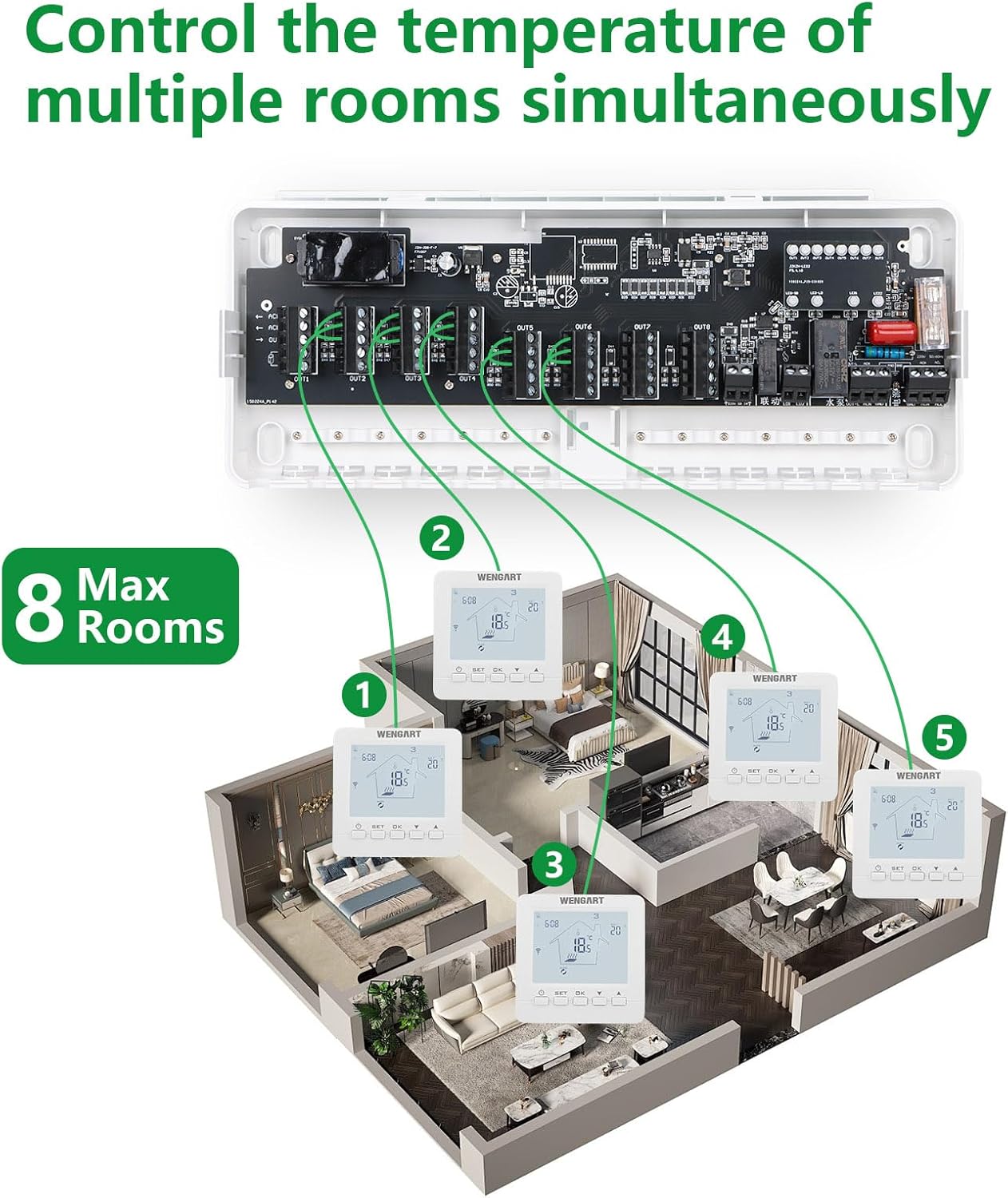
Figure 2: Internal view of the Wengart WG526 Wiring Centre with the cover removed, revealing the circuit board and clearly labeled screw terminals for connecting thermostats, actuators, boiler, and water pump.
4. Specifications
| Attribute | Value |
|---|---|
| Brand | WENGART |
| Model Number | WG526 |
| Color | White |
| Product Dimensions (L x W x H) | 26.11 x 10.9 x 3.99 cm (10.9 x 4.33 x 1.57 inches) |
| Power | 10 Watts |
| Voltage | 230 Volts |
| Material | Plastic |
| Features | 8-zone heating hub |
| Item Weight | 550 g |
| Controller Type | Manual Control |
| Specific Product Uses | Centralized control of water heating |
| Temperature Control Type | Automatic |
| Included Components | Underfloor heating actuators, wiring centre |

Figure 3: Diagram showing the physical dimensions of the Wengart WG526 Wiring Centre: 277mm (10.9 inches) in length, 110mm (4.33 inches) in width, and 40mm (1.57 inches) in depth.
5. Setup and Installation
Installation of the Wengart WG526 Wiring Centre should be carried out by a qualified professional due to the involvement of 230V AC power. Ensure all power is disconnected before beginning installation.
5.1 General Installation Guidelines
- Mount the wiring centre in an easily accessible location, preferably near the underfloor heating manifold and boiler.
- Ensure adequate space around the unit for ventilation and future maintenance.
- The unit is designed for centralized wiring, bringing all room thermostat and actuator cables to one point.
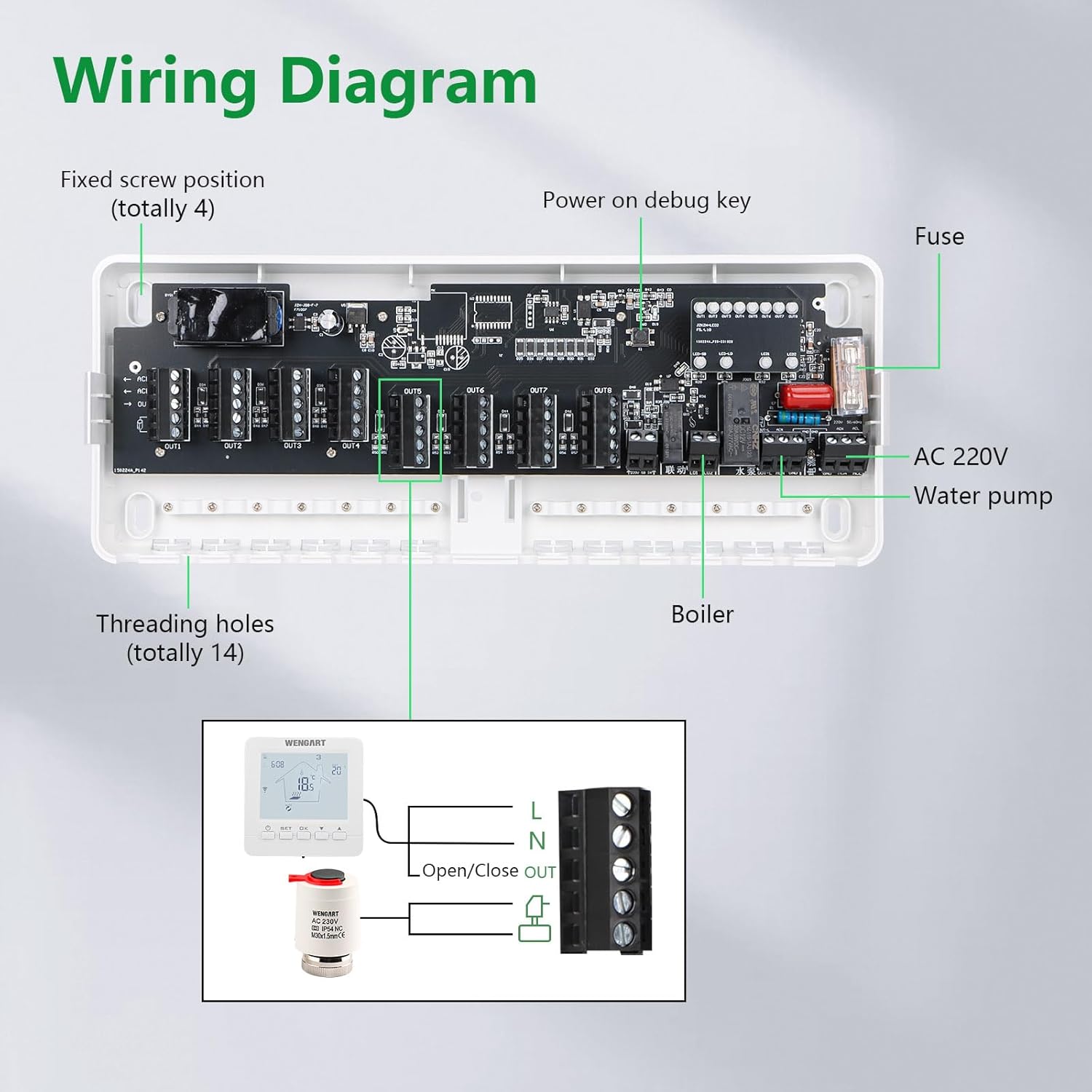
Figure 4: An illustrative diagram showing the Wengart WG526 Wiring Centre connected to multiple room thermostats and an underfloor heating manifold system, demonstrating its capability to control heating in up to 8 distinct zones within a building.

Figure 5: A simplified system diagram showing the Wengart WG526 Master Control Panel connected to two thermostats, a pump, NC actuators, and a boiler, illustrating the overall flow of an underfloor heating system.
6. Wiring Diagram
The following diagram illustrates the connection points for the Wengart WG526 Wiring Centre. Ensure all connections are secure and correctly terminated.

Figure 6: A comprehensive wiring diagram illustrating connections for the Wengart WG526 Wiring Centre, including inputs for AC 220V, outputs for water pump and boiler, and connections for up to 8 thermostats and their corresponding actuators. Key components like the fuse and debug key are also indicated.
6.1 Connection Points
- AC 220V Input: Connect the main power supply to the designated terminals.
- Water Pump Output: Connect the water pump for the underfloor heating system.
- Boiler Output: Connect to the boiler's control input for activation.
- Thermostat Inputs (OUT1-OUT8): Each zone's thermostat connects here. The thermostat signals demand for heating.
- Actuator Outputs (OUT1-OUT8): Each output corresponds to a zone and controls the respective underfloor heating actuator.
- Fixed Screw Position: (Total 4) For secure mounting of the unit.
- Threading Holes: (Total 14) For cable management.
- Power On Debug Key: Used for testing and diagnostics during installation.
- Fuse: Provides overcurrent protection for the unit.
7. Operating Instructions
Once properly installed and wired, the Wengart WG526 Wiring Centre operates automatically based on the demand from connected thermostats.
- Heating Demand: When any connected thermostat detects that the room temperature is below its setpoint, it sends a signal to the WG526.
- Actuator Activation: The WG526 activates the corresponding actuator for that zone, allowing hot water to flow through the underfloor heating pipes.
- Boiler and Pump Control: If there is a demand for heating from any zone, the WG526 will simultaneously activate the connected boiler and water pump. When all heating demands are met, the boiler and pump will be switched off, saving energy.
- Output Indicators: The LED indicators on the front panel will illuminate to show which zones are active, and whether the water pump and boiler outputs are engaged.
8. Maintenance
The Wengart WG526 Wiring Centre requires minimal maintenance. Follow these guidelines to ensure optimal performance and longevity:
- Cleaning: Periodically wipe the exterior of the unit with a soft, dry cloth. Do not use abrasive cleaners or solvents. Ensure the unit is powered off before cleaning.
- Inspection: Annually inspect the wiring connections to ensure they are secure and free from corrosion. This should be done by a qualified electrician.
- Ventilation: Ensure that the ventilation openings are not obstructed to prevent overheating.
9. Troubleshooting
If you encounter issues with your Wengart WG526 Wiring Centre, refer to the following table for common problems and solutions.
| Problem | Possible Cause | Solution |
|---|---|---|
| No power to the unit | Main power supply off, blown fuse, loose wiring. | Check main power switch. Inspect and replace fuse if necessary (ensure correct rating). Verify all power connections are secure. |
| Zone not heating | Thermostat not calling for heat, faulty actuator, wiring issue to actuator/thermostat. | Check thermostat setting and battery (if applicable). Verify thermostat is correctly wired to the WG526. Check actuator for proper function and wiring. Observe LED indicator for the specific zone. |
| Boiler/Pump not activating | No heating demand from any zone, wiring issue to boiler/pump, faulty boiler/pump. | Ensure at least one zone is calling for heat. Check wiring connections to the boiler and water pump. Verify boiler and pump are operational independently. Observe boiler/pump LED indicators on the WG526. |
| LED indicators not working | Unit not powered, internal fault. | Check power supply. If power is present and no indicators work, contact support. |
For issues not listed above or if troubleshooting steps do not resolve the problem, please contact Wengart customer support.
10. Warranty and Support
Wengart products are manufactured to high-quality standards. For specific warranty details, please refer to the warranty card included with your product or visit the official Wengart website. If you require technical assistance or have questions regarding your WG526 Wiring Centre, please contact Wengart customer support through their official channels.