
ULTRARM MAAC-P
ULTRARM Monitor Mount Reinforcement Plate MAAC-P Instruction Manual
Model: MAAC-P
Introduction
The ULTRARM Monitor Mount Reinforcement Plate is designed to protect your tabletop from potential damage caused by the stress of monitor mount installations. It distributes the weight of your monitor mount over a larger surface area, reducing stress points and minimizing the risk of distortion, scratches, or cracks on thin, glass, or other fragile tabletop surfaces. This plate is compatible with both C-clamp and grommet mounting bases.

Image: ULTRARM Reinforcement Plate, including the top and bottom plates, and its packaging.
Package Contents
Verify that all components are present before beginning installation:
- 1 x Top Reinforcement Plate
- 1 x Bottom Reinforcement Plate
- Anti-slip and anti-scratch pads (pre-applied or included)

Image: Diagram illustrating the benefits of the reinforcement plate, including weight distribution and anti-scratch properties.
Setup and Installation
The reinforcement plate is designed for easy integration with existing monitor arm setups. It can be used with both C-clamp and grommet mounting methods.
General Installation Steps:
- Prepare your workspace: Ensure your desk surface is clean and free of debris.
- Identify mounting type: Determine if your monitor arm uses a C-clamp or a grommet mount.
- Position the plates:
- For C-clamp mounts: Place the top reinforcement plate on the desk surface where the monitor arm's clamp will rest. Position the bottom reinforcement plate directly underneath the desk, aligning it with the top plate.
- For grommet mounts: Place the top reinforcement plate on the desk surface, aligning its central hole with the grommet hole. Position the bottom reinforcement plate underneath the desk, aligning its central hole with the grommet hole and the top plate.
- Install monitor arm: Proceed with the installation of your monitor arm according to its specific instructions, ensuring that its clamping or grommet mechanism securely engages with both the top and bottom reinforcement plates. Tighten all fasteners firmly but do not overtighten.
Visual Guide for Mounting Options:

Image: C-clamp mount with the reinforcement plate installed on a wooden desk. The plate is positioned between the clamp and the desk surface.
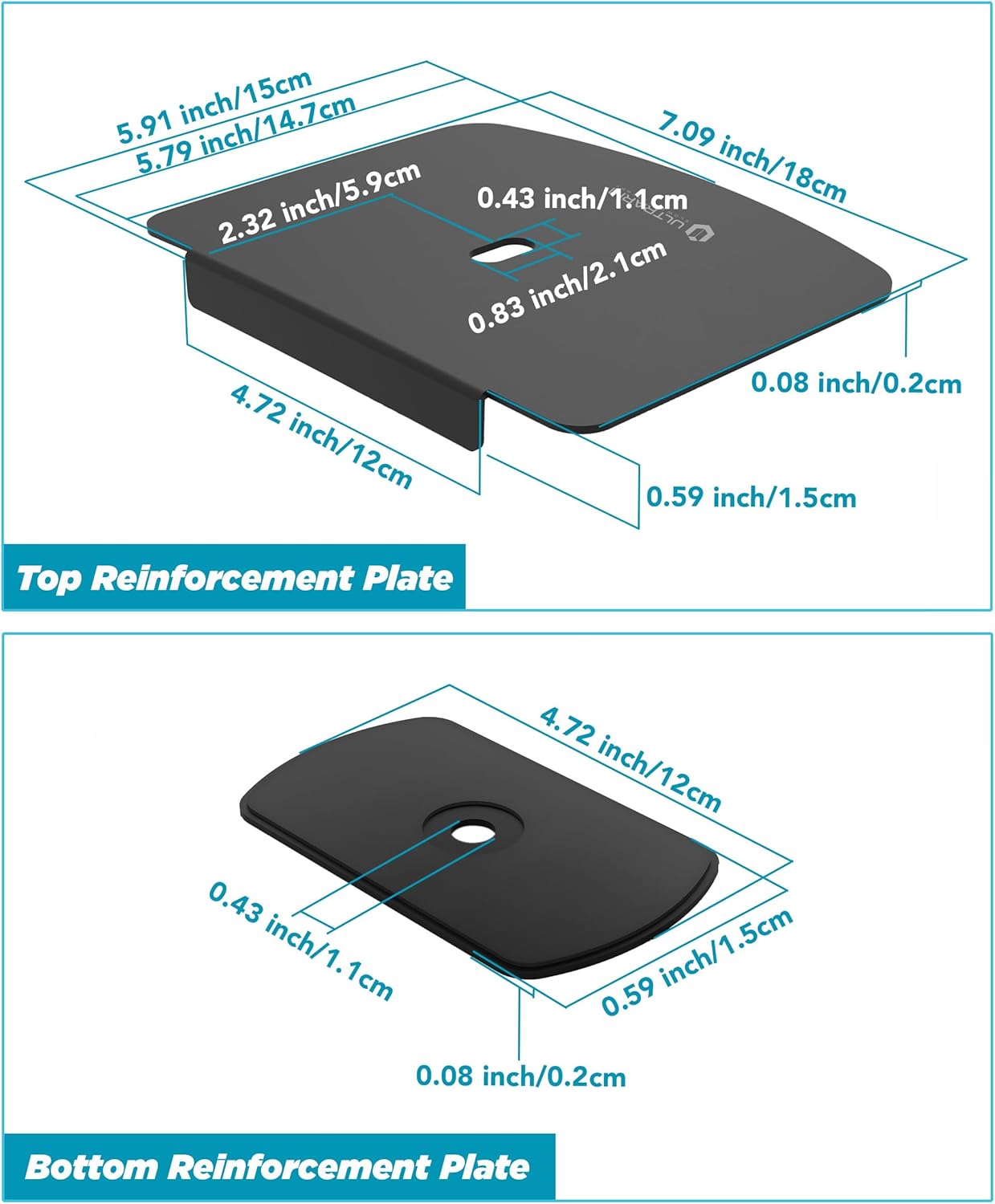
Image: Grommet mount with the reinforcement plate installed on a wooden desk. The plate is positioned around the grommet hole, distributing pressure.
The reinforcement plates are designed to spread the pressure from the monitor arm's clamp or grommet fitting over a wider area, preventing localized stress that can damage the tabletop. The anti-slip pads ensure the plates remain securely in place during and after installation.
Operating Considerations
Once installed, the reinforcement plate operates passively by distributing the weight and pressure of your monitor arm. No active operation is required. Ensure that the monitor arm is securely fastened to the reinforcement plates and the tabletop to maintain stability.
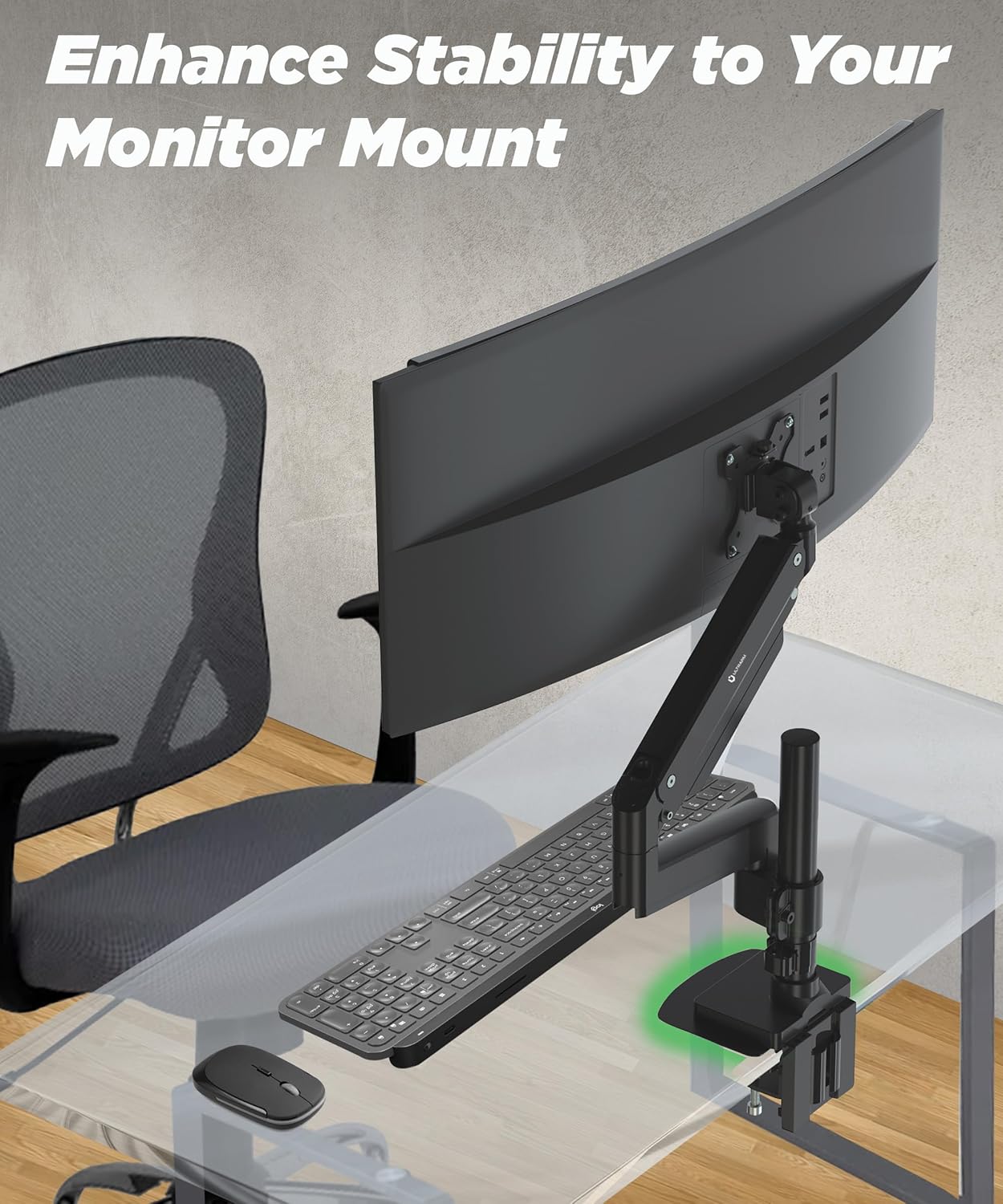
Image: A monitor arm securely mounted on a glass desk, demonstrating the enhanced stability provided by the reinforcement plate.
Maintenance
The ULTRARM Reinforcement Plate requires minimal maintenance. Periodically check the tightness of your monitor arm's clamp or grommet bolt to ensure it remains secure. Clean the plates with a soft, dry cloth if necessary. Avoid using abrasive cleaners or solvents.
Troubleshooting
- Issue: Monitor arm feels unstable.
Solution: Ensure that both the top and bottom reinforcement plates are correctly aligned and that the monitor arm's clamp or grommet bolt is tightened securely. Check that the tabletop material is suitable for monitor arm mounting, even with reinforcement.
- Issue: Visible marks or indentations on the tabletop.
Solution: Verify that the anti-slip and anti-scratch pads are properly positioned and intact on both reinforcement plates. If damage has occurred, it may indicate excessive tightening or an unsuitable tabletop material for the weight being supported.
- Issue: Reinforcement plate shifts during use.
Solution: Re-tighten the monitor arm's clamp or grommet bolt. Ensure the anti-slip pads are clean and providing adequate grip. If the issue persists, the monitor arm might be exerting uneven pressure.
Specifications
| Feature | Detail |
|---|---|
| Brand | ULTRARM |
| Model Number | MAAC-P |
| Material | Alloy Steel |
| Color | Black |
| Item Weight | 1.32 pounds (0.6 kg) |
| Product Dimensions (Top Plate) | Approx. 7.09 x 5.91 x 0.98 inches (18 x 15 x 2.5 cm) |
| Product Dimensions (Bottom Plate) | Approx. 4.72 x 2.32 x 0.98 inches (12 x 5.9 x 2.5 cm) |
| Compatible Mounting Types | C-Clamp and Grommet Monitor Arm Desk Mounts |

Image: Detailed dimensional drawing of the top and bottom reinforcement plates.
Warranty and Support
The ULTRARM Monitor Mount Reinforcement Plate MAAC-P comes with a 2-year warranty. For support, warranty claims, or further inquiries, please contact ULTRARM customer service through their official channels or the retailer where the product was purchased.
You can visit the official ULTRARM store for more information: ULTRARM Store
Related Documents - MAAC-P
 |
ULTRARM MA20P-S Instruction Manual Official instruction manual for the ULTRARM MA20P-S monitor arm. Learn how to assemble, install, and adjust your monitor for optimal ergonomics. Features VESA compatibility (75x75, 100x100), 17-57 inch screen support, and a 2-20kg weight capacity. Includes cable management and dual monitor setup guidance. |
 |
ULTRARM MA20P-S Monitor Arm User Manual User manual for the ULTRARM MA20P-S monitor arm, detailing installation, assembly, and adjustment procedures for single and dual monitor setups. Includes VESA compatibility, weight capacity, and troubleshooting tips. |
 |
LiftSync Pro User Manual: Assembly, Operation, and Safety Guide This comprehensive user manual for the LiftSync Pro adjustable standing desk frame provides detailed instructions for assembly, controller functions, error code troubleshooting, and essential safety guidelines. Includes component and hardware lists. |
 |
LiftSync Pro Adjustable Standing Desk User Manual Comprehensive user manual for the LiftSync Pro adjustable standing desk, covering installation, operation, menu functions, error codes, and safety instructions. Features include a powerful lift system, high load capacity, and easy assembly. |
 |
CMS Electracom Viva Duo Non-QI2 AU Configurations: Technical Guide Explore the configuration options for the CMS Electracom Viva Duo Non-QI2 AU, a modular desk power and charging solution. Details clamp types, USB AC modules, and color variations. |
 |
VIVO 43" x 24" Table Top - Installation Guide & Product Information Comprehensive installation guide and product information for the VIVO 43" x 24" Table Top (DESK-TOP43B/C/D/G/N/P/W). Includes setup instructions, safety warnings, and support contact details. |