
1. Introduction
The Pyle PDWM18BT is a versatile 2-in-1 Bluetooth Transmitter and Receiver designed to integrate wireless audio capabilities into your home entertainment system. This device allows you to stream audio from non-Bluetooth sources (like TVs or CD players) to Bluetooth headphones or speakers (Transmitter mode), or receive audio from Bluetooth-enabled devices (like smartphones) and output it to wired speakers (Receiver mode). It features Bluetooth 5.0 for stable connections, an LCD display for easy operation, and supports Optical and AUX audio connections.
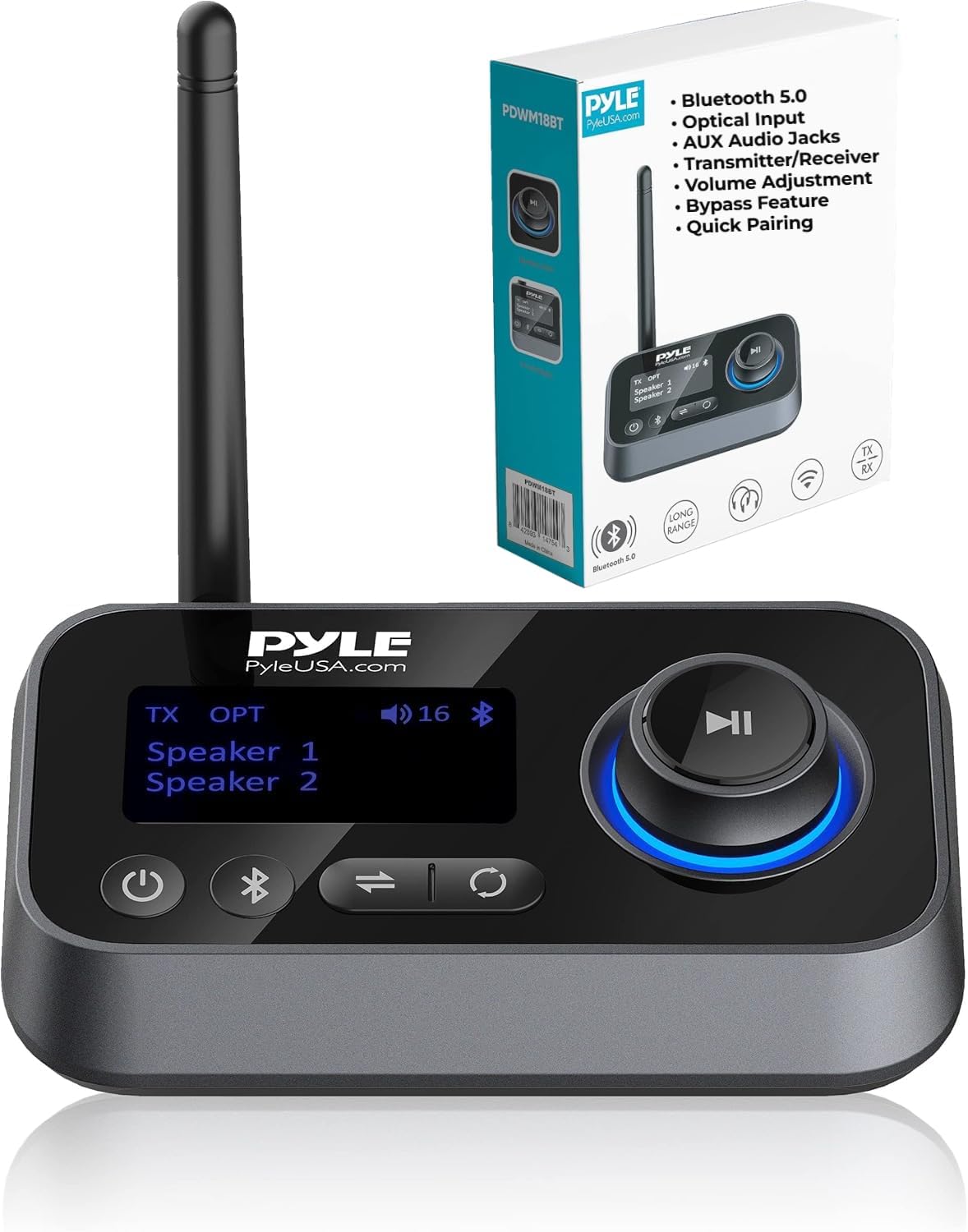
Image: The Pyle PDWM18BT device shown with its retail packaging, highlighting key features such as Bluetooth 5.0, optical input, AUX audio jacks, and its transmitter/receiver functionality.
2. Safety Information
- Read all instructions before using the device.
- Do not expose the device to extreme temperatures, moisture, or direct sunlight.
- Avoid dropping or subjecting the device to strong impacts.
- Do not attempt to disassemble or repair the device yourself. Refer all servicing to qualified personnel.
- Use only the provided power cable and accessories.
- Keep the device away from children.
3. Package Contents
Verify that all items are present in the package:
- Bluetooth Transceiver (PDWM18BT)
- Optical Audio Cable
- 3.5mm Audio Cable
- 3.5mm to RCA Audio Cable
- Type-C Power Cable

Image: The Pyle PDWM18BT unit displayed alongside its included accessories: an optical cable, a Type-C power cable, a 3.5mm audio cable, and a 3.5mm to RCA audio cable.
4. Product Overview: Parts and Functions
Familiarize yourself with the various parts and controls of the PDWM18BT device.

Image: A detailed diagram illustrating the various ports, buttons, and display elements of the Pyle PDWM18BT, including the Type-C charging port, input/output jacks, MFB, search/pair button, mode switch, and power button.
- Power ON/OFF Button: Press and hold to power the device on or off.
- Wireless BT Pairing/Re-pairing Button: Initiates Bluetooth pairing or re-pairing.
- Mode Switch (TX/RX/BYPASS): Toggles between Transmitter, Receiver, and Bypass modes.
- MFB (Multi-Function Button) / Rotary Knob:
- In RX Mode: Pause/Play, Volume +/-.
- In TX Mode: Up/Down/Confirm for menu navigation.
- 1.8" LCD Display: Shows current mode, connected devices, volume, and other status information.
- Type-C Charging Port: Connects to the power source using the provided Type-C cable.
- Input (TX mode) / Output (RX mode) Ports: Includes Optical and AUX audio jacks for connecting to external audio equipment.
5. Setup and Connection
Before operation, ensure the device is powered. Connect the Type-C power cable to the device and a USB power adapter (not included) or a USB port on your TV/computer.

Image: A visual guide demonstrating how to connect the Pyle PDWM18BT to a TV/audio source and a sound system using RCA, AUX, and Optical cables.
5.1. Transmitter (TX) Mode Setup
Use TX mode to send audio wirelessly from a non-Bluetooth device (e.g., TV, CD player) to Bluetooth headphones or speakers.
- Connect Audio Source: Connect your TV or audio source to the PDWM18BT's Input port using either the Optical Audio Cable or the 3.5mm Audio Cable (or 3.5mm to RCA).
- Select TX Mode: Slide the mode switch to TX. The LCD will display "TX".
- Pair Bluetooth Device:
- Put your Bluetooth headphones or speakers into pairing mode.
- On the PDWM18BT, press the Bluetooth pairing button. The device will search for nearby Bluetooth devices.
- Select your device from the list on the LCD using the rotary knob and press the MFB to confirm.
- Once connected, audio from your source will stream to your Bluetooth device.
- TV Audio Settings (Important for Optical): If using an optical connection with a TV, you may need to adjust your TV's audio output settings. Set the digital audio output format to PCM (Pulse Code Modulation) instead of Dolby Digital or DTS. Refer to your TV's manual for specific instructions.
5.2. Receiver (RX) Mode Setup
Use RX mode to receive audio wirelessly from a Bluetooth-enabled device (e.g., smartphone, tablet) and output it to wired speakers or a stereo system.
- Connect Audio Output: Connect your wired speakers or stereo system to the PDWM18BT's Output port using either the Optical Audio Cable or the 3.5mm Audio Cable (or 3.5mm to RCA).
- Select RX Mode: Slide the mode switch to RX. The LCD will display "RX".
- Pair Bluetooth Device:
- On your smartphone or tablet, enable Bluetooth and search for "Pyle".
- Select "Pyle" from the list of available devices to connect.
- Once connected, audio from your Bluetooth device will play through your wired speakers.
5.3. Bypass Mode
Bypass mode allows you to pass audio directly from your source to your wired speakers without Bluetooth processing. This is useful if you want to use your wired speakers and simultaneously transmit audio to Bluetooth headphones (in TX mode) or simply pass audio through when the Bluetooth function is not needed.

Image: A visual representation of the TX/Bypass/RX mode switch, indicating how to select Bypass mode for direct audio passthrough.
- Connect Audio Source: Connect your TV or audio source to the PDWM18BT's Input port.
- Connect Wired Speakers: Connect your wired speakers to the PDWM18BT's Output port.
- Select BYPASS Mode: Slide the mode switch to BYPASS. Audio will flow directly from the input to the output.
6. Operating Instructions
6.1. Power On/Off
Press and hold the Power button (⏻) for approximately 3 seconds to turn the device on or off.
6.2. Volume Control (RX Mode)
In Receiver (RX) mode, rotate the MFB knob to adjust the output volume. Press the MFB to pause or play audio.
6.3. Connecting Multiple Devices (TX Mode)
The PDWM18BT can simultaneously stream audio to two Bluetooth headphones or speakers in TX mode. After pairing the first device, put the second device into pairing mode and press the Bluetooth pairing button on the PDWM18BT again to connect the second device.
7. Troubleshooting
- No Power:
- Ensure the Type-C power cable is securely connected to the device and a working USB power source.
- Verify the power source is active.
- Cannot Pair Bluetooth Device:
- Ensure the PDWM18BT is in the correct mode (TX for transmitting, RX for receiving).
- Place your Bluetooth device (headphones/speakers/smartphone) in pairing mode.
- Ensure the devices are within the wireless range (30+ ft).
- Clear previous Bluetooth connections on both the PDWM18BT and your device, then try pairing again.
- Some Bluetooth devices, like certain AirPods, may have specific pairing requirements or compatibility issues.
- No Sound / Distorted Sound:
- Check all cable connections (Optical, AUX, RCA) are secure and in the correct input/output ports.
- Verify the PDWM18BT is in the correct mode (TX/RX/BYPASS).
- Adjust the volume on both the PDWM18BT and the connected audio device.
- If using Optical input from a TV in TX mode, ensure the TV's digital audio output is set to PCM. Dolby Digital or DTS formats are not supported and will result in no sound or static.
- If a high-pitched tone is heard, especially with HiFi systems, try adjusting audio settings on the source device or ensure proper grounding.
- Audio Delay (Latency):
- While the device is designed for low delay, some latency can occur depending on the connected Bluetooth headphones/speakers and the audio source.
- Ensure your Bluetooth headphones/speakers support low-latency codecs if available.
- Device Goes to Sleep:
- If the device seems to power off or disconnect when not in use, ensure it is receiving constant power. Some USB ports on TVs may power down when the TV is off or in standby.
8. Specifications
| Feature | Specification |
|---|---|
| Bluetooth Version | 5.0 |
| Bluetooth Network Name | 'Pyle' |
| Wireless Range | 30+ ft. |
| Supported Profiles | A2DP, AVRCP |
| Audio Codecs | SBC |
| Input Voltage / Current | DC5.0V / 500mA |
| Construction Material | ABS and PC |
| Product Dimensions (L x W x H) | 11.3'' x 3.07'' x 1.30'' -inches |
| Item Weight | 0.43 lbs (approx. 6.88 ounces) |
| LCD Display Size | 1.8 inches |
9. Maintenance
- Cleaning: Use a soft, dry cloth to clean the device. Do not use liquid cleaners or aerosols.
- Storage: Store the device in a cool, dry place away from direct sunlight and extreme temperatures.
- Cable Care: Avoid bending or crimping the cables excessively to prevent damage.
10. Warranty and Support
For warranty information or technical support, please refer to the official Pyle website or contact their customer service department. Keep your purchase receipt as proof of purchase for any warranty claims.
For further assistance, visit: www.pyleusa.com


