Product Overview
This manual provides instructions for the Replacement Remote Control designed for the Leelbox Q3 Android 7.1 TV Box S912. This remote control is also compatible with specific other Android boxes as detailed in the compatibility section.

Image: Front view of the black replacement remote control, showing its buttons and ergonomic design.
Important Compatibility Note: The remote you are replacing must look IDENTICAL in every way, including button placement, for this replacement remote to function correctly. It is not suitable for other Android boxes not explicitly listed as compatible.
Compatible Devices:
- Leelbox Q3 Android 7.1 TV Box S912
- S905 MXQ Pro Quick Play version only (other MXQ boxes are not compatible)
- RK8, K1 Plus, KIII, AE256, AE254, BB2 PRO, KB2, M8S+ (2G/8G, 2G/16G) Android TV Box
Setup
This remote control requires no programming. Simply install the batteries, and it will be ready for use with compatible devices.
Battery Installation:
- Locate the battery compartment on the back of the remote control.
- Slide the battery compartment cover downwards or in the direction indicated by an arrow to open it.
- Insert two (2) 1.5V AAA alkaline batteries into the compartment, ensuring the positive (+) and negative (-) terminals align correctly with the markings inside the compartment.
- Close the battery compartment cover by sliding it back into place until it clicks securely.
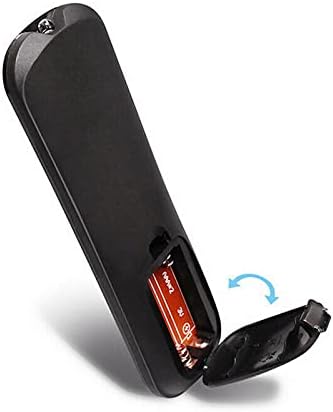
Image: Close-up view of the remote control's back, showing the battery compartment cover being slid open to reveal the battery slots.
Note: Batteries are not included with the remote control.
Operating Instructions
The remote control operates using infrared (IR) technology. Ensure there is a clear line of sight between the remote control and the IR receiver on your TV box for optimal performance.

Image: Overhead view of the remote control, highlighting various button groups and their functions, including power, navigation, media controls, and number pad.
Key Functions:
| Button/Section | Function |
|---|---|
| Power Button (Red) | Turns the TV box on or off. |
| Navigation Pad (Blue circle with OK) | Used to navigate menus (Up, Down, Left, Right) and select items (OK). |
| Volume Buttons (+/-) | Adjusts the volume level. |
| Mute Button | Mutes or unmutes audio. |
| Media Control Buttons (Play/Pause, Fast Forward, Rewind, Stop) | Controls media playback. |
| Home Button | Returns to the main home screen of the TV box. |
| Back Button | Goes back to the previous screen or menu. |
| Number Pad (0-9) | For direct input of numbers, such as channel selection or password entry. |
Maintenance
Proper care and maintenance will extend the life of your remote control.
- Cleaning: Use a soft, dry cloth to wipe the surface of the remote control. Do not use liquid cleaners, sprays, or abrasive materials, as these can damage the remote.
- Battery Replacement: Replace batteries when the remote's responsiveness decreases or it stops functioning. Always replace both batteries at the same time with new ones.
- Storage: If the remote control will not be used for an extended period, remove the batteries to prevent leakage and potential damage. Store in a cool, dry place.
- Avoid Damage: Do not drop the remote control, expose it to extreme temperatures, or immerse it in water.
Troubleshooting
If you experience issues with your remote control, refer to the following common solutions:
| Problem | Possible Cause / Solution |
|---|---|
| Remote is not responding. |
|
| Buttons are sticky or unresponsive. |
|
| Remote works intermittently. |
|
Specifications
| Feature | Detail |
|---|---|
| Model Compatibility | Leelbox Q3 Android 7.1 TV Box S912 and other specified models. |
| Connectivity Technology | Infrared (IR) |
| Controller Type | Button Control |
| Power Supply | 2 x 1.5V AAA Alkaline Batteries (not included) |
| Special Feature | Ergonomic Design |
| Dimensions (Approximate) |
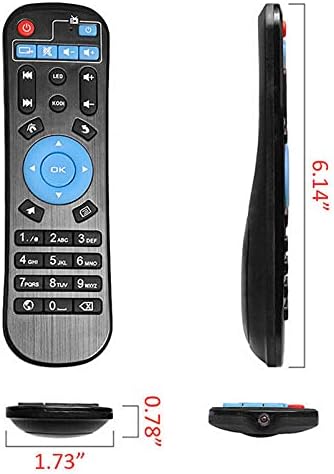 Image: Side-by-side view of the remote control, showing its length (6.14"), width (1.73"), and thickness (0.78") with measurement lines. |
| Manufacturer | NTQinParts |
| ASIN | B0B4JXMDSL |
Warranty and Support
As this is a generic replacement product, specific warranty details may vary. Please refer to the seller's return policy or contact the seller directly for information regarding warranty coverage or technical support.
For general inquiries or troubleshooting not covered in this manual, please contact the seller through the platform where the purchase was made.
Seller: NiceTQ
Amazon Product Page: https://www.amazon.com/dp/B0B4JXMDSL