
Universal Replacement Remote (Leelbox Q1/Q2 Compatible)
Replacement Remote Control Controller User Manual
Model: Universal Replacement Remote (Leelbox Q1/Q2 Compatible) | Brand: Generic
1. Introduction
This manual provides essential information for the proper use and maintenance of your new Replacement Remote Control Controller. This remote is designed to function as a direct replacement for specific Android TV Box models, ensuring seamless control without complex setup procedures. Please read this manual thoroughly before use.
2. Compatibility
This replacement remote control is specifically designed for the following Android TV Box models:
- Leelbox Q1
- Leelbox Q2
- S905 MXQ Pro (Quick Play version only)
- RK8
- K1 Plus
- KIII
- AE256
- AE254
- BB2 PRO
- KB2
- M8S+ (2G/8G, 2G/16G versions)
Important Note: For the S905 MXQ Pro, only the Quick Play version is compatible. The remote you are replacing must look IDENTICAL in every way, including button placement, for this replacement remote to function correctly. This remote is not suitable for other Android box models not listed above.
3. Key Features
- Direct compatibility with specified Leelbox Q1 and Q2 Android TV Boxes.
- No programming required for immediate use.
- Ergonomic design for comfortable handling.
- Standard button layout for intuitive control of TV box functions.
4. Setup
4.1. Battery Installation
The remote control requires two (2) 1.5V AAA alkaline batteries (not included). Follow these steps to install the batteries:
- Locate the battery compartment on the back of the remote control.
- Slide the battery compartment cover downwards or press the latch and lift to open.
- Insert two AAA batteries, ensuring the positive (+) and negative (-) terminals align correctly with the markings inside the compartment.
- Replace the battery compartment cover by sliding it back into place until it clicks securely.

Figure 4.1: The rear side of the remote control, featuring the battery compartment cover. This is where two AAA alkaline batteries are inserted.
Once batteries are installed, the remote is ready for use with your compatible Android TV Box.
5. Operating Instructions
This replacement remote control requires no programming. Simply install the batteries as described in Section 4.1, and it will be ready to operate your compatible Android TV Box.
5.1. Basic Functions
The remote features standard buttons for common TV box functions:
- Power Button: Turns the TV box on or off.
- Navigation Pad (Up/Down/Left/Right/OK): Used to navigate menus and select items.
- Volume Buttons (VOL+/-): Adjusts the volume.
- Numeric Keypad (0-9): For direct input of channels or other numerical data.
- Back/Return Button: Returns to the previous screen or menu.
- Home Button: Returns to the main home screen of the Android TV Box.
- APP Button: Accesses the applications menu.

Figure 5.1: This image displays the front of the remote control, highlighting its button layout including power, volume, navigation, and numeric keys. The design is sleek and black.
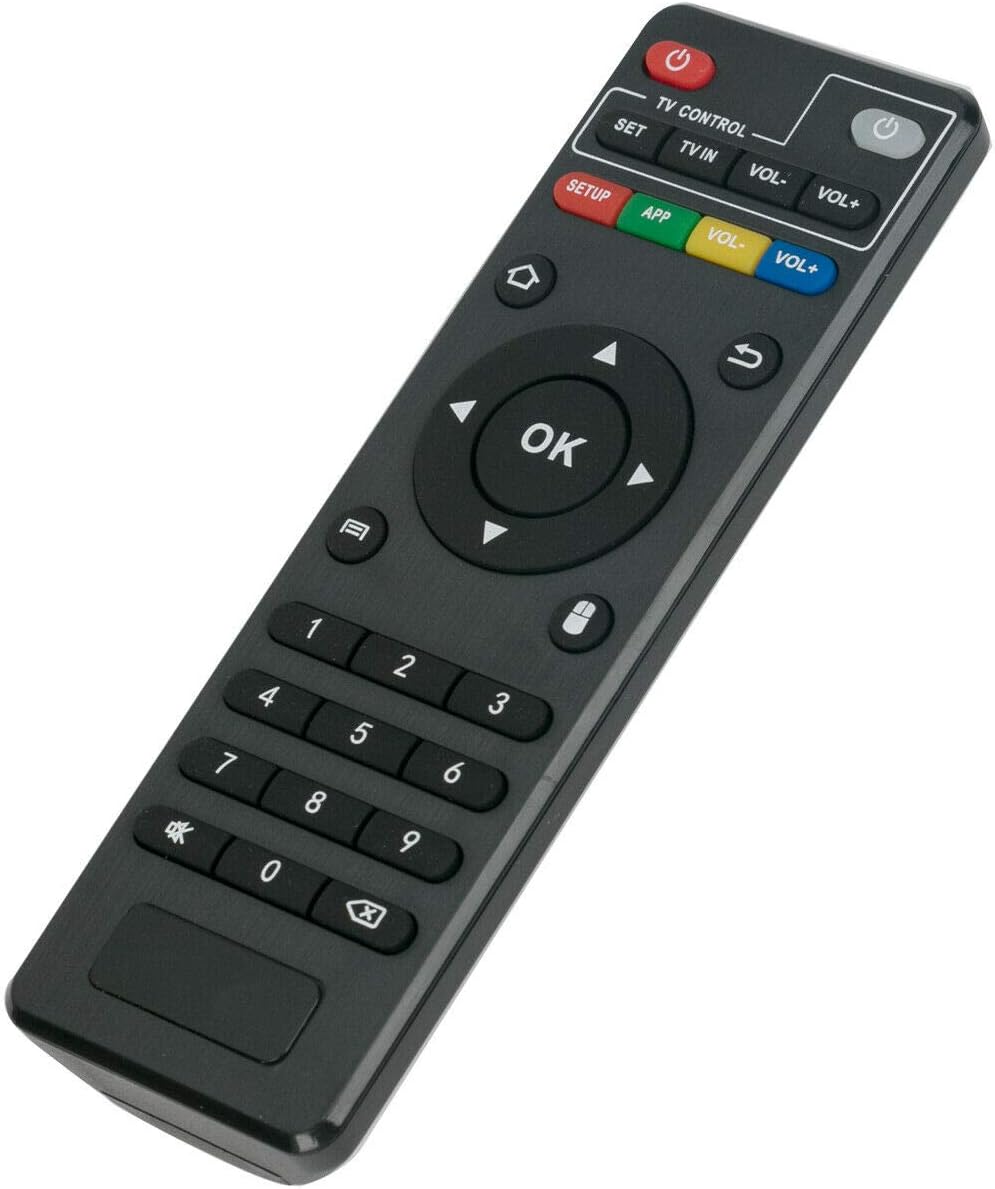
Figure 5.2: An angled perspective of the remote control, showing its ergonomic shape and the arrangement of its various function buttons.
6. Maintenance
6.1. Battery Replacement
When the remote control's performance degrades or it stops responding, it is likely time to replace the batteries. Follow the battery installation steps in Section 4.1 to replace the two (2) 1.5V AAA alkaline batteries.
Caution: Do not mix old and new batteries. Do not mix alkaline, standard (carbon-zinc), or rechargeable (nickel-cadmium) batteries. Remove batteries if the remote is not to be used for an extended period.
6.2. Cleaning
To clean the remote control, use a soft, dry cloth. Do not use abrasive cleaners, waxes, or solvents. Avoid getting moisture into any openings.
7. Troubleshooting
If you experience issues with your remote control, please refer to the following common problems and solutions:
| Problem | Possible Cause | Solution |
|---|---|---|
| Remote not responding. | Dead or incorrectly installed batteries. | Replace batteries with new 1.5V AAA alkaline batteries, ensuring correct polarity. |
| Remote not controlling the TV box. | Incompatible TV box model. | Verify your TV box model is listed in the compatibility section (Section 2). Ensure the original remote looked identical. |
| Interference or obstruction. | Ensure there are no objects blocking the line of sight between the remote and the TV box's IR receiver. | |
| Buttons are sticky or unresponsive. | Dirt or debris under buttons. | Clean the remote control as described in Section 6.2. |
8. Specifications
| Feature | Detail |
|---|---|
| Power Supply | 2 x 1.5V AAA Alkaline Batteries (not included) |
| Connectivity Technology | Infrared (IR) |
| Controller Type | Button Control |
| Special Feature | Ergonomic Design |
| Compatible Devices | Leelbox Q1, Q2, and other specified Android TV Boxes |
| Manufacturer | NTQinParts |
9. Warranty Information
Specific warranty details for this product are not provided in the available information. Please refer to your point of purchase or the seller for any warranty-related inquiries.
10. Customer Support
For technical assistance or further questions regarding this replacement remote control, please contact the seller or the manufacturer, NTQinParts. Specific contact information is not provided in this manual.