
Introduction
Thank you for choosing the Cuteefun 5-in-1 Water Quality Tester. This device is designed to provide accurate measurements for pH, Total Dissolved Solids (TDS), Electrical Conductivity (EC), Salinity, and Temperature in various water sources. Its compact design, backlit LCD, and high precision make it an ideal tool for monitoring water quality in pools, aquariums, drinking water, and hydroponic systems. Please read this manual thoroughly before use to ensure proper operation and maintenance.
Product Features
- 5-in-1 Functionality: Measures pH, TDS, EC, Salinity, and Temperature.
- Backlit LCD Screen: Ensures easy reading of displayed values in various lighting conditions.
- User-Friendly Operation: Simple button controls for power, value hold, temperature unit switching, and function mode selection.
- High Precision: pH resolution of 0.01 pH (accuracy ±0.05 pH), TDS resolution of 1ppm 0.1ppt (accuracy ±2%), EC resolution of 1uS/cm 0.1mS/CM (accuracy ±2%), Temperature resolution of 0.1°C/°F (accuracy ±0.5°C), and Salinity resolution of 0.01% (accuracy 0.01-5.00% ±0.1%, 5.10-25.00% ±1%).
- Wide Application: Suitable for home and laboratory use, including drinking water, pools, aquariums, RO systems, spas, and hydroponics.
- Robust and Durable: IP67 waterproof rating ensures protection against water immersion.

Figure 1: Overview of the 5-in-1 measurement capabilities and ranges.

Figure 2: The tester's display cycling through different measurement modes.
Device Overview

Figure 3: Labeled components of the water quality tester.
- Display Screen: Shows measurement values and indicators.
- Power Button: Turns the device ON/OFF.
- HOLD/TEMP Button: Press to hold the current reading; long-press to switch temperature units (°C/°F).
- MODE/CAL Button: Press to switch between measurement modes (pH, TDS, EC, Salinity); long-press to enter calibration mode.
- Protective Cover: Protects the electrode when not in use.
- Electrode: The sensing part of the device.
- Battery Compartment: Houses the batteries (typically button cells).
Setup
1. Battery Installation
- Unscrew the battery compartment cover located at the top of the device (refer to Figure 3).
- Insert the required batteries, ensuring correct polarity.
- Securely replace the battery compartment cover.
2. Initial Rinse
Before first use, remove the protective cap and rinse the electrode with distilled water. Gently blot dry with a clean tissue.
Operating Instructions
General Operation
- Power On: Press the Power button to turn on the tester.
- Select Mode: Press the MODE/CAL button to cycle through pH, TDS, EC, and Salinity measurement modes. The selected mode will be indicated on the display.
- Immerse Electrode: Dip the electrode into the water sample up to the immersion line. Stir gently and wait for the reading to stabilize.
- Hold Reading: Press the HOLD/TEMP button to freeze the current reading on the display. Press again to release.
- Change Temperature Unit: Long-press the HOLD/TEMP button to switch between Celsius (°C) and Fahrenheit (°F).
- Power Off: Press the Power button to turn off the tester after use.
Specific Measurements
Follow the general operation steps, ensuring the correct mode is selected for your desired measurement.
pH Measurement
The pH mode measures the acidity or alkalinity of the water. Ensure the tester is calibrated for pH before critical measurements.

Figure 4: Example of pH measurement and pH scale interpretation.
TDS Measurement
TDS (Total Dissolved Solids) indicates the total concentration of dissolved substances in water. Higher TDS values may suggest more impurities.

Figure 5: Example of TDS measurement and a guide to TDS levels in drinking water.
Calibration
Regular calibration ensures the accuracy of your tester, especially for pH measurements. It is recommended to calibrate the pH function regularly or if readings appear inconsistent.
pH Calibration Steps
- Prepare pH buffer solutions (e.g., pH 4.00, pH 6.86, pH 9.18).
- Turn on the tester and switch to pH mode.
- Long-press the MODE/CAL button to enter calibration mode. The display will show 'CAL'.
- Immerse the electrode into the first buffer solution (e.g., pH 6.86). Wait for the reading to stabilize and automatically recognize the buffer.
- Rinse the electrode with distilled water and gently blot dry.
- Immerse the electrode into the second buffer solution (e.g., pH 4.00 or pH 9.18). Wait for stabilization and automatic recognition.
- Repeat for the third buffer solution if performing a 3-point calibration.
- The tester will automatically exit calibration mode once completed, or you can short-press MODE/CAL to exit.
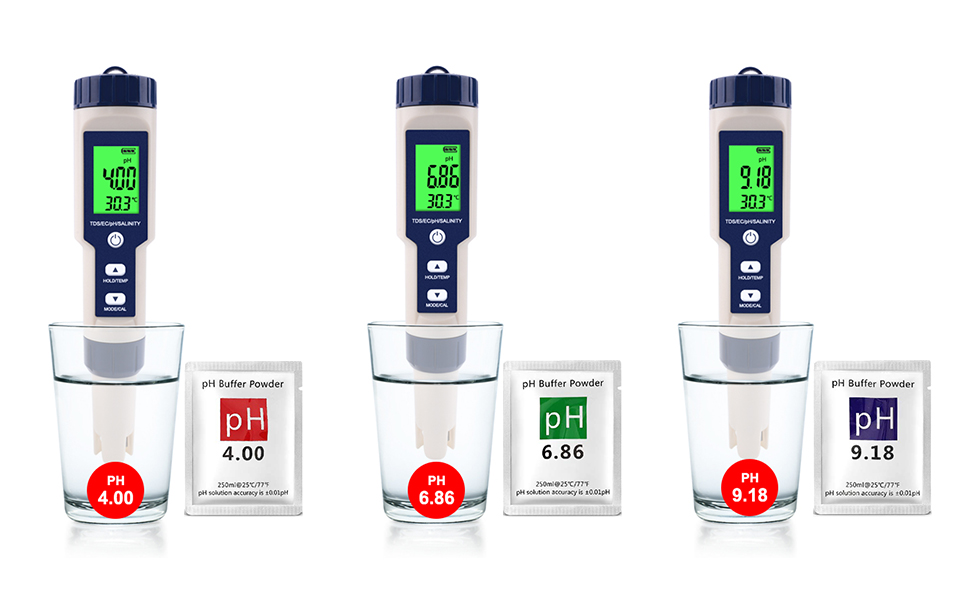
Figure 6: pH calibration process using standard buffer solutions.
Maintenance
1. Cleaning the Electrode
After each use, rinse the electrode thoroughly with distilled water to remove any residue. Do not use tap water for rinsing as it may contain minerals that can affect future readings. Gently blot dry with a clean, soft cloth or tissue. Do not rub the electrode.
2. Storage
Always replace the protective cap after use to keep the electrode moist and protected. Store the tester in a cool, dry place, away from direct sunlight and extreme temperatures.
3. Battery Replacement
If the display becomes dim or the tester fails to power on, replace the batteries as described in the Setup section. Dispose of old batteries responsibly.
Troubleshooting
- Inaccurate Readings:
– Ensure the electrode is clean. Rinse with distilled water.
– Calibrate the tester, especially for pH measurements.
– Check if the batteries are low and replace if necessary.
– Ensure the sample temperature is within the operating range. - Display Not Working/Dim:
– Check battery installation and polarity.
– Replace batteries with new ones. - Slow Response:
– The electrode might be dry or contaminated. Clean and re-calibrate. - Cannot Switch Modes:
– Ensure you are pressing the MODE/CAL button correctly. A short press cycles modes, a long press enters calibration.
Specifications
| Feature | Detail |
|---|---|
| Brand | Cuteefun |
| Model Number | WC-PH-1366 |
| Color | White |
| Product Dimensions (L x W x H) | 18.3 x 3.7 x 3.7 cm |
| Material | Plastic |
| Item Weight | 160 g |
| pH Resolution | 0.01 pH |
| pH Accuracy | ±0.05 pH |
| TDS Resolution | 1ppm 0.1ppt |
| TDS Accuracy | ±2% |
| Conductivity Resolution | 1uS/cm 0.1mS/CM |
| Conductivity Accuracy | ±2% |
| Temperature Resolution | 0.1°C/°F |
| Temperature Accuracy | ±0.5°C |
| Salinity Resolution | 0.01% |
| Salinity Accuracy | 0.01-5.00% (±0.1%), 5.10-25.00% (±1%) |
| Waterproof Rating | IP67 |
| Manufacturer | WangChuan-HT |
| Date First Available | August 24, 2022 |
Applications
The Cuteefun 5-in-1 Water Quality Tester is versatile and can be used for a wide range of applications:
- Drinking Water Testing
- Swimming Pool and Spa Water Analysis
- Aquarium and Fish Tank Water Monitoring
- Hydroponics and Plant Growing Systems
- Laboratory Experiments
- Food Processing Quality Control

Figure 7: Diverse applications of the water quality tester.

Figure 8: Visual representation of the tester's broad utility.
Safety Information
- Keep the device out of reach of children.
- Do not disassemble or modify the tester.
- Avoid dropping or subjecting the device to severe impact.
- Do not immerse the entire device in water, only the electrode part, despite its IP67 rating.
- Handle calibration solutions with care and follow their safety instructions.
Warranty and Support
For any questions or issues regarding your Cuteefun 5-in-1 Water Quality Tester, please refer to the seller's contact information or the platform where you purchased the product. Please retain your proof of purchase for warranty claims.