1. Product Overview
The YIHUA 948DQ-III is a versatile 2-in-1 soldering station designed to optimize workspace efficiency by integrating a high-power soldering iron with a fume extractor. This unit is equipped with an LED Nixie Display for clear temperature readings, an X-2 Soldering Iron Holder, and flexible Helping Hands for precise work.
The soldering iron features a 110W heating element with advanced functionalities including PID Temperature Stabilization for consistent heat, a Sleep Mode to conserve tip life, an Auto Shutdown feature for safety, Celsius/Fahrenheit conversion, and Digital Temperature Calibration for accuracy.
The integrated fume extractor provides double filtration, utilizing adsorbers at both the front and rear of the unit. Its stand offers an adjustable tilt angle, and it includes attachment points for the helping hands. This smoke absorber effectively captures harmful particles and odors generated during soldering, wood burning, and other crafting activities.

Image 1.1: The YIHUA 948DQ-III 2-in-1 Soldering Station and Fume Extractor with included accessories.
2. Safety Information
Please read and understand all safety instructions before operating the YIHUA 948DQ-III soldering station. Failure to follow these instructions may result in electric shock, fire, or serious injury.
- Electrical Safety: This unit operates on 110-127V with a US-standard power plug. Ensure the power outlet matches the unit's requirements. Do not operate with damaged cords or plugs. Keep the unit away from water or damp environments.
- Heat Safety: The soldering iron reaches high temperatures (up to 896°F). Always use caution to prevent burns. Do not touch the soldering tip or heating element when the unit is powered on or cooling down. Place the soldering iron securely in its holder when not in use.
- Fume Extraction: While the unit includes a fume extractor, it is recommended to use it in a well-ventilated area. Soldering fumes can contain harmful substances. The Proposition 65 warning indicates that this product may expose you to chemicals known to the State of California to cause cancer or birth defects or other reproductive harm. Always use appropriate personal protective equipment (PPE), such as safety glasses.
- General Safety: Keep children and pets away from the work area. Do not use the unit for purposes other than soldering and fume extraction. Disconnect power before performing any maintenance or when the unit is not in use.
3. Setup Instructions
Follow these steps to set up your YIHUA 948DQ-III soldering station:
- Unpacking: Carefully remove all components from the packaging. Verify that all included items are present: the main unit (fume extractor and control panel), soldering iron, X-2 Soldering Iron Holder, helping hands, soldering tips, filters, and lead-free solder wire.
- Positioning the Unit: Place the main unit on a stable, heat-resistant surface. Ensure there is adequate space around the unit for ventilation and safe operation.
- Installing Filters: The fume extractor comes with double filtering. Ensure the filtration adsorbers are correctly seated in both the front and rear compartments of the unit. Extra filters are provided for future replacement.
- Connecting the Soldering Iron: Plug the soldering iron cable into the designated port on the main unit.
- Assembling the Iron Holder: Attach the X-2 Soldering Iron Holder to the main unit or place it nearby on a stable surface. The holder includes a solder roll rack, cleaning wool, and a sponge.
- Attaching Helping Hands: The helping hands can be attached to the designated points on the fume extractor unit. Adjust their position as needed for your work.
- Power Connection: Connect the power cord to the main unit and then plug it into a 110-127V AC power outlet.
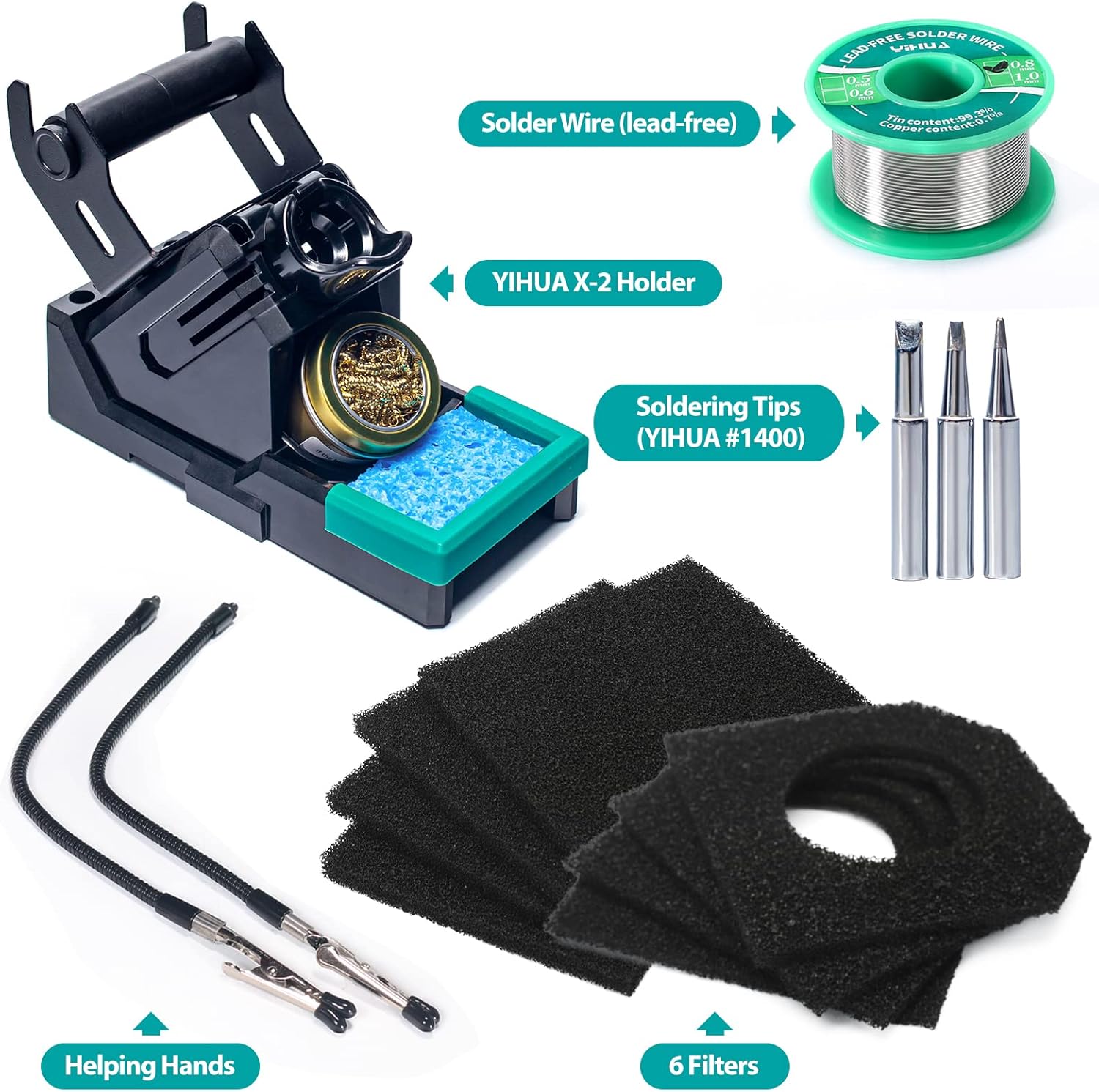
Image 3.1: Overview of included accessories: solder wire, X-2 holder, soldering tips, helping hands, and filters.
4. Operating Instructions
This section details how to operate your YIHUA 948DQ-III soldering station and fume extractor.
4.1 Power On/Off
Press the power button on the main unit to turn the station on or off. The LED display will illuminate upon power-on.
4.2 Temperature Adjustment
- Use the '+' and '-' buttons on the control panel to increase or decrease the soldering iron temperature.
- The temperature range is 392°F to 896°F (200°C to 480°C).
- The unit features PID Temperature Stabilization, which constantly monitors and adjusts the heating element to maintain the set temperature with high precision.
4.3 Celsius/Fahrenheit Conversion
Press the '°C/°F' button on the control panel to switch between Celsius and Fahrenheit temperature displays. Note: Some units may experience issues with this function, defaulting to Fahrenheit display only.

Image 4.1: Demonstrating the temperature unit conversion feature.
4.4 Sleep Mode and Auto Shutdown
- Sleep Mode: If the soldering iron is not used for 10 minutes, it will automatically enter sleep mode, reducing the tip temperature to 392°F (200°C). This extends the lifespan of the soldering tips and heating element. The iron will quickly return to the set temperature when picked up or moved.
- Auto Shutdown: For enhanced safety and energy saving, the unit will automatically shut down after a prolonged period of inactivity (typically 30 minutes after entering sleep mode).

Image 4.2: The soldering iron entering sleep mode, indicated by 'SLP' on the display.
4.5 Digital Temperature Calibration
The unit supports digital temperature calibration to ensure accuracy. Refer to the detailed instructions in the full manual for the calibration procedure, which typically involves using a thermometer with a thermocouple function.
4.6 Using the Fume Extractor
- The fume extractor fan operates automatically when the unit is powered on.
- Adjustable Tilt: The stand's tilt angle can be adjusted to direct the airflow optimally towards your work area.
- Effective Distance: For optimal fume extraction, position your work within 10cm (3.9 inches, ±10%) directly in front of the fume extractor. The fender design helps to concentrate the airflow.
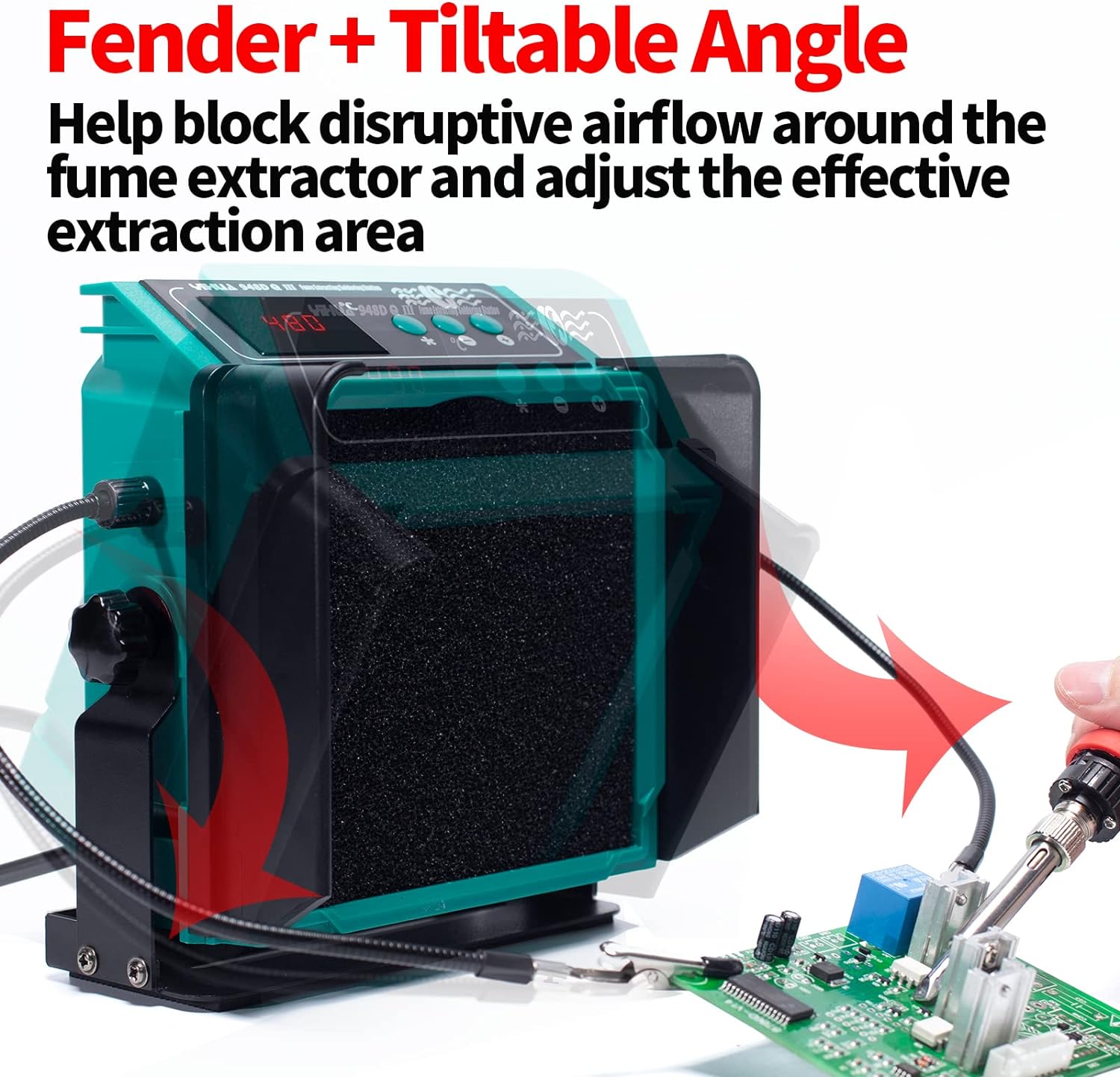
Image 4.3: The fume extractor featuring a fender design and adjustable tilt for effective fume capture.
4.7 Using Helping Hands
The attachable helping hands (30cm, 11.8 inches, ±10%) can be positioned to secure PCBs, wires, or other objects, freeing your hands to focus on soldering tasks.

Image 4.4: Using the helping hands to secure wires during a soldering operation.
5. Maintenance
Regular maintenance ensures the longevity and optimal performance of your YIHUA 948DQ-III soldering station.
5.1 Filter Replacement
The fume extractor uses carbon-activated filters for double filtration. These filters absorb harmful particles and odors. Over time, their effectiveness will decrease. Replace the filters regularly, especially if you notice a reduction in fume absorption or an increase in odors. Extra filters are included with your unit.

Image 5.1: Replacement carbon-activated filters for the fume extractor.
5.2 Soldering Tip Maintenance
- Cleaning: Always clean the soldering tip before and after use. Use the included cleaning wool or sponge (dampened with distilled water) to remove excess solder and oxidation.
- Tinning: After cleaning, re-tin the tip with a small amount of fresh solder to prevent oxidation and prolong its life.
- Replacement: The soldering iron uses YIHUA #1400 soldering tips. Replace tips when they become excessively worn or corroded, as this can affect heat transfer and soldering performance.
5.3 General Cleaning
Ensure the unit is powered off and unplugged before cleaning. Use a soft, dry cloth to wipe down the exterior of the main unit and soldering iron. Avoid using abrasive cleaners or solvents.
6. Troubleshooting
If you encounter issues with your YIHUA 948DQ-III, refer to the following common problems and solutions:
- Unit Does Not Power On:
- Check if the power cord is securely plugged into both the unit and the wall outlet.
- Verify that the power outlet is functional.
- Soldering Iron Not Heating or Inconsistent Temperature:
- Ensure the soldering iron cable is fully connected to the main unit.
- Check if the soldering tip is properly seated and not excessively worn.
- If the issue persists, the heating element may be faulty. Contact customer support for assistance.
- Fume Extractor Not Working Effectively:
- Check if the filters are clean and properly installed. Replace filters if they are clogged or saturated.
- Ensure your work is within the effective extraction distance (approx. 10cm from the fan).
- Verify that the fan intake is not obstructed.
- °C/°F Conversion Button Not Working:
- Some units may have this function disabled or may only display in Fahrenheit. If this is critical for your workflow, contact customer support.
- Damaged or Missing Parts:
- If any part of your unit arrived damaged or is missing, contact YIHUA customer support immediately for replacement parts.
7. Specifications
| Feature | Specification |
|---|---|
| Model Number | YIHUA 948DQ-III |
| Power (Soldering Iron) | 110 Watts |
| Voltage | 110-127 Volts AC |
| Temperature Range | 392°F - 896°F (200°C - 480°C) |
| Temperature Stability | PID Controlled |
| Display Type | LED Nixie Display |
| Fume Extractor Filtration | Double Carbon-Activated Filters |
| Effective Fume Extraction Distance | Approx. 10cm (3.9 inches) |
| Sleep Mode | 10 minutes inactivity |
| Auto Shutdown | After prolonged inactivity |
| Included Components | Soldering Iron, Fume Extractor, Helping Hands, Iron Holder, Soldering Tips, Filters, Solder Wire |
| Item Weight | 4.07 pounds |
| Product Dimensions (L x W x H) | 3.54 x 5.71 x 6.46 inches |
8. Warranty and Support
YIHUA provides a 12-month US-exclusive manufacturer technical coverage for the 948DQ-III model. For any technical assistance, troubleshooting, or warranty claims, please contact YIHUA customer support. You can typically find 24/7 professional assistance on Amazon by contacting the 'YIHUA OFFICIAL STORE' seller directly.
When contacting support, please have your product model number (YIHUA 948DQ-III) and purchase information readily available.