1. Product Overview
This manual provides instructions for the installation, operation, and maintenance of the GAOCHENG Laptop CPU Fan, designed specifically for the Siragon NB-3100 laptop model. This component is essential for maintaining optimal operating temperatures within your laptop, preventing overheating and ensuring stable performance.
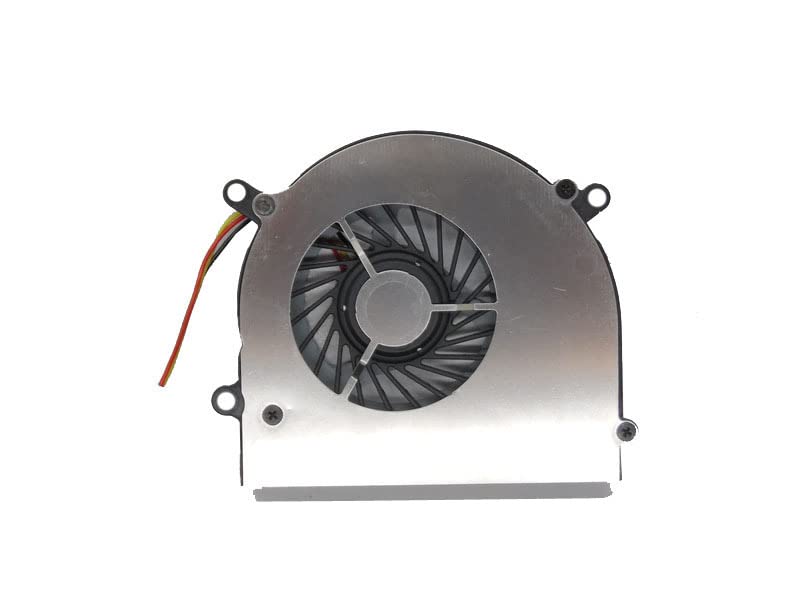
Image 1.1: GAOCHENG Laptop CPU Fan. This image displays the CPU fan unit, showing its compact design and connector cable.
2. Safety Information
Please read all safety instructions before installation and use. Failure to follow these instructions may result in electric shock, fire, or damage to the product or laptop.
- Power Disconnection: Always disconnect the laptop from its power source and remove the battery before attempting any installation or maintenance.
- Static Electricity: Take precautions against electrostatic discharge (ESD). Use an anti-static wrist strap or touch a grounded metal object before handling internal components.
- Professional Installation: If you are not comfortable with laptop disassembly, seek professional assistance.
- Component Handling: Handle the fan and other laptop components with care to avoid damage.
- Ventilation: Ensure proper ventilation around the laptop after installation to prevent overheating.
3. Package Contents
Verify that all items are present in the package:
- 1 x GAOCHENG Laptop CPU Fan for Siragon NB-3100
- (Additional items, if any, would be listed here)
4. Installation Guide
This section outlines the general steps for replacing a laptop CPU fan. Specific disassembly procedures may vary by laptop model. Refer to your laptop's service manual for detailed instructions.
- Prepare the Laptop:
- Shut down the laptop completely.
- Disconnect the AC adapter and remove the battery.
- Place the laptop on a clean, flat, and static-free surface.
- Access the CPU Fan:
- Depending on your Siragon NB-3100 model, you may need to remove the bottom cover, keyboard, or other components to access the motherboard and CPU fan.
- Carefully unscrew and remove the necessary panels. Keep track of screw locations.
- Remove the Old Fan:
- Locate the CPU fan. It is usually connected to the motherboard via a small connector cable.
- Gently disconnect the fan cable from the motherboard.
- Unscrew the fan from its mounting points on the heatsink or chassis.
- Carefully lift and remove the old fan.
- Install the New Fan:
- Position the new GAOCHENG CPU fan in the same location as the old one.
- Secure the fan with the appropriate screws. Do not overtighten.
- Connect the fan cable to the corresponding header on the motherboard. Ensure the connector is fully seated and oriented correctly.
- Reassemble the Laptop:
- Carefully reattach any removed components (e.g., panels, keyboard, battery).
- Ensure all screws are replaced in their original positions.
- Initial Power-On:
- Reconnect the AC adapter (do not insert the battery yet).
- Power on the laptop. Listen for fan operation and observe if the system boots normally.
- If the fan spins and the system boots, shut down, insert the battery, and power on again.
5. Operating Instructions
The CPU fan operates automatically, controlled by the laptop's BIOS/UEFI and operating system to regulate CPU temperature. No manual intervention is typically required for its operation.
- Automatic Operation: The fan speed will adjust based on the CPU's thermal load. It will spin faster under heavy load and slower during idle periods.
- Monitoring: You can use third-party software to monitor CPU temperature and fan speed if desired, but this is not necessary for normal operation.
6. Maintenance
Regular maintenance helps ensure the longevity and efficiency of your CPU fan.
- Dust Cleaning: Periodically (e.g., every 6-12 months, depending on environment) open the laptop and gently clean dust from the fan blades and heatsink fins using compressed air or a soft brush. Always hold the fan blades stationary when using compressed air to prevent over-spinning and damage to the bearings.
- Inspection: Check for any obstructions, loose wires, or unusual wear on the fan blades.
- Thermal Paste: If the heatsink was removed during fan replacement, ensure new thermal paste is applied to the CPU before reassembly.
7. Troubleshooting
| Problem | Possible Cause | Solution |
|---|---|---|
| Fan not spinning |
|
|
| Loud fan noise |
|
|
| Laptop overheating |
|
|
8. Specifications
| Model | Siragon NB-3100 Compatible CPU Fan |
| Brand | GAOCHENG |
| Voltage | DC 5V |
| Current | 0.5A |
| Part Number | CPU FAN (as per manufacturer) |
| Dimensions | Approx. 30 x 20 x 10 cm |
| Weight | Approx. 800 g |
9. Warranty and Support
This GAOCHENG CPU fan comes with a 90-day warranty from the date of purchase. This warranty covers manufacturing defects and material faults under normal use.
The warranty does not cover:
- Damage caused by improper installation or misuse.
- Damage caused by accidents, abuse, neglect, or unauthorized modification.
- Normal wear and tear.
For warranty claims or technical support, please contact your retailer or the GAOCHENG customer service department with your purchase details. You may be asked to provide item pictures for confirmation.