
BLACK+DECKER HM4250-B5
BLACK+DECKER Digital Humidifier HM4250-B5 User Manual
Model: HM4250-B5
1. Important Safety Instructions
Please read and save these important safety instructions before using this humidifier. Failure to follow these instructions may result in electric shock, fire, or serious injury.
- Always place the humidifier on a firm, flat, level surface.
- Do not place the humidifier near heat sources such as stoves, radiators, or direct sunlight.
- Do not block air vents. Ensure proper air circulation around the unit.
- Use only clean, cool tap water. Distilled or demineralized water is recommended to prevent mineral buildup.
- Never add essential oils or other additives directly into the water tank, as this may damage the unit and void the warranty.
- Unplug the humidifier from the power outlet before filling, cleaning, or moving it.
- Do not immerse the humidifier base in water or other liquids.
- Keep out of reach of children and pets. This appliance is not intended for use by persons with reduced physical, sensory or mental capabilities, or lack of experience and knowledge, unless they have been given supervision or instruction concerning use of the appliance by a person responsible for their safety.
- If the power cord is damaged, it must be replaced by the manufacturer, its service agent, or similarly qualified persons to avoid a hazard.
2. Product Overview
The BLACK+DECKER Digital Humidifier HM4250-B5 is designed to provide optimal humidity levels for large rooms up to 40m2, enhancing comfort and air quality. It features both cool and warm mist options, an intuitive touch control panel, and a convenient top-fill design.
Key Features:
- Optimal Room Coverage: Engineered to cover rooms up to 40 sq m, this humidifier offers a mist output of 180-350ml/h. The 4L tank ensures continuous operation for 8-14 hours.
- Versatile Mist Options: Features both cool and warm mist settings to suit your comfort needs, with warm mist ideal for steam sterilization and enhanced home comfort during cooler seasons.
- Advanced Filtration System: Equipped with an air filter that removes impurities, providing clean and pure mist for healthier indoor air quality.
- Intuitive Touch Controls: User-friendly touch interface allows easy mode selection and mist level adjustment, complemented by an LED display for clear visibility of settings.
- Convenient Top-Fill Design: The square water tank's top-fill design allows for easy refills and cleaning, with a maximum water level window to prevent overflows.
- Safety Auto Shutoff: Includes an automatic shutoff function with an indicator light that activates when water is low, ensuring safe and worry-free operation.
- Stylish Modern Aesthetics: Features a modern design with a matte texture and decorative wooden finish, making it a stylish addition to any living room or bedroom decor.
- Dual Mist Levels: Offers two mist levels to cater to different preferences and needs, coupled with a high-performance ultrasonic system for efficient mist dispersion.
- Portable and Practical: Designed with a detachable power cord for convenient storage and handling.
Components:

Figure 2.1: Front view of the humidifier, showing the LED display and touch controls.

Figure 2.2: Angled view of the humidifier, highlighting its modern design and wooden finish accent.

Figure 2.3: The humidifier with its top lid removed, showing the wide opening for easy water refilling.

Figure 2.4: Internal view of the water tank, showing the mist outlet and maximum water level indicator.

Figure 2.5: Visual icons representing key features: Touch Panel, Cool Mist, Warm Mist, Room Area (Up to 40m2), Integrated Tank Design, PTC Pasteurization, 12hr Timer, Silent Sleep Mode.
3. Setup
- Unpacking: Carefully remove the humidifier from its packaging. Retain packaging for future storage or transport.
- Placement: Place the humidifier on a flat, stable, water-resistant surface at least 15 cm (6 inches) away from walls and furniture. Ensure the mist outlet is not directed at walls or furniture.
- Filling the Water Tank:
- Remove the top lid of the humidifier.
- Pour clean, cool tap water directly into the water tank opening. Distilled or demineralized water is recommended to minimize mineral residue.
- Fill the tank up to the "MAX" water level indicator. Do not overfill.
- Replace the top lid securely.
Figure 3.1: Demonstrating the easy top-fill method for the water tank.
- Power Connection: Plug the detachable power cord into the humidifier's power inlet, then plug the other end into a standard electrical outlet.
4. Operating Instructions
The humidifier features an intuitive touch control panel and LED display for easy operation.

Figure 4.1: A hand interacting with the touch control panel and LED display.
Control Panel Functions:
| Icon/Button | Function | Description |
|---|---|---|
| Power Button (On/Off) | Power On/Off | Press to turn the humidifier on or off. |
| Mist Level Icon | Mist Level Adjustment | Press to cycle through available mist levels (e.g., Low, High). The LED display will show the current setting. |
| Warm Mist Icon (SSS) | Warm Mist Mode | Press to activate or deactivate the warm mist function. An indicator light will illuminate when warm mist is active. |
| Timer Icon (Clock) | Timer Setting | Press to set the operating timer (e.g., 1-12 hours). The unit will automatically shut off when the set time expires. |
| Humidity Icon (%RH) | Humidity Setting | Press to set your desired humidity level (e.g., 50%-80%). The humidifier will automatically adjust mist output to maintain this level. |
Automatic Shutoff:
The humidifier is equipped with an automatic shutoff feature for safety. When the water level in the tank is too low, the unit will automatically turn off, and an indicator light will illuminate to signal that the tank needs refilling.
5. Maintenance and Cleaning
Regular cleaning is essential to maintain the efficiency and longevity of your humidifier and to prevent the growth of mold and bacteria.
- Daily Maintenance:
- Before refilling, empty any remaining water from the tank and base.
- Rinse the water tank and base thoroughly with clean water.
- Weekly Cleaning:
- Unplug the humidifier and remove the water tank.
- Clean the Water Tank: Fill the tank halfway with water and add 2 tablespoons of white vinegar. Shake vigorously and let it stand for 30 minutes. Rinse thoroughly with clean water until the vinegar smell is gone.
- Clean the Base Unit: Gently wipe the surface of the base unit, especially around the ultrasonic transducer (the small disc), with a soft cloth dampened with white vinegar. Do not immerse the base in water. Use a small brush (not metal) to remove any mineral deposits from the transducer.
- Clean the Air Filter: The humidifier is equipped with an air filter. Gently remove the filter and clean it according to the instructions provided in the filter compartment. If heavily soiled, replace it.
- Rinse all parts with clean water and allow them to air dry completely before reassembling.
- Storage: If the humidifier will not be used for an extended period, clean all parts as described above, ensure they are completely dry, and store the unit in a cool, dry place.
6. Troubleshooting
Before contacting customer support, please refer to the following troubleshooting guide for common issues.
| Problem | Possible Cause | Solution |
|---|---|---|
| No mist or very little mist |
|
|
| Unusual odor from mist |
|
|
| Water leakage |
|
|
| Unit not turning on |
|
|
7. Specifications
| Specification | Value |
|---|---|
| Brand | BLACK+DECKER |
| Model Number | HM4250-B5 |
| Color | White |
| Product Dimensions (L x W x H) | 28 x 25 x 25 cm |
| Item Weight | 1.6 Kilograms |
| Capacity | 4 Liters (4000 Milliliters) |
| Power / Wattage | 110W |
| Runtime | Up to 14 hours |
| Special Features | Ultrasonic, Warm Mist, Cool Mist, Digital Display, Auto Shutoff |
| Recommended Room Area | Up to 40 m2 |
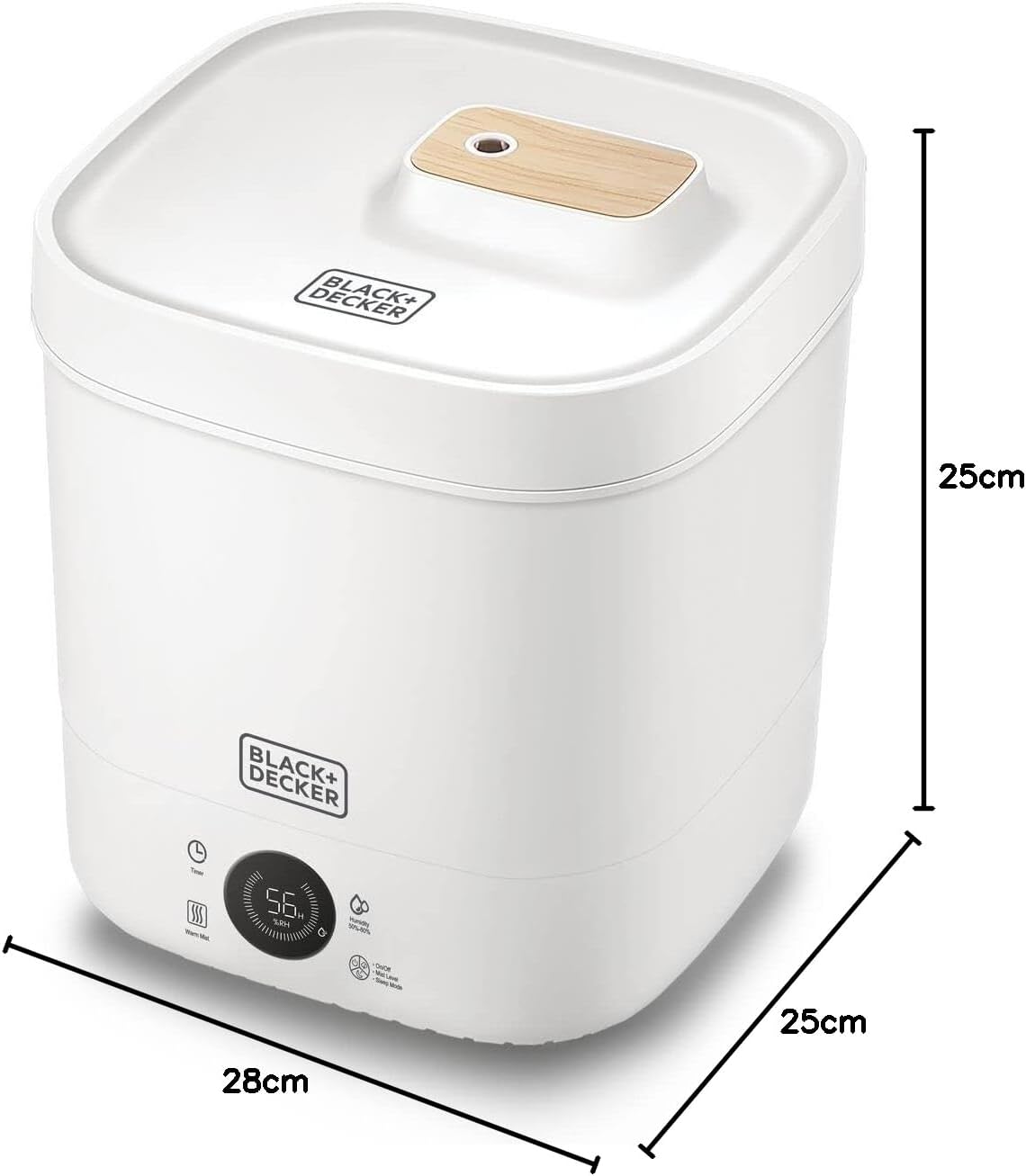
Figure 7.1: Diagram showing the dimensions of the humidifier: 28cm (length), 25cm (width), 25cm (height).
8. Warranty and Support
This BLACK+DECKER Digital Humidifier HM4250-B5 comes with a 2-Year Brand and Manufacturer Warranty, ensuring reliable performance and peace of mind.
For warranty claims, technical support, or any inquiries regarding your product, please contact BLACK+DECKER customer service through their official website or the retailer from whom you purchased the product. Please have your model number (HM4250-B5) and proof of purchase ready when contacting support.
You can find more information and support resources on the official BLACK+DECKER website: www.blackanddecker.com
Related documentsHM4250-B5


Ask a question about this manual
Ask about setup, troubleshooting, compatibility, parts, safety, or missing instructions. Manuals+ will review the question and use this page’s manual context to help answer it.