
Introduction
This manual provides detailed instructions for the proper use and maintenance of your NEEWER NW600 Flash Speedlite. Designed for compatibility with a wide range of DSLR and mirrorless cameras, this manual flash offers robust performance and versatile lighting control. Please read this manual thoroughly before operation to ensure safe and effective use of your device.
Product Overview

Figure 1: NEEWER NW600 Flash Speedlite. This image displays the flash unit from both front and side angles, highlighting its compact design and the adjustable flash head.
The NEEWER NW600 is a manual flash speedlite featuring a high guide number of GN40 (35mm, ISO100) and 76W power output. It provides a consistent 5600K±200K daylight color temperature. The flash supports M (Manual), S1, and S2 flash modes, allowing for precise control over flash output across 8 levels (1, 1/2, 1/4, 1/8, 1/16, 1/32, 1/64, 1/128). Its flash head offers adjustable bounce angles, turning 180° right and left, and tilting 120° up and 7° down. Integrated retractable diffuser and reflector panels enhance lighting versatility.
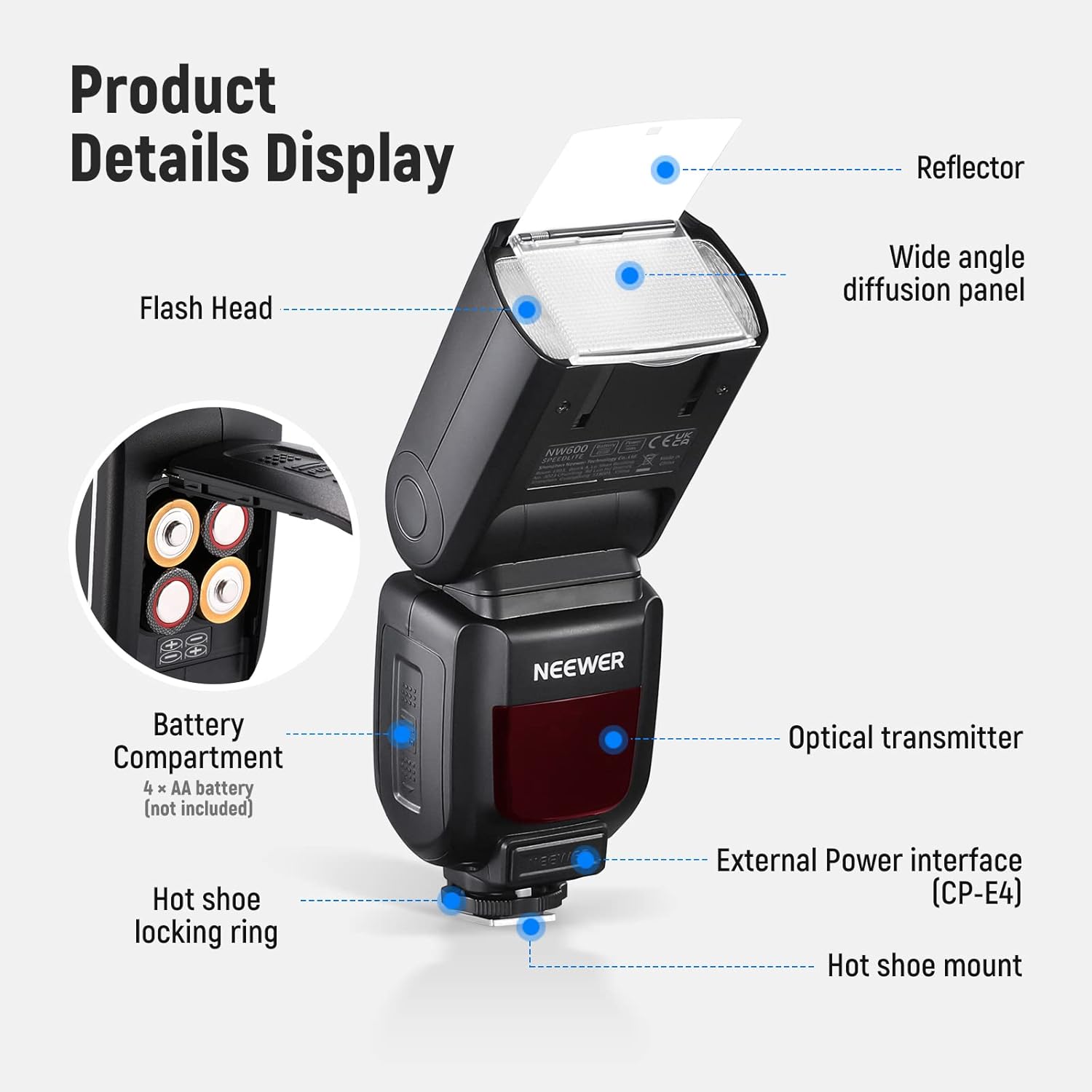
Figure 2: Labeled components of the NW600 Flash Speedlite, including the flash head, wide angle diffusion panel, reflector, optical transmitter, external power interface (CP-E4), hot shoe mount, hot shoe locking ring, and battery compartment.
Setup
Battery Installation
The NW600 Flash Speedlite is powered by 4 x AA batteries (not included). To install, open the battery compartment cover located on the side of the flash unit. Insert the batteries according to the polarity indicators inside the compartment. Close the cover securely. When powered by AA batteries, the flash can deliver 100–1500 flashes depending on power output settings.
Mounting on Camera
The flash features a single-contact hot shoe for broad compatibility. Slide the hot shoe mount onto your camera's hot shoe. Secure the flash by tightening the hot shoe locking ring. Ensure the flash is firmly attached to prevent accidental detachment during use.

Figure 3: The NW600 Flash Speedlite attached to a camera via its single-contact hot shoe. This flash is compatible with Canon, Nikon, Panasonic, Olympus, Pentax, Fujifilm, and Sony MI Hot Shoe (A9, A7RIV/III/II, A7III/II, A7SII, A6600, A6500, A6400, A6300, A6000) DSLR and mirrorless cameras. Note: Not compatible with Canon EOS Rebel SL3/250D, Rebel T7/1500D 2000D, Rebel T100/3000D 4000D.
Operating Instructions
Power On/Off
Locate the power switch on the flash unit and slide it to the "ON" position to power on the device. Slide it to "OFF" to power down.
Flash Modes
The NW600 supports three flash modes: M (Manual), S1, and S2. Short press the "MODE" button to switch between these modes.
- M (Manual) Mode: Allows you to manually set the flash output level.
- S1 Mode: Slave mode where the flash fires in response to the first flash from a master flash.
- S2 Mode: Slave mode where the flash fires in response to the second flash from a master flash, ignoring the pre-flash.

Figure 4: Controls for selecting flash modes (M, S1, S2) and adjusting flash output levels (1/1 to 1/128).
Adjusting Flash Output
In M mode, the flash output can be manually set at 8 levels, from 1/1 (full power) to 1/128 (lowest power). Use the rotary dial adjustment to select the desired output level. The flash output level indicator will display the current setting.
Test Flash
Press the "Test button / Flash-ready indicator" to fire a test flash. The indicator light will illuminate when the flash is ready to fire.
Adjusting Bounce Angles
The flash head can be rotated horizontally 180° to the right and 180° to the left. It can also be tilted vertically 120° upwards and 7° downwards. These adjustments allow for bounce flash techniques to soften shadows and create more natural lighting.
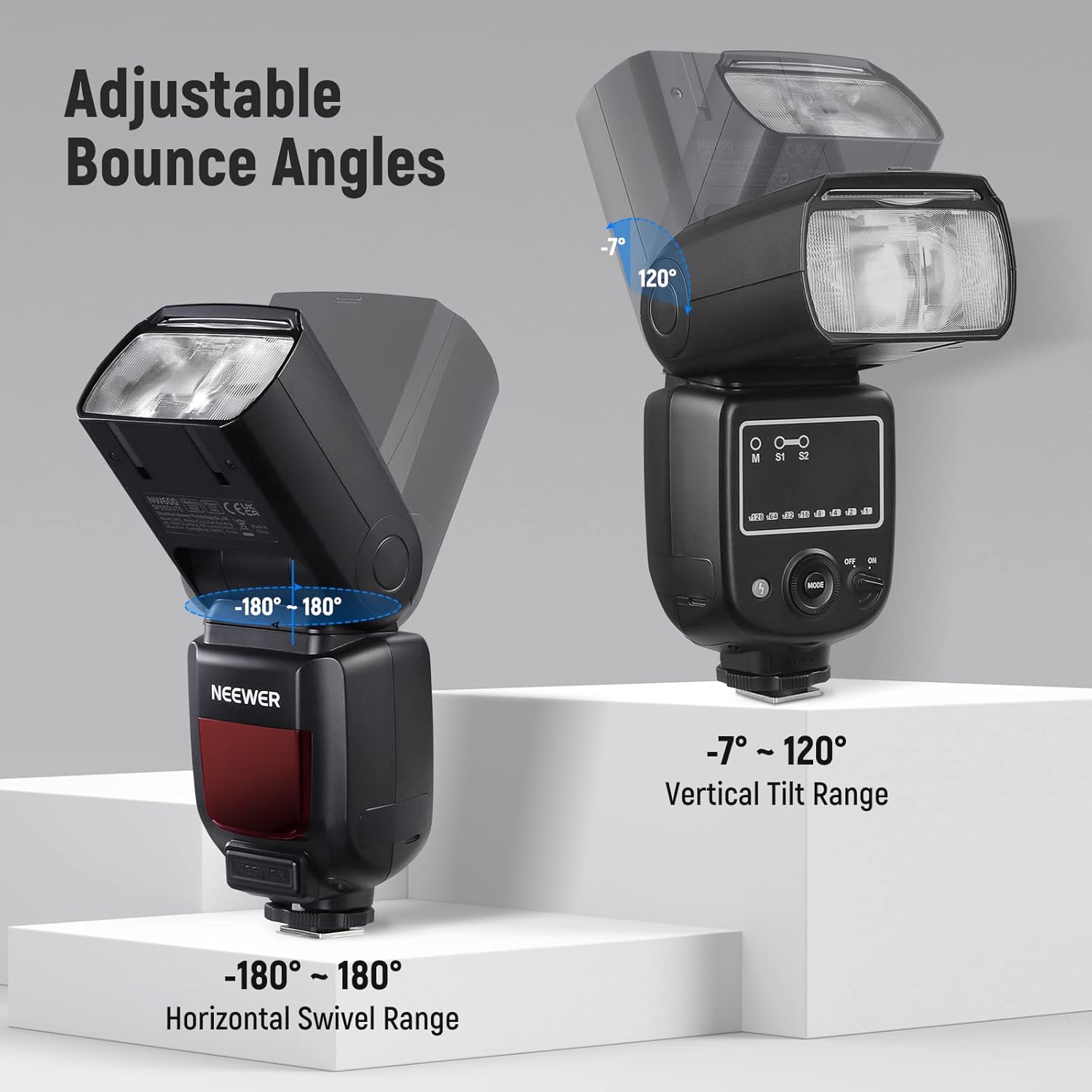
Figure 5: The flash head's adjustable horizontal swivel range (-180° to 180°) and vertical tilt range (-7° to 120°).
Using Diffuser and Reflector
The flash includes a retractable wide-angle diffusion panel and a reflector. Pull these out from the flash head as needed to soften the light or direct it for specific effects.
Connectivity
The NW600 Flash Speedlite offers multiple connectivity options:
- PC Sync Port: Connect a PC sync cable to this port to trigger the flash and your camera simultaneously.
- CP-E4 Port: This port allows for connection to an external power source (e.g., a CP-E4 battery pack) for extended use.
- USB Type-C Port: Used for firmware updates to ensure your flash unit remains up-to-date with the latest features and improvements.

Figure 6: Detailed view of the CP-E4 port, PC Sync port, and USB Type-C port on the flash unit.
Specifications
| Guide Number | GN40 (35mm, ISO100) |
| Power Output | 76W |
| Color Temperature | 5600K±200K |
| Flash Modes | M (Manual), S1, S2 |
| Flash Output Levels | 8 levels (1, 1/2, 1/4, 1/8, 1/16, 1/32, 1/64, 1/128) |
| Recycle Time | 0.1–5s |
| Flash Duration | 1/300–1/20000s |
| Horizontal Swivel Range | -180° to 180° |
| Vertical Tilt Range | -7° to 120° |
| Power Options | 4 x AA batteries or external CP-E4 port |
| Dimensions | 7.87 x 2.95 x 1.97 inches |
| Weight | 1.21 pounds |
| Model Number | 10101161 |

Figure 7: Key specifications as displayed on the product packaging.
What's in the Box
- 1 × NW600 Camera Flash
- 1 × Mini Stand
- 1 × Storage Pouch
- 1 × User Manual
Maintenance and Care
To ensure the longevity and optimal performance of your NEEWER NW600 Flash Speedlite, follow these general maintenance guidelines:
- Keep the flash unit clean and free from dust and debris. Use a soft, dry cloth for cleaning.
- Avoid exposing the flash to extreme temperatures, humidity, or direct sunlight for prolonged periods.
- Remove batteries if the flash will not be used for an extended period to prevent leakage.
- Store the flash in its provided storage pouch when not in use to protect it from scratches and impacts.
Troubleshooting
If you encounter issues with your NW600 Flash Speedlite, consider the following common troubleshooting steps:
- Flash not firing: Check battery levels and ensure they are correctly inserted. Verify the flash is securely mounted on the camera's hot shoe.
- Inconsistent flash output: Ensure the flash mode and power output settings are appropriate for your shooting conditions.
- Overheating: The flash incorporates an overheating-protection mechanism. If the unit becomes excessively hot, allow it to cool down before further use.
For more detailed troubleshooting or persistent issues, please refer to the comprehensive user manual included with your product or visit the official NEEWER website.
Warranty and Support
For warranty information and product support, please visit the official NEEWER website. You can activate your product warranty and find additional resources there.