
Introduction
This manual provides detailed instructions for the VINABTY 1810196 replacement remote control, designed for use with various Hisense air conditioning units, including models DG11L1-01, DG11L1-03, and DG11L1-04. Please read this manual carefully before using the remote control to ensure proper operation and longevity.
Setup
Battery Installation
The remote control requires two AAA alkaline batteries (not included). Follow these steps to install them:
- Locate the battery compartment cover on the back of the remote control.
- Slide the cover downwards or press the latch and lift to open the compartment.
- Insert two AAA batteries, ensuring the positive (+) and negative (-) terminals match the diagrams inside the compartment.
- Replace the battery compartment cover by sliding it back into place until it clicks securely.

Image: Back of the remote control with the battery compartment open, illustrating correct battery placement.
No programming or pairing is required. Once batteries are installed, the remote is ready for use with compatible Hisense air conditioning units.
Operating Instructions
Familiarize yourself with the buttons on your VINABTY 1810196 remote control. The layout is designed for intuitive control of your Hisense air conditioner.
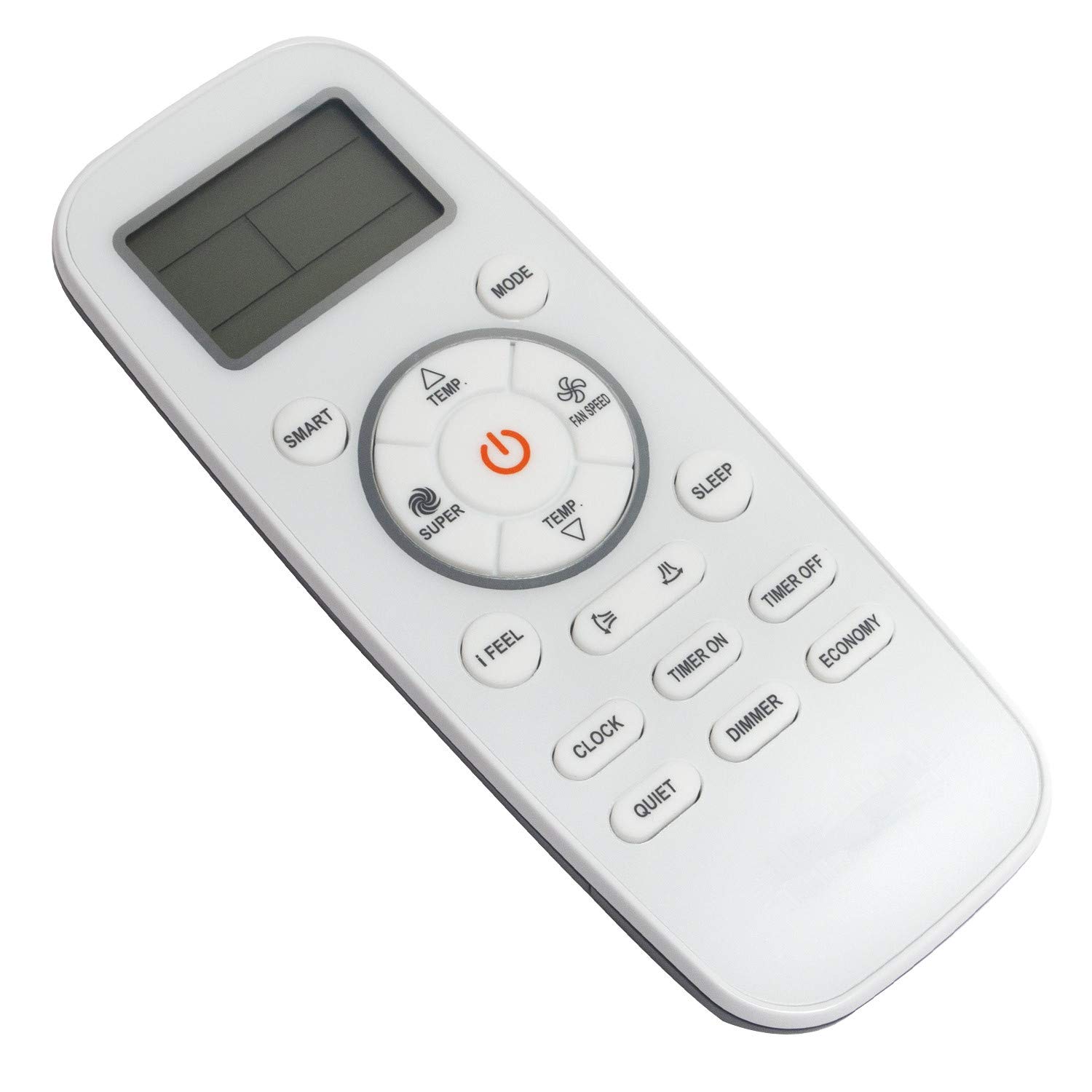
Image: Front view of the remote control, displaying the LCD screen and all function buttons.
Button Functions:
- Power Button (⏻): Turns the air conditioner ON or OFF.
- MODE: Cycles through operating modes (e.g., Cool, Heat, Fan, Dry, Auto).
- TEMP. ▲ / ▼: Adjusts the temperature setting up or down.
- FAN SPEED: Adjusts the fan speed (e.g., Low, Medium, High, Auto).
- SMART: Activates the intelligent operating mode for optimal comfort.
- SUPER: Engages rapid cooling or heating for quick temperature changes.
- I FEEL: Activates the "I Feel" function, which senses the temperature at the remote's location.
- SLEEP: Activates the sleep mode, adjusting temperature for comfortable sleep.
- CLOCK: Sets the current time on the remote's display.
- TIMER ON: Sets a timer for the air conditioner to turn ON automatically.
- TIMER OFF: Sets a timer for the air conditioner to turn OFF automatically.
- QUIET: Activates a low-noise operation mode.
- DIMMER: Adjusts the brightness of the air conditioner's display.
- ECONOMY: Activates energy-saving mode.
- Swing Buttons (Horizontal/Vertical): Controls the direction of the air flow.
Point the remote control directly at the air conditioner's receiver when pressing buttons to ensure commands are registered.
Maintenance
Cleaning the Remote Control
To maintain the remote control's appearance and functionality:
- Wipe the surface with a soft, dry cloth.
- Do not use liquid cleaners, sprays, or abrasive materials, as these can damage the remote.
Battery Replacement
Replace batteries when the remote control's range decreases or it stops responding. Always replace both batteries at the same time with new AAA alkaline batteries. Do not mix old and new batteries, or different types of batteries.
Dispose of used batteries according to local regulations.
Troubleshooting
| Problem | Possible Cause | Solution |
|---|---|---|
| Remote control not working. | Batteries are dead or incorrectly installed. | Replace batteries with new AAA alkaline batteries, ensuring correct polarity. |
| Remote control range is short or intermittent. | Low battery power; Obstruction between remote and AC unit; Infrared sensor on AC unit is blocked. | Replace batteries. Ensure a clear line of sight to the air conditioner. Check for and remove any obstructions blocking the AC unit's sensor. |
| Air conditioner does not respond to commands. | Remote control is not compatible with the AC unit; AC unit is not powered on. | Verify the remote control model (1810196) is compatible with your Hisense AC unit (DG11L1-01, DG11L1-03, DG11L1-04). Ensure the air conditioner is plugged in and powered on. |
Specifications
- Brand: VINABTY
- Model Number: 1810196
- Compatible Air Conditioner Models: Hisense DG11L1-01, DG11L1-03, DG11L1-04
- Connectivity Technology: Infrared
- Color: White/Grey with Black Buttons
- Special Feature: Ergonomic design
- Number of Buttons: 25
- Max Operating Range: 10 meters (approximately 33 feet)
- Battery Type: 2 x AAA Alkaline batteries (not included)
- Country of Origin: China
Support
For any issues or questions regarding your VINABTY 1810196 remote control, please contact the seller. We aim to provide a satisfactory response within 24 hours.
Please note that specific warranty details may vary. Refer to your purchase documentation or contact the seller for warranty information.