
1. Product Overview
The Flastec 10A 250V Fused Inlet Rocker Switch Power Socket (Model AS-10) is a compact electrical component designed for integration into various devices and systems. It combines an AC power inlet, a rocker switch, and a 10A fuse holder into a single unit, providing both power connection and overcurrent protection.
Key Features:
- Integrated AC Power Socket
- Built-in Rocker Switch for ON/OFF control
- Replaceable 10A Fuse for overcurrent protection
- Durable Plastic Construction
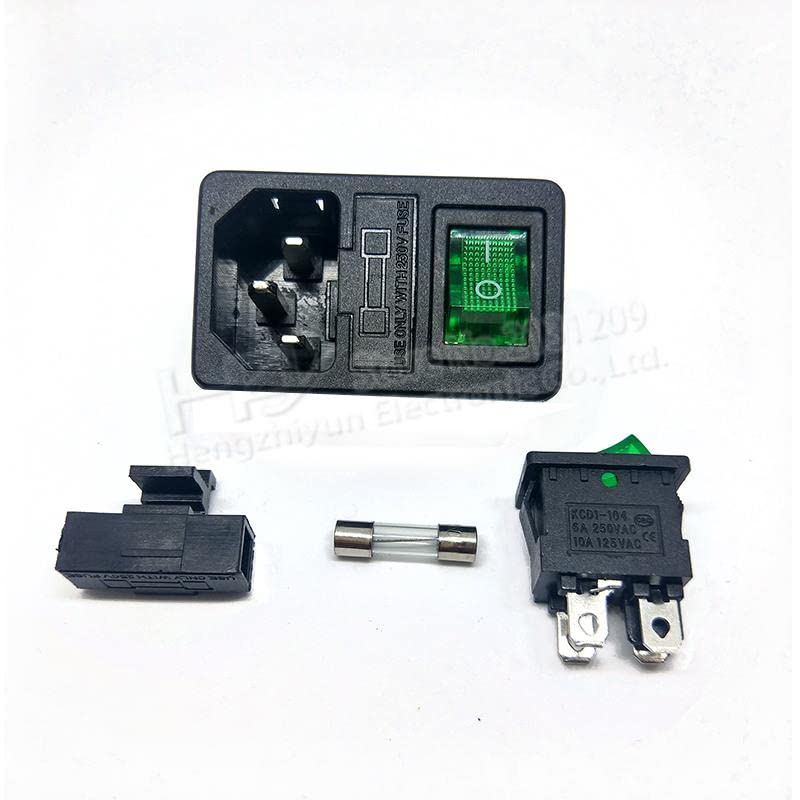
Image showing the Flastec 10A 250V Fused Inlet Rocker Switch Power Socket, featuring the integrated fuse holder and rocker switch.
2. Installation and Setup
Safety Precautions:
- Always disconnect power from the main supply before performing any installation or wiring.
- Ensure all wiring is performed by a qualified individual or in accordance with local electrical codes.
- Verify the voltage and current ratings of your application match the product specifications.
Installation Steps:
- Prepare Mounting Location: Create an appropriate cutout in your device enclosure for the plug-in mount. Ensure the dimensions are accurate for a secure fit.
- Mount the Socket: Insert the Fused Inlet Rocker Switch into the prepared cutout. The plug-in mount design typically secures it firmly.
- Wire Connections: Connect the AC input wires to the designated terminals on the back of the socket. Ensure correct polarity (Live, Neutral, Ground) as indicated on the unit or in the device's wiring diagram.
- Secure Wiring: Double-check all connections for tightness and proper insulation to prevent shorts or loose contacts.
- Install Fuse: Ensure a 10A fuse is correctly inserted into the fuse holder.
- Test: Once installation is complete and all connections are secure, restore power and test the functionality of the switch.
3. Operating Instructions
Operating the Flastec Fused Inlet Rocker Switch is straightforward:
- Power ON: Press the rocker switch to the 'ON' position (often indicated by 'I' or a lit indicator, if present). This will supply power to the connected device.
- Power OFF: Press the rocker switch to the 'OFF' position (often indicated by 'O'). This will cut off power to the connected device.
The integrated 10A fuse provides protection against overcurrent. If an overload occurs, the fuse will blow, interrupting the circuit and protecting the connected equipment.
4. Maintenance
The Flastec Fused Inlet Rocker Switch requires minimal maintenance. Regular inspection is recommended to ensure optimal performance and safety.
- Cleaning: Keep the unit clean and free from dust and debris. Use a dry, soft cloth for cleaning. Do not use liquid cleaners directly on the electrical components.
- Fuse Replacement: If the fuse blows, disconnect power to the unit. Carefully remove the fuse holder cap, replace the blown fuse with a new 10A fuse of the same type, and reinsert the cap. Never use a fuse with a higher current rating than specified.
- Inspection: Periodically inspect the wiring connections for any signs of loosening, corrosion, or damage. Check the switch for smooth operation and the housing for any cracks or physical damage.
5. Troubleshooting
If you encounter issues with your Flastec Fused Inlet Rocker Switch, refer to the following troubleshooting guide:
- No Power to Device:
- Ensure the rocker switch is in the 'ON' position.
- Check the fuse. If blown, replace it with a new 10A fuse.
- Verify that the main power supply to the unit is active.
- Inspect all wiring connections for looseness or damage.
- Fuse Blows Repeatedly:
- This indicates an overcurrent condition. Disconnect the connected device and check its power requirements.
- Ensure the total current draw of the connected load does not exceed 10A.
- Inspect the connected device and its wiring for short circuits or faults.
- Switch Not Responding:
- Ensure the unit is receiving power.
- If the switch feels loose or unresponsive, it may be damaged and require replacement.
If problems persist after following these steps, contact Flastec customer support or a qualified electrician.
6. Specifications
| Parameter | Value |
| Model Number | AS-10 (Part No: Fla3-AL166-SW5-745) |
| Operating Voltage | 250 Volts AC |
| Current Rating | 10 Amperes |
| Switch Type | Rocker |
| Connector Type | Plug In |
| Mounting Type | Plug In Mount |
| Material | Plastic |
| Manufacturer | Flastec |
7. Warranty Information
This Flastec product is covered by a 2-year warranty from the date of purchase. This warranty covers defects in materials and workmanship under normal use. It does not cover damage caused by improper installation, misuse, unauthorized modifications, or natural disasters. Please retain your proof of purchase for warranty claims.
8. Support
For technical assistance, warranty claims, or further inquiries regarding your Flastec 10A 250V Fused Inlet Rocker Switch Power Socket, please contact Flastec customer support. Refer to the product packaging or the official Flastec website for the most current contact information.