
1. Product Overview
The Flastec FA2-6/1BEK is a replacement speed control trigger switch designed for electric drills and similar power tools. This component allows for variable speed control and features a lock-on function for continuous operation. It is constructed from durable plastic and is intended for panel mounting.
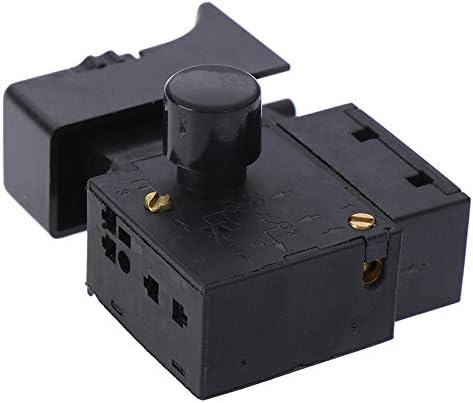
Figure 1: Top-down angled view of the Flastec FA2-6/1BEK switch, showing the trigger and main body. This image illustrates the overall form factor of the switch.
2. Safety Information
Always disconnect the power tool from its power source before attempting any installation, maintenance, or repair. Wear appropriate personal protective equipment (PPE) such as safety glasses. If you are unsure about any step, consult a qualified technician. This switch operates with electrical current; improper installation can lead to electric shock or fire hazards.
3. Setup and Installation
This section provides general guidelines for replacing an existing trigger switch. Specific installation steps may vary depending on your power tool model. Refer to your power tool's original service manual for detailed instructions.
- Disconnect Power: Ensure the power tool is unplugged from the electrical outlet.
- Access Switch: Carefully open the casing of your power tool to access the existing trigger switch. This usually involves removing screws.
- Note Wiring: Before disconnecting, take a clear photograph or draw a diagram of the existing wiring connections to the switch. Note the color and position of each wire.
- Remove Old Switch: Disconnect all wires from the old switch and remove it from its mounting.
- Install New Switch: Connect the wires to the new Flastec FA2-6/1BEK switch according to your diagram or photograph. Ensure all connections are secure. The switch is designed for panel mounting.
- Secure Switch: Mount the new switch securely within the tool's casing.
- Reassemble Tool: Carefully reassemble the power tool casing, ensuring no wires are pinched.

Figure 2: Side view of the Flastec FA2-6/1BEK switch, highlighting the speed control knob and electrical terminals. This view is helpful for understanding wiring connections.
4. Operating Instructions
Once installed, the Flastec FA2-6/1BEK switch functions as follows:
- Variable Speed Control: Press the trigger button to activate the tool. The further the trigger is pressed, the faster the tool will operate.
- Lock-On Function: For continuous operation, press the trigger fully and then engage the lock-on button (typically a small button on the side of the trigger). To disengage, press the trigger fully again and release.
- Power Off: Release the trigger button to turn off the tool. If the lock-on function is engaged, press the trigger fully and release to disengage the lock and turn off the tool.
5. Maintenance
The Flastec FA2-6/1BEK switch is a sealed unit and requires no internal maintenance. Keep the exterior of the switch clean and free from dust and debris. Do not attempt to disassemble the switch, as this may damage the component and void any potential warranty.
6. Troubleshooting
| Problem | Possible Cause | Solution |
|---|---|---|
| Tool does not turn on. | No power to tool, faulty wiring connection, or defective switch. | Check power supply. Verify all wiring connections are secure. If power and wiring are correct, the switch may be faulty and require replacement. |
| Tool operates only at one speed. | Variable speed function not working, or switch is stuck. | Ensure the trigger is not obstructed. If the issue persists, the variable speed mechanism within the switch may be faulty. |
| Lock-on function does not engage/disengage. | Lock-on button mechanism is faulty or obstructed. | Check for any physical obstructions. If none, the lock-on mechanism within the switch may be faulty. |
For issues not listed above, or if troubleshooting steps do not resolve the problem, contact customer support or a qualified technician.
7. Specifications
- Model: FA2-6/1BEK
- Part Number: Fla3-AL166-SW5-794
- Manufacturer: Flastec
- Item Type: Switches
- Switch Type: Push Button
- Mounting Type: Panel Mount
- Material: Plastic
- Current Rating: Other (Specific current rating should be verified on the product label or tool specifications)
- Connectivity Protocol: Other
- Unit Count: 1.0 Count
8. Warranty and Support
This product is covered by a standard manufacturer's warranty against defects in materials and workmanship. For specific warranty terms and conditions, please refer to the documentation provided with your purchase or contact Flastec customer support.
For technical assistance, troubleshooting, or to inquire about replacement parts, please contact your retailer or the manufacturer directly. Keep your purchase receipt as proof of purchase for warranty claims.