
MX-Evo 1PACK 120V (008)
MX-Evo 120V Voltage Protector User Manual
Model: 1PACK 120V (008)
Product Overview
The MX-Evo 120V Voltage Protector is an essential device designed to safeguard your valuable home appliances from electrical irregularities. It provides comprehensive protection against voltage fluctuations, including high voltage, low voltage, and sudden power spikes. This protector is ideal for use with a wide range of electronics and appliances, ensuring their longevity and safe operation.
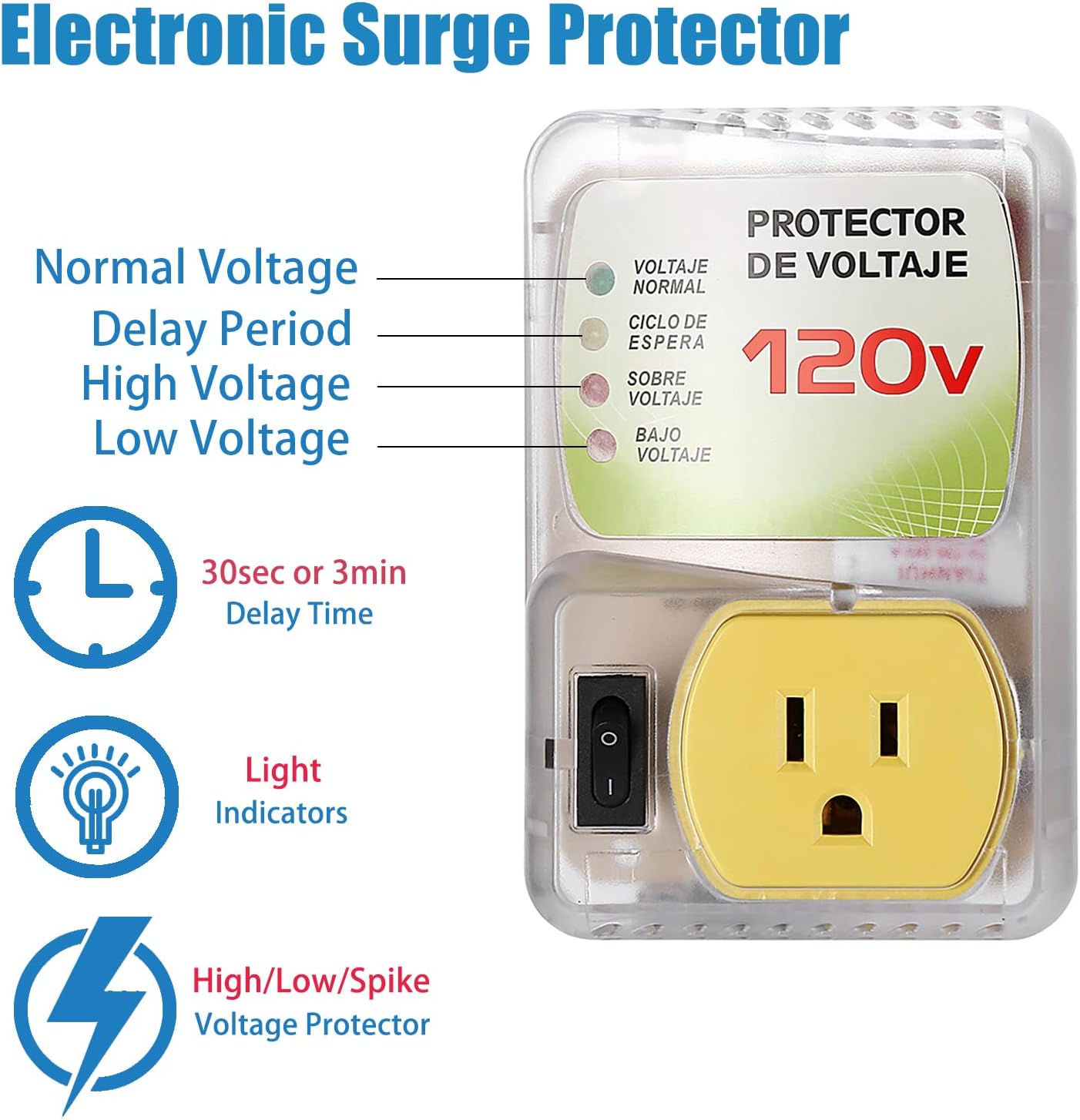
Figure 1: Front view of the MX-Evo 120V Voltage Protector, illustrating its light indicators for Normal Voltage, Delay Period, High Voltage, and Low Voltage. It also highlights the 30-second or 3-minute delay time, light indicators, and high/low/spike voltage protection capabilities.
Key Features:
- Indicator Lights: Features distinct light indicators for Normal (Output), High (SOBRE VOLTAJE), Low (BAJO VOLTAJE), and Delay (CICLO DE ESPERA) states.
- Delay Function: Provides a 3-minute delay (CICLO DE ESPERA) to stabilize voltage before re-establishing power to connected appliances, protecting them from immediate fluctuations.
- Voltage Protection: Offers protection against voltage spikes, high voltage, and low voltage conditions.
- Adjustable Voltage Capacity: The minimum and maximum voltage capacity can be adjusted from 90V to 140V to suit specific needs. The adjustment dial is located on the back of the unit.
- Durable Construction: Made with high-quality prongs and a flame-retardant PC shell for enhanced safety and longevity.
- Wide Applicability: Suitable for various home appliances including Air Conditioners, Refrigerators, Ice Makers, Washing Machines, TVs, and PCs.
Setup and Installation
Setting up your MX-Evo Voltage Protector is straightforward. Follow these steps to ensure proper installation and operation.
- Unpack the Device: Carefully remove the voltage protector from its packaging.
- Inspect for Damage: Before use, visually inspect the device for any signs of physical damage. Do not use if damaged.
- Adjust Voltage (Optional): If necessary, adjust the voltage protection range. The adjustment dial is located on the back of the unit. Use a small flat-head screwdriver to turn the dial to your desired minimum or maximum voltage setting (90V to 140V).

Figure 2: Rear view of the voltage protector, highlighting the adjustable voltage dial. This dial allows users to set the minimum and maximum voltage thresholds between 90V and 140V.
- Plug into Wall Outlet: Insert the voltage protector directly into a standard 120V wall outlet. Ensure it is firmly seated.
- Connect Appliance: Plug your appliance (e.g., refrigerator, TV, PC) into the outlet on the front of the voltage protector.
- Power On: Turn on the power switch located on the side of the voltage protector. The indicator lights will illuminate to show the current status.
The device is designed for easy installation and use, making it suitable for general power equipment in various household environments.

Figure 3: The voltage protector shown with icons representing various applicable equipment such as refrigerators, amplifiers, PCs, microwaves, and washing machines/dryers, emphasizing its broad compatibility and ease of installation.
Operating Instructions
Understanding the indicator lights and the delay function is key to utilizing your voltage protector effectively.
Indicator Lights:
- Normal (Output): When this light is illuminated, it indicates that the voltage is within the safe operating range and power is being supplied to your appliance.
- High (SOBRE VOLTAJE): This light indicates that the incoming voltage is excessively high, exceeding the safe threshold. The protector will cut off power to protect the appliance.
- Low (BAJO VOLTAJE): This light indicates that the incoming voltage is too low, falling below the safe threshold. The protector will cut off power to protect the appliance.
- Delay (CICLO DE ESPERA): When this light is on, the device is in its delay cycle. This typically lasts for 3 minutes, allowing the voltage to stabilize before power is restored to the appliance.
Delay Function Explained:
The delay function is a critical safety feature. If the device detects a voltage fluctuation (either too high or too low, or after a power outage), it will initiate a delay period. During this time, the "Delay" indicator light will be on, and no power will be supplied to the connected appliance. This 3-minute interval ensures that the voltage has fully stabilized before power is re-established, preventing potential damage to your appliance from unstable power. This is particularly useful in areas with frequent power interruptions or unstable grids.

Figure 4: A diagram illustrating the three levels of protection provided by the surge protector: Low Voltage Protection, Spike/Surge Protection, and High Voltage Protection, demonstrating how it safeguards appliances from various electrical anomalies.
Maintenance
The MX-Evo Voltage Protector requires minimal maintenance to ensure its continued performance.
- Cleaning: Periodically wipe the exterior of the device with a soft, dry cloth. Do not use liquid cleaners or abrasive materials.
- Inspection: Regularly check the power cord and the device for any signs of wear, fraying, or damage. If any damage is observed, discontinue use immediately and contact customer support.
- Ventilation: Ensure the device is not covered or placed in an enclosed space that could impede airflow, as proper ventilation helps maintain optimal operating temperature.
Troubleshooting
If you encounter issues with your voltage protector, refer to the following common problems and solutions:
| Problem | Possible Cause | Solution |
|---|---|---|
| No power to appliance, no lights on protector. | Protector not plugged in, wall outlet no power, or protector switch off. | Ensure protector is firmly plugged into a live wall outlet. Check the protector's power switch is in the 'On' position. Test the wall outlet with another device. |
| "Delay" light is on, appliance not receiving power. | Voltage fluctuation detected or recent power outage. | This is normal operation. Wait for the 3-minute delay cycle to complete. Power will be restored automatically once voltage stabilizes. |
| "High" or "Low" voltage light is on, appliance not receiving power. | Incoming voltage is outside safe operating range. | The protector is functioning as intended to protect your appliance. Check your household voltage. If this persists, contact an electrician. |
| Appliance still damaged despite using protector. | Extreme surge beyond protector's capacity or improper use. | Ensure the protector's specifications match your appliance's requirements. While highly effective, no protector can guarantee 100% protection against all extreme events. |
If the problem persists after attempting these solutions, please contact customer support for further assistance.
Specifications
| Feature | Detail |
|---|---|
| Model | 1PACK 120V (008) |
| Brand | MX-Evo |
| Product Dimensions | 4.72 x 3.15 x 1.5 inches (120mm x 80mm x 38.2mm) |
| Item Weight | 7 ounces |
| Voltage | 120 Volts |
| Adjustable Voltage Range | 90V to 140V |
| Maximum Load | 20A, 1440W |
| Total Power Outlets | 1 (US Plug) |
| Special Feature | Surge Protection, Voltage Protection, Delay Function |
| Shell Material | PC Flame Retardant Material |
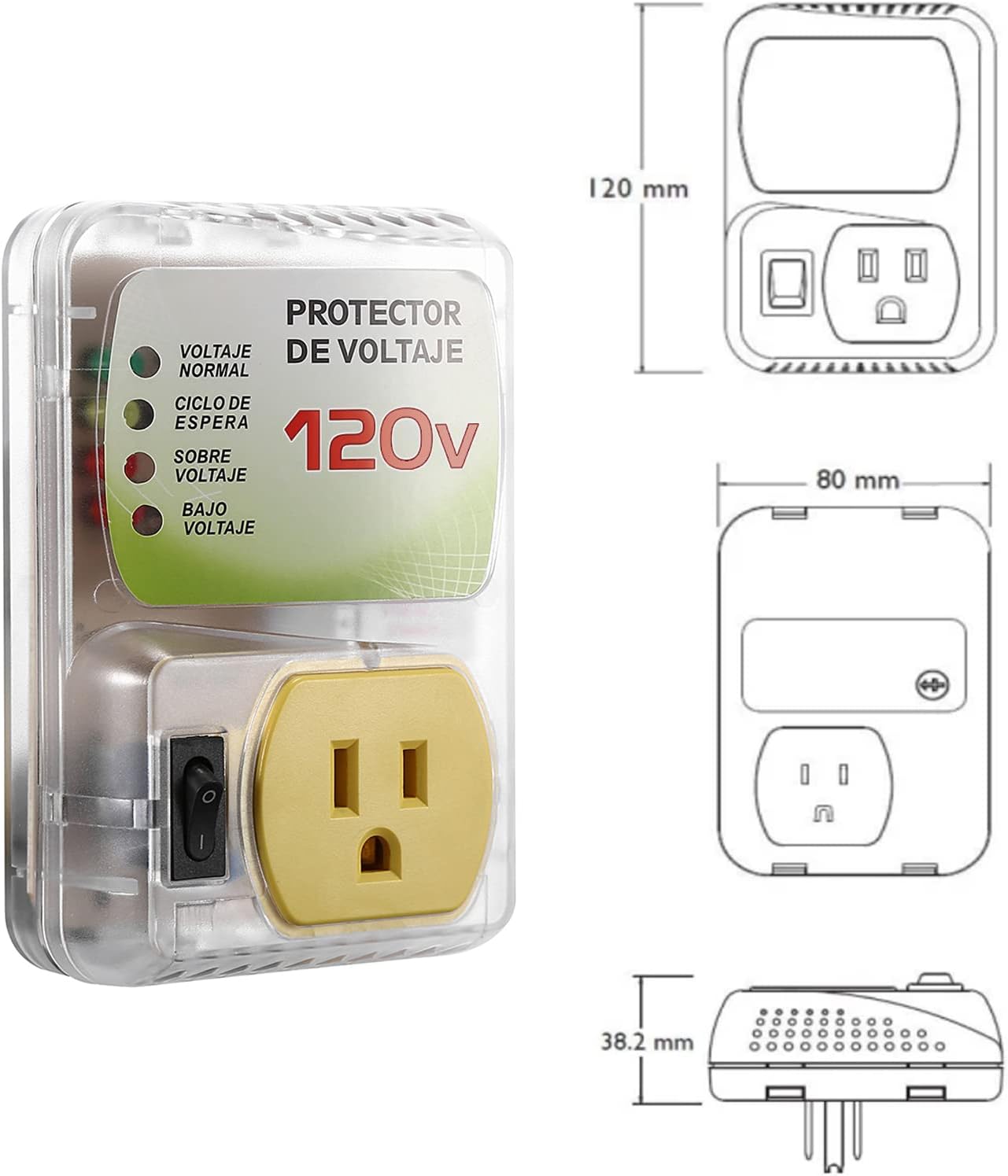
Figure 5: The voltage protector displayed alongside its key dimensions (120mm height, 80mm width, 38.2mm depth), providing a clear understanding of its physical size.
Warranty Information
Specific warranty details for the MX-Evo Voltage Protector are typically provided at the point of purchase or within the product packaging. Please retain your proof of purchase for any warranty claims.
For information regarding returns or replacements, please refer to the retailer's return policy. The buybox winner information indicates a return policy with a duration of 30 days for refund/replacement.
Customer Support
If you have any questions, require technical assistance, or need to report an issue with your MX-Evo Voltage Protector, please contact the seller or manufacturer directly.
For general inquiries, you may refer to the brand's official presence on Amazon: MX-Evo Brand Page.
Please note that the printed text and instructions on some units of this surge protector may be in Spanish. If you encounter any language barriers or have questions, do not hesitate to reach out for clarification.
Official Product Videos
No official product videos from the seller are available for this model at this time.
Related Documents - 1PACK 120V (008)
 |
Compact Stainless Steel Water Heater Assembly Instructions Detailed assembly instructions and features for a compact 316 stainless steel water heater, including specifications on heating element, temperature control, tank durability, and installation options. |
 |
Electric Storage Water Heater DX-14VA(M,S) - User Manual & Installation Guide Comprehensive guide for the Electric Storage Water Heater, model DX-14VA(M,S). Includes specifications, safety, installation, operation, and troubleshooting for optimal performance. Available in multiple languages. |
 |
Avantco CO-14 Quarter Size Countertop Convection Oven - 0.8 Cu. Ft. Detailed specifications and features of the Avantco CO-14 quarter size countertop convection oven, including dimensions, capacity, power, and certifications. Ideal for light-duty commercial use. |
 |
Eaton Tripp Lite SmartPro 1500VA UPS - Product Overview and Specifications Detailed information on the Eaton Tripp Lite SmartPro 1500VA 1440W 120V Line-Interactive Sine Wave UPS, including features, specifications, and applications. This UPS offers reliable battery backup and pure sine wave power output for critical IT equipment. |
 |
Avantco HEAT-1836 Full Size Non-Insulated Heated Holding Cabinet with Clear Door - 120V Detailed specifications for the Avantco HEAT-1836, a full-size, non-insulated heated holding cabinet designed for commercial kitchens. Features 36-pan capacity, 9 temperature settings up to 185°F, clear Lexan door, and 120V power. |
 |
Eaton TLM825USB 8-Outlet Industrial Safety Surge Protector with 2 USB-A Ports Discover the Eaton TLM825USB, an industrial-grade 8-outlet surge protector featuring 2 USB-A charging ports, 25 ft. cord, 1960 joules of protection, and durable metal housing. Ideal for harsh environments, it offers advanced surge suppression, EMI/RFI filtering, and safety features. View detailed specifications, compliance, and warranty information. |
Ask a question about this manual
Ask about setup, troubleshooting, compatibility, parts, safety, or missing instructions. Manuals+ will review the question and use this page’s manual context to help answer it.