1. Important Safety Information
Please read and understand all safety information before assembling or using this product. Failure to follow these instructions may result in injury or product damage.
- Weight Limit: Do not exceed the weight limit of 180 pounds (81.6 kg) per shelf. Overloading can cause the cabinet to collapse or tip over.
- Assembly: Always assemble the cabinet strictly according to the instructions provided. Ensure all fasteners are securely tightened.
- Keys: Keep all keys in a safe place, away from children. Do not leave keys in the locks when the cabinet is unattended.
- Pinch Points: Be cautious of pinch points when operating the drawers and doors, especially when children or pets are nearby.
- Stability: For added stability, consider anchoring the cabinet to a wall, especially if it will be placed on uneven surfaces or in areas with high traffic.
2. Product Overview
The BESFUR Metal Storage Cabinet is designed for versatile storage in various environments such as classrooms, homes, and offices. It features a durable metal construction, locking doors, and two drawers for secure organization.

Image 2.1: Front view of the BESFUR Metal Storage Cabinet with both doors and drawers open, showcasing its storage compartments and locking mechanisms.
Key Features:
- Ample Storage: Features a spacious desktop, two lockable drawers, and an adjustable shelf within the main cabinet compartment.
- Adjustable Shelf: The internal shelf can be adjusted to accommodate items of various heights, providing flexible storage solutions.
- Secure Locking System: Equipped with two locks and administrator keys for enhanced security of stored items.
- High Weight Capacity: Each shelf is constructed from heavy-duty cold-rolled steel, supporting up to 180 pounds (81.6 kg).
- Durable Construction: Made from metal with a powder-coated finish for longevity and resistance to wear.

Image 2.2: The metal storage cabinet positioned in an office environment, demonstrating its practical use for organizing files, a printer, and other office supplies.
3. Specifications

Image 3.1: Detailed diagram showing the dimensions of the BESFUR Metal Storage Cabinet, including height, width, and depth, as well as internal shelf and drawer heights.
| Attribute | Detail |
|---|---|
| Brand | BESFUR |
| Model Name | Floor cabinet (D-Cabinet-001) |
| Color | Black |
| Product Dimensions | 15.75"D x 31.5"W x 36"H (40D x 80W x 91.4H cm) |
| Item Weight | 56 Pounds (25.4 kg) |
| Material | Metal (Alloy Steel) |
| Finish Type | Powder Coated |
| Special Feature | Lockable |
| Mounting Type | Floor Mount |
| Number of Shelves | 2 (1 adjustable) |
| Number of Drawers | 2 |
| Weight Limit (per shelf) | 180 Pounds (81.6 kg) |
| Assembly Required | Yes |
4. Setup and Assembly
The BESFUR Metal Storage Cabinet requires assembly. All necessary parts and tools are included, and the assembly process is designed to be straightforward. It is recommended to assemble the cabinet with at least two people for ease and safety.
Assembly Steps:
- Unpack and Identify Parts: Carefully unpack all components and hardware. Refer to the included parts list to ensure all items are present and undamaged.
- Assemble the Base: Connect the bottom panel to the side panels using the provided screws and fasteners. Ensure the base is stable and level.
- Construct the Frame: Attach the remaining side panels and the top panel to form the main cabinet frame. Do not fully tighten all screws until the entire frame is aligned.
- Install Drawer Slides: Secure the drawer slides to the internal cabinet walls according to the instructions. Ensure they are level and properly aligned for smooth drawer operation.
- Assemble and Insert Drawers: Assemble the two drawers, then carefully insert them into the installed slides. Test for smooth movement.
- Install Adjustable Shelf: Place the adjustable shelf supports at the desired height within the main cabinet compartment, then rest the shelf on top.
- Attach Doors: Secure the cabinet doors to the frame using the provided hinges. Adjust as necessary to ensure proper alignment and closure.
- Install Locks and Handles: Attach the door handles and ensure the locking mechanisms are correctly installed and functional.
- Final Tightening: Once all components are in place and aligned, fully tighten all screws and fasteners.

Image 4.1: A visual guide highlighting key assembly and feature details: adjustable shelf brackets, noise reduction pads, plastic door buckles, and the lock with two keys.
5. Operating Instructions
5.1 Using the Drawers
The cabinet features two full-extension drawers designed for storing files, keys, and other small items. Each drawer is equipped with a lock for security.
- Opening: Pull the drawer handle to open. The full-extension slides allow the drawer to extend completely for easy access.
- Closing: Push the drawer firmly until it is fully closed.
- Locking: Insert the key into the drawer lock and turn it to the locked position. Remove the key.
- Unlocking: Insert the key into the drawer lock and turn it to the unlocked position.
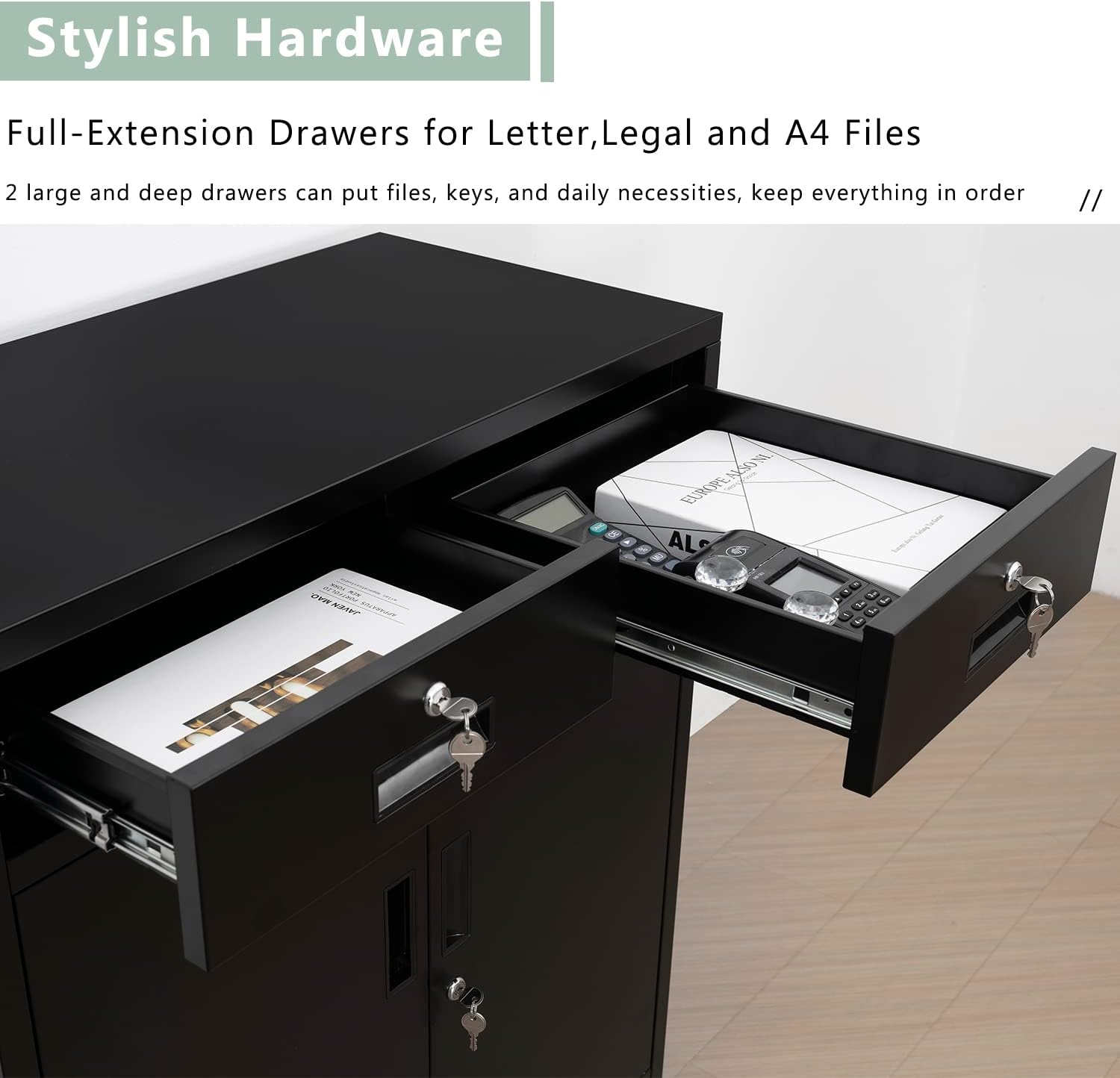
Image 5.1: A close-up view of the two lockable drawers, showing the keys inserted into the locking mechanisms.
5.2 Adjusting Shelves
The internal shelf can be adjusted to different heights to accommodate various items.
- Empty the Shelf: Remove all items from the shelf you wish to adjust.
- Remove Shelf: Carefully lift the shelf and remove it from its current position.
- Relocate Supports: Move the shelf supports to the desired slots on the cabinet's side panels. Ensure they are level and securely seated.
- Reinsert Shelf: Place the shelf back onto the relocated supports. Ensure it is stable before placing items back on it.
5.3 Locking and Unlocking Doors
The main cabinet doors are equipped with a central locking mechanism for secure storage.
- Locking: Close both doors firmly. Insert the key into the door lock and turn it to the locked position. Remove the key.
- Unlocking: Insert the key into the door lock and turn it to the unlocked position. Pull the handle to open the doors.
6. Maintenance
Regular maintenance will help prolong the life and appearance of your BESFUR Metal Storage Cabinet.
- Cleaning: Wipe surfaces with a soft, damp cloth. Avoid abrasive cleaners or harsh chemicals that could damage the powder-coated finish.
- Inspection: Periodically check all screws and fasteners to ensure they remain tight. Retighten if necessary.
- Drawer Slides: If drawers become stiff, a small amount of silicone-based lubricant can be applied to the ball-bearing slides.
- Locks: Ensure locks operate smoothly. Do not force keys if they are stiff; apply a small amount of graphite lubricant if needed.
7. Troubleshooting
| Problem | Possible Cause | Solution |
|---|---|---|
| Missing parts during assembly | Packaging error or lost during unpacking. | Double-check packaging. Contact BESFUR customer support with your purchase details. |
| Drawers do not slide smoothly | Misaligned slides, debris in tracks, or lack of lubrication. | Ensure slides are correctly installed and aligned. Clean tracks. Apply silicone lubricant if necessary. |
| Doors do not close properly | Misaligned hinges or cabinet frame not level. | Adjust hinge screws. Ensure the cabinet is on a level surface. |
| Keys are lost | Misplaced or lost. | Use the spare key provided. For replacement keys, contact BESFUR customer support with your product model and lock code (if available). |
| Cabinet feels unstable | Uneven floor or loose fasteners. | Ensure the cabinet is on a level surface. Tighten all assembly screws. Consider anchoring to a wall for added stability. |
8. Warranty and Support
For warranty information and customer support, please refer to the documentation included with your purchase or contact BESFUR directly through their official channels. Keep your purchase receipt for warranty claims.
Contact Information:
- Visit the BESFUR Store on Amazon for product information and support.
- Refer to the contact details provided in your product packaging.