
Night Owl BTN8-82-6L
Night Owl 8 Channel Bluetooth Video Home Security Camera System User Manual
Model: BTN8-82-6L
Introduction
This manual provides comprehensive instructions for the installation, operation, and maintenance of your Night Owl 8 Channel Bluetooth Video Home Security Camera System. This system includes a Wired NVR with a 2TB Hard Drive and six 4K HD Wired IP Spotlight Cameras with Audio. Please read this manual thoroughly before setup and operation to ensure proper functionality and safety.
System Contents
Verify that all components listed below are included in your package:
- 1 x Wired NVR with 2TB Hard Drive
- 1 x NVR Power Adapter
- 1 x 6 ft. HDMI Cable
- 1 x RJ-45 Cable (Ethernet)
- 1 x USB Mouse
- 1 x Support Material & Window Sticker
- 6 x 4K HD Wired IP Cameras
- 6 x 60 ft. RJ-45 Ethernet Camera Cables
- 6 x Mounting Hardware and Screw Packets
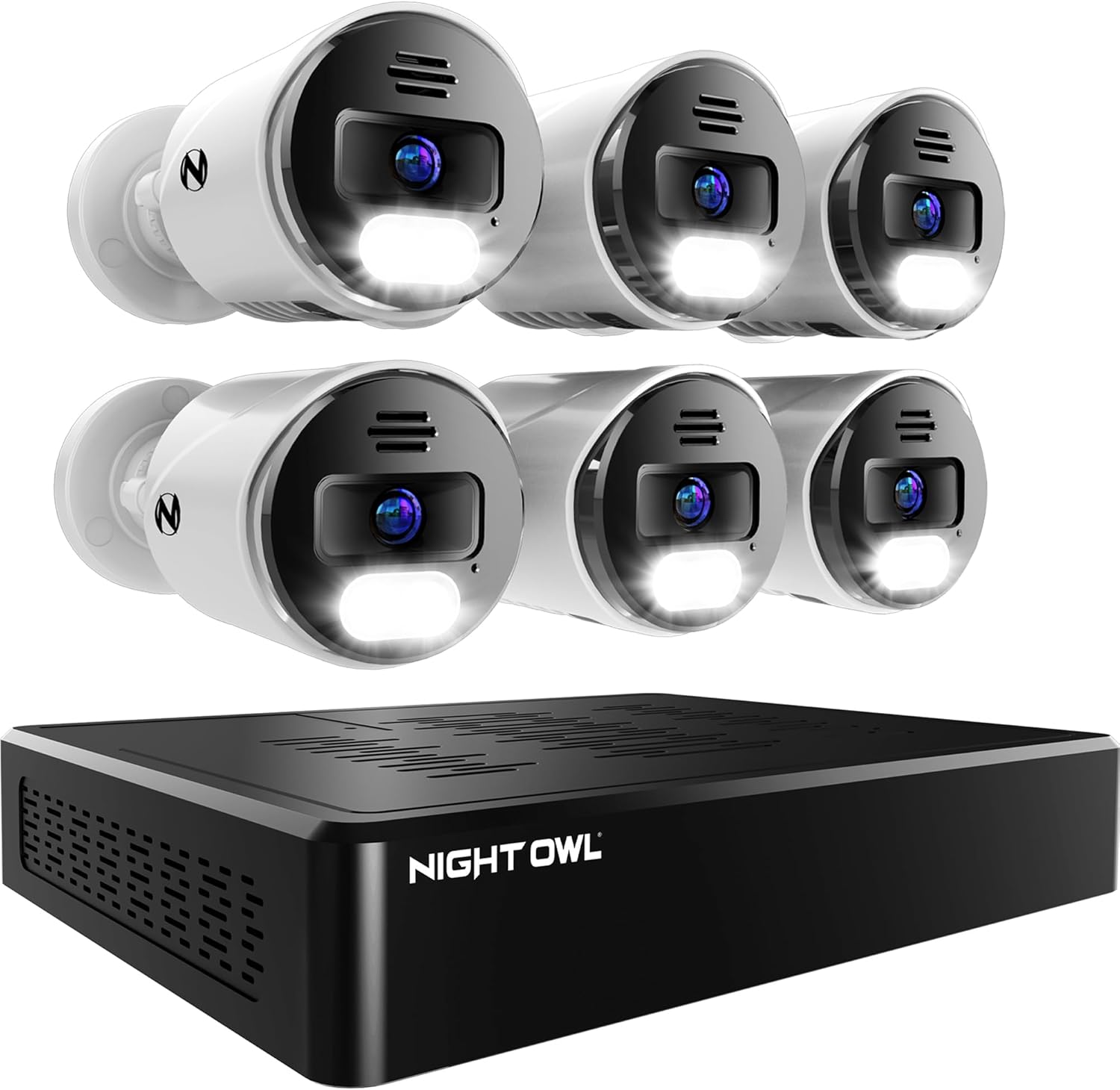
Image: Overview of the Night Owl 8 Channel Security System components, showing the NVR unit and six wired IP cameras.
Setup Guide
1. Initial NVR Setup
- Connect the NVR: Connect the NVR Power Adapter to the NVR and plug it into a power outlet.
- Connect USB Mouse: Plug the included USB Mouse into one of the USB ports on the NVR.
- Network Connection (Optional for initial setup, recommended for remote access): Connect the RJ-45 Ethernet cable from the NVR's LAN port to your router.
- Bluetooth Setup (App-Based):
The system features secure app-based Bluetooth setup, eliminating the need for a TV or monitor for initial configuration. Download the Night Owl Protect app on your smart device.

Image: A Night Owl NVR unit on a table with a hand holding a smartphone showing the Night Owl Protect app's device setup screen, highlighting the easy Bluetooth setup.
Follow the in-app instructions to pair your smart device with the NVR via Bluetooth and complete the initial system configuration.
2. Camera Installation
The 4K HD Wired IP Cameras connect to the NVR using a single RJ-45 Ethernet cable for both power and video signal (Power over Ethernet - PoE).
- Mounting: Select suitable indoor or outdoor locations for your cameras. Use the included mounting hardware to securely attach each camera. Ensure the camera has a clear line of sight to the area you wish to monitor.
- Cable Connection: Connect one end of the 60 ft. RJ-45 Ethernet Camera Cable to the camera and the other end to an available "CAMERAS" port on the back of the NVR.
- Power On: Once all cameras are connected, ensure the NVR is powered on. The cameras will automatically power up and connect to the NVR.

Image: Rear view of the Night Owl NVR, illustrating the 8 channel camera ports (PoE), USB ports, HDMI, and LAN connections. This system supports up to 8 wired cameras.
Operating Instructions
1. Using the Night Owl Protect App
The Night Owl Protect app is your primary interface for managing and monitoring your security system.
- Live View: Access real-time video feeds from all connected cameras.
- Playback: Review recorded footage stored on the 2TB hard drive.
- 2-Way Audio: Utilize the built-in microphone and speaker on the cameras to listen and talk through the app.
- Preset Voice Alerts & Siren: Trigger pre-recorded messages or a loud siren through the camera speakers to deter intruders or communicate with visitors.
- Notifications: Receive real-time alerts on your smart device for motion detection or other events.
- Security Features: The app supports 2-Step Verification and Single Sign-On for enhanced account security.

Image: Illustration of the 2-way audio feature, showing a person communicating with a delivery driver at their front door using the Night Owl Protect app on a smartphone.

Image: A Night Owl camera with its spotlight and siren activated, deterring a hooded figure in front of a garage, with the scene simultaneously displayed on a smartphone app.

Image: Screenshots of the Night Owl Protect mobile app interface, demonstrating real-time alerts, live view, playback options, and sharing capabilities.
2. Local Storage and Privacy
Your security camera recordings are stored securely on the pre-installed 2TB hard drive within the NVR. This system prioritizes your privacy by keeping data local and not relying on mandatory cloud storage or subscriptions.

Image: An exploded view of the Night Owl NVR, showing the internal 2TB hard drive, highlighting the system's free local storage capability.
Maintenance
- Camera Lens Cleaning: Periodically clean camera lenses with a soft, damp cloth to ensure clear image quality. Avoid abrasive cleaners.
- Firmware Updates: Check the Night Owl Protect app regularly for available firmware updates for your NVR and cameras. Updates can improve performance and add new features.
- Hard Drive Management: The 2TB hard drive provides ample storage. The system typically overwrites the oldest footage when the drive is full. You can configure recording settings (e.g., motion-activated recording) to optimize storage usage.
- Cable Inspection: Periodically inspect all Ethernet cables for any signs of wear or damage, especially for outdoor installations.
Troubleshooting
| Problem | Possible Cause | Solution |
|---|---|---|
| No video from camera |
|
|
| App connectivity issues |
|
|
| Poor image quality |
|
|
| No audio or poor 2-way audio |
|
|
Specifications
| Feature | Detail |
|---|---|
| Brand | Night Owl |
| Model Number | BTN8-82-6L |
| Connectivity Technology | Wired (PoE) |
| Video Capture Resolution | 2160p (4K HD) |
| Number of Channels | 8 (Expandable up to 12 cameras: 8 wired IP + 4 Wi-Fi) |
| Memory Storage Capacity | 2 TB Hard Drive (Pre-installed) |
| Power Source | Corded Electric |
| Item Dimensions (L x W x H) | 10 x 15 x 5 inches |
| Compatible Devices | Security Cameras |
| Signal Format | Digital |
| Low Light Technology | Night Vision |
| Frame Rate | 30 fps |
| Recording Mode | Video |
| Optical Sensor Technology | CMOS |
| Hardware Interface | Bluetooth, RJ45, USB, HDMI |
| Lens Type | Wide Angle |
| Viewing Angle | 82 Degrees |
| Item Weight | 17.22 pounds |
| UPC | 816522025038 |
Warranty and Support
Night Owl products typically come with a 1-year limited warranty from the date of purchase. For detailed warranty information, technical support, or to register your product, please visit the official Night Owl website or contact their customer service. Support materials and window stickers are included in your package for quick reference.
Note: All Night Owl products are proudly designed and engineered in the U.S.A.