
1. Introduction
This manual provides essential information for the safe and effective use of your Sony SRS-XE300 X-Series Wireless Portable Bluetooth Speaker. Please read this manual thoroughly before using the device and retain it for future reference.
The Sony SRS-XE300 is designed to deliver high-quality audio in various environments. Its robust construction features IP67 waterproofing, dustproofing, and shock resistance, making it suitable for outdoor and active use. Key features include a Line-Shape Diffuser for wide sound distribution, X-Balanced Speakers for clear audio, up to 24 hours of battery life with quick charging, and app control via Sony | Music Center and Fiestable.

Image 1.1: Front view of the Sony SRS-XE300 X-Series Wireless Portable Bluetooth Speaker in black.
2. Package Contents
Verify that all items are present in the package:
- Sony SRS-XE300 Wireless Portable Bluetooth Speaker
- USB-C Cable for charging
- Instruction Manual (this document)
3. Setup
3.1. Charging the Speaker
Before initial use, fully charge the speaker. Connect the supplied USB-C cable to the speaker's USB-C port and the other end to a compatible USB power adapter (not included).
- A full charge takes approximately 24 hours.
- Quick charging provides approximately 70 minutes of playback after just 10 minutes of charging.
- The CHARGE indicator will illuminate during charging and turn off when charging is complete.
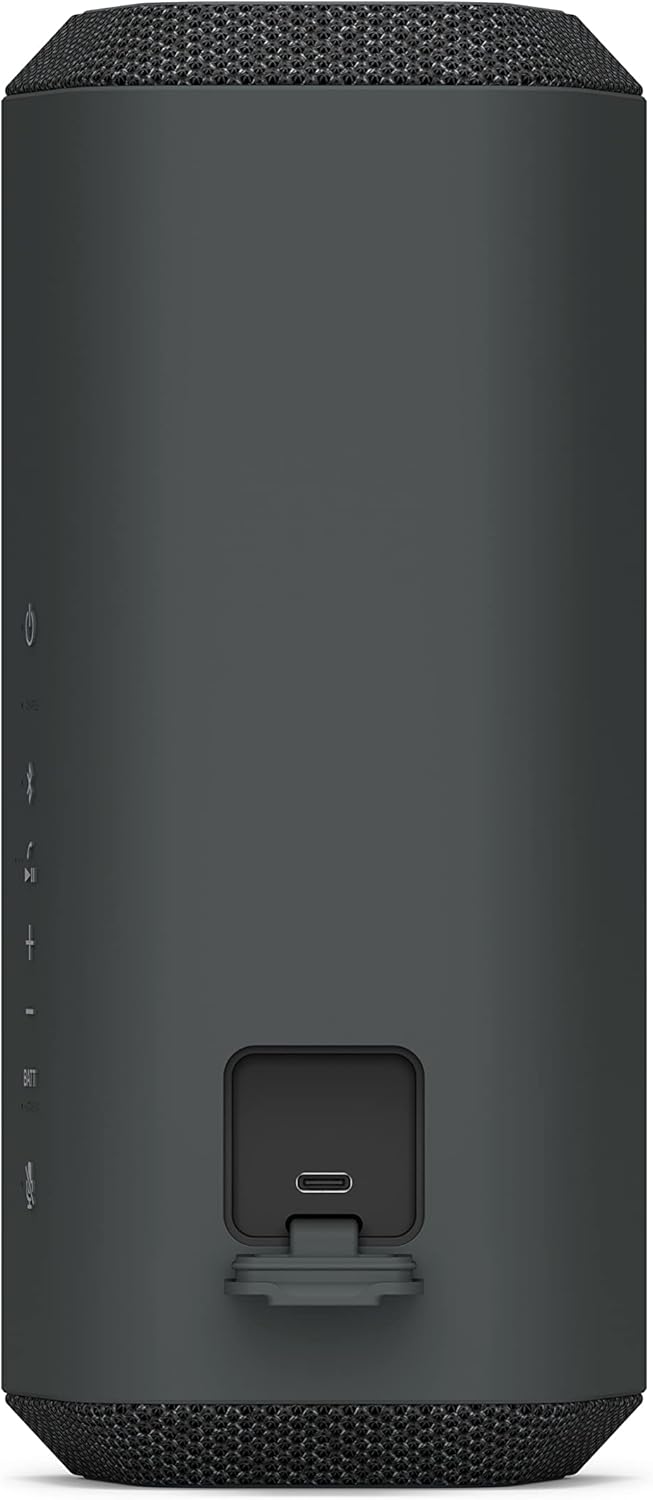
Image 3.1: The USB-C charging port located on the rear of the speaker.
3.2. Powering On/Off
To power on the speaker, press and hold the Power button until the indicators light up. To power off, press and hold the Power button again until the indicators turn off.

Image 3.2: Control panel with power and other function buttons.
3.3. Bluetooth Pairing
- Ensure the speaker is powered on.
- Press and hold the Bluetooth button on the speaker until the Bluetooth indicator starts flashing rapidly. This indicates pairing mode.
- On your smartphone or other Bluetooth device, navigate to the Bluetooth settings and select "SRS-XE300" from the list of available devices.
- Once connected, the Bluetooth indicator on the speaker will stop flashing and remain lit.

Image 3.3: The speaker's compact design allows for easy portability.
4. Operating Instructions
4.1. Audio Playback
After successful Bluetooth pairing, audio from your connected device will play through the SRS-XE300 speaker. Use the volume buttons on the speaker or your connected device to adjust the sound level.
The speaker features a Line-Shape Diffuser which helps distribute sound evenly across a wide area, ensuring a consistent listening experience for everyone.

Image 4.1: The Line-Shape Diffuser technology provides broad sound coverage.
4.2. App Control (Sony | Music Center & Fiestable)
Enhance your speaker experience by downloading the Sony | Music Center app and the Fiestable app from your device's app store.
- Sony | Music Center: Provides personalized sound control, including equalizer settings, battery health features, and other speaker management options.
- Fiestable: Offers additional effects and features to enhance the mood, particularly for party settings.
4.3. Hands-Free Calling
The SRS-XE300 includes a built-in microphone with echo-canceling technology for clear hands-free calls. When a call comes in, music playback will pause, and you can answer the call using the speaker's controls.
4.4. Party Connect
Connect up to 100 compatible wireless speakers using the Party Connect feature via the Sony | Music Center app to synchronize music and create a larger sound experience.
5. Maintenance
5.1. Cleaning
To clean the speaker, wipe it with a soft, dry cloth. For stubborn dirt, use a cloth lightly dampened with water. Do not use abrasive cleaners, alcohol, benzene, or thinners, as these can damage the surface.
The speaker's IP67 rating means it is waterproof and dustproof. If the speaker gets dirty, it can be rinsed with fresh water. Ensure all ports are securely closed before rinsing.

Image 5.1: The speaker is designed to withstand water exposure.
5.2. Battery Care
To prolong battery life, avoid fully discharging the battery frequently. The Sony | Music Center app offers battery care features, such as limiting charging to 90%, which can help extend the overall lifespan of the battery.
6. Troubleshooting
If you encounter issues with your SRS-XE300 speaker, refer to the following common problems and solutions:
| Problem | Possible Cause / Solution |
|---|---|
| No power | The battery may be depleted. Charge the speaker using the supplied USB-C cable. |
| Cannot pair via Bluetooth |
|
| No sound or low volume |
|
| Sound distortion |
|
7. Specifications
| Feature | Detail |
|---|---|
| Model Name | SRS-XE300 |
| Brand | Sony |
| Speaker Type | Portable Speaker |
| Connectivity Technology | Bluetooth (Wireless) |
| Wireless Communication Technology | Bluetooth |
| Bluetooth Range | Up to 30 meters (10 meters maximum range for general use) |
| Water Resistance Level | IP67 (Waterproof and Dustproof) |
| Shockproof | Yes |
| Battery Life | Up to 24 hours |
| Quick Charging | 10 minutes charge for 70 minutes playback |
| Power Source | Battery Powered (1 Lithium Ion battery included) |
| Audio Driver Type | X-Balanced Speakers, Line-Shape Diffuser |
| Audio Output Mode | Stereo |
| Speaker Maximum Output Power | 10 Watts |
| Control Method | App, Remote, Touch, Voice |
| Product Dimensions (D x W x H) | 4.69" x 4.13" x 9.37" |
| Item Weight | 1.5 Kilograms (3.3 pounds) |
| Included Components | Speaker, USB C Cable |
8. Warranty and Support
This Sony SRS-XE300 speaker is covered by a limited warranty. For specific terms and conditions, please refer to the warranty card included with your product or visit the official Sony support website.
For further assistance, troubleshooting, or to download the full PDF user manual, please visit the Sony support website or contact customer service.
Official User Manual (PDF): Download PDF
Note: No official product videos from the seller were available for embedding based on the provided data.