
1. Introduction
Thank you for choosing MALUX Solar Outdoor Lights. This manual provides essential information for the safe and efficient use of your solar sphere lights. These lights are designed for outdoor use, featuring solar charging, multiple color options, and remote control functionality, making them ideal for gardens, patios, and pools.
This product includes a light source with an energy efficiency class [F]. The surrounding products are lighting fixtures that can be disassembled to separately control the included light source.
2. Parts List
Please check the package contents to ensure all items are present:
- 3 x LED Solar Lights
- 3 x Remote Controls
- 3 x Plastic Stakes
- 1 x User Manual (this document)
3. Technical Specifications
| Feature | Specification |
|---|---|
| Material | PE Plastic |
| Water Resistance (LED Lights) | IPX6 (floatable on water) / IP67 (general waterproof rating) |
| Colors | RGB + White (8 colors) |
| Battery | Li-Ion (integrated, non-replaceable) |
| Remote Distance | 4 meters (13 feet) |
| Charging Time | Full day (with good sunlight exposure) |
| Operating Time (approx.) | 4-8 hours (RGB colors: 8 hours) |
| Solar Panel | 0.4 W |
| Dimensions (L x W x H) | 13L x 13l x 13H cm |
| Light Type | LED |
| Control Method | Remote Control |
| Connectivity Protocol | Infrared |
| Energy Efficiency Class | F (EU Label A+++) |
For detailed energy information, please refer to the official EU energy label and product data sheet:
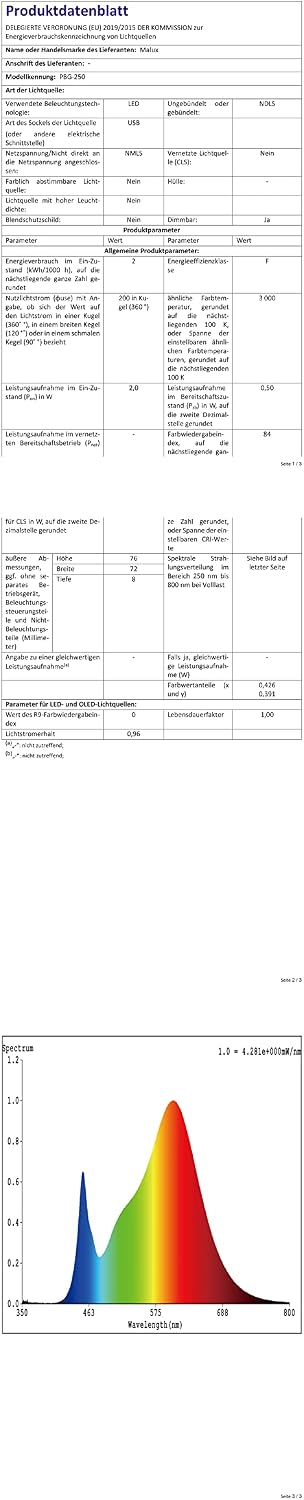
Image: EU Energy Label showing efficiency class F.

Image: Product Data Sheet with detailed specifications.
For more information, visit the EPREL database.
4. Setup and Installation
4.1 Initial Charging
Before first use, ensure the solar lights are placed in direct sunlight for a full day to allow the internal battery to charge completely. The solar panel converts sunlight into electricity, which charges the battery.
4.2 Placement Guidelines
- Optimal Sunlight: Choose a location where the solar panel receives maximum direct sunlight throughout the day. Shaded areas will reduce charging efficiency and operating time.
- Avoid Other Light Sources: Do not place the lights near other strong night-time light sources (e.g., porch lights, streetlights, pool lights). These external lights can interfere with the solar light's automatic sensor, causing it to flicker or turn off prematurely.
- Ground Installation: Use the provided plastic stakes to secure the lights in the ground if desired.
- Floating Use: The lights are IPX6 water-resistant and can float on water, making them suitable for pools or ponds.

Image: MALUX solar lights illuminating a beach scene at sunset, demonstrating outdoor placement.

Image: Multiple MALUX solar lights placed in a garden and floating in a pool, showcasing versatile outdoor use.
5. Operating Instructions
5.1 Automatic Operation
The MALUX solar lights are designed for automatic operation. They will automatically turn on in dark conditions (night-time) once sufficiently charged and turn off during daylight hours to charge.
Note: If you wish to test or operate the light during the daytime, place the product in a completely dark environment to activate the light sensor.
5.2 Remote Control Functions
Each solar light comes with a remote control to manage its lighting modes and colors. The remote control operates within a range of approximately 4 meters (13 feet).
- Power ON/OFF: Use the dedicated buttons to turn the light on or off manually.
- Color Selection: Choose from 8 different colors (RGB + White) to set a static color.
- Lighting Modes: Select from 4 light modes:
- Monochromatic: Displays a single, steady color.
- Bright+/Slow: Gradually changes colors with a slow transition.
- Fast: Quickly cycles through colors.
- Brightness Adjustment: Adjust the intensity of the light.
Video: Demonstration of MALUX floating pool lights changing colors and modes. This video showcases the product's ability to float and display various RGB colors, controlled by the remote.
6. Maintenance
- Cleaning: Regularly wipe the solar panel and the light sphere with a soft, damp cloth to remove dust, dirt, or debris. A clean solar panel ensures optimal charging efficiency.
- Winter Care: In regions with prolonged periods of low sunlight or freezing temperatures, it is recommended to store the solar lights indoors to protect the battery and extend their lifespan.
- Battery: The Li-Ion battery is integrated and not user-replaceable. Do not attempt to open the unit to replace the battery.
7. Troubleshooting
- Light does not turn on at night:
- Ensure the solar panel is receiving direct sunlight for at least 6-8 hours daily.
- Check if the light is placed near other strong light sources that might trigger its sensor to turn off.
- Verify the remote control is functioning and the light is not manually turned off.
- Allow for a full day of charging before first use or after prolonged storage.
- Short operating time:
- Insufficient sunlight during the day. Relocate the light to a sunnier spot.
- Solar panel may be dirty. Clean the solar panel as described in the Maintenance section.
- Weather conditions (e.g., cloudy days) can affect charging efficiency.
- Remote control not working:
- Ensure you are within the 4-meter operating range.
- Check if the remote control's battery needs replacement (if applicable, though product description doesn't specify remote battery type).
- Ensure there are no obstructions between the remote and the light.
8. Safety Information
- Do not attempt to disassemble or modify the product. This may damage the unit and void any warranty.
- Keep the product away from open flames or extreme heat sources.
- While the lights are waterproof (IP67) and floatable (IPX6), avoid submerging the remote control in water.
- Dispose of the product and its battery responsibly according to local regulations.
9. Warranty and Support
For any questions, concerns, or support regarding your MALUX Solar Outdoor Lights, please contact your retailer or the manufacturer directly. Please retain your proof of purchase for warranty claims.