
1. Introduction
This manual provides detailed instructions for the setup, operation, and maintenance of your LP&No.1 LPSC-321 Record Player with External Speakers. Please read this manual thoroughly before using the product to ensure proper function and longevity.
2. Safety Instructions
- Do not expose the unit to rain or moisture.
- Do not open the cabinet. Refer servicing to qualified personnel only.
- Ensure proper ventilation around the unit.
- Use only the power adapter supplied with the unit.
- Keep the unit away from direct sunlight, heat sources, and strong magnetic fields.
- Clean only with a dry cloth.
3. Package Contents
Verify that all items listed below are included in your package:
- LP&No.1 LPSC-321 Record Player Unit
- External Speakers (2 units)
- Power Adapter
- 45 RPM Adapter
- User Manual (this document)
4. Product Overview
4.1 Top View Components

- 45 RPM Adapter: Used for playing 7-inch records with a large center hole.
- Lift Lever: Raises and lowers the tone arm.
- Platter: The rotating platform where records are placed.
- 33/45/78 RPM Switch: Selects the playback speed for your records.
- Auto Stop On/Off Switch: Enables or disables the automatic stop function at the end of a record.
- Tone Arm: Holds the cartridge and stylus.
- Ceramic Cartridge: Contains the stylus (needle) that reads the record grooves.
- Power/Volume Control Knob: Turns the unit on/off and adjusts the volume.
- Function Switch Knob: Selects between Phono (vinyl playback) and Wireless (Bluetooth) modes.
4.2 Rear View Components

- DC IN Port: Connects the power adapter to the record player.
- RCA Output Ports: Used to connect the record player to the included external speakers or other audio systems.
- Right Speaker Connection: Connects the right external speaker.
- Left Speaker Connection: Connects the left external speaker.
5. Setup
- Unpacking: Carefully remove all components from the packaging. Retain the packaging for future transport or storage. Remove any protective materials, including the Styrofoam block under the platter.
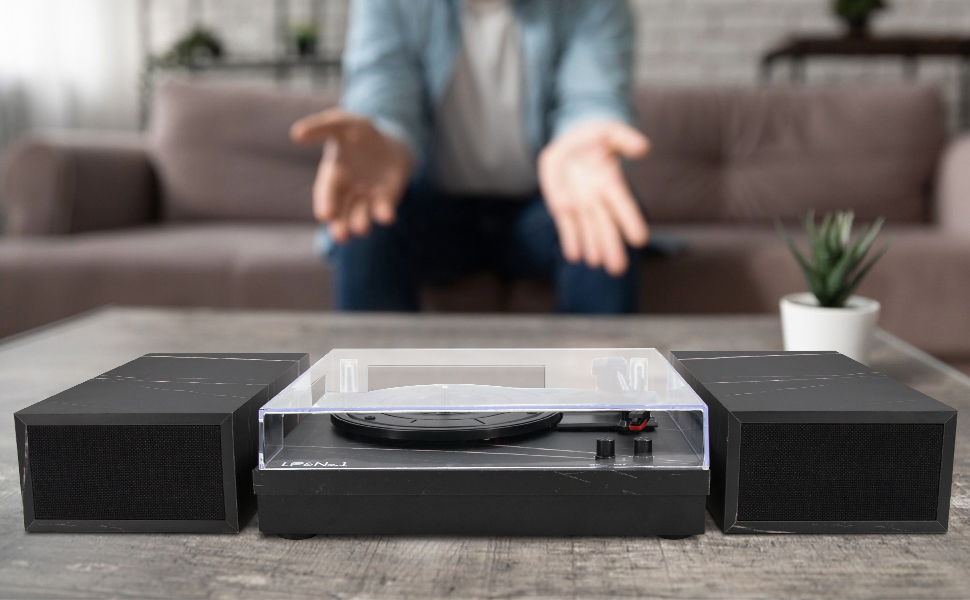
- Placement: Place the record player on a stable, level surface. Position the external speakers on either side of the record player for optimal stereo sound. Ensure adequate space for ventilation.
- Speaker Connection: Connect the external speakers to the RCA output ports on the rear of the record player. Match the red plug to the red port (right channel) and the white plug to the white port (left channel).
- Power Connection: Insert the DC plug of the power adapter into the DC IN port on the rear of the record player. Plug the AC adapter into a wall outlet.

6. Operating Instructions
6.1 Playing a Vinyl Record
- Power On: Turn the Power/Volume Control Knob clockwise to power on the unit.
- Select Phono Mode: Turn the Function Switch Knob to the "Phono" position.
- Select Speed: Set the 33/45/78 RPM Switch to the appropriate speed for your record (33 1/3, 45, or 78 RPM). Use the 45 RPM adapter for 7-inch singles if needed.
- Place Record: Carefully place your vinyl record on the platter.
- Lift Tone Arm: Push the Lift Lever backward to raise the tone arm.
- Position Tone Arm: Gently move the tone arm over the desired starting groove of the record.
- Lower Tone Arm: Push the Lift Lever forward to slowly lower the tone arm onto the record. Playback will begin.
- Adjust Volume: Adjust the volume using the Power/Volume Control Knob.
- Auto-Stop Function: If the Auto Stop On/Off Switch is set to "ON", the platter will stop rotating automatically when the record finishes. If set to "OFF", the platter will continue to rotate.
- Stopping Playback: At the end of the record, or to stop playback manually, push the Lift Lever backward to raise the tone arm, then return the tone arm to its rest. Turn the Power/Volume Control Knob counter-clockwise to power off the unit.

6.2 Wireless Playback (Bluetooth)
- Power On: Turn the Power/Volume Control Knob clockwise to power on the unit.
- Select Wireless Mode: Turn the Function Switch Knob to the "BT" (Bluetooth) position. The unit will emit an audible signal indicating it is in pairing mode.
- Pair Device: On your mobile device (smartphone, tablet, etc.), enable Bluetooth and search for "LP&No.1". Select it to pair.
- Play Audio: Once paired, you can play audio from your device through the record player's speakers.
- Adjust Volume: Adjust the volume using the Power/Volume Control Knob on the record player and/or your connected device.
7. Maintenance
7.1 Cleaning the Stylus
The stylus is delicate and should be handled with care. Use a soft brush, specifically designed for stylus cleaning, to gently brush from back to front. Avoid touching the stylus with your fingers.
7.2 Cleaning the Unit
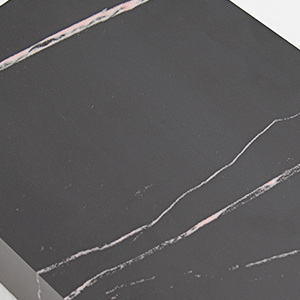
Wipe the record player and speakers with a soft, dry cloth. Do not use abrasive cleaners, waxes, or solvents as they may damage the finish.
7.3 Replacing the Stylus
The ceramic cartridge features a durable diamond-tipped stylus. If sound quality degrades significantly, the stylus may need replacement. Contact customer support for replacement parts and instructions.

8. Troubleshooting
| Problem | Possible Cause | Solution |
|---|---|---|
| No power | Power adapter not connected or outlet not active. | Ensure power adapter is securely connected and the outlet is functional. |
| No sound from speakers | Speakers not connected, volume too low, or incorrect function mode. | Check speaker connections, increase volume, and ensure Function Switch is set to "Phono" or "BT". |
| Record skips | Record is dirty or scratched, stylus is dirty or worn, or unit is not level. | Clean the record, clean or replace the stylus, ensure the unit is on a stable, level surface. |
| Bluetooth not connecting | Unit not in BT mode, device Bluetooth off, or device too far. | Set Function Switch to "BT", enable Bluetooth on your device, and ensure device is within range. |
| Record plays too fast/slow | Incorrect speed setting. | Adjust the 33/45/78 RPM Switch to match the record's speed. |
9. Specifications
- Model: LPSC-321
- Speeds: 33 1/3, 45, 78 RPM
- Drive Type: Belt-Drive
- Cartridge Type: Ceramic
- Connectivity: RCA Output, Bluetooth
- Power Supply: DC Adapter (included)
- Dimensions (Record Player): Approximately 32cm (12.6 inches) x 30cm (11.8 inches) x 10cm (3.9 inches)
- Dimensions (Each Speaker): Approximately 16.5cm (6.5 inches) x 9cm (3.5 inches) x 30cm (11.8 inches)
- Weight: Approximately 6 kg (13.2 lbs)
- Included Components: Power Adapter, 45 rpm Adapter, Users Manual

10. Warranty and Support
LP&No.1 provides a lifetime technology-support with a 30-day money-back guarantee for any reasons, and an extra 60 days quality warranty for freely returning and exchanging new products. For technical assistance or warranty claims, please contact LP&No.1 customer support through the retailer where the product was purchased or visit the official LP&No.1 website.
Online Support: LP&No.1 Brand Store
11. Additional Features and Usage Tips
11.1 Flexible Speaker Placement
The external speakers offer versatile placement options. They can be positioned as a powerful sound base, placed on a bookshelf, or used as a record shelf to complement your setup.

11.2 Auto-Stop Feature
The intelligent auto-stop setting protects your vinyl records by automatically stopping the platter rotation when the record reaches its end. This prevents unnecessary wear on the stylus and record grooves.
12. Official Product Videos
The following videos provide visual guidance on the product's features and operation:
Video 1: Product Overview and Features. This video demonstrates the LP&No.1 LPSC-321 record player's key features, including its design, speaker setup, and Bluetooth connectivity.