
Introduction
Thank you for choosing the HPYLIF·H USB Computer Speaker Soundbar. This manual provides essential information for setting up, operating, and maintaining your new soundbar. Please read it carefully before use to ensure optimal performance and longevity of the product.
This soundbar delivers high-fidelity stereo sound with clear treble and smooth bass, even at high volumes. It features dynamic RGB lighting to enhance your audio and gaming experience. Designed for broad compatibility, it connects easily to most devices via a standard 3.5mm audio jack and USB interface.
Package Contents
- HPYLIF·H USB Computer Speaker Soundbar (Model YXSM9012BL)
- Integrated USB Power Cable
- Integrated 3.5mm AUX Audio Cable
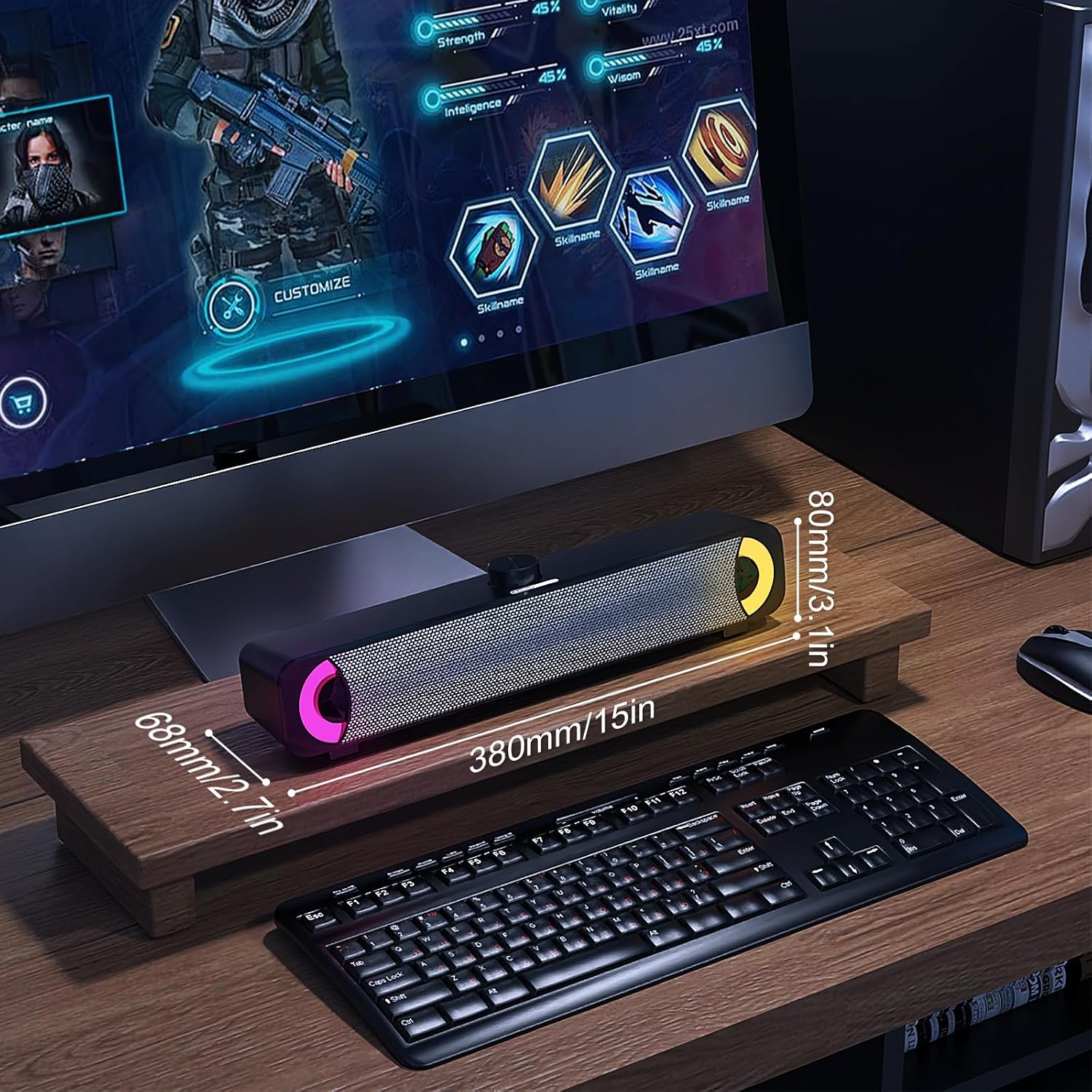
Image: The HPYLIF·H USB Computer Speaker Soundbar shown with its retail packaging and a small user manual.
Product Overview
Familiarize yourself with the components and controls of your soundbar.
Controls and Ports

Image: A close-up of the soundbar's top-mounted rotary knob, indicating its function for power on/off and volume control.
- Rotary Knob: Located on top. Press to power on/off. Rotate to adjust volume.
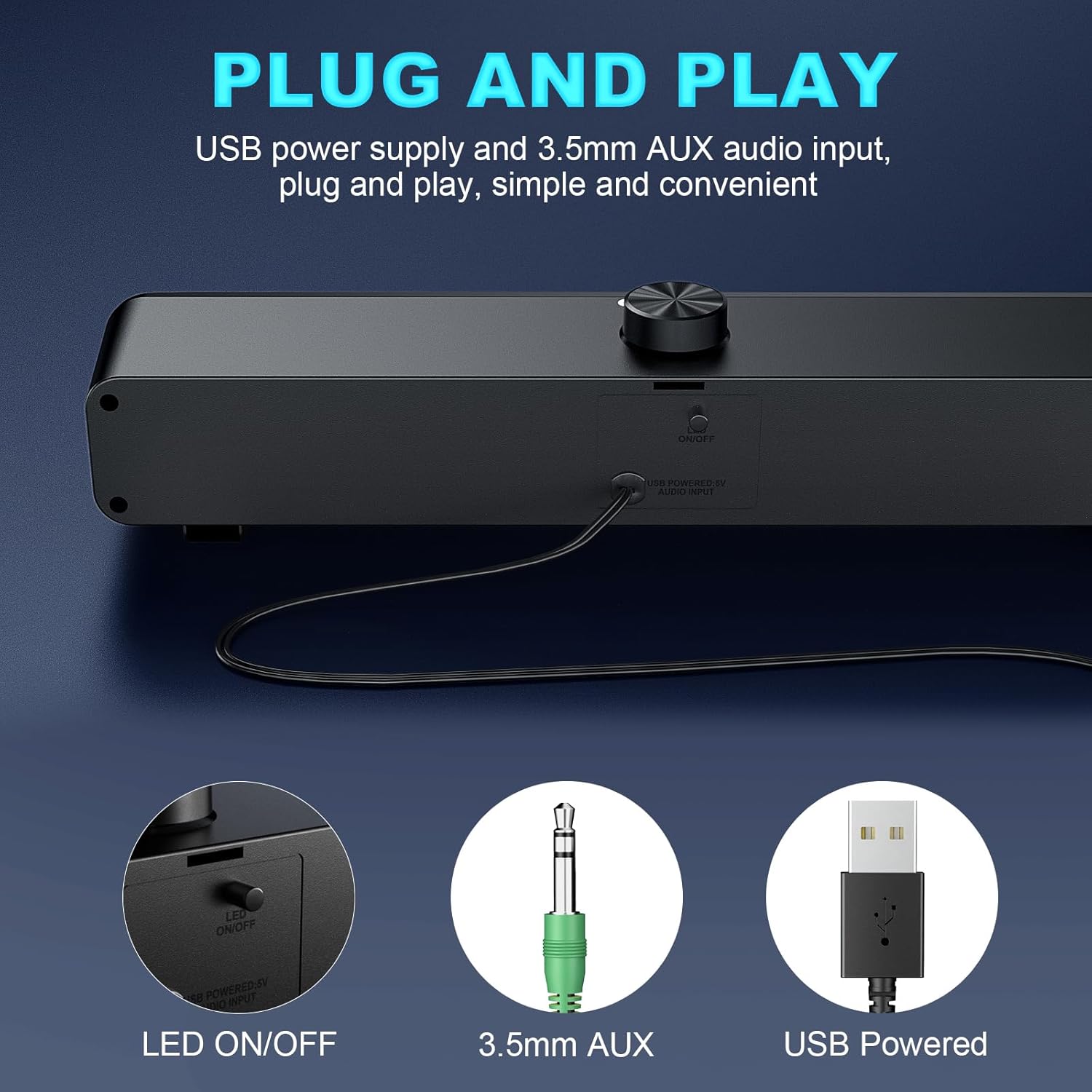
Image: The back of the soundbar, highlighting the integrated USB power cable, 3.5mm AUX audio input, and a small switch labeled 'LED ON/OFF'.
- USB Cable: For power supply.
- 3.5mm AUX Cable: For audio input.
- LED ON/OFF Switch: Located on the back, controls the RGB lighting.
Dimensions

Image: A visual representation of the soundbar's dimensions, indicating a length of 380mm (15 inches), a height of 80mm (3.1 inches), and a depth of 68mm (2.7 inches).
- Length: Approximately 38 cm (15 inches)
- Width: Approximately 9 cm
- Height: Approximately 19 cm
- Weight: 670 grams
Setup
The soundbar is designed for simple plug-and-play operation.
- Connect Power: Insert the integrated USB cable into an available USB port on your computer, laptop, or a USB power adapter (5V/1A recommended).
- Connect Audio: Insert the integrated 3.5mm AUX audio cable into the headphone jack or audio output port of your computer, laptop, tablet, or other audio source.
- Power On: Press the rotary knob on top of the soundbar to turn it on. The RGB lighting will illuminate.
- Adjust Volume: Rotate the knob to adjust the volume to your desired level. You can also control the volume through your connected device.
Operating Instructions
Power On/Off
- To turn on the soundbar, press the rotary knob once.
- To turn off the soundbar, press the rotary knob once again.
Volume Control
- To increase volume, rotate the knob clockwise.
- To decrease volume, rotate the knob counter-clockwise.
- Volume can also be adjusted directly from your connected device (computer, laptop, etc.).
RGB Lighting Control

Image: The soundbar illuminated with vibrant, dynamic RGB lighting, showcasing its aesthetic feature.
- The soundbar features dynamic RGB lighting.
- To turn the RGB lighting on or off, use the dedicated LED ON/OFF switch located on the back of the soundbar.
Specifications
| Feature | Specification |
|---|---|
| Model Number | YXSM9012BL |
| Brand | HPYLIF·H |
| Dimensions (L x W x H) | 39 x 9 x 19 cm |
| Weight | 670 grams |
| Max Speaker Output Power | 10 Watts |
| Frequency Response | 100 Hz |
| Connectivity Technology | Auxiliary, USB |
| Audio Output Mode | Stereo (2.0 Channels) |
| Mounting Type | Table Mount |
| Material | Plastic |
| Speaker Type | Soundbar |
| Special Feature | RGB Lighting |
| Compatible Devices | Personal Computer, Laptop, Tablet |
| Power Source | Electric Cable (USB Powered) |
| Subwoofer Diameter | 2 Inches |
| Color | Black |
| Control Method | Rotary Knob |
Troubleshooting
If you encounter any issues, please refer to the following common problems and solutions:
- No Sound:
- Ensure the USB cable is securely connected to a powered USB port.
- Verify the 3.5mm AUX cable is fully inserted into both the soundbar and your audio source.
- Check if the soundbar is powered on (press the rotary knob).
- Increase the volume using the soundbar's rotary knob and your device's volume controls.
- Confirm that your device's audio output is set to the correct port.
- Distorted Sound:
- Lower the volume on both the soundbar and your audio source.
- Ensure the audio cable connections are secure and free from interference.
- Test with a different audio source or cable if possible.
- RGB Lighting Not Working:
- Check the LED ON/OFF switch on the back of the soundbar and ensure it is in the 'ON' position.
- Ensure the soundbar is powered on via the USB connection.
Maintenance
To ensure the longevity and optimal performance of your soundbar, follow these simple maintenance guidelines:
- Cleaning: Use a soft, dry cloth to wipe the surface of the soundbar. Do not use liquid cleaners or abrasive materials, as they may damage the finish or internal components.
- Storage: When not in use for extended periods, store the soundbar in a cool, dry place away from direct sunlight and extreme temperatures.
- Handling: Avoid dropping the soundbar or subjecting it to strong impacts.
Warranty and Support
Limited Warranty
This product comes with a limited warranty. Please refer to the product packaging or contact customer support for specific warranty terms and conditions.
Customer Support
Should you have any questions, require assistance, or encounter issues that cannot be resolved using the troubleshooting guide, please contact our professional support team. We are committed to providing excellent service and will endeavor to resolve your problem within 12 hours.
Contact information can typically be found on the product packaging or by visiting the official HPYLIF·H website.

Image: A group of customer service representatives with headsets, ready to assist with product inquiries.