
1. Introduction
Thank you for purchasing the Toshiba TY-P30 Portable CD Player. This device offers versatile audio playback with support for standard audio CDs and MP3 CDs, along with convenient Bluetooth connectivity for wireless listening. Its compact design and multiple power options make it ideal for on-the-go use or at home. Please read this manual thoroughly before using the product to ensure safe and correct operation.
2. Safety Information
To ensure safe operation and prevent damage, please observe the following precautions:
- Do not expose the unit to rain, moisture, or extreme temperatures.
- Avoid placing the unit near heat sources or in direct sunlight.
- Do not disassemble, repair, or modify the unit yourself. Refer all servicing to qualified personnel.
- Use only the specified power supply (USB DC 5.0V/0.5A or 2x AAA batteries).
- Keep the unit away from strong magnetic fields.
- Do not use abrasive cleaners or solvents on the unit.
- Avoid listening at high volume levels for extended periods to prevent hearing damage.
3. Package Contents
Please check that all items are present in the package:
- Toshiba TY-P30 Portable CD Player
- USB Power Cable
- Remote Control (with clip)
- Stereo Earphones (wired, for trial use)
- Instruction Manual (this document)
4. Product Overview
Familiarize yourself with the main components and controls of your Toshiba TY-P30.
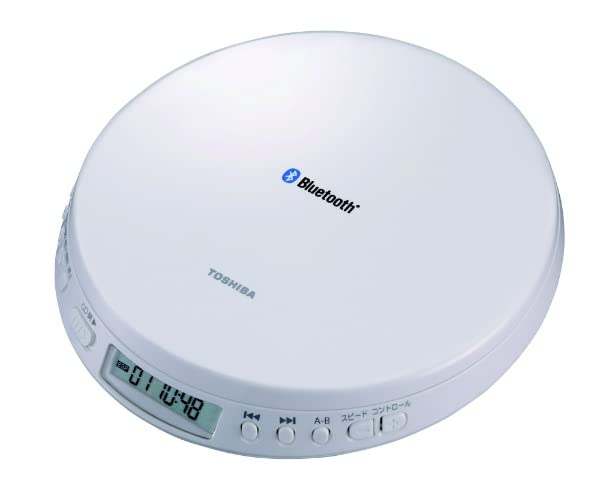
Figure 4.1: Top view of the Toshiba TY-P30 Portable CD Player, showing the Bluetooth logo and Toshiba branding.

Figure 4.2: Close-up of the player's front panel, featuring the LCD display and control buttons for playback, track navigation, and speed control.

Figure 4.3: The Toshiba TY-P30 Portable CD Player shown with its wired remote control, which includes playback and volume functions.
4.1 Controls and Indicators
- LCD Display: Shows track number, time, and playback status.
- Play/Pause Button: Starts or pauses playback.
- Stop Button: Stops playback.
- Skip/Search Buttons (<< / >>): Skips tracks or fast-forwards/rewinds.
- CD Open Switch: Releases the CD compartment lid.
- Volume Control: Adjusts audio output level.
- Speed Control Button: Adjusts playback speed (for language learning).
- A-B Repeat Button: Repeats a specific section of audio.
- Bluetooth Button: Initiates Bluetooth pairing mode.
- Headphone Jack: 3.5mm stereo mini jack for wired headphones.
- USB Power Input: For connecting the USB power cable.
5. Setup
5.1 Power Supply
The TY-P30 can be powered by either a USB power source or AAA batteries.
- USB Power: Connect the supplied USB power cable to the unit's USB input and to a USB power adapter (DC 5.0V/0.5A, not supplied) or a compatible USB port on a computer.
- Battery Power: For portable use, insert two (2) AAA alkaline batteries (sold separately) into the battery compartment. Ensure correct polarity (+/-). The unit operates on DC 3.0V when using batteries. Battery life is approximately 8 hours with Toshiba alkaline batteries, but may vary based on usage.
5.2 Battery Installation
- Locate the battery compartment cover on the underside of the unit.
- Slide the cover open.
- Insert two (2) AAA batteries, matching the polarity indicators inside the compartment.
- Close the battery compartment cover securely.
5.3 Connecting Headphones or Speakers
- Wired Connection: Plug the 3.5mm stereo mini plug of your headphones or external speakers into the headphone jack on the unit.
- Bluetooth Connection: Follow the Bluetooth pairing instructions in Section 6.3 to connect wireless headphones or speakers.
6. Operating Instructions
6.1 Basic CD Playback
- Ensure the unit is powered on (either via USB or batteries).
- Slide the "CD OPEN" switch to open the CD compartment lid.
- Carefully place a CD (audio CD or MP3 CD) onto the spindle with the label side facing up.
- Close the CD compartment lid firmly until it clicks.
- Press the PLAY/PAUSE button to start playback. The track number and elapsed time will appear on the LCD display.
- Adjust the volume using the volume control.
- To pause playback, press PLAY/PAUSE again. Press it once more to resume.
- To stop playback, press the STOP button.
- To skip to the next track, press the >> button. To go to the previous track, press the << button.
- To fast-forward or rewind within a track, press and hold the >> or << button respectively.
6.2 MP3 CD Playback
The TY-P30 supports MP3 audio files burned onto a CD-R/RW disc. When an MP3 CD is inserted, the player will automatically detect the MP3 format. Navigation will be similar to standard CD playback, but the display may show folder and file numbers if applicable.
6.3 Bluetooth Pairing
To connect your TY-P30 to Bluetooth headphones or speakers:
- Ensure the TY-P30 is powered on and no CD is actively playing (or is paused).
- Press and hold the Bluetooth button on the unit until the Bluetooth indicator light flashes, indicating pairing mode.
- Activate Bluetooth on your headphones or speaker and put them into pairing mode (refer to your device's manual for specific instructions).
- Select "TY-P30" from the list of available devices on your Bluetooth receiving device.
- Once connected, the Bluetooth indicator light on the TY-P30 will stop flashing and remain solid. You can now play audio wirelessly.
- The TY-P30 supports Bluetooth version 5.0 and profiles A2DP, AVRCP, with a line-of-sight range of approximately 10 meters.
6.4 Using the Remote Control
The supplied wired remote control provides convenient access to basic playback functions:
- Play/Pause: Starts or pauses playback.
- Stop: Stops playback.
- Volume Up/Down: Adjusts the audio volume.
- Skip Forward/Backward: Navigates between tracks.
6.5 Special Functions
- Resume Function: The player remembers the last stopped position on a CD and resumes playback from that point when powered on again.
- Speed Control: Press the SPEED CONTROL button to adjust the playback speed. This feature is useful for language learning or transcribing audio. The pitch remains constant during speed adjustment.
- A-B Repeat: Press the A-B button at the start point (A) and again at the end point (B) of the desired section to repeat it. Press a third time to cancel.
7. Maintenance
- Cleaning the Unit: Wipe the exterior of the unit with a soft, dry cloth. For stubborn dirt, use a slightly damp cloth and then wipe dry. Do not use chemical cleaners or solvents.
- Cleaning the Lens: If playback issues occur, the CD lens may be dirty. Use a commercially available CD lens cleaner disc.
- CD Handling: Always hold CDs by their edges. Avoid touching the playing surface. Store CDs in their cases to prevent scratches and dust accumulation.
- Battery Care: If the unit will not be used for an extended period, remove the batteries to prevent leakage.
8. Troubleshooting
If you experience problems with your TY-P30, refer to the following table for possible solutions:
| Problem | Possible Cause | Solution |
|---|---|---|
| No power | Batteries are depleted or incorrectly inserted. USB cable is not connected or power source is faulty. | Replace batteries or ensure correct polarity. Check USB cable connection and power source. |
| No sound | Volume is too low. Headphones/speakers not connected properly. Bluetooth not paired. | Increase volume. Check headphone/speaker connection. Re-pair Bluetooth device. |
| CD skipping or not playing | CD is dirty or scratched. CD is inserted incorrectly. Lens is dirty. | Clean or replace CD. Ensure CD is placed label-side up. Use a CD lens cleaner. |
| Bluetooth connection fails | Device is out of range. Bluetooth device is not in pairing mode. Interference. | Move devices closer. Ensure Bluetooth device is in pairing mode. Try re-pairing. Avoid sources of interference. |
9. Specifications
| Feature | Description |
|---|---|
| Power Supply | USB: DC 5.0V/0.5A; Batteries: DC 3.0V (2x AAA batteries, sold separately) |
| Battery Life | Approx. 8 hours (using Toshiba alkaline AAA batteries, varies by usage) |
| Practical Maximum Output | 14mW + 14mW |
| Output Terminal | Headphone Output: Φ3.5mm Stereo Mini Jack |
| Dimensions (W x H x D) | 142 x 26.5 x 155 mm (excluding protrusions) |
| Weight | Approx. 200g (excluding batteries) |
| CD Player Channels | 2 Channel Stereo |
| Supported Media | CD (CD-DA/MP3) |
| Bluetooth Version | 5.0 |
| Supported Bluetooth Profiles | A2DP, AVRCP |
| Bluetooth Line of Sight Distance | Approx. 10m |
10. Warranty and Support
For warranty information and customer support, please refer to the warranty card included with your product or visit the official Toshiba Electronics website. Keep your purchase receipt as proof of purchase for warranty claims.