
1. Introduction
The Strymon Deco V2 is a powerful and versatile effects pedal designed to bring the rich, warm, and dynamic characteristics of vintage tape machines to your audio setup. It combines two distinct effects: tape saturation and doubletracking, allowing for a wide range of sonic possibilities from subtle warmth to thick, modulated textures.

Figure 1: The Strymon Deco V2 pedal, showcasing its primary controls and robust build.

Figure 2: The Deco V2 pedal, emphasizing its core function of adding tape-like effects to your signal.
2. Key Features
- Vintage Tape Warmth: Experience the rich tape saturation and warmth heard on classic recordings from the '50s and '60s. Deco creates luscious tape compression, saturation, and time-based effects.
- Master of Saturation: Deco's Saturation side enhances your tone with variable gain, from warm and smooth to full overdrive. The Classic voice is derived from open reel mastering machines, while the all-new Cassette voice is based on the Auto Level Control (ALC) feature of high-end cassette decks from the '70s, providing a dynamic and fat tone with built-in compression.
- Vintage Studio Revival (Doubletracker): The Doubletracker side operates as two tape decks in series, achieving hyper-authentic vintage flanging, phasing, chorusing, slapback, and echo by changing the offset between the Reference and Lag decks via the Lag Time control.
- Full MIDI Control: Easily sync the Lag Deck’s delay time to MIDI Clock, use an expression pedal to control Blend, or switch between Classic and Cassette mode remotely. Features 300 preset locations.
- Superior Hardware: Includes a premium discrete Class A JFET analog input circuit, stereo inputs and outputs, rear-panel mono/stereo switch, TRS MIDI, USB-C for MIDI and preset management, and a powerful ARM processor.

Figure 3: The Deco V2 brings authentic vintage tape effects to your setup.

Figure 4: Detail of the Voice switch, offering Classic 2-track mastering reel-to-reel sound and Cassette for fat tone with ALC.

Figure 5: Detail of the Type switch for the Doubletracker side, providing Sum (decks in phase), Invert (Lag Deck phase inverted), and Bounce (Right Lag Deck bounced to left input for stereo ping-pong or mono double-echo).
3. Controls and Connections
The Deco V2 features intuitive controls for both Tape Saturation and Doubletracker sections, along with versatile connectivity options.
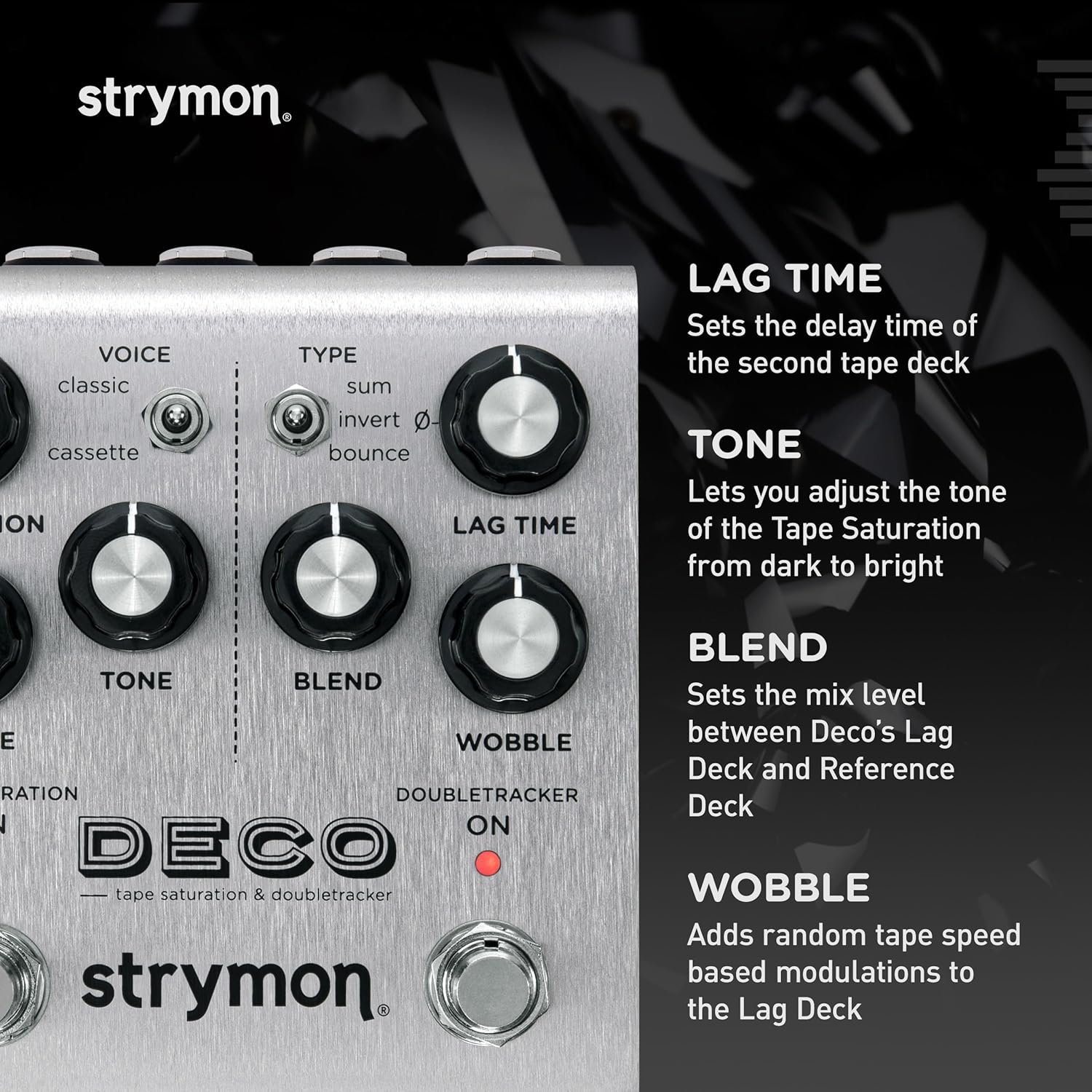
Figure 6: Key controls on the Deco V2. Lag Time sets the delay time of the second tape deck. Tone adjusts the tone of the Tape Saturation from dark to bright. Blend sets the mix level between Deco's Lag Deck and Reference Deck. Wobble adds random tape speed based modulations to the Lag Deck.

Figure 7: TRS input for Mono or Stereo input sources.

Figure 8: Premium analog JFET input circuit for superb responsiveness.

Figure 9: Full MIDI Control + 300 MIDI preset locations.
4. Operation Modes
The Deco V2 offers various modes to explore its tape saturation and doubletracker capabilities. Below are demonstrations of different sounds and settings.
4.1 Wide Cassettes
Video 1: Demonstrates the wide cassette sound, showcasing the unique tonal characteristics of the Cassette voice.
4.2 Flanged Shortness
Video 2: Illustrates the flanged shortness effect, highlighting the doubletracker's ability to create unique modulation.
4.3 Lopsided
Video 3: Shows the lopsided effect, demonstrating asymmetrical doubletracking for unique rhythmic textures.
4.4 Fifties Vibes
Video 4: Captures the classic fifties vibe, showcasing the pedal's ability to recreate vintage tape sounds.
4.5 Bounced Back
Video 5: Demonstrates the bounced back effect, highlighting the ping-pong delay capabilities.
4.6 Variable Crunchitude
Video 6: Showcases variable crunchitude, demonstrating the range of saturation from subtle to aggressive.
4.7 Cr02 Crunch
Video 7: Highlights the Cr02 crunch, demonstrating a specific type of saturated tone.
4.8 Exploding Slides
Video 8: Demonstrates exploding slides, showcasing dynamic and expressive slide guitar tones.
4.9 Spankmod
Video 9: Illustrates the spankmod effect, highlighting unique modulation capabilities.
4.10 Wide Bouncy Slap
Video 10: Shows the wide bouncy slap effect, demonstrating a spacious and rhythmic delay.
4.11 Nieuw Yark
Video 11: Demonstrates the Nieuw Yark sound, showcasing a unique and atmospheric tone.
5. Specifications
| Item Weight | 1.37 pounds |
| Product Dimensions | 7.9 x 4.6 x 3.7 inches |
| Item model number | DECOV2 |
| Color Name | Silver |
| Hardware Interface | USB |
| Signal Format | Analog |
| Voltage | 9 Volts |
| Amperage | 300 Microamps |
6. Troubleshooting
If you encounter any issues with your Strymon Deco V2, please refer to the following general troubleshooting steps:
- No Power: Ensure the correct power supply (9V DC, center-negative, 300mA minimum) is connected securely. Check the power outlet.
- No Sound: Verify all audio cables are correctly connected to inputs and outputs. Check instrument and amplifier volume levels. Ensure the pedal is engaged (LEDs on).
- Unwanted Noise: Try using a different power supply or a dedicated isolated power brick. Ensure all cables are in good condition and properly shielded. Move the pedal away from other electronic devices that may cause interference.
- MIDI Issues: Confirm MIDI cables are correctly connected (MIDI In to MIDI Out, and vice-versa if bi-directional communication is needed). Check MIDI channel settings on both the pedal and your MIDI controller. Refer to the full manual for detailed MIDI implementation.
- Unexpected Behavior: Perform a factory reset (refer to the full manual for instructions). This can resolve issues caused by corrupted settings.
7. Warranty and Support
Strymon products are designed for reliability and durability. For detailed warranty information, product registration, and technical support, please visit the official Strymon website or contact their customer service directly.
For additional resources, including firmware updates, advanced user guides, and community forums, please visit: www.strymon.net


