
1. Introduction
Thank you for choosing the zakotu Wireless Earbuds. These earbuds are designed to provide a superior audio experience with advanced Bluetooth 5.2 technology, clear sound, and convenient features. This manual will guide you through the setup, operation, and maintenance of your new earbuds to ensure optimal performance and longevity.

Image 1.1: zakotu Wireless Earbuds and Charging Case. The earbuds are white, resting in their open charging case, which displays a digital battery percentage.
2. Product Overview
2.1 Package Contents
- zakotu Wireless Earbuds (Left and Right)
- Charging Case
- USB-C Charging Cable
- Silicone Ear Tips (Small, Medium, Large)
- User Manual

Image 2.1: Contents of the zakotu Earbuds package, including the earbuds in their case, a USB-C cable, various sizes of ear tips, and the user manual.
2.2 Key Features
- Bluetooth 5.2 Technology: Ensures stable connection, faster transmission speed, and wider range up to 15 meters.
- Hi-Fi Stereo Sound: Equipped with 13mm dynamic drivers for powerful bass, stunning treble, and clear audio.
- Superior Clear Call: CVC 8.0 noise cancellation technology reduces ambient noise for clear voice transmission during calls.
- One-Step Pairing: Automatic connection to the last paired device upon removal from the charging case.
- Smart Touch Control: Intuitive touch sensors for managing music, calls, and voice assistant.
- LED Power Display: Digital display on the charging case shows battery levels for the case and individual earbuds.
- Extended Playtime: Up to 8 hours on a single charge, and up to 40 hours total with the charging case.
- IP7 Waterproof: Designed to withstand splashes, sweat, and raindrops, making them suitable for workouts and outdoor activities.
- Ergonomic Design: Small, lightweight, and comes with multiple ear tip sizes for a comfortable and secure fit.

Image 2.2: Illustration of Bluetooth 5.2 technology, highlighting improved transmission efficiency and wider range compared to Bluetooth 5.1.

Image 2.3: Diagram illustrating the components contributing to the Hi-Fi stereo sound, including 13mm drivers, bass enhancement, Bluetooth 5.2, and lightweight design.
3. Setup
3.1 Initial Charging
Before first use, fully charge the charging case and earbuds.
- Place both earbuds into the charging case.
- Connect the USB-C charging cable to the charging port on the case and plug the other end into a USB power adapter (not included) or a computer's USB port.
- The LED power display on the case will show the charging progress, flashing from 1 to 100. Once 100 is displayed steadily, the case is fully charged.
- The earbuds will charge automatically when placed in the case. Their individual battery indicators on the case will show their charging status.

Image 3.1: Visual representation of the 40-hour total playtime, showing the earbuds and charging case with a USB-C charging port.
3.2 Pairing with Your Device
The earbuds feature one-step auto pairing for convenience.
- Ensure your device's Bluetooth function is turned on.
- Open the charging case and take out both earbuds. They will automatically power on and enter pairing mode.
- On your device, search for Bluetooth devices and select "IT100 Plus" from the list.
- Once connected, you will hear a confirmation tone, and the earbuds will be ready for use.
Note: If you only take out one earbud, it will connect in mono mode. To use both, take both out of the case.
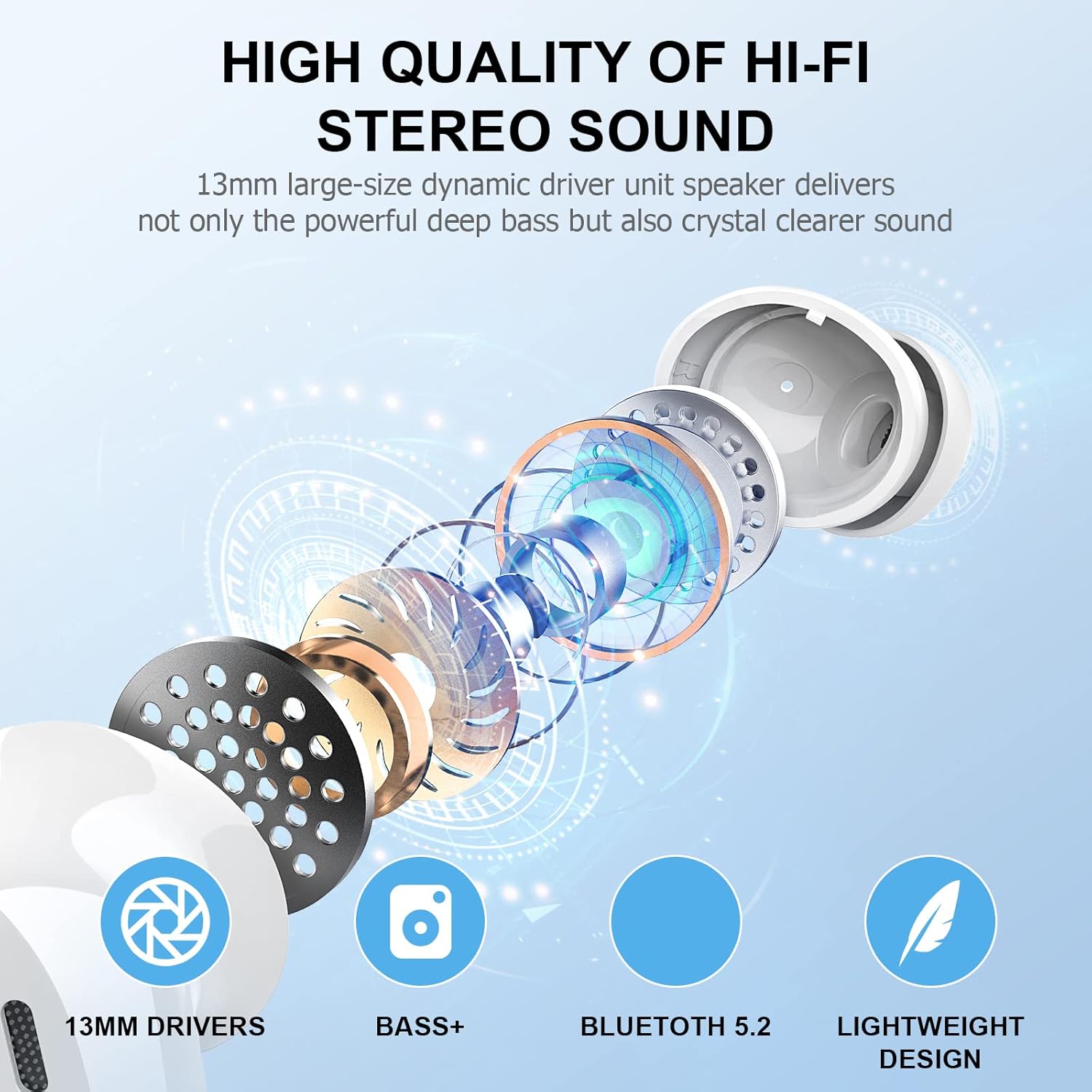
Image 3.2: Illustration of the one-step auto pairing process, showing the earbuds connecting to a smartphone's Bluetooth settings.
4. Operating Instructions
4.1 Wearing the Earbuds
Choose the silicone ear tips that provide the most comfortable and secure fit for your ears. Insert the earbuds gently into your ear canal and rotate slightly to ensure a snug seal for optimal sound quality and noise isolation.

Image 4.1: Demonstrates the comfort and secure fit of the earbuds, showing a person wearing them and the three sizes of replacement ear tips (S, M, L).
4.2 Smart Touch Controls
The earbuds feature multi-function touch sensors on each earbud. Refer to the table below for control functions:
| Action | Left Earbud (L) | Right Earbud (R) |
|---|---|---|
| Play/Pause Music | Double Tap | Double Tap |
| Volume Up | Single Tap | |
| Volume Down | Single Tap | |
| Next Track | Long Press (2s) | |
| Previous Track | Long Press (2s) | |
| Answer/End Call | Single Tap | Single Tap |
| Reject Call | Long Press (2s) | Long Press (2s) |
| Activate Voice Assistant | Triple Tap | Triple Tap |

Image 4.2: Diagram illustrating the various smart touch control gestures for music playback, call management, and voice assistant activation.
4.3 LED Power Display
The charging case features a digital LED display that shows the remaining battery percentage of the case (1-100). Additionally, it displays separate LED indicators for the left and right earbuds, showing their individual charging status or battery level when placed in the case.

Image 4.3: Close-up of the charging case's LED power display, showing the digital percentage for the case and separate battery indicators for the left and right earbuds.
5. Maintenance
5.1 Cleaning
- Regularly clean the earbuds and charging case with a soft, dry, lint-free cloth.
- Remove ear tips and clean them with mild soap and water. Ensure they are completely dry before reattaching.
- Gently clean the charging contacts on both the earbuds and inside the case with a dry cotton swab to ensure proper charging.
- Do not use abrasive cleaners, alcohol, or chemical sprays.
5.2 Storage
- When not in use, store the earbuds in their charging case to protect them and keep them charged.
- Store in a cool, dry place, away from extreme temperatures and direct sunlight.
5.3 Water Resistance (IP7)
The earbuds are IP7 waterproof, meaning they are protected against immersion in water up to 1 meter for up to 30 minutes. This makes them resistant to sweat and rain. However, they are not designed for swimming or showering. Do not intentionally submerge them in water. Ensure the earbuds are dry before placing them back into the charging case to prevent damage.

Image 5.1: Illustration demonstrating the IP7 waterproof rating, showing an earbud with water splashing around it.
6. Troubleshooting
6.1 Earbuds Not Pairing / Only One Earbud Working
- Ensure both earbuds are fully charged.
- Place both earbuds back into the charging case, close the lid, wait a few seconds, then open the lid and take them out again.
- On your device, forget or delete "IT100 Plus" from your Bluetooth settings.
- Turn off your device's Bluetooth, then turn it back on.
- Repeat the pairing process from Section 3.2.
6.2 Earbuds Not Charging
- Ensure the charging cable is securely connected to both the case and the power source.
- Check if the power adapter or USB port is functional.
- Clean the charging contacts on the earbuds and inside the case with a dry cotton swab to remove any dust or debris.
- Ensure the earbuds are correctly seated in the charging case.
6.3 Poor Sound Quality
- Ensure the earbuds are properly seated in your ears and you are using the correct size ear tips for a good seal.
- Clean the earbud mesh and ear tips to remove any earwax or debris.
- Move closer to your connected device to avoid signal interference.
- Try playing audio from a different source or device to rule out source issues.
6.4 Bluetooth Disconnection
- Ensure the earbuds are within the 15-meter Bluetooth range of your device.
- Avoid obstacles between the earbuds and your device (e.g., thick walls, large metal objects).
- Minimize interference from other wireless devices (e.g., Wi-Fi routers, other Bluetooth devices).
- Re-pair the earbuds with your device.
7. Specifications
| Feature | Specification |
|---|---|
| Model Number | IT100 plus |
| Bluetooth Version | 5.2 |
| Wireless Communication Technology | Bluetooth |
| Connectivity Technology | Wireless |
| Headphones Jack | USB (for charging case) |
| Battery Life (Earbuds) | 8 Hours (single charge) |
| Battery Life (with Charging Case) | Up to 40 Hours |
| Water Resistance Level | IP7 Waterproof |
| Control Type | Noise Control, Touch, Voice |
| Ear Placement | In Ear |
| Form Factor | In Ear |
| Material | Plastic |
| Item Weight | 0.176 ounces (approx. 5 grams per earbud) |
| Product Dimensions | 0.79 x 0.39 x 0.39 inches |
| Manufacturer | zakotu |
8. Warranty and Support
For warranty information or technical support, please refer to the warranty card included in your product packaging or contact zakotu customer service directly through their official website or the platform where you purchased the product. Please have your model number (IT100 plus) and purchase details ready when contacting support.