
1. Introduction
Thank you for choosing G GVOEARS Q20 Replacement Earpads. These earpads are designed to provide a comfortable fit and enhanced sound experience for your Anker Soundcore Life Q20 headphones. Made with premium materials, they offer excellent noise isolation and durability. This manual provides detailed instructions for installation, care, and general information about your new earpads.

Image 1.1: A pair of G GVOEARS Q20 Replacement Earpads, showing the left and right cushions.
2. Product Overview
The G GVOEARS Q20 Replacement Earpads are crafted to match the original design and provide superior comfort and acoustic performance. They feature a combination of high-quality materials for an optimal listening experience.
2.1 Key Features and Materials
- Premium Protein Leather: Provides a soft, smooth surface for maximum comfort during extended use.
- High-Density Memory Foam: Conforms to the shape of your ears, enhancing comfort and contributing to effective noise isolation.
- Noise Isolation: Designed to create a perfect seal around your ears, blocking external noise and allowing for a purer sound experience.
- Durable Construction: The materials are selected for their resilience, ensuring the earpads are not easily deformed and offer long-lasting performance.
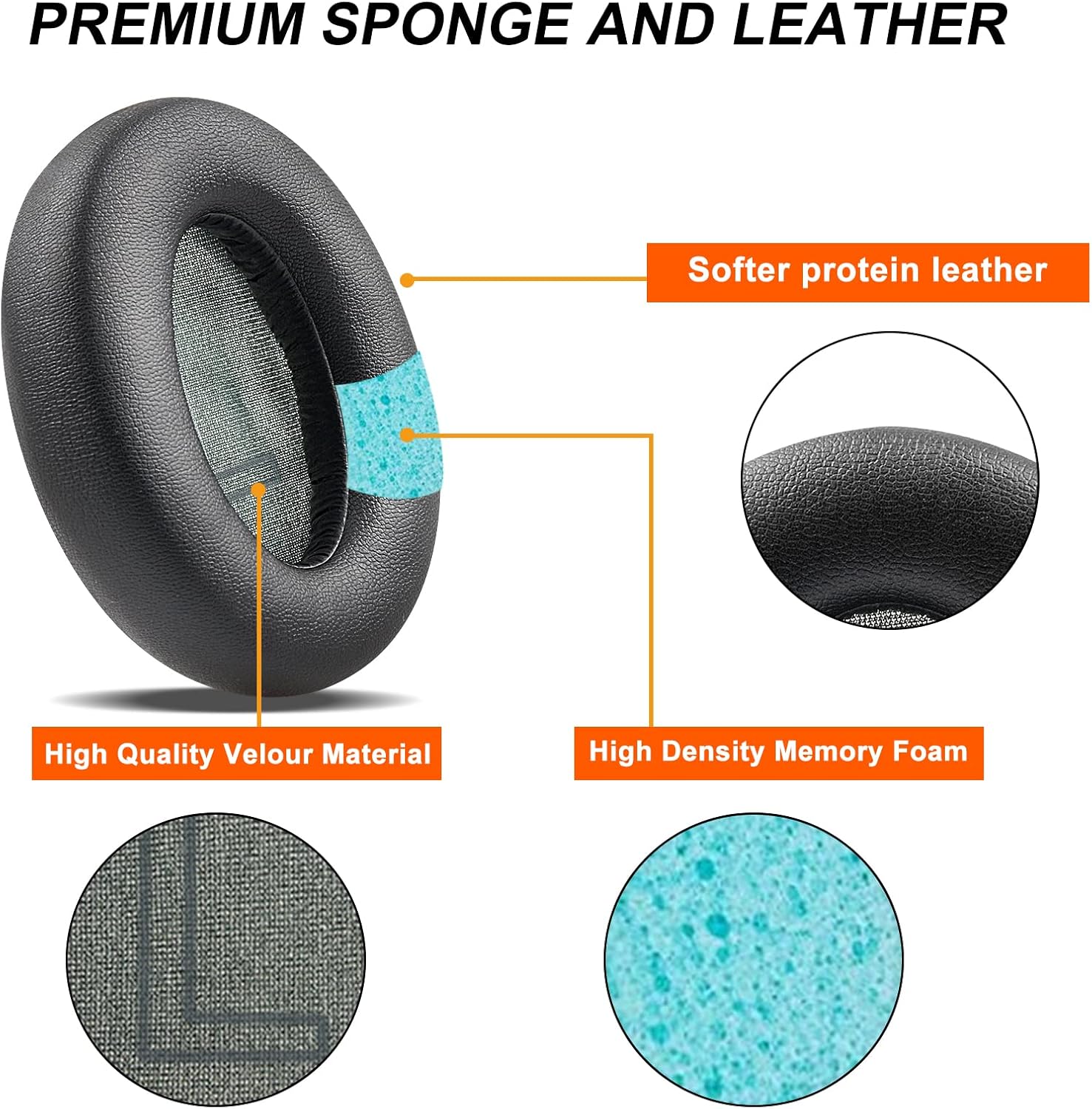
Image 2.1: An exploded view illustrating the premium protein leather, high-quality velour material, and high-density memory foam used in the earpads.
2.2 Dimensions
The earpads are precisely sized to fit the compatible headphone models. Refer to the diagram below for detailed dimensions.

Image 2.2: Detailed measurements of the replacement earpads, including diameter and thickness.
3. Compatibility
These replacement earpads are specifically designed for the following headphone models:
- Anker Soundcore Life Q20
- Anker Soundcore Life Q20 BT
Please ensure your headphone model matches one of the listed compatible models before proceeding with installation.

Image 3.1: Visual confirmation of compatibility with Anker Q20 headphones.
4. Installation Guide
Replacing your old earpads with the new G GVOEARS Q20 earpads is a straightforward process that requires no special tools. Follow these steps carefully:
- Step 1: Remove Old Earpads. Gently pull and peel off the old, worn-out earpads from your Anker Soundcore Life Q20 headphones. They are typically held in place by a rim or adhesive.
- Step 2: Clean Headphone Surface. Use the provided alcohol wipe pads to clean any residue or debris from the headphone's ear cup surface where the new earpads will attach. Ensure the surface is dry before proceeding.
- Step 3: Align New Earpads. Take one new earpad and align its inner rim with the groove or attachment points on the headphone's ear cup. Ensure the 'L' (Left) and 'R' (Right) markings on the earpads correspond to the correct side of your headphones.
- Step 4: Secure Earpads. Starting from one point, gently press the earpad's rim into the groove, working your way around the entire circumference until the earpad is fully seated and snapped into place. Ensure it is securely attached all around.
- Step 5: Repeat for the Other Side. Follow the same steps for the second earpad on the other ear cup.
Once both earpads are installed, gently press them to ensure they are firmly attached and feel secure. The specific installation operation is often demonstrated in product videos, though no video is available in this manual. Please refer to the product listing or manufacturer's website for any available video guides.

Image 4.1: Anker Soundcore Life Q20 headphones with the G GVOEARS replacement earpads successfully installed.
5. Operating Benefits
While earpads do not have 'operating' functions in the traditional sense, their design significantly impacts the performance and user experience of your headphones:
- Enhanced Noise Isolation: The snug fit and dense memory foam of these earpads create an improved seal around your ears, effectively reducing ambient noise and allowing you to immerse yourself more fully in your audio.
- Improved Comfort: The soft protein leather and slow-rebound memory foam provide a comfortable fit, reducing pressure points and allowing for longer listening sessions without discomfort.
- Maintained Sound Quality: By restoring the proper seal and distance between your ears and the headphone drivers, these earpads help maintain the intended sound profile and bass response of your Anker Soundcore Life Q20 headphones.
6. Maintenance and Care
Proper care will extend the lifespan and maintain the performance of your G GVOEARS replacement earpads:
- Regular Cleaning: Gently wipe the surface of the earpads with a soft, damp cloth. For deeper cleaning, use a mild soap solution or a specialized leather cleaner. Avoid harsh chemicals or abrasive materials.
- Avoid Excessive Moisture: Do not submerge the earpads in water. If they get wet, pat them dry immediately with a clean cloth and allow them to air dry completely before use.
- Storage: When not in use, store your headphones in a clean, dry place away from direct sunlight and extreme temperatures. This helps prevent material degradation.
- Handle with Care: Avoid pulling or stretching the earpads excessively, as this can damage the material or the attachment mechanism.

Image 6.1: The package includes the replacement earpads and alcohol wipe pads for cleaning.
7. Troubleshooting
If you encounter any issues with your new earpads, consider the following common scenarios:
- Earpads Not Fitting Securely:
- Ensure you have the correct model of earpads for your Anker Soundcore Life Q20/Q20 BT headphones.
- Verify that the old earpad's remnants are completely removed from the headphone's ear cup.
- Make sure the earpad's rim is fully seated into the groove around the entire circumference. Apply gentle, even pressure.
- Reduced Noise Isolation:
- Check if the earpads are fully and evenly attached to both ear cups. A gap can compromise the seal.
- Ensure the earpads are not twisted or creased, which could prevent a proper seal.
- Discomfort During Use:
- Allow some time for the memory foam to conform to your ears. Initial use might feel slightly different.
- Ensure the headphones are adjusted correctly on your head, distributing pressure evenly.
If these steps do not resolve your issue, please refer to the Warranty and Support section for further assistance.
8. Specifications
| Feature | Detail |
|---|---|
| Brand | G GVOEARS |
| Model Number | Anker-Q20 |
| Compatible Headphone Models | Anker Soundcore Life Q20 / Q20 BT |
| Material | Protein Leather, Memory Foam |
| Color | Black |
| Product Dimensions (L x W x H) | 3.54 x 2.76 x 0.98 inches (9 x 7 x 2.5 cm) |
| Item Weight | 2.08 ounces |
9. Warranty and Support
G GVOEARS is committed to providing high-quality audio accessories. While specific warranty details are not provided in this manual, we encourage you to contact us if you have any questions or concerns after receiving your product.
For support, please refer to the contact information provided on the product packaging or the official G GVOEARS store page on Amazon. Your satisfaction is our priority.