
Inkbird IHC-200+ITH-10
INKBIRD Humidity Controller Combo User Manual
Model: IHC-200 + ITH-10
Brand: Inkbird
Introduction
This user manual provides detailed instructions for the safe and efficient operation of your INKBIRD Humidity Controller Combo, which includes the IHC-200 Dual Stage Humidistat and the ITH-10 Mini Digital Thermometer and Hygrometer. This system is designed to precisely control humidity and monitor environmental conditions in various applications such as mushroom cultivation, mini-greenhouses, reptile enclosures, and more. Please read this manual thoroughly before use to ensure proper setup and functionality.
Important Safety Information
- Always ensure the power supply matches the device specifications (10A 110V 1100W).
- Do not immerse the controller or sensor in water.
- Keep the device away from extreme temperatures and direct sunlight.
- Do not attempt to disassemble or repair the device yourself. Contact qualified personnel for service.
- Ensure all connections are secure before plugging into a power outlet.
Package Contents
Upon opening the package, please verify that all components are present and undamaged:
- 1 x INKBIRD IHC-200 Humidity Controller
- 1 x INKBIRD ITH-10 Mini Digital Thermometer and Hygrometer
- 1 x Humidity Sensor (integrated with IHC-200)
- 1 x CR2032 Button Battery (for ITH-10)

Image: All components included in the INKBIRD Humidity Controller Combo package.
Product Overview

Image: Overview of the INKBIRD IHC-200 and ITH-10 devices.
IHC-200 Humidity Controller
The IHC-200 is a pre-wired, dual-stage humidity controller designed for plug-and-play operation. It features two output sockets, one for humidification (WORK1) and one for dehumidification (WORK2), allowing it to control both humidifiers and dehumidifiers simultaneously to maintain a desired humidity range. The digital display shows the current humidity (PV) and the set humidity value (SV).
ITH-10 Mini Digital Thermometer and Hygrometer
The ITH-10 is a compact device that provides real-time temperature and humidity readings. It features a clear LCD display, showing current temperature, humidity, and min/max records. It is ideal for monitoring conditions in small spaces or as a secondary reference.
Technical Specifications

Image: Dimensional specifications of the IHC-200 and ITH-10.
IHC-200 Humidity Controller
| Humidity Control Range | 5% ~ 99.99% RH |
| Humidity Control Accuracy | ±3% RH |
| Power Supply | 10A 110V 1100W |
| Display Type | Digital |
| Outer Material | Acrylonitrile Butadiene Styrene (ABS) |
ITH-10 Mini Digital Thermometer and Hygrometer
| Temperature Measuring Range | 23°F ~ 140°F (-5°C ~ 60°C) |
| Humidity Measuring Range | 30% ~ 90% RH |
| Power Source | CR2032 Button Battery |
| Display Type | Digital |
Setup Instructions
Setting up the IHC-200 Humidity Controller
- Placement: Choose a suitable location for the IHC-200 controller. It can be mounted on a wall using the integrated hanging hole. Ensure it is in a dry area, away from direct water spray.
- Connect Sensor: Plug the humidity sensor cable firmly into the designated port on the IHC-200 controller. Position the sensor within the environment you wish to control (e.g., inside a terrarium, greenhouse, or grow tent). Ensure the sensor is not directly exposed to water or extreme airflow.
- Connect Appliances:
- For humidification, plug your humidifier into the "WORK1" outlet.
- For dehumidification, plug your dehumidifier into the "WORK2" outlet.
- Power On: Plug the IHC-200's power cord into a standard 110V AC power outlet. The display will illuminate, showing the current humidity (PV) and the set humidity value (SV).
Setting up the ITH-10 Mini Digital Thermometer and Hygrometer
- Battery Installation: The ITH-10 comes with a CR2032 button battery. Open the battery compartment on the back of the unit and insert the battery, observing polarity.
- Placement: Place the ITH-10 in the area where you want to monitor temperature and humidity. Its compact size allows for flexible placement, such as inside a guitar case, mason jar, or reptile enclosure.
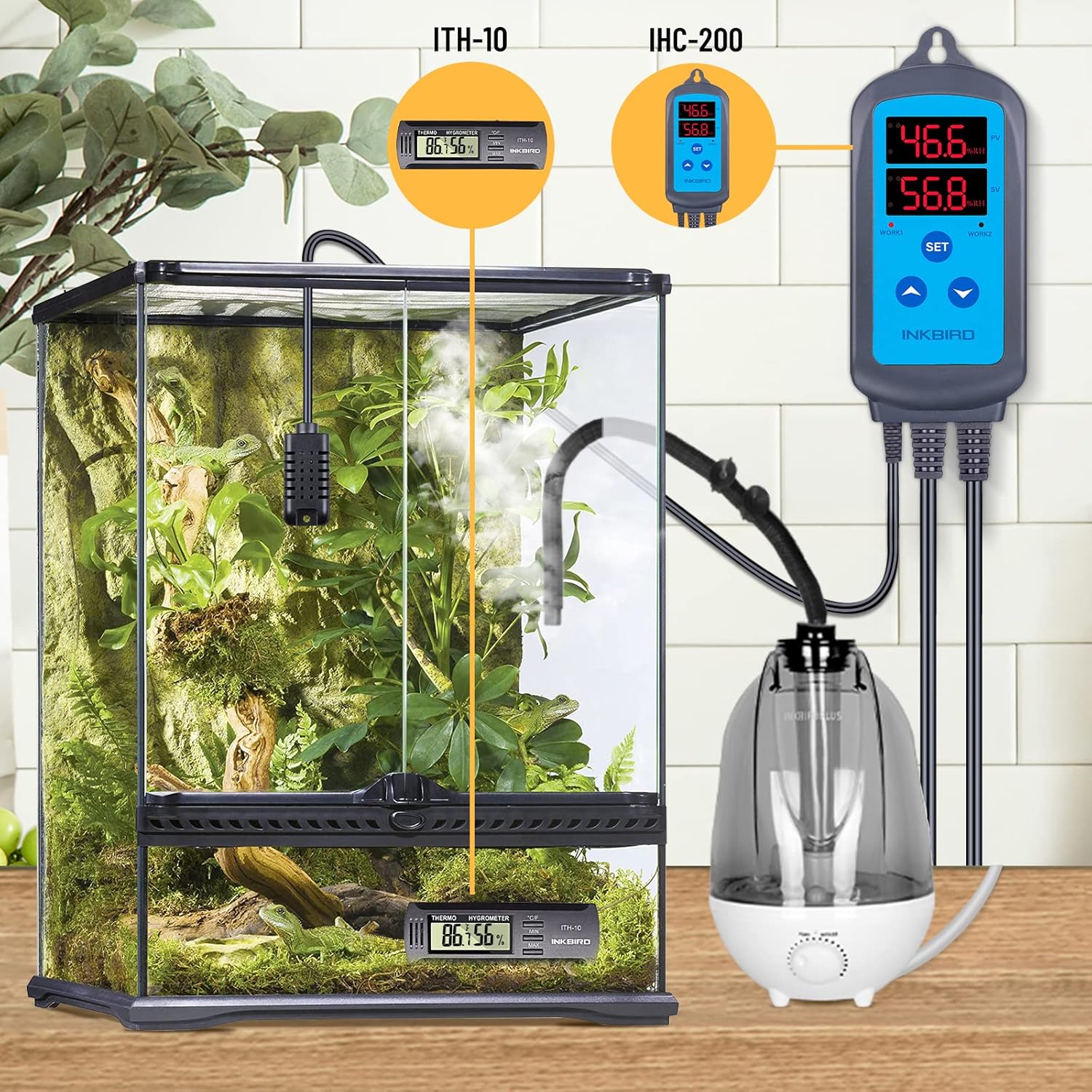
Image: Example setup of the IHC-200 and ITH-10 in a terrarium environment.
Operating Instructions
Operating the IHC-200 Humidity Controller
- View Current Humidity (PV): The upper display (red) shows the current humidity measured by the sensor.
- Set Humidity Value (SV): The lower display (blue) shows the target humidity value.
- Setting Humidity Range:
- Press the SET button once. The SV display will flash.
- Use the UP (▲) and DOWN (▼) buttons to adjust the desired humidity set point.
- Press SET again to confirm and exit, or wait a few seconds for it to auto-save.
- Advanced Settings (Calibration, Differential, Alarm):
- Press and hold the SET button for 3 seconds to enter the parameter setting mode.
- Use the SET button to cycle through parameters (e.g., HC: Humidification/Dehumidification mode, CA: Calibration, DE: Differential, AL: High/Low Humidity Alarm).
- Use the UP (▲) and DOWN (▼) buttons to adjust the value of the selected parameter.
- Press and hold SET again for 3 seconds to save changes and exit, or wait for auto-exit.
Operating the ITH-10 Mini Digital Thermometer and Hygrometer
- Reading Display: The LCD screen displays the current temperature (in °F or °C) and humidity (%RH).
- Switching Temperature Units: Press the °C/°F button to toggle between Celsius and Fahrenheit.
- View MIN/MAX Records:
- Press the MIN/MAX button once to display the maximum recorded temperature and humidity.
- Press it again to display the minimum recorded temperature and humidity.
- Press it a third time to return to current readings.
- Clear MIN/MAX Records: While MIN or MAX values are displayed, press and hold the MIN/MAX button for 3 seconds to clear the records.
Application Scenarios
The INKBIRD Humidity Controller Combo is versatile and can be used in various environments requiring precise humidity and temperature control:
- Mushroom Cultivation: Maintain optimal humidity levels for mushroom growth chambers.
- Mini-Greenhouses: Regulate humidity for plant propagation and growth.
- Reptile Enclosures: Create ideal habitat conditions for various reptile species.
- Wine Cellars: Preserve wine quality by controlling cellar humidity.
- Musical Instrument Storage: Protect wooden instruments like guitars and ukuleles from humidity fluctuations.
- Seed Germination: Provide consistent humidity for successful seed sprouting.
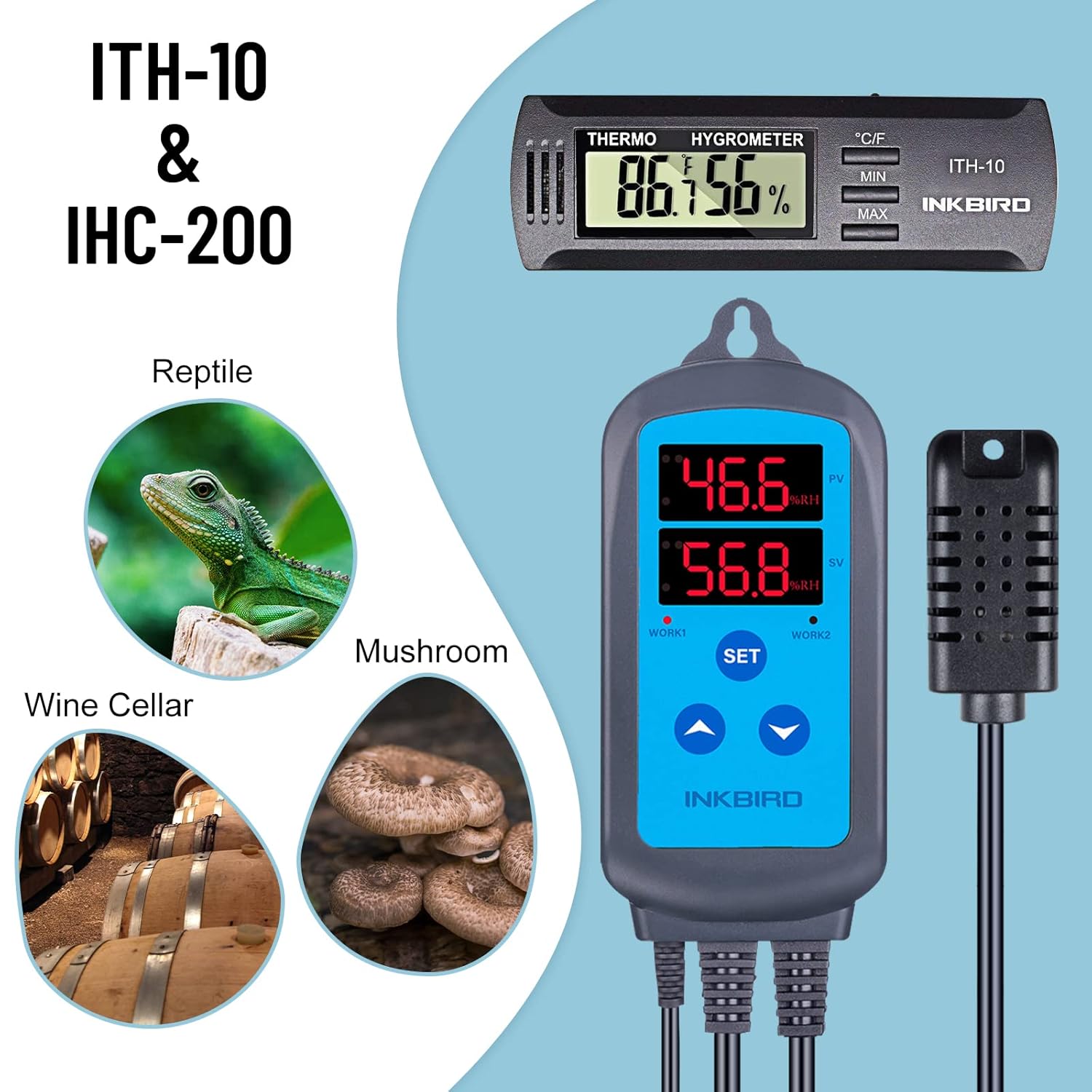
Image: Diverse applications of the INKBIRD humidity control system.
Maintenance
- Cleaning: Wipe the surfaces of both the IHC-200 and ITH-10 with a soft, damp cloth. Do not use abrasive cleaners or immerse the units in water.
- Sensor Care: Keep the humidity sensor clean and free from dust or debris. Avoid touching the sensor directly with bare hands, as oils can affect accuracy. If the sensor gets wet, allow it to air dry completely before use.
- ITH-10 Battery Replacement: When the ITH-10 display becomes dim or unresponsive, replace the CR2032 button battery. Ensure correct polarity during installation.
Troubleshooting
| Problem | Possible Cause | Solution |
|---|---|---|
| IHC-200 display is off. | No power supply. | Check if the power cord is securely plugged into a live outlet. Verify the outlet is functioning. |
| IHC-200 not controlling appliance. | Incorrect settings; appliance not plugged in or faulty. | Verify the set humidity range (SV) is appropriate. Ensure the appliance is correctly plugged into WORK1 (humidify) or WORK2 (dehumidify) and is functional. Check if HC mode is set correctly. |
| IHC-200 or ITH-10 readings are inaccurate. | Sensor dirty or damaged; device needs calibration. | Clean the sensor. If the issue persists, consider calibrating the IHC-200 (refer to advanced settings) or replacing the ITH-10 battery. |
| ITH-10 display is dim or blank. | Low or dead battery. | Replace the CR2032 button battery. |
Warranty and Support
Warranty Information
Inkbird products typically come with a standard manufacturer's warranty. Please refer to the warranty card included in your product packaging or visit the official Inkbird website for specific warranty terms and conditions applicable to your region and product model.
Customer Support
For technical assistance, troubleshooting, or any inquiries regarding your INKBIRD Humidity Controller Combo, please contact Inkbird Customer Support:
- Website: www.inkbird.com
- Email: support@inkbird.com (Example, actual email may vary, check official website)
When contacting support, please have your product model (IHC-200 + ITH-10) and purchase information ready.
Ask a question about this manual
Ask about setup, troubleshooting, compatibility, parts, safety, or missing instructions. Manuals+ will review the question and use this page’s manual context to help answer it.