
1. Introduction
Thank you for choosing the FELLAT XR1 Geiger Counter. This professional nuclear radiation detector is designed for accurate measurement of Beta (β), Gamma (γ), and X-rays. This manual provides essential information for the safe and effective use of your device, including setup, operation, maintenance, and technical specifications. Please read this manual thoroughly before operating the device.

Figure 1: The FELLAT Geiger Counter is suitable for a wide range of applications, from personal safety to industrial monitoring.
2. Safety Information
To ensure safe operation and prevent damage to the device, please observe the following safety precautions:
- Do not attempt to open or modify the device. Internal components are sensitive and can be damaged.
- Keep the device away from water and high humidity.
- Avoid exposing the device to extreme temperatures or direct sunlight for prolonged periods.
- Use only the specified power sources (AA batteries or Type-C USB cable).
- Handle the device with care to prevent drops or impacts.
- This device is for detection and monitoring purposes only. It does not provide protection against radiation. Always follow official safety guidelines when dealing with radioactive materials.
3. Package Contents
Upon unpacking, please verify that all items are present:
- FELLAT XR1 Geiger Counter
- Type-C USB Charging Cable
- User Manual (this document)
- Note: AA batteries are not included and must be purchased separately.
4. Product Overview
4.1 Key Features
The FELLAT XR1 Geiger Counter offers the following features:
- Professional and High Sensitivity: Equipped with an integrated GM tube sensor for high precision (0.01 µSv/h) and wide measurement range.
- Multi-functional Nuclear Data Meter: Clear LCD screen displays real-time, average, and cumulative radiation values. Data is retained even after power loss.
- Dual Power Supply Modes: Can be powered via Type-C USB cable or 3x AA batteries.
- Portable Design: Compact and lightweight for easy carrying and storage.
- Multiple Detection Types: Detects Beta (β), Gamma (γ), and X-rays.
- Automatic Alarm: Alerts automatically if radiation values exceed 0.5 µSv/h.

Figure 2: Overview of the FELLAT Geiger Counter's professional and user-friendly features.
4.2 Device Components
The device features a clear LCD display and intuitive controls. Familiarize yourself with the layout:

Figure 3: Labeled display elements of the Geiger Counter.
- LCD Display: Shows real-time, average, and cumulative radiation values, along with a trend graph and battery indicator.
- 'L' Button (Sound): Controls sound settings.
- 'M' Button (Play): Used for menu navigation or playback (specific functions may vary).
- 'R' Button (Light): Controls backlight settings.
- ON/OFF Button: Powers the device on or off.
- Type-C USB Port: For external power supply or charging (if rechargeable batteries are used).
5. Setup
5.1 Powering the Device
The FELLAT XR1 Geiger Counter can be powered in two ways:
- Using AA Batteries: Open the battery compartment on the back of the device and insert three (3) AA batteries, ensuring correct polarity.
- Using USB Power: Connect the provided Type-C USB cable to the device's USB port and plug the other end into a compatible USB power adapter (not included) or a computer USB port. The device can operate directly from USB power without batteries.

Figure 4: The device supports both AA battery and USB Type-C power options.
5.2 Initial Power On
Press the ON button to turn on the device. The LCD screen will illuminate and begin displaying readings after a brief startup sequence.
6. Operating Instructions
6.1 Basic Measurement
Once powered on, the device automatically begins detecting radiation. Position the Geiger Counter in the area you wish to monitor. The device is capable of detecting Beta (β), Gamma (γ), and X-rays.
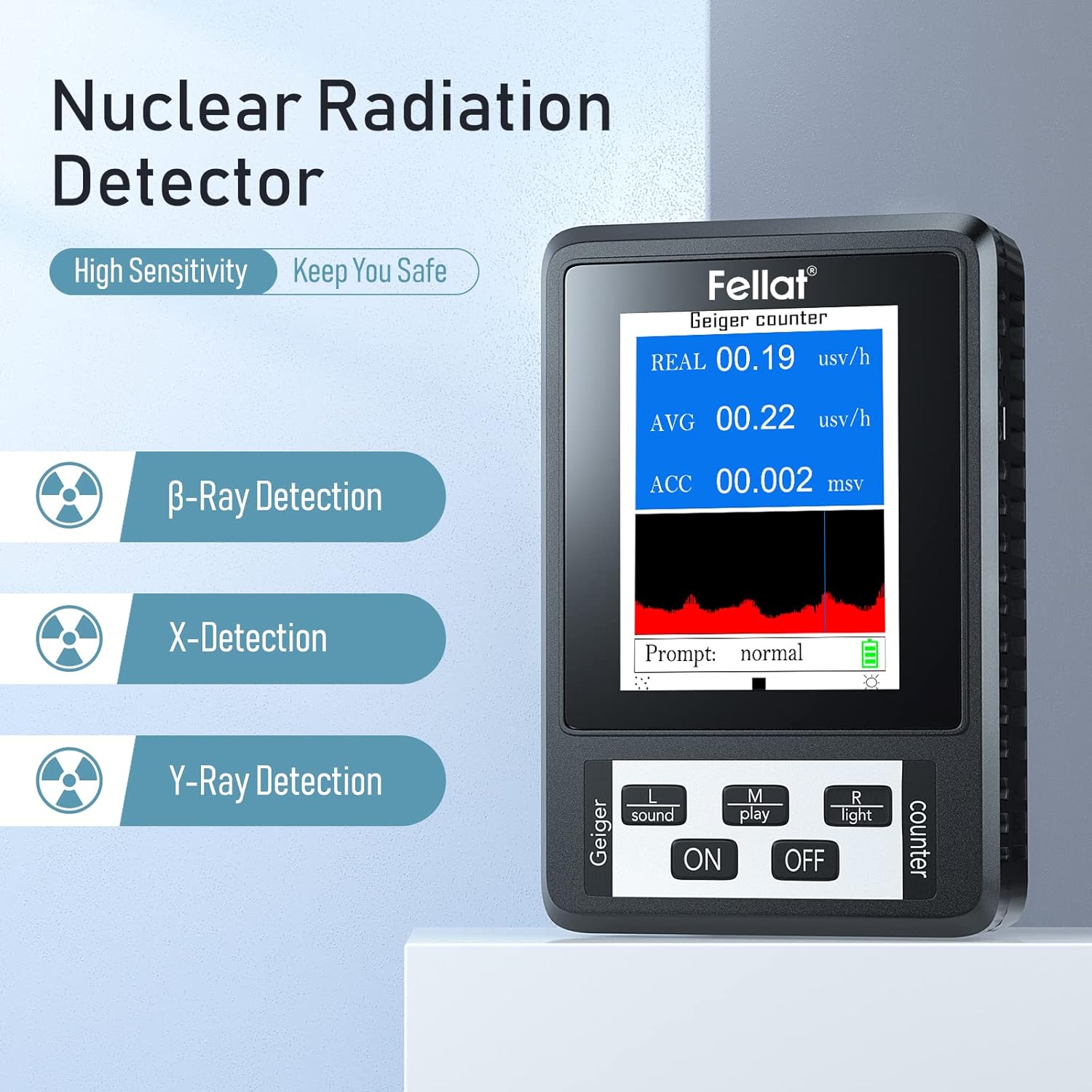
Figure 5: The Geiger Counter detects Beta, Gamma, and X-ray radiation.
6.2 Understanding the Display
The LCD display provides comprehensive radiation data:
- REAL (Real-time Dose): Shows the current radiation dose rate in µSv/h. This value fluctuates based on immediate detection.
- AVG (Average Dose): Displays the average radiation dose rate over a period, providing a more stable reading.
- ACC (Cumulative Dose): Accumulates the total radiation dose received since the last reset, measured in mSv. This value is retained even if the device is powered off.
- Trend Graph: A visual representation of real-time radiation fluctuations, allowing you to observe changes over time.
- Prompt: Indicates the current status, e.g., "normal" or "over standard".
- Battery Indicator: Shows the remaining battery life.

Figure 6: Real-time dose display showing various measurement parameters.
6.3 Alarm Function
The device is programmed to alert you if the radiation dose rate exceeds a preset threshold of 0.5 µSv/h. When this threshold is surpassed, the device will emit an audible alarm and display a "Prompt: Over standard" message.

Figure 7: The device indicates an 'Over standard' prompt when radiation levels exceed the threshold.
6.4 Clearing Cumulative Data
To reset the cumulative dose (ACC) value, simultaneously press the L (Sound) key and the R (Light) key. This action will clear the accumulated radiation data.
7. Maintenance
- Cleaning: Wipe the device with a soft, dry cloth. Do not use abrasive cleaners or solvents.
- Storage: Store the device in a cool, dry place away from direct sunlight and extreme temperatures. If storing for an extended period, remove the batteries to prevent leakage.
- Battery Replacement: Replace AA batteries when the battery indicator shows low power. Ensure correct polarity during installation.
8. Troubleshooting
- Device does not turn on: Check if batteries are installed correctly and have sufficient charge, or ensure the USB cable is properly connected to a power source.
- Inaccurate readings: Ensure the device is not near strong electromagnetic interference. Allow some time for readings to stabilize.
- No sound from alarm: Check the sound settings using the 'L' button.
- Display is dim: Adjust backlight settings using the 'R' button or check battery level.
9. Specifications

Figure 8: Physical dimensions of the FELLAT XR1 Geiger Counter.
| Parameter | Value |
|---|---|
| Model Number | XR1 |
| Manufacturer | Shenzhen Kexun Huitong Electronics Co.,Ltd. |
| Detection Types | Beta (β), Gamma (γ), X-ray |
| Measurement Range | 0.01 µSv/h (High Precision) |
| Automatic Alarm Threshold | 0.5 µSv/h |
| Power Supply | 3x AA Batteries (not included) or Type-C USB |
| Product Dimensions (L x W x H) | 7.11 x 10.41 x 2.79 cm (2.8 x 4.1 x 1.1 inches) |
| Weight | 130 grams |
| Color | Black |
10. Warranty and Support
FELLAT products are manufactured to high-quality standards. For warranty information, technical support, or service inquiries, please refer to the contact information provided with your purchase or visit the official FELLAT website. Please retain your proof of purchase for warranty claims.