
1. Introduction
The MOUDENSKAY 24V 5A Automatic Battery Charger (Model 24V5-de) is an intelligent 150W charger designed for efficient and safe charging of 24V lead-acid batteries. This includes AGM, sealed, VRLA, GEL, SLA, WET, and Deep Cycle battery types. Equipped with MCU control, it features a fully automatic 4-step charging process to ensure optimal battery health and extended lifespan. Its robust design and comprehensive safety features make it suitable for a wide range of applications, from electric wheelchairs and scooters to motorcycles and marine boats.
This manual provides essential information for the proper setup, operation, maintenance, and troubleshooting of your MOUDENSKAY battery charger. Please read it thoroughly before first use to ensure safe and effective operation.

Image 1.1: MOUDENSKAY 24V 5A Automatic Smart Battery Charger. This image highlights the charger's main features and its application with a wheelchair.
2. Safety Instructions
Always adhere to the following safety guidelines to prevent injury or damage to the charger and battery:
- Important Warning: Before charging, ensure that the correct voltage of the battery matches the voltage of the charger (24V).
- Do not attempt to charge non-rechargeable batteries.
- Ensure the charger is used in a well-ventilated area.
- Avoid exposing the charger to rain, moisture, or extreme temperatures.
- Do not operate the charger if it has been dropped, damaged, or if the power cord or XLR connector is compromised.
- Always disconnect the power supply before connecting or disconnecting the battery.
- Keep out of reach of children.
- The charger provides protection against overloads, overvoltage, overcurrent, short circuits, and over-temperature. However, always exercise caution.
- Do not disassemble the charger. Refer all servicing to qualified personnel.

Image 2.1: Product Protection Features. This image illustrates the various safety protections integrated into the charger, such as short circuit, overvoltage, and overcurrent protection.
3. Product Overview and Components
The MOUDENSKAY 24V 5A Battery Charger features a durable aluminum casing and essential components for efficient charging.

Image 3.1: Charger Components. This image labels the key parts of the charger: Aluminum Casing, AC Input Interface, Power Plug, and XLR Connector.
- Aluminum Casing: Provides durability and efficient heat dissipation.
- AC Input Interface: For connecting the power cable.
- Power Plug: Connects the charger to a standard AC power outlet.
- XLR Connector: The output connector for connecting to the battery.
- Integrated Fan: An intelligent, quiet fan with 7 rotation speeds that auto-adjusts based on load and temperature for effective heat dissipation.
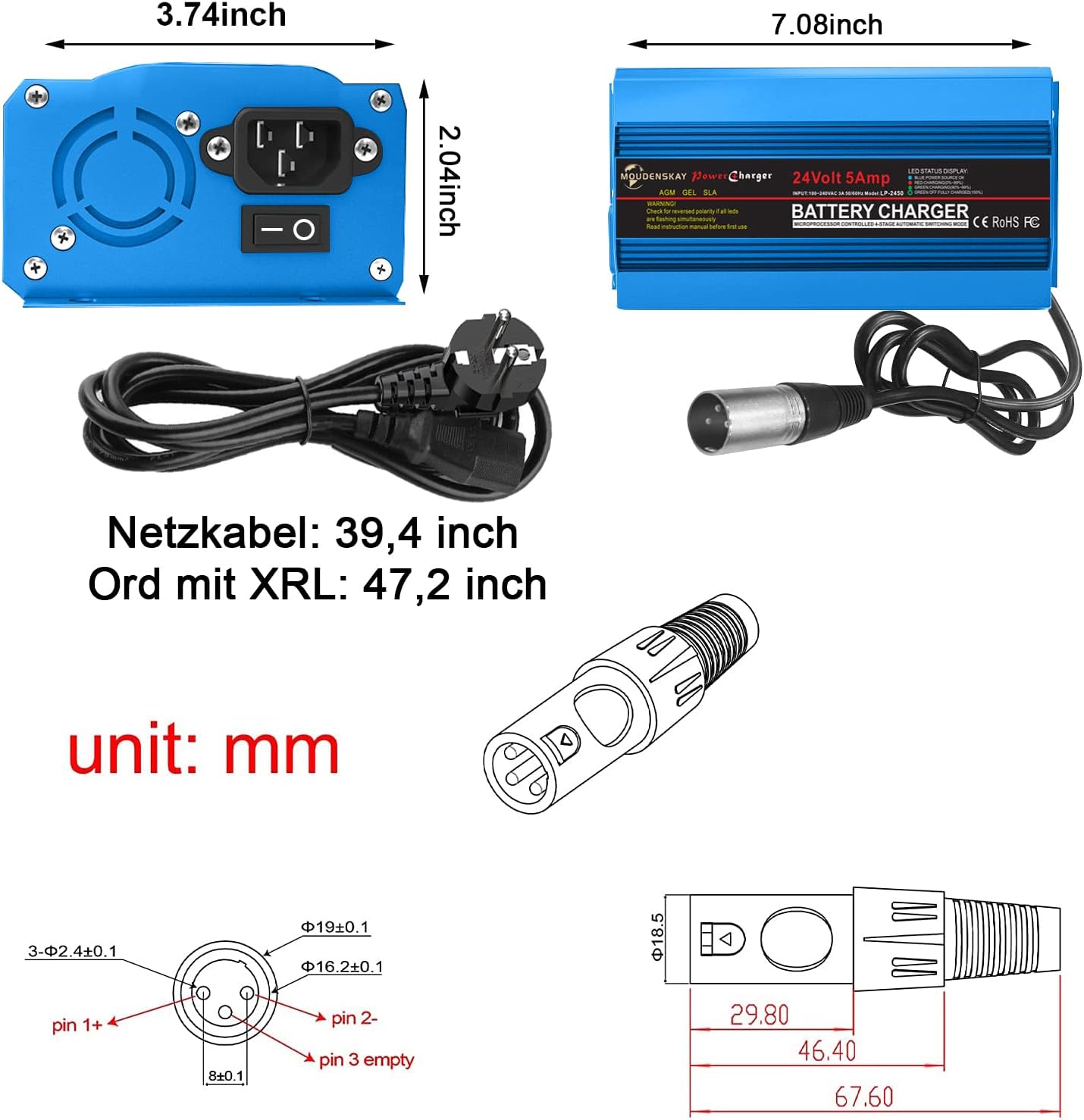
Image 3.2: Integrated Fan. This image shows the charger with a detailed view of its integrated cooling fan.

Image 3.3: Interface Description. This image clearly labels the XLR Connector and the Power Plug for easy identification.
4. Setup and Connection
Follow these steps to properly set up and connect your MOUDENSKAY battery charger:
- Verify Battery Compatibility: Ensure your battery is a 24V lead-acid type (AGM, GEL, VRLA, SLA, WET, or Deep Cycle) and that its voltage matches the charger's output.
- Connect to Battery: Plug the 3-pin XLR connector from the charger into the charging port of your device (e.g., electric wheelchair, scooter). Ensure a secure connection.
- Connect to Power: Plug the AC power cable into the charger's AC input interface, then plug the power plug into a standard 100-240V AC wall outlet.
- Power On: Flip the power switch on the charger to the 'ON' position. The LED indicators will illuminate to show the charging status.

Image 4.1: Charger with Connectors. This image displays the charger along with its XLR output connector and AC power cable, ready for connection.
5. Operating Instructions
The MOUDENSKAY charger features an intelligent 4-step charging process:
- Desulfation: If the charger detects a sulfated or severely discharged lead-acid battery, it sends pulse charges to help break down sulfate crystals, restoring battery capacity and health. (Note: Charging error may occur if battery voltage is below 12V).
- Bulk Charge: This is the primary charging stage where the charger delivers maximum current until the battery reaches approximately 80% capacity.
- Absorption: The charger gradually reduces the current while maintaining a constant voltage, bringing the battery to 100% charge.
- Float/Maintenance: Once fully charged, the charger automatically switches to a low-current float mode to maintain the battery at full capacity without overcharging, preventing damage even if left connected.
LED Indicators: The charger features an LED panel display that clearly indicates the charging progress:
- 25%
- 50%
- 75%
- 100% (Full Charge)

Image 5.1: LED Charging Indicators. This image shows the charger's LED display, which provides a visual representation of the battery's charging status.
6. Maintenance
Proper maintenance ensures the longevity of your battery and charger:
- Regular Cleaning: Keep the charger clean and free from dust and debris. Use a dry, soft cloth for cleaning.
- Ventilation: Ensure the charger's fan and cooling holes are not obstructed to allow for efficient heat dissipation. The intelligent fan adjusts speed based on temperature.
- Cable Inspection: Periodically inspect the power cable and XLR connector for any signs of damage, fraying, or loose connections.
- Battery Health: The desulfation feature helps maintain battery health and restore capacity, extending the battery's lifespan.
- Storage: When not in use, store the charger in a cool, dry place away from direct sunlight and moisture.
7. Troubleshooting
If you encounter issues with your MOUDENSKAY charger, refer to the following common problems and solutions:
- Charger Not Turning On:
- Check if the power cable is securely plugged into both the charger and the wall outlet.
- Ensure the power switch on the charger is in the 'ON' position.
- Verify the wall outlet is functional by plugging in another device.
- Charging Error (LEDs not indicating progress or flashing abnormally):
- Battery Voltage Too Low: If the battery voltage is below 12V, the charger may not initiate charging. Attempt to recover the battery with a specialized low-voltage recovery charger if available, or consider battery replacement.
- Incorrect Battery Type/Voltage: Ensure the battery is a 24V lead-acid type. The charger is not suitable for lithium batteries unless explicitly stated for a specific model.
- Poor Connection: Ensure the XLR connector is firmly seated in the battery's charging port.
- Reverse Polarity: The charger has reverse polarity protection. If connected incorrectly, it will not charge. Recheck the connection.
- Over-temperature: If the charger becomes excessively hot, it may temporarily stop charging. Allow it to cool down in a well-ventilated area.
- Slow Charging:
- Ensure the battery capacity is within the recommended range (9-120 Ah for charging, 15-150 Ah for maintenance).
- Older or heavily sulfated batteries may take longer to charge, especially during the desulfation stage.
If the problem persists after trying these steps, please contact customer support.
8. Specifications

Image 8.1: Technical Specifications. This table provides a quick overview of the charger's key technical data.
| Feature | Specification |
|---|---|
| Brand | MOUDENSKAY |
| Model Number | 24V5-de |
| Input Voltage | 100-240V AC |
| Output Voltage | 24V DC |
| Output Current | 5A |
| Compatible Battery Types | 24V AGM, GEL, VRLA, SLA, WET, Deep Cycle Lead-Acid Batteries |
| Charging Capacity Range | 9-120 Ah |
| Maintenance Capacity Range | 15-150 Ah |
| Charging Time | 3-24 Hours (depending on battery capacity and discharge level) |
| Charging Process | 4-step (Desulfation, Bulk, Absorption, Float) |
| Safety Protections | Overload, Overvoltage, Overcurrent, Short Circuit, Reverse Polarity, Over-temperature |
| Cooling | Intelligent Fan |
| Connector Type | 3-pin XLR |
| Product Dimensions | 23P x 15l x 7H millimeters (approx. 9.06 x 5.91 x 2.76 inches) |
| Item Weight | 1.1 pounds |
| Power Cable Length | 39.4 inches |
| XLR Cable Length | 47.2 inches |
| Certifications | CE Compliant |

Image 8.2: Dimensions and Connector Pinout. This image provides detailed measurements of the charger and the pin configuration for the XLR connector (Pin 1+, Pin 2-, Pin 3 empty).
9. Application Areas
The MOUDENSKAY 24V 5A Automatic Battery Charger is versatile and suitable for charging 24V lead-acid batteries in a variety of vehicles and equipment:
- Electric Wheelchairs
- Electric Scooters
- Motorcycles
- Electric Bicycles (e-bikes)
- Lawn Mowers
- Marine Boats
- Electric Carts and Trucks
- Balance Cars (Hoverboards)
- Tricycles
- Cars (for 24V systems)

Image 9.1: Application Areas. This visual guide demonstrates the wide range of vehicles and equipment compatible with the MOUDENSKAY 24V 5A Battery Charger.
10. Warranty and Support
Tesure offers a one-year quality warranty for this product. If you have any questions or encounter problems with your MOUDENSKAY 24V 5A Automatic Battery Charger, please contact Tesure customer support for assistance. We are committed to providing a satisfactory response and solution.
For warranty claims or technical support, please refer to the contact information provided with your purchase or visit the official Tesure website.


