
Introduction
This manual provides comprehensive instructions for the operation and maintenance of your RELAX Multi Retro Portable Radio Speaker, Model RE096. Please read this manual thoroughly before use to ensure proper function and longevity of the product. This device combines multiple features including FM/AM/SW radio, Bluetooth speaker, MP3 player, LED flashlight, mobile power bank, and a clock, with versatile charging options.
Safety Precautions
- Do not expose the device to extreme temperatures, direct sunlight, or high humidity.
- Avoid dropping or subjecting the device to strong impacts.
- Do not disassemble or attempt to repair the device yourself. Contact customer support for assistance.
- Keep out of reach of children.
- Use only specified charging cables and adapters.
Product Overview
The RELAX Multi Retro Portable Radio Speaker is a versatile device designed for both everyday use and emergency situations. It features a retro design combined with modern functionalities.
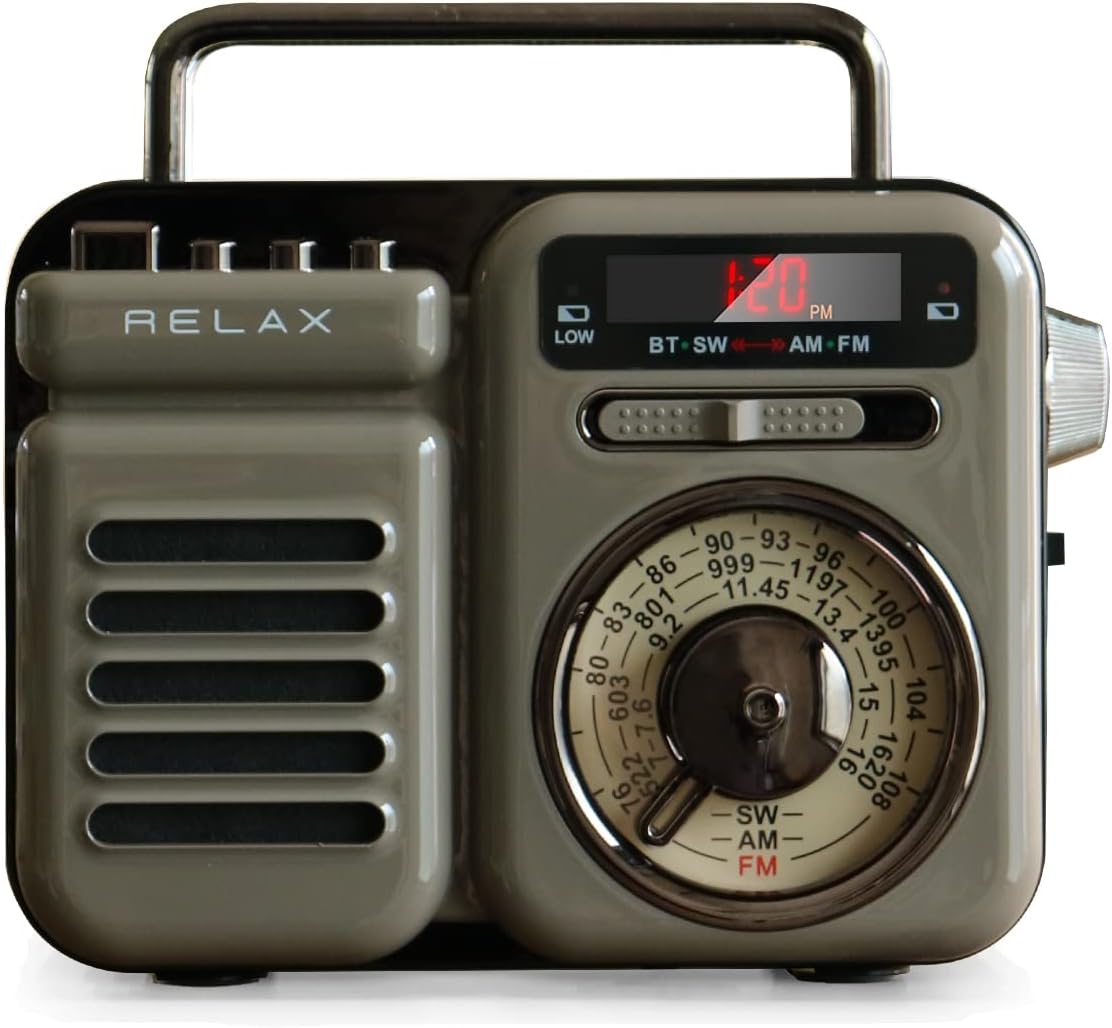
Image: Front view of the RELAX Multi Retro Portable Radio Speaker.
Key Features:
- AM/FM/SW Radio: Access a wide range of broadcasts, including emergency information.
- Bluetooth & MP3 Playback: Connect wirelessly to smart devices or play music from USB/microSD.
- Multiple Charging Methods: USB, hand-crank, and solar power for reliable operation.
- Mobile Power Bank: Charge external devices via USB-A port.
- Torchlight: Integrated LED light for illumination.
- SOS Alarm: Emergency alarm with loud sound and flashing light.
- Clock Function: Digital time display for convenience.
Parts Identification:

Image: Detailed diagram illustrating the various parts and controls of the radio.
- Band Switch (SW/AM/FM)
- Tuning Knob
- Volume Dial / Power Switch
- LED Display
- Torchlight Switch
- Torchlight
- Hand-crank Handle
- Solar Panel
- USB-A Output Port (Mobile Battery)
- Micro USB Input Port (Charging)
- MicroSD Card Slot
- USB Memory Slot
- SOS/Battery/Charging Switch
Setup
Initial Charging:
Before first use, fully charge the device using the provided USB cable. Connect the micro USB end to the radio's input port and the USB-A end to a standard USB power adapter (not included) or computer USB port.
- Charging time via USB is approximately 3-4 hours.
- The charging indicator light will illuminate during charging.

Image: The radio being charged via USB cable.
Power On/Off:
Rotate the volume dial clockwise to power on the device. Rotate counter-clockwise until it clicks to power off.
Operating Instructions
1. Radio Function (AM/FM/SW):
- Turn on the radio using the volume dial.
- Select the desired band (FM, AM, or SW) using the band switch.
- Rotate the tuning knob to find a station. The frequency will be displayed on the LED screen.
- Adjust the volume using the volume dial.
Note: Radio reception sensitivity may vary depending on location. If reception is poor, try moving the device to a different spot. The handle is not an antenna; the antenna is internal.
2. Bluetooth Speaker Function:
- Turn on the radio.
- Switch the mode to Bluetooth (BT) using the mode button (if available, or it might automatically switch if no other media is playing). The LED display will show "BT".
- On your smartphone or other Bluetooth-enabled device, search for "RELAX Radio" in the Bluetooth settings and pair.
- Once paired, you can play audio from your device through the radio speaker.
3. MP3 Music Playback (USB/microSD):
- Insert a USB memory stick or microSD card (containing MP3 files) into the respective slot.
- The device should automatically switch to MP3 playback mode. If not, use the mode button to select it.
- Use the playback control buttons (play/pause, next/previous track) to manage your music.
4. Torchlight Function:
Slide the torchlight switch to turn the LED flashlight on or off. This is useful for illumination in dark environments or emergencies.
5. Mobile Power Bank Function:
Connect your smartphone or other USB-chargeable device to the USB-A output port on the radio using your device's charging cable. The radio's internal battery (2000mAh) will provide power to charge your device.

Image: The radio functioning as a mobile power bank, charging a smartphone.
Note: The capacity is 2000mAh, which may not fully charge all smartphones. This function is primarily for emergency use.
6. SOS Alarm Function:
In an emergency, slide the SOS switch to activate the alarm. It will emit a loud sound and flash the LED light to attract attention. Slide the switch back to deactivate.
7. Clock Function:
The LED display shows the current time. Refer to the detailed instructions in the included paper manual for setting the time and alarm function.

Image: Close-up of the radio's digital LED display showing the time.
Alternative Charging Methods:
- Hand-crank Charging: Extend the hand-crank handle and rotate it clockwise or counter-clockwise to generate power. This is ideal for emergencies when no other power source is available.
- Solar Charging: Place the radio with the solar panel facing direct sunlight. The solar panel will slowly charge the internal battery. This is a supplementary charging method.

Image: A hand rotating the hand-crank handle on the back of the radio for emergency charging.
Note: Hand-crank and solar charging require significant time to fully charge the device. USB charging is recommended for regular use.
Maintenance
- Clean the device with a soft, dry cloth. Do not use abrasive cleaners or solvents.
- Store the radio in a cool, dry place away from direct sunlight and moisture.
- If not used for extended periods, charge the battery at least once every three months to maintain battery health.
Troubleshooting
| Problem | Possible Cause | Solution |
|---|---|---|
| No power / Device won't turn on | Battery is depleted. | Charge the device using USB, hand-crank, or solar power. |
| Poor radio reception | Weak signal in current location. | Move the radio to a different location, especially near a window. |
| Bluetooth not connecting | Bluetooth not enabled on device, or radio not in pairing mode. | Ensure Bluetooth is on and the radio is in BT mode. Re-pair the devices. |
| MP3 files not playing | Incorrect file format or corrupted files. | Ensure files are in MP3 format. Try a different USB/microSD card. |
| External device not charging | Radio battery low, or incorrect cable. | Ensure radio is sufficiently charged. Use a compatible USB cable. |
Specifications
| Feature | Detail |
|---|---|
| Model Number | RE096 |
| Dimensions | 128 x 57 x 98 mm (approx. 12 x 5.5 x 11.5 cm) |
| Weight | 395 g |
| Charging Methods | USB, Hand-crank, Solar |
| Frequency Bands | SW: 7-16 MHz, FM: 76-108 MHz, AM: 522-1620 KHz |
| Battery | 2000mAh / 3.7V Lithium-ion |
| Speaker Output | 8W 4Ω |
| Bluetooth Version | Bluetooth 5.0 |
| LED Light Brightness | 120 LM |
| Operating Voltage | 2.7V - 4.2V |
| USB Charging Time | Approx. 3-4 hours |
| Estimated Operation Time (Fully Charged) | Bluetooth (Full Volume): Approx. 3.5 hours, Bluetooth (75% Volume): Approx. 5 hours, LED Light: Approx. 6 hours, Radio (Medium Volume): Approx. 20 hours |
| Included Accessories | Instruction Manual, Warranty Card, Micro USB Charging Cable (with earphone plug) |
| Material | Acrylonitrile Butadiene Styrene (ABS), Silicone Rubber, Iron |
| Connectivity Technology | AUX, Bluetooth, USB |
| Display Type | LED |
| Tuner Type | AM, FM, SW |
Warranty and Support
This RELAX Multi Retro Portable Radio Speaker comes with a 1-year warranty from the date of purchase. This warranty covers initial defects and malfunctions under normal use.
In case of any issues, please contact customer support. When contacting support, please provide your Amazon order number for smoother assistance.
The product is TELEC certified, ensuring compliance with Japanese radio equipment technical standards.
Additional Information
This product is designed and supported by a Japanese company, ensuring reliable customer service.

Image: The RELAX Multi Retro Radio highlighting its seven key functions: mobile battery, FM/AM/SW radio, torchlight, alarm (SOS), speaker, clock, and MP3 playback.