
EnhanBili LED-780H
LED-780H Magnimage LED Video Processor
User Manual
Model: LED-780H | Brand: EnhanBili
1. Introduction
The LED-780H is an advanced 4K x 2K/60Hz capable video processor designed for superior visual performance on LED walls. It supports 4-screen splicing and offers high-quality pixel-to-pixel display through user-friendly controls. This processor is an ideal solution for multi-media halls, multi-purpose rooms, theaters, studios, and showrooms.
Key Features:
- Supports 4K x 2K/60Hz input and output.
- Capable of 4-screen splicing.
- Features EDID and user-defined output management for precise display.
- High loading capacity with up to 15360 processing width and 121Hz refresh rate.
- Includes 16 selective built-in resolutions for scaling and matching LED wall sizes.
- Extensive input ports: DVIx2, HDMIx2, DPx1 (4K), SDIx1 (with loop function).
- Expandable inputs: 2 ports from VGA, DVI, SDI, or one 4K input from DP1.1 or HDMI 1.4.
- Multiple control options: Network linking, USB linking, or RS232 linking.
2. Setup and Installation
2.1 Unpacking and Initial Inspection
Carefully unpack the LED-780H video processor and inspect it for any signs of damage during transit. If any damage is found, contact your dealer immediately.
What's in the Box:
- LED-780H Video Processor
- Power Cable
- USB Cable
- User Manual (this document)
- Other accessories (may vary by package)
2.2 Physical Installation
The LED-780H is designed for rack-mount or desktop installation. Ensure adequate ventilation around the unit to prevent overheating.
- Dimensions (D x W x H): 2.76" x 19.09" x 17.91" (7.01 cm x 48.5 cm x 45.5 cm)
- Net Weight: 13.2 pounds (6 Kg)
2.3 Power Connection
Connect the provided power cable to the AC input on the rear panel of the LED-780H and then to a grounded power outlet.
- Input Voltage: AC 100-240 V, 50/60Hz
- Overall Consumption: 55W
2.4 Environmental Requirements
- Operating Temperature: 0℃ - 45℃ (32°F - 113°F)
- Operating Humidity: 10-90% (non-condensing)
2.5 Connecting Devices
The LED-780H offers a wide range of input and output ports for connecting various video sources and LED displays. Refer to the rear panel diagram below for port identification.
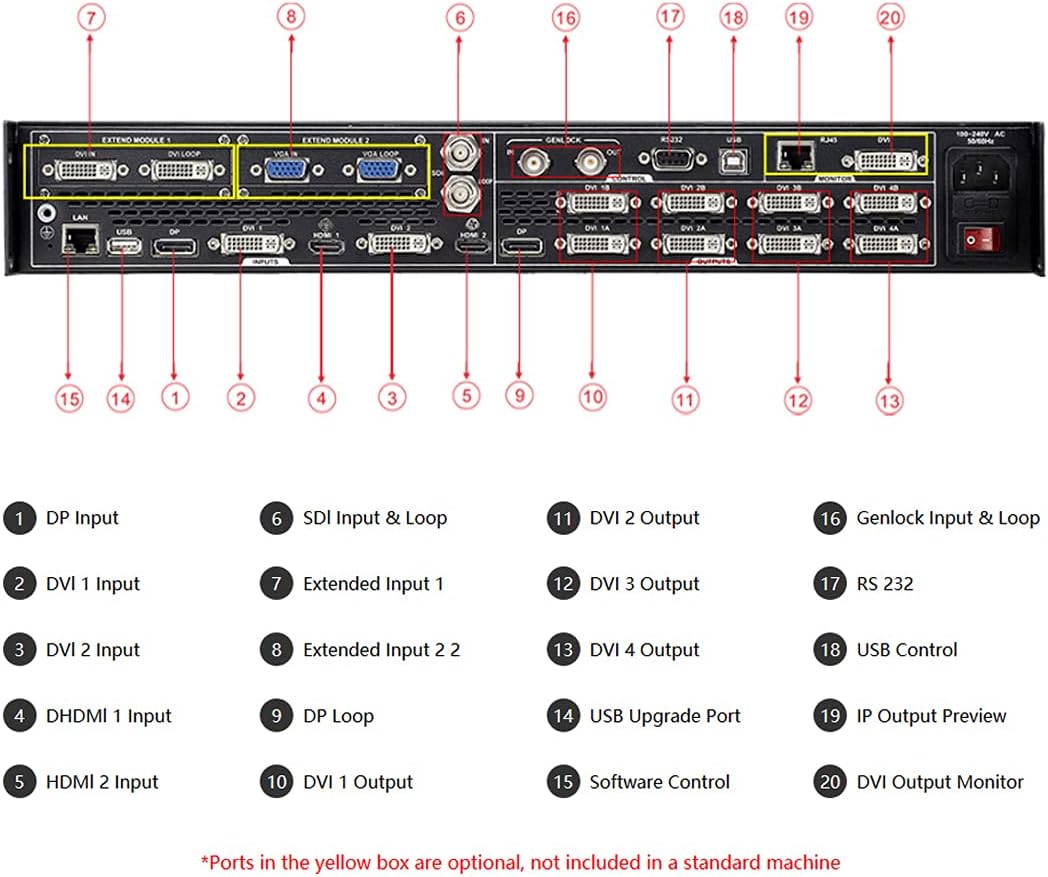
Figure 2.1: Rear Panel Connections of LED-780H. This image shows the various input and output ports on the back of the unit, including DVI, HDMI, DP, SDI, USB, LAN, and RS232 connections, along with power input.
Key Rear Panel Ports:
- DP Input: DisplayPort input.
- DVI Input: Digital Visual Interface inputs (DVI 1, DVI 2).
- HDMI Input: High-Definition Multimedia Interface inputs (HDMI 1, HDMI 2).
- SDI Input & Loop: Serial Digital Interface input with loop-through function.
- Extended Inputs: Optional VGA, DVI, or SDI inputs.
- DVI Output: DVI outputs for connecting to LED screens (DVI 1, DVI 2, DVI 3, DVI 4).
- Genlock Input & Loop: For synchronizing with external video sources.
- RS232: Serial port for control.
- USB Control & Upgrade Port: For software control and firmware upgrades.
- IP Output Preview: For network-based preview.
- LAN: Ethernet port for network control.
3. Operation
3.1 Front Panel Controls
The front panel provides intuitive controls for managing inputs, outputs, and various display functions. Familiarize yourself with the layout below.
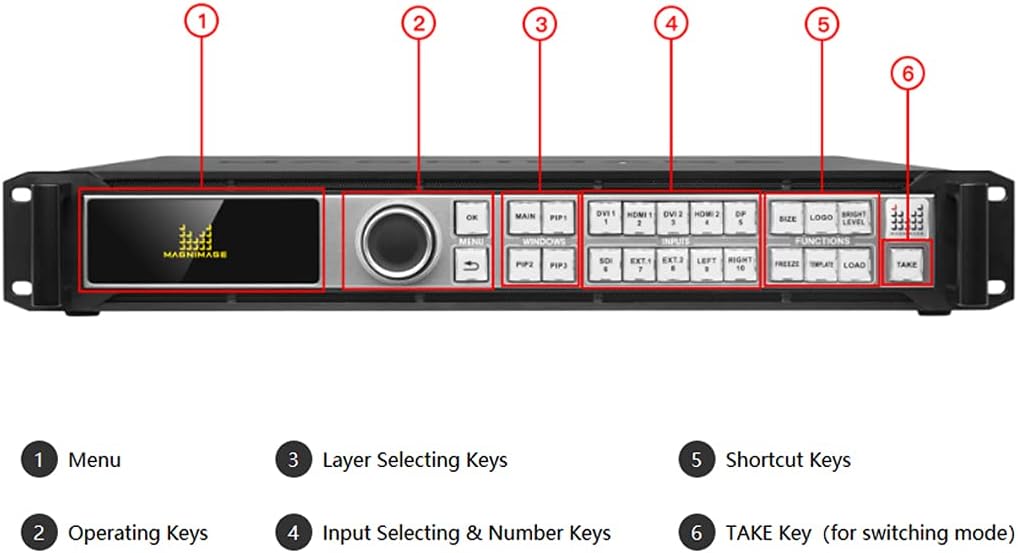
Figure 3.1: Front Panel Controls of LED-780H. This image highlights the display screen, rotary knob, and various buttons for input selection, window management, and function controls.
Key Front Panel Elements:
- Menu Display: Shows current settings and navigation options.
- Operating Keys (OK, Menu, Back): For navigating menus and confirming selections.
- Layer Selecting Keys (MAIN, PIP1, PIP2, PIP3): To select and manage different video layers (Main, Picture-in-Picture).
- Input Selecting & Number Keys (DVI, HDMI, DP, SDI, EXT): To choose active video inputs.
- Shortcut Keys (SIZE, LOGO, BRIGHT LEVEL): Quick access to common functions.
- TAKE Key: For executing transitions or switching modes.
3.2 Input and Output Management
The LED-780H allows for flexible management of video inputs and outputs to suit various display configurations.
- EDID Management: Configure EDID settings to ensure optimal compatibility and resolution negotiation between the processor and connected sources.
- User-Defined Output: Customize output resolutions and aspect ratios to precisely match the specifications of your LED display.
- 4K Processing: The processor supports 4K x 2K/60Hz input, allowing for high-resolution content display.
- Resolution Scaling: Utilize the 16 built-in resolutions to scale and fit content perfectly to your LED wall's physical dimensions.
- Splicing: The unit supports 4-screen splicing, enabling the creation of larger, seamless video walls from multiple outputs.
4. Maintenance
4.1 Cleaning
To ensure the longevity and optimal performance of your LED-780H, regular cleaning is recommended.
- Disconnect the power cable before cleaning.
- Use a soft, dry cloth to wipe the exterior surfaces.
- For stubborn dirt, slightly dampen the cloth with water; avoid harsh chemicals or abrasive cleaners.
- Ensure ventilation openings are free from dust and debris. Use compressed air if necessary to clear vents.
4.2 Storage
If the unit will not be used for an extended period, store it in a cool, dry place, away from direct sunlight and extreme temperatures. It is recommended to store the unit in its original packaging to protect it from dust and physical damage.
5. Troubleshooting
This section provides solutions to common issues you might encounter with the LED-780H video processor. If the problem persists, please contact customer support.
| Problem | Possible Cause | Solution |
|---|---|---|
| No power indicator light. | Power cable not connected or power outlet issue. | Check power cable connection. Ensure power outlet is functional. |
| No video output. | Incorrect input selected, cable issue, or display settings. | Verify correct input is selected on the front panel. Check all video cables. Ensure output resolution matches display capabilities. |
| Image flickering or unstable. | Loose cable connection, incompatible resolution, or interference. | Secure all cable connections. Adjust output resolution or refresh rate. Check for nearby sources of electromagnetic interference. |
| Control panel unresponsive. | Temporary software glitch. | Power cycle the unit (turn off, wait 10 seconds, turn on). |
6. Technical Specifications
| Feature | Specification |
|---|---|
| Brand Name | EnhanBili |
| Model Number | LED-780H |
| Product Dimensions | 19.09 x 17.91 x 2.76 inches (48.5 x 45.5 x 7.01 cm) |
| Item Weight | 13.2 pounds (6 Kg) |
| Color | Black |
| Input Voltage | AC 100-240 V, 50/60Hz |
| Overall Consumption | 55W |
| Operating Temperature | 0℃ - 45℃ |
| Operating Humidity | 10-90% |
| Display Technology | LED (for connected screens) |
| Resolution Support | Up to 4K (4096x2160) @ 60Hz |
| Max Processing Width | 15360 pixels |
| Max Refresh Rate | 121Hz |
| Input Ports | DVIx2, HDMIx2, DPx1 (4K), SDIx1 (with loop), Optional VGA/DVI/SDI/4K DP1.1/HDMI 1.4 |
| Output Ports | DVI outputs (4 for splicing) |
| Control Methods | Network (LAN), USB, RS232 |
| Certifications | CE, RoHS |
7. Warranty and Support
7.1 Warranty Information
The LED-780H video processor comes with a standard manufacturer's warranty against defects in materials and workmanship. Please refer to the warranty card included with your product or contact your point of purchase for specific warranty terms and conditions. Keep your purchase receipt as proof of purchase for warranty claims.
7.2 Customer Support
For technical assistance, troubleshooting, or service inquiries, please contact the EnhanBili customer support team or your authorized dealer. When contacting support, please have your product model number (LED-780H) and serial number ready.
For the most up-to-date support information, visit the official EnhanBili website or the website of your product retailer.
Related Documents - LED-780H
 |
MAGNIMAGE LED-FW16-B Video Control Server User Manual Comprehensive user manual for the MAGNIMAGE LED-FW16-B Video Control Server. This document details product features, technical specifications, front and back panel operations, menu system navigation, input/output configurations, backup settings, presets, miscellaneous functions, language options, and warranty information. |
 |
NovaStar VX400 All-in-One Controller User Manual Comprehensive user manual for the NovaStar VX400 All-in-One Controller, detailing its features, setup, operations, and advanced settings for professional LED screen management. Covers video processing, input/output, layer management, and system updates. |
 |
MAGNIMAGE MH80-C LED 视频控制服务器 使用说明书 MAGNIMAGE MH80-C LED 视频控制服务器的用户手册,详细介绍了产品特性、功能、技术规格、操作指南、设置方法及保修信息。 |
 |
MIG-DN9402 4K Video Mosaic Server User Manual Comprehensive user manual for the Magnimage MIG-DN9402 4K Video Mosaic Server, covering product features, technical specifications, software control, installation, operation, and warranty information. |
 |
NovaStar TU15 Pro LED Playback Control Processor Specifications and Features Detailed specifications, features, and technical information for the NovaStar TU15 Pro LED Playback Control Processor, including inputs, outputs, system functions, dimensions, media decoding capabilities, and installation notes. |
 |
LED-F806/F808/F810 视频控制服务器 使用说明书 用户手册详细介绍了 MAGNIMAGE LED-F806/F808/F810 系列视频控制服务器的功能、特性、技术规格和操作指南,包括菜单导航、输入/输出设置、图层管理等。 |
Ask a question about this manual
Ask about setup, troubleshooting, compatibility, parts, safety, or missing instructions. Manuals+ will review the question and use this page’s manual context to help answer it.